
How to Make a Father’s Day Video Montage (2026)
A Father’s Day video montage collects personal video messages from the people who love your dad — his kids, grandkids, siblings, old friends, whoever matters to him — and combines them into a single polished video he can watch on the day and return to whenever he needs it. This guide walks through how to…
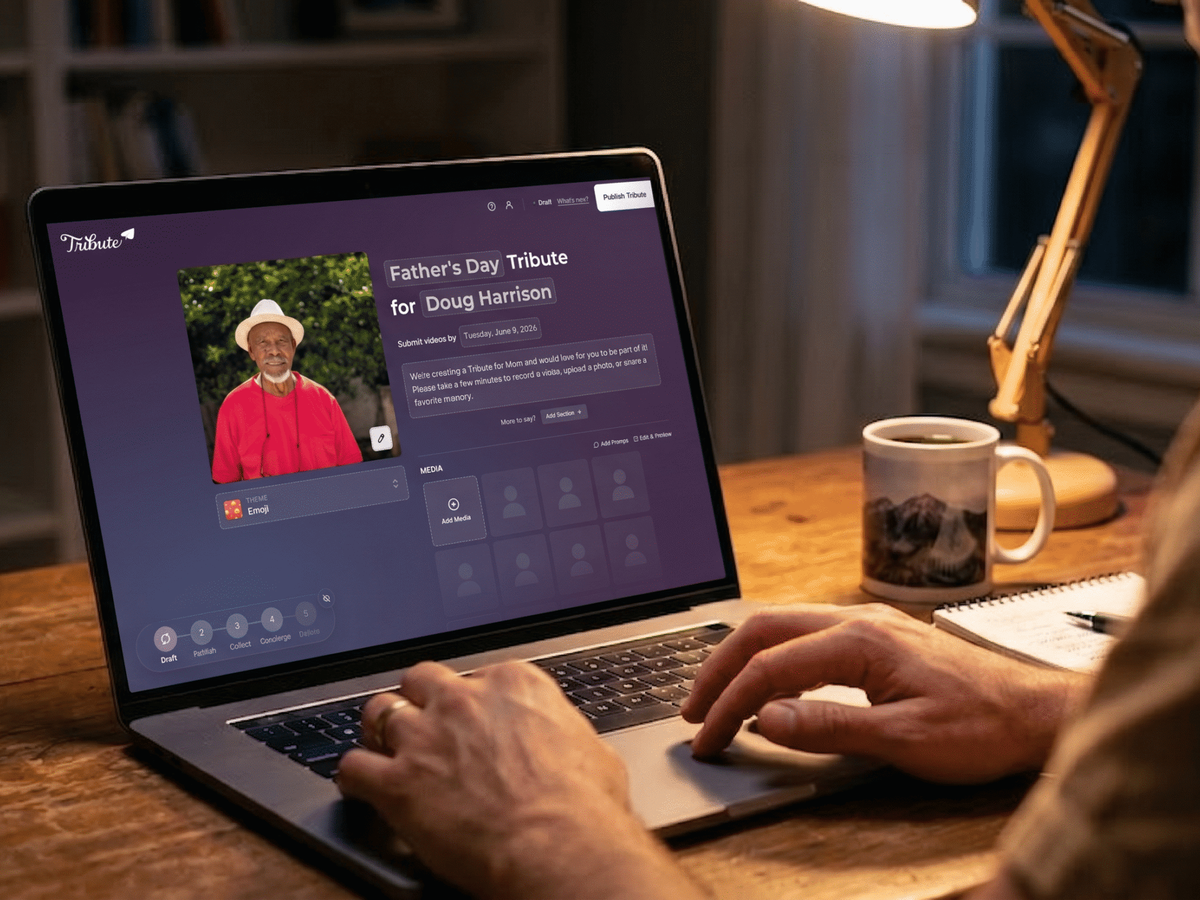
A Father’s Day video montage collects personal video messages from the people who love your dad — his kids, grandkids, siblings, old friends, whoever matters to him — and combines them into a single polished video he can watch on the day and return to whenever he needs it. This guide walks through how to make one, from start to finish, with the easiest method first.
What Is a Father’s Day Video Montage?
A Father’s Day video montage is a compilation of short personal video clips from multiple contributors — typically family members and close friends — each saying something real to the dad being celebrated. Unlike a slideshow of photos or a single recorded message, a montage brings together multiple voices into one video, creating a collective tribute rather than an individual message.
The result is something a dad can watch in one sitting that covers the full scope of what he means to the people in his life: his kids at different ages, his old friends, his siblings, his grandchildren. Each clip adds another layer to what the video collectively says.
👉 Start building your Father’s Day video montage now — free to begin
How Do You Make a Father’s Day Video Montage With Tribute?
The easiest way to make a Father’s Day video montage is through Tribute (tribute.co), a group video gift platform that collects personal video messages from everyone who loves him into one polished Father’s Day montage. It works by sharing a link — contributors record from any device, no app needed, and Tribute compiles everything automatically.
See how the finished product looks:
Step 1: Create Your Tribute Project
Go to tribute.co, select Father’s Day as the occasion, and name the recipient. You become the organizer — the person who manages the project, invites contributors, and delivers the final video to Dad.
The setup takes about five minutes. You’ll enter his name, choose a theme or style, and get a shareable collection link.
Step 2: Invite Contributors with the Collection Link
Share the collection link with everyone you want to contribute: siblings, grandchildren, cousins, old family friends, former colleagues, childhood friends — anyone whose message would mean something to him. Send it via text, email, or WhatsApp group. Contributors don’t need an account or app to record; they click the link, record directly from their phone or computer camera, and submit.
Include a prompt to help contributors who aren’t sure what to say: “Tell him your favorite memory with him,” “Tell him one thing you love or appreciate about him,” or “Tell him something you’ve always meant to say.” Specific prompts produce better, more personal clips than open-ended “say something.”
Most contributors submit their clip within 24 to 48 hours of receiving the link. Follow up once on the day before the deadline for anyone who hasn’t recorded yet.
Step 3: Set a Collection Deadline
Give contributors a clear deadline: two to three days before Father’s Day works well for most families. Earlier is better — contributors who get the link with a week to go tend to record more thoughtfully than those with 24 hours.
Start the project at least two weeks before Father’s Day if you want maximum participation from contributors across multiple time zones and busy schedules.
Step 4: Review and Arrange the Clips
Once contributors have submitted, you can view and arrange the clips in the order you want them to appear in the montage. Consider starting with the youngest voices (grandchildren) and building toward longer, more substantial messages from adult children and close friends. End with a clip from the organizer — or save the most emotional clip for last to close on a strong note.
You can trim clips, reorder them, and add a music soundtrack through Tribute’s editing tools.
Step 5: Deliver the Finished Video
Share the completed video with Dad via a digital link — by text, email, or by pulling it up on a screen when you’re with him in person. The video can be downloaded and saved permanently.
For maximum impact: play it on a TV or large screen with the family present. Watch him watch it. Give him a moment before asking for a reaction.
👉 Create your Father’s Day video montage now and share it by June 21
How Do You Make a Father’s Day Video Montage Without a Platform?
If you want to collect and edit clips manually rather than using a platform, here’s how to do it well:
Collect Clips Individually
Ask each contributor to record a short clip (30 to 90 seconds is ideal) and send it to you directly. Make sure they’re recording horizontally (landscape orientation) for consistent formatting. Send a prompt so everyone is working with the same instruction.
Collect all clips to a shared Google Drive folder or via AirDrop. Give contributors at least a week and follow up once. Low-quality clips are fine — the sentiment matters more than the production.
Edit with a Free Video Editor
Import all clips into iMovie (Mac), CapCut (mobile), or DaVinci Resolve (PC). Arrange them in a logical order, trim the beginning and ending of each clip if needed, and add a simple title card or music track. Keep the editing minimal — heavy production can feel formal in a way that undermines the personal nature of the clips.
Export the finished video as an MP4 and share it via text, email, or streaming to a TV.
Common Issues with DIY Montage Assembly
The main challenges with manual collection and editing: inconsistent clip orientations (some horizontal, some vertical), varying audio quality, and the coordination overhead of chasing contributors. Tribute eliminates these issues by handling collection and compilation automatically — contributors are guided toward consistent recording, and the final video is produced without manual editing work.
What Should You Ask Contributors to Say in a Father’s Day Video Montage?
The prompt you give contributors determines the quality of what you receive. These prompts produce the best clips:
“Tell him your single favorite memory with him.” — Produces specific, personal content rather than generic appreciation.
“Tell him one thing he taught you that you still use.” — Produces reflective, meaningful content from adult contributors.
“Tell him something you’ve always wanted to say but never have.” — Produces emotional, direct content from contributors who have unsaid things.
“For grandchildren: Tell Grandpa what you love about him.” — Produces natural, unscripted content from children that is often the most moving part of the montage.
Keep prompts simple and singular. A contributor asked to “say anything” will often produce a generic clip. A contributor asked for one specific thing will produce something personal every time.
How Long Should a Father’s Day Video Montage Be?
An ideal Father’s Day video montage runs between 5 and 15 minutes. Shorter is usually better — a 7-minute video with 12 strong clips is more effective than a 25-minute video with 30 clips of variable quality. If you have more contributors than the ideal length allows, consider trimming each clip to the 30-second highlight rather than including full-length clips from every contributor.
For a dad being surprised with a large gathering, keep the montage under 10 minutes so the room stays engaged for the full runtime.
Frequently Asked Questions About Father’s Day Video Montages
How do you make a Father’s Day video montage?
The easiest way to make a Father’s Day video montage is with Tribute: create a project, share a collection link with contributors, and Tribute compiles everything automatically. The manual alternative is to collect clips via Google Drive or AirDrop, then edit them in iMovie, CapCut, or DaVinci Resolve. Either method produces a meaningful result — Tribute saves significant coordination and editing time.
How far in advance should you start a Father’s Day video montage?
Start at least two weeks before Father’s Day for the best results. This gives contributors time to record thoughtfully and allows for one round of follow-up. The latest practical start date is three to four days before Father’s Day — contributors can record quickly when the deadline is imminent, but quality suffers under time pressure. Tribute has no hard cutoff: you can start and receive a finished video within 24 hours if needed.
How many clips should a Father’s Day video montage include?
Ten to twenty clips is the sweet spot for most Father’s Day video montages. Fewer than ten can feel sparse; more than thirty can feel long. The quality and specificity of each clip matters more than quantity. Ten specific, personal 45-second clips produce a stronger montage than twenty generic one-minute clips.
Can you make a Father’s Day video montage for a dad who lives far away?
Yes — distance is not a constraint for a video montage. Contributors record from wherever they are and the finished video delivers digitally wherever he is. This makes a video montage particularly well-suited to long-distance Father’s Day situations, where gathering in person isn’t possible but bringing everyone’s voices together in one video is.
What makes a good Father’s Day video montage?
A good Father’s Day video montage has three qualities: specific content (each contributor says something personal and true rather than generic), variety of contributors (different ages, relationships, and perspectives), and a clear emotional arc (building in intensity toward the final clips). The prompt you give contributors is the most important factor — specific prompts produce specific, memorable clips.
Is Tribute free to use for a Father’s Day video montage?
Tribute offers free and paid plans. Free to begin and collect contributions; paid plans unlock extended video length, additional features, and download options. For most Father’s Day montages, the platform handles everything you need to create and deliver a polished video to Dad.
The Video He Watches More Than Once
A Father’s Day video montage is one of the few Father’s Day gifts that gets better with time. He watches it on the day, then again when he needs a reminder of what he means to the people who love him. The grandkid who could barely say his name in the clip will be ten by the time he watches it again — and that’s its own kind of record of time.
Unlike a purchased gift that sits on a shelf or in a drawer, a video montage lives wherever he carries his phone. He can watch it on any day he wants, from any location, for the rest of his life.
Father’s Day 2026 is Sunday, June 21. Start your montage now.
👉 Start your Father’s Day video montage now — your dad’s family is waiting to be asked
See also: 15 Father’s Day Video Ideas to Surprise Dad | Group Video for Dad: How to Organize the Whole Family | The Complete Guide to Father’s Day Gifts (2026)


