
How to Make a Wedding Video Montage Everyone Will Cry Over (2026)
A wedding video montage collects personal video messages from the people who matter most to a couple and turns them into one emotional, watchable gift.
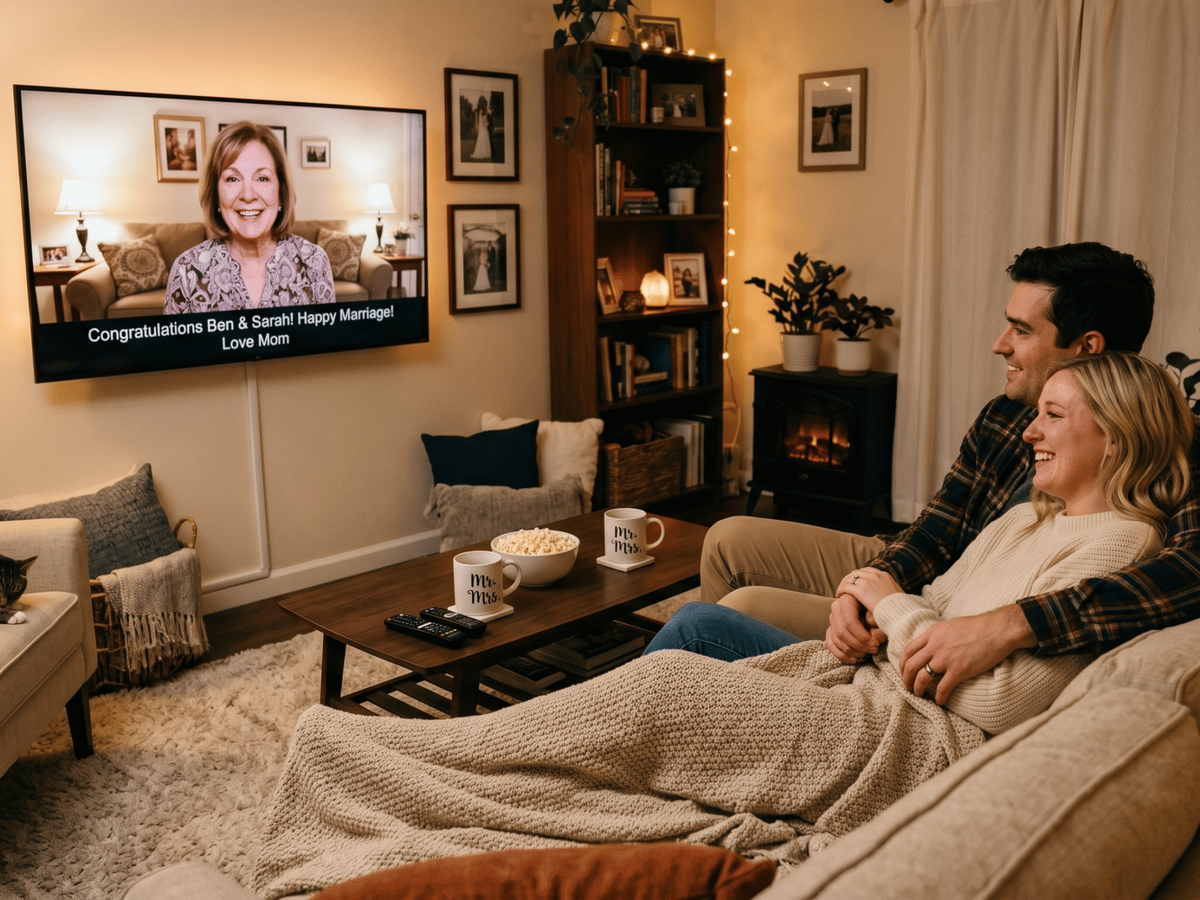
A wedding video montage collects personal video messages from the people who matter most to a couple and turns them into one emotional, watchable gift. The best ones feel like a love letter in video form — personal, layered, and impossible to watch without tearing up. This guide shows you how to make one that the couple will keep forever.
👉 Start your wedding video montage on Tribute
What Makes a Wedding Video Montage Worth Watching?
The difference between a slideshow of photos and a true wedding montage is presence. A photo shows a moment. A video message gives the couple the actual voices, faces, and words of the people they love — captured in real time, unscripted, and deeply personal.
The most meaningful wedding montages share three qualities: they include a range of voices (childhood friends, parents, coworkers, siblings), they capture genuine emotion rather than rehearsed speeches, and they flow together into something that feels like a complete story about the couple.
Tribute is a group video gift platform that lets you collect personal video messages from friends and family into a polished wedding montage. It works by sharing a link — contributors record from any device, no app needed, and Tribute compiles everything automatically.
What Do You Need Before You Start?
Before you send a single invite, gather these three things: a list of contributors, a clear deadline, and a few prompts to guide what people say. Most people want to contribute to a wedding montage but freeze when staring at a blank recording screen. A simple prompt like “Share your favorite memory with the bride or groom” or “What do you love most about them as a couple?” removes the hesitation entirely.
Set your deadline at least four days before you need to present the montage. This gives you buffer time for late contributors and any final editing. If you are surprising the couple at the rehearsal dinner or reception, build in even more time.
How Do You Make a Wedding Video Montage Step by Step?
Here is the exact process for creating a wedding video montage through Tribute, from start to finish.
Step 1: Create Your Tribute Page
Go to Tribute and create a new video project. Add the couple’s names, the wedding date, and a short description contributors will see when they open the link. This sets the tone and tells contributors what the video is for.
Choose your plan based on how much support you want. The DIY plan at $35 gives you full control. The Concierge plan at $99 includes a human editor who shapes the final video. For a gift that keeps playing, the Concierge + Video Book plan at $149 delivers the montage inside a linen-bound hardback with a 7-inch HD LCD screen — an heirloom the couple can display and replay whenever they want.
Step 2: Invite Contributors
Share your unique Tribute link with everyone on your list. You can send it by text, email, WhatsApp, or post it in a group chat. Contributors click the link, record their message directly in the browser, and submit — no app download, no account creation required. Tribute handles devices of every kind, so your 70-year-old contributor and your 14-year-old contributor can both record without help.
Include a recording prompt in your invitation message. Something like: “Record a 30 to 60 second message sharing a memory, a wish for the couple, or a word of advice for married life.” Short, focused messages edit together far better than long, wandering ones.
Step 3: Follow Up on Late Contributors
Send a reminder two days before your deadline to anyone who has not recorded yet. Keep the message warm and low-pressure — “Still time to add your message!” works better than anything that sounds like a deadline warning. Tribute shows you who has submitted, so you always know exactly where you stand.
Step 4: Review and Arrange the Messages
Once submissions close, review each clip. Trim any that run long. Arrange them in an order that builds emotionally — parents and childhood friends early, the couple’s inner circle toward the end, and someone who knows both of them best as the closing message.
If you chose the Concierge option, Tribute’s editors handle this step for you. They sequence, trim, and add music so the final video flows like a professional production.
Step 5: Add Music
Choose background music that matches the couple’s taste. A song that means something to them lands harder than a generic wedding track. Keep the volume low enough that voices remain clear throughout — the messages are the point, not the music.
Step 6: Deliver or Present the Montage
Decide how you will reveal it. Playing a wedding video montage at the rehearsal dinner gives the couple a private moment with family before the big day. Presenting it at the reception during cocktail hour lets the whole room experience it together. Sending it as a digital gift works beautifully for couples celebrating from a distance.
If you ordered the Video Book, it arrives as a standalone physical object — no screen required, no Wi-Fi needed. The couple presses play and the montage begins on a built-in 7-inch display, encased in a hardback book they can keep on a shelf forever.
Here is a look at what a Tribute wedding video looks like in practice:
👉 Create your wedding video montage today
What Are the Best Wedding Montage Ideas by Relationship?
The contributor list makes or breaks a wedding video montage. Here is how to think about who to include based on your relationship to the couple.
If You Are a Parent
Organize a montage from the entire family — grandparents, siblings, cousins, childhood friends. Parents often have access to the widest network and can collect messages nobody else could get. A montage organized by the couple’s families together, featuring voices from both sides, is one of the most meaningful wedding video montage ideas a family can offer.
Best for: Parents of the bride or groom who want to give a group gift from the whole family
Why it works: The couple receives voices from their whole history in one place — people who may never all be in the same room again
If You Are a Best Friend or Maid of Honor
Organize a montage from the wedding party and close friends. You know the couple’s inner circle and can prompt people to share inside stories, old memories, and genuine emotion. A best friend or maid of honor who organizes a group tribute video often creates the most personal moment of the entire celebration.
Best for: Best friends, maids of honor, best men, and members of the wedding party
Why it works: You have access to the people the couple loves most and the context to make the prompts specific and personal
If You Are a Coworker or Professional Contact
Organize a montage from the office or professional community. Work friends often can not attend weddings but still want to celebrate. A short group video tribute from the team is a warm, memorable way to show up even from a distance.
Best for: Colleagues, managers, team members, or professional mentors
Why it works: It brings the couple’s professional life into the celebration in a way a physical gift from a registry cannot
See also: How to Organize a Group Video Gift for a Wedding
How Long Should a Wedding Video Montage Be?
The sweet spot for a wedding video montage is four to eight minutes. Long enough to feel substantial, short enough to hold attention in a room full of people who have been celebrating all day. If you collect more messages than you can fit, keep the most emotional, the most specific, and the most surprising — cut anything that feels generic or repetitive.
For a couple who will watch the montage privately rather than at a reception, a longer version of 10 to 15 minutes works well. You can also create two versions: a shorter highlight reel for the reception and a full version for the couple to watch at home.
See also: What to Say in a Video Message for a Wedding
What Is the Difference Between a Wedding Slideshow and a Wedding Video Montage?
A wedding slideshow is photos set to music. It shows the couple’s history through images. A wedding video montage is live video messages from real people — it shows the couple their relationships, not just their memories. Both have a place at a wedding celebration, but only one lets the couple’s grandmother in another country speak directly to them on their wedding day.
The tribute video format is also different from a professionally shot wedding film. A wedding film captures the day itself. A tribute video captures everyone who helped make the couple who they are — and that content cannot be filmed on the wedding day because it comes from people who may not even be there.
See also: How to Make a Wedding Tribute Video
How Do You Collect Video Messages Without Spoiling the Surprise?
Keep the Tribute link out of any group chat the couple is in. Send individual messages to contributors rather than broadcasting in a shared space. If the couple shares a social circle with you, tell contributors directly: “This is a surprise — please do not mention it.”
Tribute does not send any notifications to the couple, so the project stays private until you choose to reveal it. You control the entire process from collection to delivery.
See also: Best Wedding Gift Ideas for Every Budget and Relationship
Frequently Asked Questions About Wedding Video Montages
How much does it cost to make a wedding video montage on Tribute?
Tribute offers three plans: DIY at $35, Concierge at $99, and Concierge + Video Book at $149. The DIY plan gives you full editing control. The Concierge plan includes professional editing. The Video Book plan adds a physical linen-bound book with a built-in HD screen that plays the video without any device.
How many people can contribute to a wedding video montage?
There is no hard limit on contributors. Most wedding montages include 10 to 40 messages. Larger gatherings can exceed 50. The key is setting a clear deadline and curating the final video so it stays within a watchable length.
Do contributors need to download an app to record their message?
No. Contributors record directly in their browser by clicking the shared link. There is no app to download and no account to create. The process works on smartphones, tablets, and desktop computers.
Can I add photos or music to the wedding montage?
Yes. Tribute supports background music and photo uploads alongside video messages. The Concierge plan includes editing support for mixing these elements into a polished final video.
When should I present the wedding video montage?
The rehearsal dinner is the most intimate option — the couple sees it privately with close family before the wedding. The reception works well for a larger reveal. Some organizers send the montage digitally as a wedding gift before or after the event.
What prompts work best for wedding video contributors?
The most effective prompts are specific: “Share your favorite memory with [name],” “What do you wish for them in married life?”, or “Describe the moment you knew they were right for each other.” Open-ended prompts like “Say something nice” produce generic results. Specific prompts produce emotional ones.
Can I use Tribute to create a wedding anniversary montage instead of a wedding gift?
Yes. Tribute works for any relationship milestone. Anniversary montages are one of the most common uses — particularly for milestone anniversaries like 25th or 50th, where family and friends want to celebrate the couple’s journey together.
The Wedding Video Montage the Couple Will Play Again and Again
A wedding video montage made with Tribute is not a one-time gift. It is a recorded archive of the people who love the couple most, speaking directly to them at the moment they started their life together. Unlike any physical gift, it does not wear out, get stored in a closet, or duplicate what someone else gave. It is the one gift that gets more meaningful over time — something the couple will watch on anniversaries, share with their children, and return to whenever they want to remember who was there.
Over 8 million video messages have been sent through Tribute. In user surveys, 84.4% of recipients cried happy tears. That is not a coincidence — it is what happens when the people who matter most show up in one place, on video, and say exactly what they feel.


