
A wedding tribute video is a collection of personal video messages from the people who love a couple most, edited together into a single, emotional gift. Unlike a wedding film that captures the day itself, a tribute video captures the relationships — the voices, faces, and words of everyone who helped make the couple who they are. This guide walks through how to make one that the couple will never forget.
👉 Create a wedding tribute video on Tribute
What Is a Wedding Tribute Video?
A wedding tribute video is a compiled video gift made up of short personal messages recorded by family members, friends, and colleagues — each one speaking directly to the couple about their relationship, their memories, and their wishes for the marriage. The messages are edited together into a single video, typically four to ten minutes long, and presented as a surprise at the rehearsal dinner, reception, or as a standalone gift.
The format is sometimes called a group video gift, a wedding video montage, or a tribute reel. What all of these share is the same core idea: instead of one person giving a speech, everyone who matters speaks. The result is something neither the couple nor anyone in the room expects to feel the way they do when they watch it.
Why Do Wedding Tribute Videos Hit So Hard?
Most wedding gifts are things. A tribute video is people. When the couple watches it, they are not looking at a product — they are hearing the actual voices of their parents, their childhood best friend, their college roommate, and the coworker who became a real friend. Those voices, speaking directly to them on the day they get married, land in a way that nothing else does.
Tribute user data shows that 84.4% of recipients cry happy tears when they watch a tribute video. That number is not surprising once you understand what is actually happening: the couple is receiving proof, in real time, that the people they love most showed up for them.
How Do You Make a Wedding Tribute Video?
Tribute is a group video gift platform that lets you collect personal video messages from friends and family into a polished wedding montage. It works by sharing a link — contributors record from any device, no app needed, and Tribute compiles everything automatically.
Here is the step-by-step process for creating a wedding tribute video that works.
Step 1: Start a Project on Tribute
Go to Tribute and create a new project for the couple. Add their names, a photo, and a brief description of what the video is for. This is what contributors will see when they click the link, so keep it warm and specific: “We’re making a video tribute for [Name] and [Name]’s wedding — please record a short message before [date].”
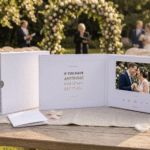
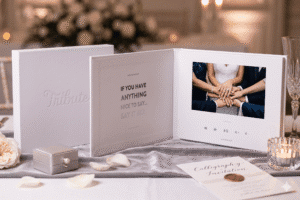
Choose the right plan for your situation. The DIY plan at $35 gives you full control over editing and sequencing. The Concierge plan at $99 brings in a professional editor who shapes the final video for you. The Concierge + Video Book plan at $149 delivers the tribute video inside a linen-bound hardback book with a built-in 7-inch HD screen — the couple opens it and presses play, no device needed.
Step 2: Invite the Right People
The strength of a wedding tribute video comes from the range of its contributors. A parent from childhood, a college roommate, a work friend, a sibling, a grandparent — each relationship brings a different perspective on who the couple is. The more range you include, the richer the final video.
Send the link individually rather than in a shared group chat, especially if the project is a surprise. Tell contributors what to say. A specific prompt — “Share your favorite memory of [name]” or “What do you wish for them in their marriage?” — produces far better messages than an open-ended “say something nice.”
Step 3: Set a Deadline and Follow Up Once
Give contributors a deadline that falls at least four days before you need the final video. This leaves room for late submissions and any last-minute edits. Tribute shows you who has recorded and who has not, so one targeted reminder to stragglers is all you need. Send that reminder two days before the deadline and keep it warm, not urgent.
Step 4: Edit the Video
Review each submission. Trim clips that run long. Cut anything that feels generic or repetitive. Arrange the messages so they build emotionally: family and long-term friends early, the inner circle toward the end, and the most emotionally resonant message closing the video.
If you are on the Concierge plan, Tribute’s editorial team handles all of this. They sequence the clips, add music, and deliver a polished final video without requiring anything more from you.
Step 5: Add Music
Background music should sit underneath the voices, not compete with them. Choose a song that means something to the couple, or one that matches the emotional register you want — celebratory, tender, or both. Keep the volume low enough that every word is audible.
Step 6: Reveal the Tribute Video
The reveal moment matters as much as the video itself. Common options include: playing it at the rehearsal dinner for an intimate reveal with close family; screening it at the reception during cocktail hour so all guests experience it together; or presenting it privately after the wedding so the couple can watch it alone when the noise of the day has settled.
If you ordered the Video Book, wrap it and present it as a physical gift. The couple will not know what it is until they open it and see their names on the cover — then they press play.
👉 Start the wedding tribute video now
What Should People Say in a Wedding Tribute Video?
The best messages in a wedding tribute video are specific, personal, and short. Generic congratulations (“Wishing you a lifetime of happiness!”) take up space without adding anything the couple does not already expect to hear. What moves people is the unexpected: the specific memory, the honest observation, the thing only that person could have said.
Prompts That Work for Close Family
“Tell me about the moment you knew they were right for each other.” “What is your favorite memory of [name] before they met their partner?” “What does their love look like from the outside?” Family members often have the deepest context and the most to say — the right prompt unlocks it.
Best for: Parents, siblings, grandparents, and close family members
Why it works: Family carries the couple’s whole history. Their messages ground the tribute in something deeper than the present moment.
Prompts That Work for Friends
“Share a story that shows who [name] really is.” “What do you love most about them as a couple?” “What piece of advice would you give them for married life?” Friends often have the funniest material and the most unguarded emotion — a prompt that gives them permission to be real produces the best messages.
Best for: Best friends, college friends, childhood friends, and members of the wedding party
Why it works: Friends carry the couple’s social history — the inside jokes, the hard moments, the nights that turned into stories. That material makes a tribute video feel alive.
Prompts That Work for Coworkers
“Describe [name] in three words and explain your choices.” “What has working with them taught you?” “What do you wish for them in this next chapter?” Work relationships often do not get to show up at weddings — a video message gives those voices a way to be present.
Best for: Colleagues, managers, mentors, and professional contacts
Why it works: It shows the couple that their professional life is full of people who genuinely care about them — a dimension of their lives that rarely gets celebrated at weddings
See also: What to Say in a Video Message for a Wedding
How Is a Wedding Tribute Video Different From a Best Man Speech or Toast?
A best man speech is one person speaking. A wedding tribute video is everyone speaking. The speech happens once in a room and then it is over. The tribute video is permanent — the couple can watch it again on their first anniversary, on their tenth, and on the day their children are old enough to want to know who these people were.
Unlike a traditional wedding toast, a tribute video also includes people who are not at the wedding. Remote guests, family members who could not travel, and friends from another era of the couple’s life can all appear in the tribute as if they were in the room.
See also: How to Make a Wedding Video Montage
What Makes Tribute Better Than DIY Video Editing?
Collecting video files from 30 people across email, WhatsApp, Google Drive, and text messages — then editing them together in iMovie or Premiere — is a project that sounds manageable until you are doing it. Different resolutions, different aspect ratios, files that will not open, and messages that arrive the night before the reveal: the logistics alone can take hours.
Tribute handles all of it. Contributors record in a standardized format through the link, files go directly into the project, and the platform’s editing tools or Concierge editors handle the rest. According to The Knot’s research on wedding video costs, professional videography for a wedding can run $1,500 to $10,000. A Tribute wedding tribute video starts at $35 and captures something a wedding videographer cannot: the voices of the people who were not there.
See also: How to Organize a Group Video Gift for a Wedding
Frequently Asked Questions About Wedding Tribute Videos
How long should a wedding tribute video be?
Four to eight minutes is the ideal range for a reception screening. For a private viewing at home, 10 to 15 minutes works well. The key is cutting anything that feels repetitive — a shorter, tighter video holds attention better than a longer one that trails off.
Do contributors need any video editing skills?
No. Contributors click a link, record their message in the browser, and submit. Tribute handles all collection and compilation. The organizer (or a Tribute editor) does the final sequencing and editing.
Can I include subtitles or captions in the tribute video?
Tribute supports title cards and text overlays. Captions for individual messages are not automatically generated but can be added in post-editing. For large reception screenings, consider adding captions so the video is accessible to all guests.
What is the best way to present the Video Book?
Wrap it like any physical gift and present it at the rehearsal dinner or reception. The couple opens it to find a linen-bound hardback with their names on the cover. When they press play, the tribute video begins on the built-in screen — no phone, no streaming, no setup required.
Can I update or add clips after I have submitted the project?
Yes. Tribute allows you to add clips and make edits before finalizing the project. Once you submit for Concierge editing, the editorial process begins, but you can communicate with the team about any last-minute additions.
What happens if someone submits a poor-quality video?
Tribute accepts video recorded in most standard conditions. Messages recorded in good lighting with clear audio will look best. If a submission is too dark or has poor audio, you can flag it and ask the contributor to re-record — most are happy to take another shot.
Is there a limit to how many times the couple can watch the tribute video?
No. The digital video is the couple’s to keep and watch as many times as they want. The Video Book plays indefinitely from its built-in storage, no internet connection required.
The Wedding Gift That Stays
A wedding tribute video is not consumed on the wedding day and forgotten by Monday. It is a permanent record of the people who mattered most, speaking directly to the couple at the exact moment their life together began. Every message in it is a gift from someone who chose to show up — in voice, on camera, saying something real.
The couple will watch it on quiet nights, on anniversaries, on the hard days when they need to remember. Over 8 million video messages have been sent through Tribute. The couples who receive them do not put them away. They come back.
See also: Best Wedding Gift Ideas for Every Budget and Relationship