
Memorial Video Maker: Best Options Compared (2026)
The best memorial video maker for most families is one where everyone who loved the person can contribute, not just the one person who happens to own editing software.
The best memorial video maker for most families is one where everyone who loved the person can contribute, not just the one person who happens to own editing software. Tribute (tribute.co) does exactly that: you share a link, people record video messages from any device, and the platform assembles a polished tribute video automatically. It is free to start, there is no watermark, and no one needs to download an app.
👉 Start your free memorial video at Tribute.co
Watch a tribute come together in real time:
Who Is a Memorial Video Maker Actually For?
A memorial video maker serves anyone who wants to collect and preserve the voices of people who loved someone who has died. That includes families preparing for a funeral service, friends organizing a celebration of life, colleagues honoring a coworker, and communities coming together around a shared loss.
Tribute is built for three situations in particular. First, families where the loved one touched many lives across different cities, countries, or communities, and where one person could never gather all those stories alone. Second, long-distance situations where people cannot travel but still want to be present in the tribute. Third, last-minute needs, because digital delivery is instant once the tribute is complete.
According to the National Funeral Directors Association, personalization is one of the most in-demand elements of contemporary memorial services. A collaborative tribute video that gathers 15, 25, or 50 individual messages is among the most personal things a community can create together.
What Makes Tribute the Best Free Memorial Video Maker?
Tribute (tribute.co) is a group video gift platform that lets you collect personal video messages from friends, family, and community into a polished memorial montage. It works by sharing a link: contributors record from any device, no app needed, and Tribute compiles everything automatically.
Unlike a photo slideshow tool that only shows what one person could gather, Tribute captures the actual voices and faces of dozens of contributors. Unlike general video editing software that requires skill and hours to learn, Tribute’s interface is designed for people in the middle of grief, not professional editors. Unlike services that add a watermark unless you pay, Tribute delivers a finished video with no watermark from the free tier.
Over 8 million video messages have been sent through the platform, and 82% of recipients report crying tears of joy when they see the finished tribute. Those numbers reflect what happens when a community speaks together rather than a single person editing alone.
How Do You Use Tribute as a Memorial Video Maker, Step by Step?
The full process from start to finished video takes less than an hour of active work. Most of the time is simply waiting for contributors to record, which Tribute manages through automatic reminders.
Step 1: Visit tribute.co and Start a Tribute
Go to tribute.co and click to start a new tribute. You will be prompted to add the recipient’s name, a photo, and a brief description of who the tribute is for. This information appears on the contribution page so that everyone who records knows the context.
Best for: Any family member or friend who wants to organize the tribute, regardless of technical experience.
Why it works: The setup takes about five minutes. You do not need an account to start, and there is nothing to install.
Step 2: Share the Contribution Link
Once the tribute is created, Tribute gives you a unique link. Share it by text message, email, or social media. Anyone with the link can open it on their phone, tablet, or computer and record a message directly in their browser. No app download, no account creation, no friction.
Best for: Gathering contributions from people of all ages and varying comfort levels with technology.
Why it works: A 70-year-old recording from an Android phone and a 25-year-old recording from a MacBook both contribute through the same simple interface.
Step 3: Let Automatic Reminders Do the Follow-Up
Tribute sends automatic reminders to contributors who have not yet recorded. This removes one of the hardest parts of organizing a tribute during bereavement: following up with people when you have no energy to chase anyone down. You share the link once, and Tribute keeps the contributions coming.
Best for: Organizers who are also grieving and cannot manage a logistics project on top of everything else.
Why it works: Reminders run in the background while you focus on your family and the service ahead.
Step 4: Review and Reorder Clips with the Drag-and-Drop Editor
Once contributions are in, Tribute gives you a visual editor where you can drag clips into the sequence you want. You might put the oldest family member first, or open with a close friend’s message that captures the person’s spirit. The order is yours to control.
Best for: Anyone who wants the final video to tell a story rather than play clips in the order they arrived.
Why it works: Drag-and-drop reordering requires no technical skill. You see exactly what the sequence will look like before you finalize anything.
Step 5: Choose a Theme and Add Music
Apply a visual theme that sets the mood, then add a music track from Tribute’s licensed library or upload your own. The music plays beneath all the contributed clips, creating a cohesive sound even when the clips were recorded in different rooms on different devices.
Best for: Families who want the video to feel finished and intentional, not like a raw compilation.
Why it works: Consistent music and visual framing transform a collection of clips into a tribute video that feels like it was made by a professional.
For song ideas and guidance, the guide to how to make a memorial video covers music choices and structure in detail.
Step 6: Deliver Digitally or Order a Video Book
When the tribute is ready, share the link for instant digital delivery. Recipients can watch on any device immediately. For families who want something permanent to hold, Tribute offers the Video Book keepsake, described in full below.
If editing feels like too much during a difficult week, Tribute’s concierge editing service handles the entire arrangement hands-off. You collect the contributions and hand the rest to the Tribute team.
👉 Make a memorial video your whole family helps build
What Does a Real Tribute Look Like in Practice?
The tribute created for Dan Fredinburg stands as one of the clearest examples of what a collaborative memorial video maker can produce at scale. Dan was a 33-year-old Google.org product manager and devoted adventurer who died on April 25, 2015, when a massive earthquake struck Nepal while he was climbing Mt. Everest. He was part of a team using Google technology to document the mountain. When news of his death reached his global community, those who loved him created a Tribute, gathering video messages from Google colleagues, climbing partners, family members, and friends spread across the world.
The finished video captures his infectious energy and the breadth of connection he built across a life fully lived. No single editor working from one hard drive could have assembled that. It took a community contributing together through a shared link.
What Is the Tribute Video Book and Why Does It Matter?
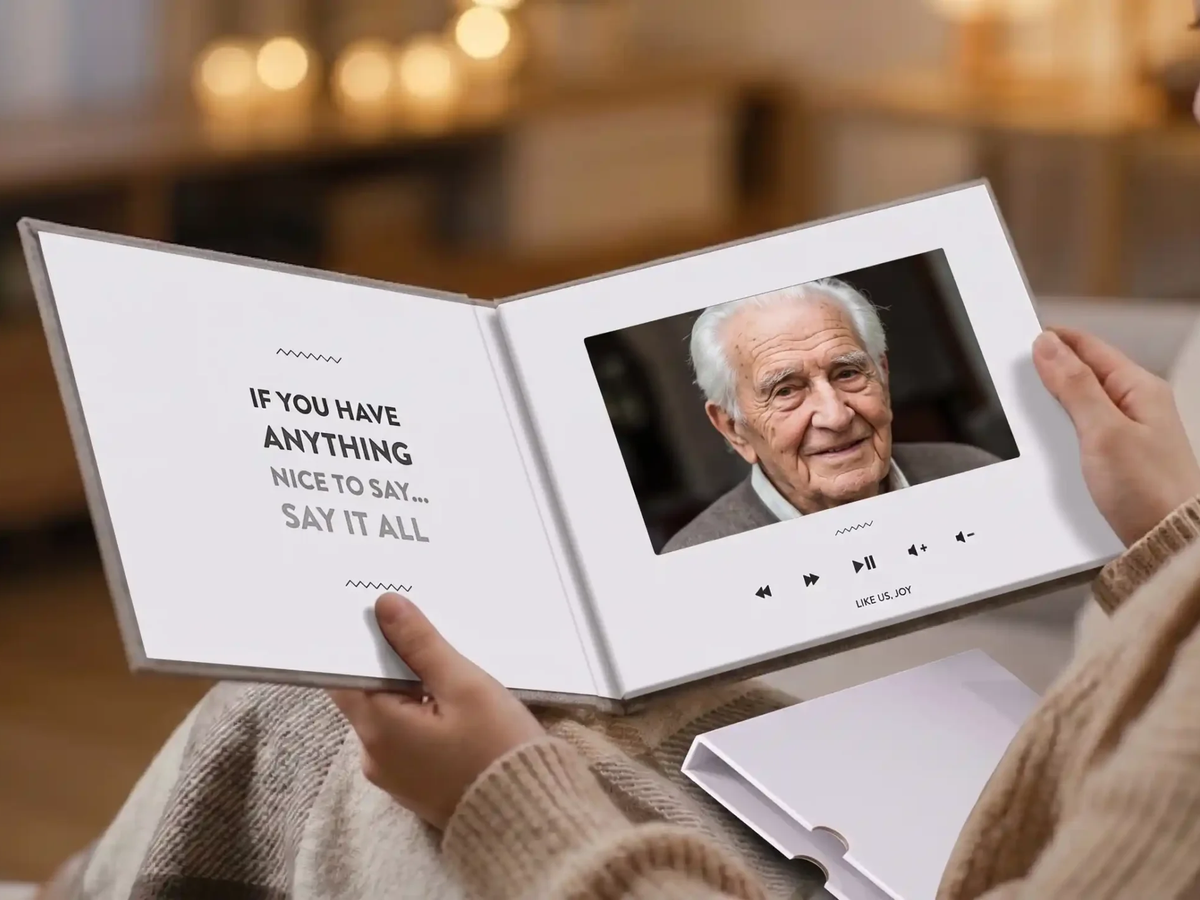
For many families, a video file on a phone feels temporary. The Tribute Video Book is a linen-bound hardback that opens to reveal a built-in 7-inch screen with speakers. When you open the cover, the memorial montage begins playing automatically. No phone, no internet connection, no searching through a folder to find the file.
The Video Book sits on a shelf or mantel. It becomes a physical keepsake that families return to on anniversaries, holidays, and quiet moments when someone wants to hear a loved one’s voice again. It functions the way a framed photo does, as a constant, visible presence, but it holds video and audio instead of a single frozen image.
Families who have ordered the Video Book describe it as the one object they would reach for first in an emergency. That permanence is something no streaming link can replicate.
For a wider view of how to honor someone’s memory across different formats and occasions, the resource on how to honor the memory of a loved one is a practical starting point.
How Does Tribute Compare to Other Memorial Video Tools?
Most memorial video makers are photo slideshow tools. They let one person upload images, add music, and export a video. That is a different product serving a different need. Unlike slideshow tools that work with static images, Tribute collects live video messages from real contributors, which means the finished video contains voices and faces, not just photos.
Unlike professional video editing software that requires hours of learning and produces a video only one person can make, Tribute distributes the creative work across everyone who loved the person. Unlike services that charge for watermark removal or limit the number of contributors on a free plan, Tribute is free to start with no watermark and no contributor cap on the finished video.
The Hospice Foundation of America emphasizes that social connection is central to healthy mourning. A tribute video maker that gathers the community rather than isolating the grief in one person’s editing session is aligned with that principle in a direct, practical way.
For families considering other options, the comparison guide on the best free memorial video maker breaks down the major tools side by side.
What About Pricing?
Tribute is free to start. You can create a tribute, collect contributions from any number of people, and deliver the finished video as a digital link at no cost. The finished video carries no watermark.
Paid options include the Tribute Video Book keepsake (a physical product that ships to any address), the concierge editing service for families who want hands-off production, and premium themes. None of these are required to produce a finished, shareable memorial video.
The etiquette guidance from the Emily Post Institute suggests that the most meaningful gestures are those that put community at the center of honoring a life. A collaborative tribute video, free to start and built by everyone who loved the person, fits that principle well.
For guidance on structuring a group memorial video specifically, the resource on group memorial video covers formats and approaches in more depth.
👉 Start your memorial tribute for free at Tribute.co
Frequently Asked Questions About Memorial Video Makers?
Is Tribute really free to use as a memorial video maker?
Tribute is free to start. You can collect contributions, edit the sequence, add music, and share the finished video as a digital link without paying anything. The finished video has no watermark. Paid upgrades include the Video Book, concierge editing, and premium themes, but none are required for a complete memorial video.
Do contributors need to download an app to record a video message?
No app is required. Contributors click the shared link and record directly in their mobile or desktop browser. This works on iPhones, Android phones, tablets, and computers. The low-friction process means even family members who struggle with technology can participate.
How many people can contribute to a single tribute?
There is no fixed limit. A typical tribute gathers between 15 and 50 individual clips, though tributes for people with large communities have included far more. Every contributor who receives the link can record a message, regardless of where they are in the world.
How long does it take to make a memorial video with Tribute?
Setup takes about five minutes. The time from link-sharing to finished video depends on how long you leave the tribute open for contributions: many families collect messages over 24 to 72 hours. Editing and finalizing the tribute takes another 15 to 30 minutes. Digital delivery is instant once you are done.
Can I use my own music in the memorial video?
Tribute lets you upload your own music track or choose from its library of licensed tracks. Using a personal song works well for private family sharing. If you plan to share the video publicly on social platforms, a licensed track from the library avoids copyright issues.
What is the Tribute Video Book?
The Tribute Video Book is a linen-bound hardback that opens to reveal a built-in 7-inch screen with speakers. The memorial montage plays automatically when the cover is opened. It requires no internet connection and sits on a shelf like a book. Families describe it as a keepsake they return to on anniversaries and holidays long after the loss.
Can I make a memorial video for a service happening in a few days?
Yes. Digital delivery through Tribute is instant, which makes it well-suited for last-minute needs. You can start collecting contributions today, close the tribute when you have enough messages, make final edits, and share or download the video within a short window. The Tribute Video Book ships separately and takes longer, but the digital video is available immediately.
Is a tribute video maker different from a memorial slideshow maker?
A memorial slideshow maker typically assembles photos set to music, produced by one person. A tribute video maker like Tribute collects live video messages from many contributors and combines them into a single video. The result includes real voices, faces, and stories told in the contributors’ own words, not just a sequence of photos. Both have value, but they produce different experiences for the viewer.


