
CapCut Music Editor: Adding, Cutting and Balancing a Track
The CapCut music editor is the Audio tab: Sounds for the built-in library, Extracted to pull audio out of another video, Voiceover to record, and your own files from the device. Everything after that happens on the audio row under your clips.
What does the CapCut music editor give you?
Four controls that matter and a long tail that does not.
Volume, fade, speed and beat markers do the work on almost every video. The rest of the panel exists for creators cutting to a track rather than talking over one.
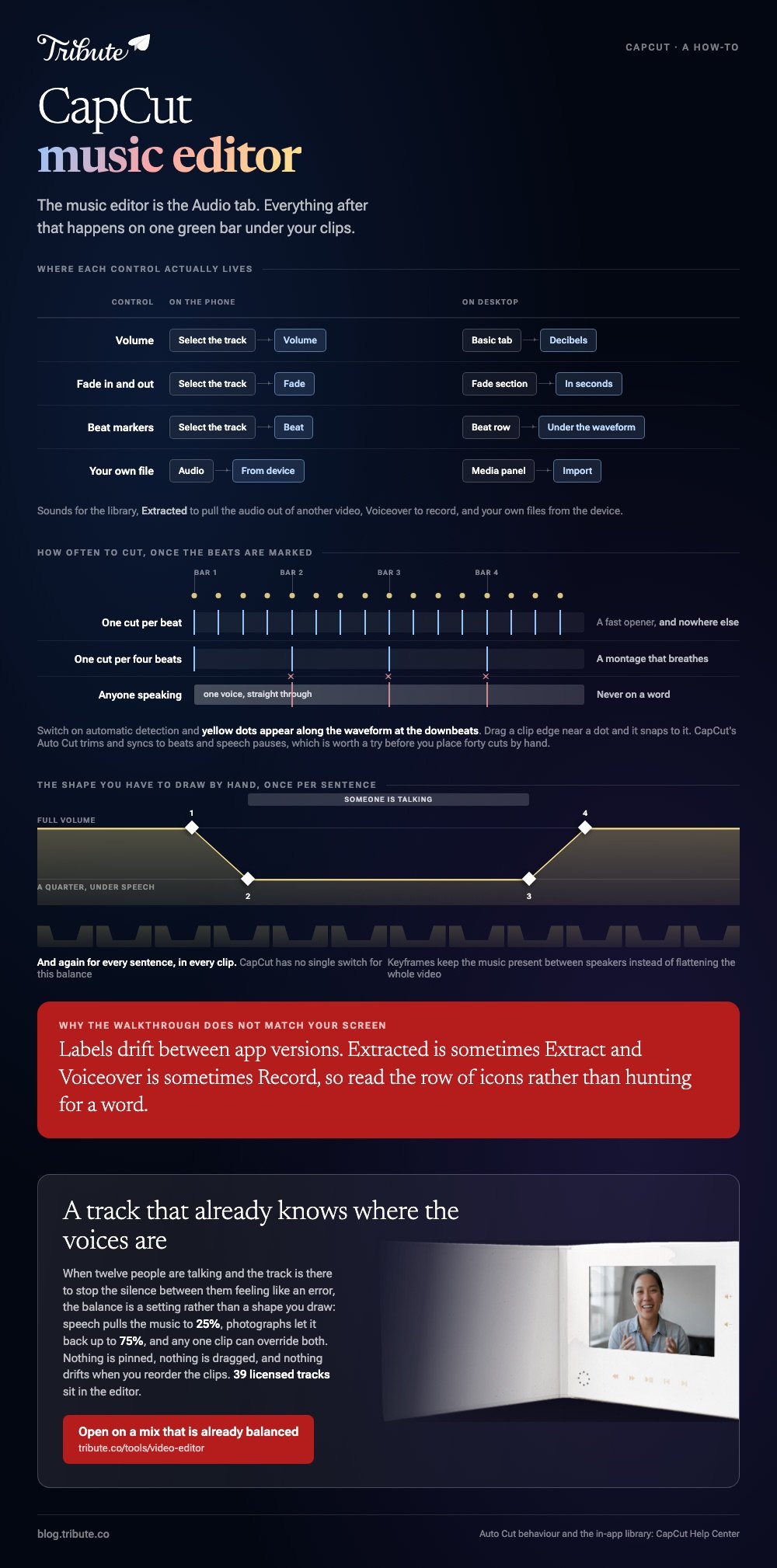
| Control | On the phone | On desktop |
|---|---|---|
| Volume | Select the track, tap Volume | Basic tab, right-hand panel |
| Fade in and out | Select the track, tap Fade | Fade section, in seconds |
| Beat markers | Select the track, tap Beat | Beat row under the waveform |
| Your own file | Audio, then From device | Media panel, then Import |
Labels drift between app versions. Extracted is sometimes Extract, and Voiceover is sometimes Record, so read the row of icons rather than hunting for a word.
How do you add a track in the CapCut music editor?
On the phone, in five taps, with the playhead parked where you want the track to start.
- Open the project and tap Audio in the bottom toolbar.
- Choose Sounds for the library, or Extracted to take the audio from another video on your phone.
- Tap the plus beside a track to drop it on the audio row.
- Drag either end of the green bar to trim it, and drag the middle to move it.
- Tap the bar, then Volume, and set the level before you add anything else.
The same job on a desktop
Open the Audio tab at the top of the media panel, browse Music or Sound effects, and drag a track down to the audio row. Your own file goes through the Media panel and the Import button instead.
Selecting the track fills the right-hand panel: volume in decibels, fade in and fade out in seconds, and a speed slider that changes pitch unless you switch that off.
How do you cut a CapCut music video to the beat?
Let the app mark the beats, then move your cuts to the marks.
Select the audio clip and tap Beat. Switch on automatic detection and yellow dots appear along the waveform at the downbeats. Drag a clip edge near a dot and it snaps to it.
- One cut per four beats for a montage that breathes.
- One cut per beat for a fast opener, and nowhere else.
- Never on a word, if anyone in the clip is speaking.
CapCut also sells this as an automatic feature. Its help page for Auto Cut describes a tool that trims and syncs clips to music beats and speech pauses, which is worth a try before you place forty cuts by hand.
A CapCut photo music video editor search lands on the same screen with stills instead of clips. The track sets the length, and the photos divide into it: a three minute song carries about forty-five photos at four seconds each.
How loud should the track sit under a voice?
Lower than it sounds right in headphones.
Library music is mastered to sound good on its own, which means it will swallow a sentence recorded on a phone in a kitchen. The usable rule is a quarter of full volume under speech and three quarters under photos.
CapCut has no single switch for that balance, so you build it with keyframes.
- Select the audio clip and move the playhead to a second before the talking starts.
- Tap the keyframe diamond to pin the current volume.
- Move to where the voice begins, lower the volume, and a second keyframe is created.
- Repeat in reverse at the end of the sentence.
Compared with lowering the whole track, keyframes keep the music present between speakers instead of flattening it for the whole video.
The general version of this, across other editors, is in putting music into a video and video editors on Windows.
Can you use any song in a CapCut music video?
Inside the app, yes. Outside it, that depends on where the video goes.
The in-app library is cleared for videos you make and publish from CapCut. A commercial release you imported from your own phone is a different matter, and YouTube will match it the moment you upload.
For a track that travels with you, the YouTube Audio Library offers royalty free production music, with a filter for tracks that need no credit.
Unlike a library track, a song you bought grants you the right to listen and nothing else. The longer version of that distinction is in royalty free music for videos.
What if the music came with the editor?
Then picking a track and setting its level stop being two separate jobs.
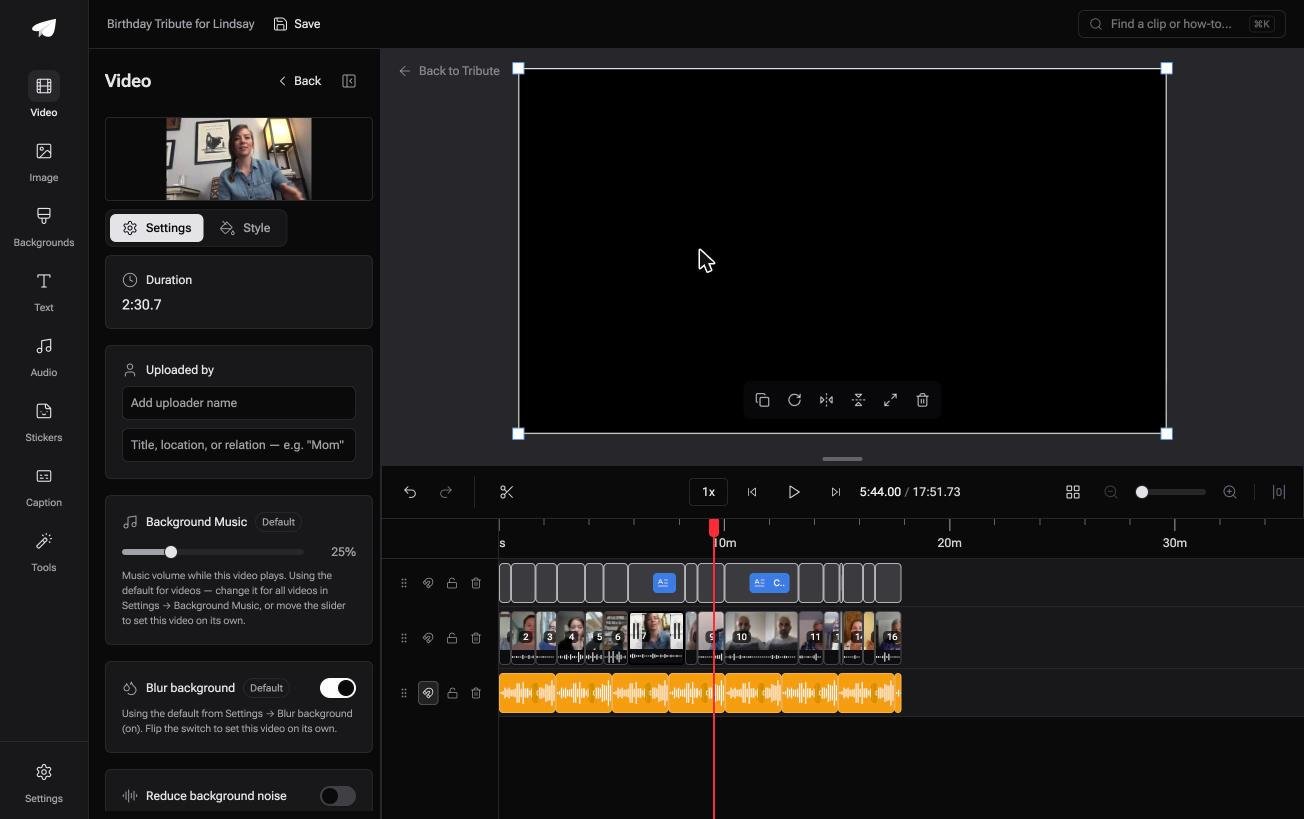
The Tribute video editor is a browser-based group video editor: contributors record clips on their phones and Tribute assembles them on a timeline with the music balanced under the voices. It is ours, and it is the last thing on this page.
- 39 licensed tracks across 11 genres, cleared for use inside the editor
- 25% under video and 75% under photos by default, and overridable on any single clip
- Crossfade songs blends one track into the next when the video outlasts a song
- Your own audio too: a YouTube link, or an MP3, WAV, M4A or FLAC upload

Best for: An edit where the soundtrack has to sit under twelve people talking rather than carry the video on its own.
Why it works: The ducking you would build with keyframes in CapCut is the default here, and the exception is the thing you set.
Does a group video need a music editor at all?
Everything above is a way of marrying a track you chose to footage you shot.
Find the song, place it, cut to it, then dip it under every voice. Four jobs, and all four start with you choosing a song nobody else has heard yet.
There is one kind of video where the music is the smallest decision in the room.
The case: the voices are the content
You are in it when several people each record something for one person.
A grandmother turning eighty. A colleague leaving after fifteen years. A memorial where the people who should speak are in four time zones.
Nobody is cutting to a beat. Twelve people are talking, and the track is there to stop the silence between them feeling like an error.

Why the keyframes never get drawn
Because the balance is a setting rather than a shape you draw on a waveform.
Speech pulls the music to a quarter, photographs let it back up to three quarters, and any one clip can override both. Nothing is pinned, nothing is dragged, and nothing drifts when you reorder the clips afterwards.
That is how the Tribute video editor treats a soundtrack: not a better beat tool, but a track that already knows where the voices are.
What you do not have to do
- Set a single keyframe. Music ducks to a quarter under anyone speaking, as a default you can move.
- Hunt for a track. 39 licensed ones sit in the editor, and Crossfade songs blends one into the next.
- Line the clips up to it. They arrive in order with the music already underneath.
- Mix it yourself, on a Concierge Tribute. Tribute's editors build the video, and Concierge Deluxe returns it as a video book.
When this is the wrong answer: you are cutting a montage to a track you love, and the beat is the point. Then CapCut is the right tool and the Beat panel is where the video gets made.
The editor is also not a standalone audio tool: it lives inside a paid Tribute.
Frequently Asked Questions
Why can I not hear the music I added in CapCut?
Your track landed on a different row than you think, or its volume is at zero after a keyframe. Select the bar, check the volume, and look for a diamond sitting on it.
How do I extract audio from a video in CapCut?
Tap Audio, then Extracted, then choose the video on your phone. The soundtrack arrives on the audio row without the picture attached.
Can I use CapCut library music on YouTube?
The in-app library is cleared for videos made and published through CapCut. If a claim worries you, use a track from the YouTube Audio Library instead and the question never comes up.
Does CapCut lower the music under speech on its own?
Not as one switch you can rely on. The dependable route is keyframes: pin the level, drop it where the voice starts, raise it where the voice stops.
What is the longest track CapCut will take?
Longer than any video you will make here. The practical limit is the project length, since audio beyond the last clip is trimmed at export.
Can I beat match photos instead of video clips?
Yes. Beat markers sit on the audio row, so stills snap to them in the same way clips do, which is the whole trick behind a photo montage that feels cut rather than timed.
👉 Open on a mix that is already balanced if twelve people are talking and one track has to sit under all of them, and keyframes never enter it.
