
Slideshow: How to Make One From Photos and Video Clips
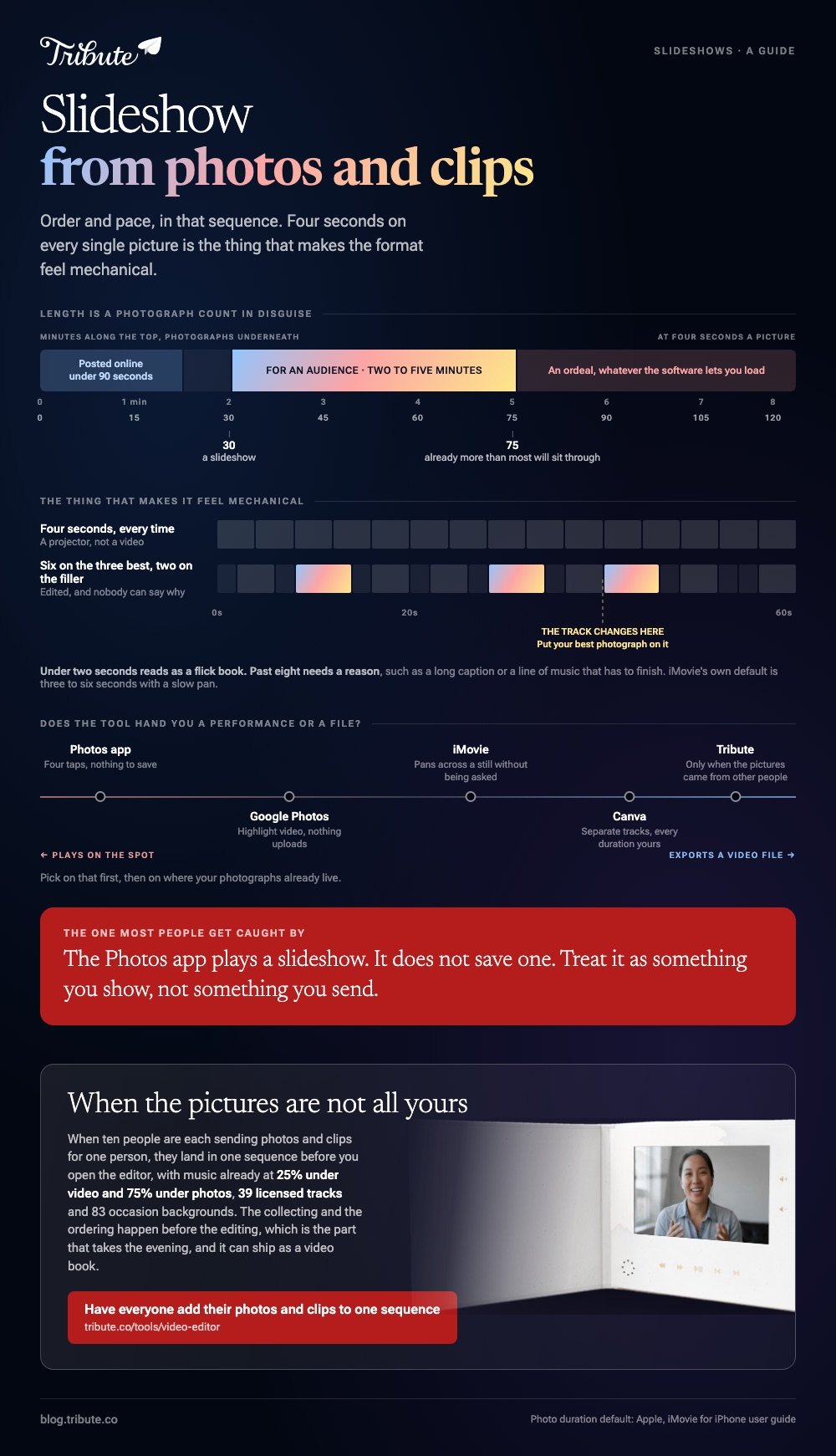
A slideshow is a set of photos, and now often a few video clips, played in order with music under them. The Photos app builds one in a minute, but it plays rather than saves. For a file you can send, use Google Photos, Canva or iMovie, which export video.
One note before the list: we make the Tribute video editor, and it is one of the five tools below, near the end, for the case it fits. The other four are tools we do not sell.

What makes a slideshow worth watching?
Order and pace, in that sequence. A pile of good photographs in a random order reads as a screensaver, and the same pile arranged as a story holds a room.
Decide the first picture and the last picture before you open any tool, because those two carry most of the shape.
Then cut. Thirty photographs is a slideshow and a hundred and twenty is an ordeal, whatever the software lets you load. If two frames show the same moment, keep the one with the better face.
The last thing is the pace. Three to five seconds a picture feels deliberate, under two feels like a flick book, and anything over eight needs a reason, such as a long caption or a line of music that has to finish.
How long should a slideshow be?
Between two and five minutes for an audience, and under ninety seconds for anything posted online. At four seconds a photograph, five minutes is seventy five pictures, which is already more than most people will sit through.
Length also depends on where it plays. A slideshow projected at a party can run long because people drift in and out, while one sent as a link gets closed at the first dull stretch.
YouTube is where most of these end up: 84% of US adults use it, per Pew's social media fact sheet, so the person opening your link seldom needs an account.
Build the short version first. Adding three pictures to a tight slideshow is a minute of work, and cutting forty out of a long one never happens.
What music should sit under a slideshow?
One track, chosen for tempo before sentiment. A slideshow with music that moves at the wrong speed fights every cut, and no amount of meaning in the lyrics fixes that.
Count the beat, set your picture duration to match it, and the slideshow starts to look edited.
Licensing is the other half. A slideshow maker with music built in gives you tracks cleared for use, which matters the moment you upload anywhere public.
Canva, CapCut and iMovie all include libraries; using a song from your own collection is fine on a laptop at a party and risky on a platform that scans audio.
Keep the music under the voices when clips are in the mix. If a clip has someone speaking, the track should drop while they talk and come back up afterwards.

Which slideshow maker should you use?
The best slideshow makers differ in one thing: whether the result is a performance or a file. Pick on that first, then on where your photographs already live.
The Photos app on an iPhone
Fastest route by a distance, and the one most people miss.
- Open Photos and tap Library.
- Tap Select, then tap each photo and clip you want.
- Tap the more button, then tap Start Slideshow.
- Tap the screen, then tap Customize to reach Transition & Duration, Music and Loop.
Apple's iPhone guide covers playing, looping and sharing a slideshow. It does not describe saving one as a video file, so treat this as something you show on the spot rather than something you send.
Best for: Handing someone your phone at a kitchen table.
Why it works: The photographs are already there, and the app formats and scores the whole thing without a single decision from you.
Google Photos Highlight video
Google's photo slideshow generator is called a Highlight video, and it will take clips as well as stills.
- Go to photos.google.com and click Create at the top right, then Highlight video.
- Click Create your own video, then click or select photos.
- Select your photos and clips, then click Create at the top.
- Click Save, then Play, or wait to be told the video is ready.
If you would rather it chose for you, the same screen suggests subjects by person, place, theme or date, and builds the cut itself.
Best for: A library that already lives in Google Photos.
Why it works: Nothing uploads, because the photographs are on Google's servers already, and the output is a real video file.
Canva
The one with a timeline you can argue with.
- From the homepage select Video, or select Create and choose Videos, then pick a design size.
- Select the plus button beside the main track, choose Uploads, and add your photos and clips.
- Drag the left and right handles of each item on the timeline to set how long it holds.
- Select Add Audio in the timeline and pick a track.
- To cut a clip, park the playhead and press the S key, or use Split in the more menu.
Canva's help center notes that this rebuilt timeline is reaching accounts in stages, so an older page-based editor is still what some people see. Compared to the phone apps, Canva asks more of you and gives back control over every duration.
Best for: A slideshow with titles, a cover frame and a deliberate rhythm.
Why it works: Photos, clips, text and audio sit on separate tracks, so changing one does not disturb the rest.

iMovie on an iPhone or a Mac
Included with the hardware, and the only one on this list that pans across a photograph without being asked.
- Open iMovie, tap Start New Project, then Movie.
- Tap each photo and clip, then tap Create Movie.
- To add more later, move the playhead, tap Add Media, then Photos or Albums, tap a photo and tap Add to Project.
- Tap Done, then the share icon, then Save Video.
Apple documents the import steps in its guide to adding video clips and photos in iMovie, which also explains the defaults: an added photo holds for about three to six seconds and arrives with a slow pan and zoom you can adjust or switch off.
Best for: A phone full of photographs and no wish to learn an editor.
Why it works: The pan and zoom gives a still image movement, which is the single thing that stops a slideshow feeling static.
The Tribute video editor
Here only if the photographs and clips are coming from other people.
The Tribute video editor is a browser-based group video editor: contributors record clips on their phones and Tribute assembles them on a timeline with the music balanced under the voices.
Photos and clips land in one sequence before you open it, music sits at 25% under video and 75% under photos by default, and there are 39 licensed tracks and 83 occasion backgrounds to choose from.
It lives inside a paid Tribute rather than standing on its own.
Best for: A slideshow for one person, assembled from whatever everyone who knows them sends.
Why it works: The collecting and the ordering happen before the editing, which is the part that takes the evening.

More on that case in collecting clips from everyone and turning them into a video and one video from thirty different phones.
How do you stop a slideshow looking like a slideshow?
Vary the duration. Four seconds on every single picture is what makes the format feel mechanical, so give the three best images six seconds and the filler two.
Movement is the other fix. A slow push in across a still, the effect iMovie applies by default, reads as video rather than a projector. Use it on faces and leave it off on anything with text in it.
Then cut on the music. If the track has an obvious change at forty seconds, put your best photograph there. Unlike the order of the pictures, this is something nobody notices and everybody feels.

Where should the finished slideshow go?
Upload rather than attach. Messaging apps compress video hard, and a slideshow built from good photographs is the worst thing to put through that. An unlisted link holds the quality and travels further.
Assume a phone screen at the other end.
With 91% of US adults owning a smartphone, according to the Pew Research Center mobile fact sheet, that is where it gets watched first, so check that faces are still readable at that size before you share.
If you want to go further and build a video rather than a sequence of stills, start with making a video montage, or trim and join the clips first in a browser editor and cutter.
Frequently Asked Questions
What is the difference between a slideshow and a montage?
A slideshow holds each image for a set time and moves on. A montage cuts between moving clips on the beat. The tools overlap, the pacing does not.
Can I make a slideshow with music for free?
Yes. Google Photos, iMovie and Canva's free plan all include a music library and export without a watermark on your own media. The track you cannot use for nothing is a commercial song on a public platform.
How many photos should a slideshow have?
Between thirty and seventy five for a three to five minute piece. Count backwards from the length you want at four seconds a picture rather than loading everything and trimming later.
Can I put video clips in a slideshow?
In every tool here except the collage makers. Clips bring their own audio, so set the music lower underneath them or mute the clip if the sound adds nothing.
What resolution should I export?
1080p covers almost everything. Go to 4K only if the source photographs are large and the slideshow will play on a television, because the file grows about four times for a difference most screens hide.
How do I put the photos in the right order?
Sort by date first, then move by hand. Chronology gives you a spine, and the three or four deliberate exceptions are what make it feel composed rather than automatic.
Can I add captions or names?
Canva and iMovie both add text over a picture, and the phone slideshow tools do not. If people in the photographs need naming, that decision rules out the one-minute route.
👉 Have everyone add their photos and clips to the same sequence if the slideshow is a group project rather than your own photo library, and the arranging is done before you open it.
