
Tribute video maker: Collecting Clips From Everyone and Turning Them Into a Video
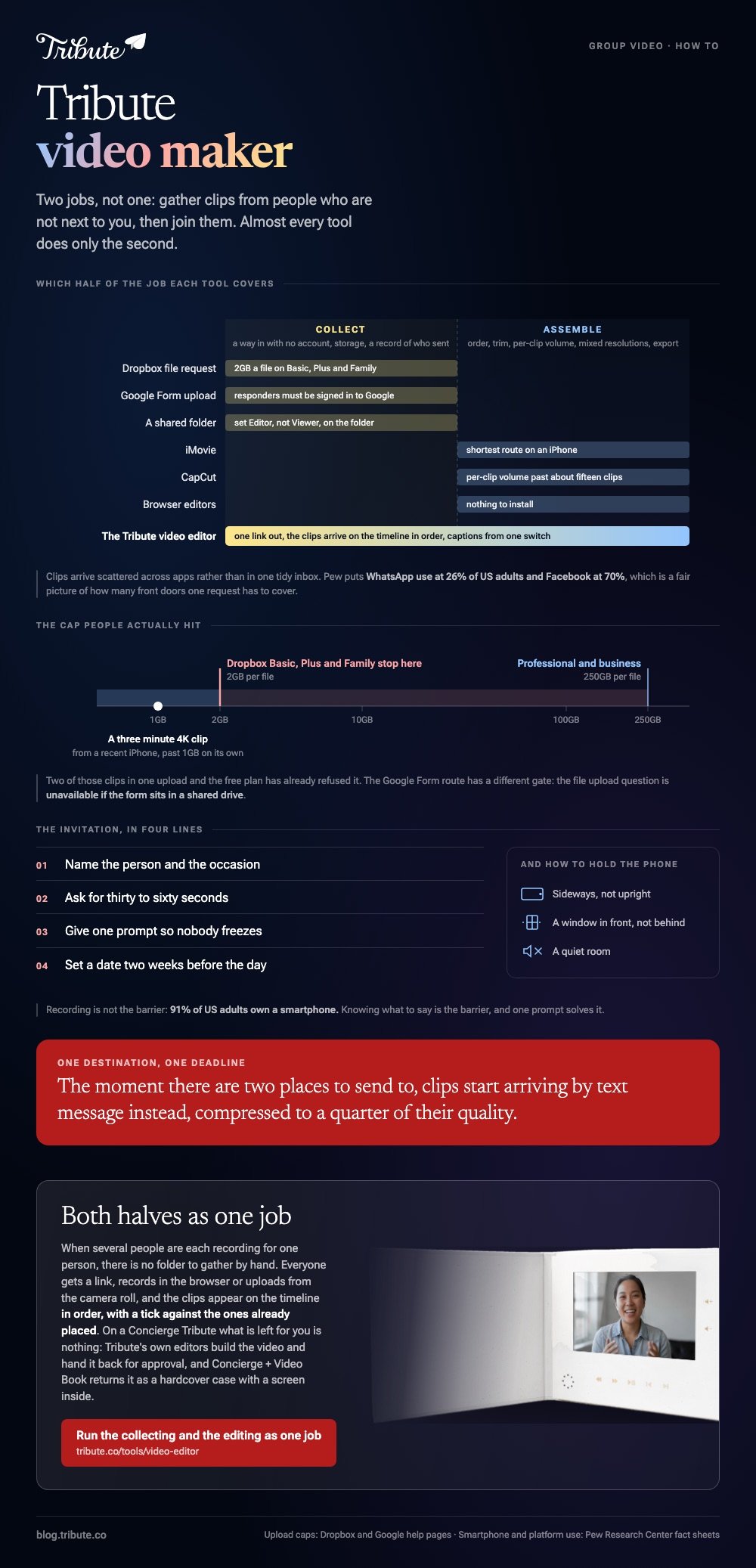
A tribute video maker has two jobs: gather clips from people who are not next to you, and join them into one video with the sound under control. Almost every tool does the second job. Chasing twenty people for footage is where a tribute goes wrong, so pick your collection method first.
One note before the steps: we make the Tribute video editor, and it is one of the options below. The collection and editing methods either side of it use tools we do not sell.

What does a tribute video maker have to do?
Write the list down before you shop, because it is longer than "joins videos".
A tribute built from other people's phones needs a way in for people with no account, storage that will not reject a 1.4GB clip, a record of who has sent what, an editor that handles mixed resolutions, and a link at the end that opens on a television.
Unlike a montage you shoot on one trip yourself, almost none of this is editing. Plan your evenings around that list and the video arrives on time.
How do you collect the clips without losing half of them?
Give everyone one destination and one deadline. The moment there are two places to send to, clips start arriving by text message instead, compressed to a quarter of their quality.
A Dropbox file request
Dropbox has a feature built for this job, and the sender needs no account.
In Dropbox's own file request help page the steps are: log in at dropbox.com, click File requests in the left sidebar, click New request, give it a title and a destination under Folder for uploaded files, click Create, then click Copy next to Share a link instead.
Watch the size cap, which is the part people hit. Dropbox documents 2GB per file on Basic, Plus and Family, and 250GB on Professional and the business plans. A three minute 4K clip from a recent iPhone can pass 1GB on its own.
Best for: A list of twenty or more people, most of whom will send from a phone.
Why it works: Uploads land in one folder and Dropbox can add the sender's name to each file, so your record of who has replied builds itself.
A Google Form with a file upload question
Useful when you want the clip and some information in the same submission: how they know the person it is for, how to spell their name, which story they told.
Google's question types help page says to click Add and choose File upload, and that you can cap the file type, the number of files and the maximum size.
There is one catch worth knowing before you send the link to a seventy year old. Responders have to be signed in to a Google account to answer a file upload question, and the question is unavailable if the form sits in a shared drive.
Best for: A workplace retirement, where everyone already has a work Google account.
Why it works: The name and relation arrive with the clip, which is what you need later for on-screen titles.
A shared folder
Make a folder in Google Drive or iCloud, set it so the people you invite can add to it, and send the link.
In Google Drive that means choosing Editor rather than Viewer in the sharing panel, and Google notes that access applied to a folder is inherited by everything inside it.
Best for: A small family group who already share photo albums.
Why it works: No new service and no new password for anyone, which raises your reply rate more than any reminder does.

What should the invitation say?
Four lines is enough, and leaving any of them out costs you a round of follow-up messages. Name the person and the occasion, ask for thirty to sixty seconds, give one prompt so nobody freezes, and set a date two weeks before the day.
Ask people to video holding the phone sideways, in a quiet room, with a window in front of them rather than behind. Recording is not the barrier: smartphone ownership among US adults sits at 91%, according to the Pew Research Center mobile fact sheet.
Knowing what to say is the barrier, and one prompt solves it.
Prompts you can paste straight into the message are here: how to ask for a birthday video message.
How do you make a tribute video once the clips are in?
Download everything into one folder and rename each file with a number for the order you want. Doing that in the file browser takes ten minutes and saves you an hour of dragging on a timeline.
On an iPhone, iMovie is the shortest route. Apple's iMovie for iPhone guide gives the flow:
- Tap Start New Project, then Movie.
- On the Moments screen, tap the clips in the order you want them. A checkmark marks each one you pick.
- Tap Create Movie, and the clips land on a timeline in that order.
- Tap a clip and drag its yellow edge in to cut the pause before the first word.
- Tap the audio tab to add a music bed, then lower it so the voices sit in front.
- Tap Done, then the share icon, then Save Video.
Past about fifteen clips, or on a laptop, CapCut gives you per-clip volume, which is the one control that stops a tribute sounding like twenty different rooms. The full comparison of assembly tools sits in our main guide: turning everyone's clips into one video.

Is there a tribute video maker that does both halves at no cost?
Not quite, and it is worth knowing why before you spend an evening looking. If you came here hunting for free tribute video maker tools, you will find plenty of editors that join clips at no cost, including iMovie, CapCut and the browser editors.
What none of them include is the collection side: the upload link, the reminder list and the storage for thirty large files.
A search for tribute video maker free turns up free tools that stop at the same place.
The usual workaround is to pair one of those editors with a Dropbox file request or a shared folder, which costs nothing until you pass the storage you already have.
Clips also arrive scattered across apps rather than in one tidy inbox: Pew's social media fact sheet puts WhatsApp use at 26% of US adults and Facebook at 70%, which is a decent picture of how many front doors your request has to cover.
What does a dedicated tribute video maker change?
It collapses the two halves into one. The Tribute video editor is a browser-based group video editor: contributors record clips on their phones and Tribute assembles them on a timeline with the music balanced under the voices.
Everyone gets a link, records in the browser or uploads from their camera roll, and the clips appear on the timeline in order with a tick against the ones already placed.
What that leaves you, on a Concierge Tribute, is nothing: Tribute's own editors build the video and hand it back for your approval, and Concierge + Video Book returns it as a hardcover case with a screen inside.
One switch captions every clip, and in the version we tested that was sixteen contributors and seventeen minutes of footage captioned in under a minute, with ten caption styles to pick from.
Music ducks to 25% under video and 75% under photos by default, and you can override it per clip.

The music library holds 39 licensed tracks across eleven genres, and you can import a YouTube link or upload your own MP3.
Compared with a shared folder plus an editor, the thing you are buying is the ordering and the audio balance being done before you sit down. It lives inside a paid Tribute and is not a general purpose editor.

If the video is for a birthday, the occasion specifics are here: making a birthday video from everyone's clips. If you have more photographs than footage, start with building a slideshow from stills and clips.
How do you deliver the finished video?
Send a link, never a file. Upload the export to YouTube as unlisted, or to the shared folder you already made, and send that address to everyone who contributed as well as to the person it is for.
Download a copy to the laptop that will play it if there is an event. Venue wifi fails at the worst moment, and a local file does not care.
For the wider picture of what a tribute is and how long it should run, start here: what a video tribute is.
Frequently Asked Questions
How many clips do I need?
Eight to twelve makes a video that holds attention. Under six it reads as a handful of messages rather than a tribute, and past thirty you will be cutting people down to one sentence each.
How do I stop people sending compressed video?
Give them an upload link rather than asking them to text it. Messaging apps shrink video to save data, and once a clip has been compressed there is no way to get the quality back.
What if someone videos upright and someone videos sideways?
That will happen on any list longer than five people. Pick one output frame and fill the space around the upright clips with a blurred copy of the footage, which reads far better than black bars.
Can I add photographs as well as video?
Yes, and a video built from talking heads alone improves when you do. Hold each still on screen for three to five seconds and put them between the longer stories.
Who should go first and last?
Open with someone warm and quick, and close with the person closest to the one it is for. The middle is where the long stories go, because that is where attention is highest.
How long does rendering take?
A phone editor exports a ten minute video in a few minutes. Browser and server-side tools vary from minutes to hours depending on length and queue, so render the night before, not an hour before.
Can someone else do the edit for me?
Yes. Freelance editors take a folder of clips and a brief, and some group video services include a concierge edit where their own editors assemble the video from your submissions.
👉 Run the collecting and the editing as one job if several people each recorded something for one person, and no folder of files has to be gathered by hand.
