
Video Montage Maker: How to Turn Everyone's Clips Into One Video
A video montage maker lays clips and photos on one timeline and exports one video. The joining takes four minutes in CapCut, iMovie or Clipchamp.
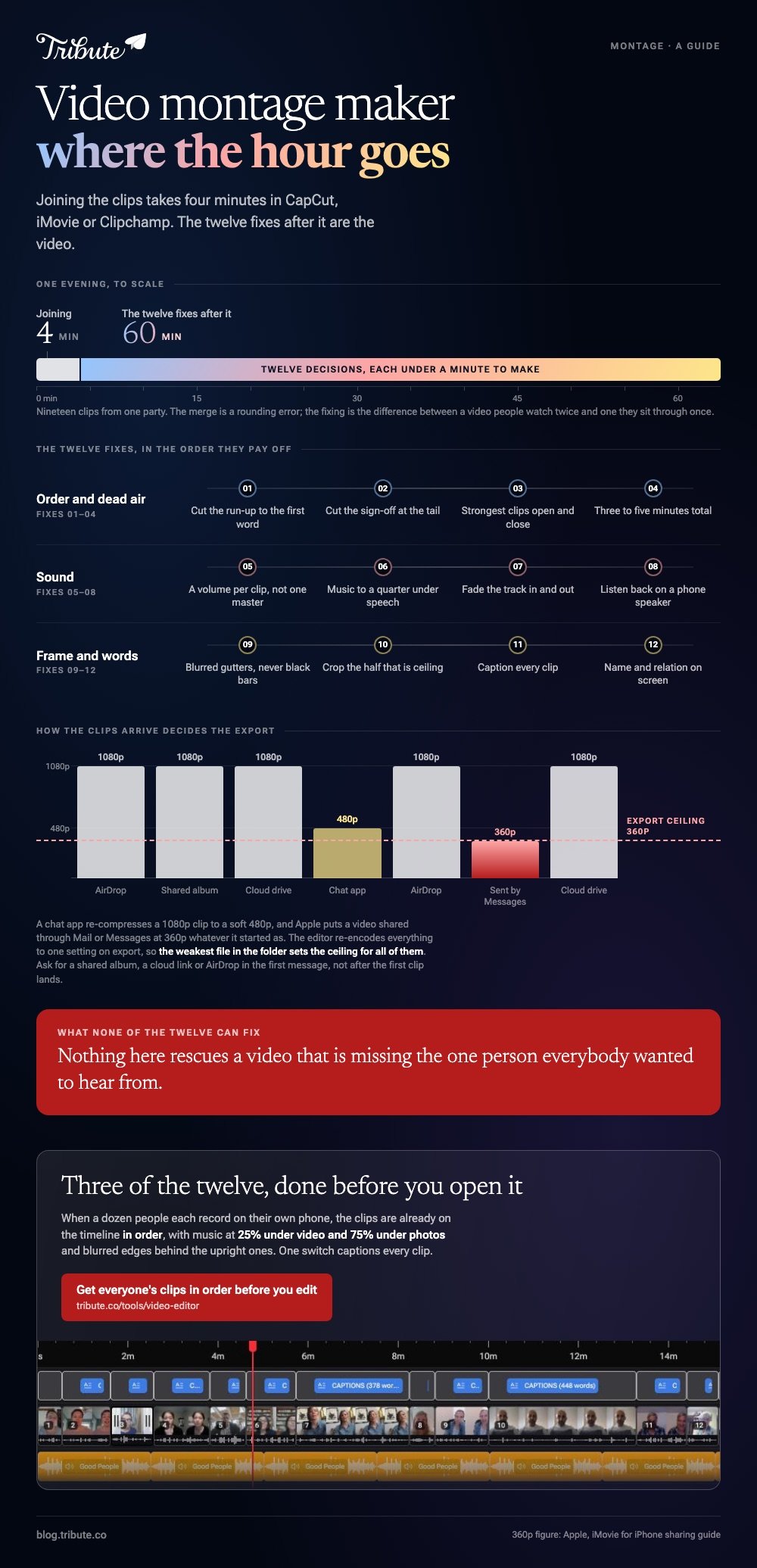
What takes the evening is the dozen fixes after it: dead air at the head of every clip, music over the voices, upright footage in a wide frame.
Before the guide, a disclosure: we make the Tribute video editor, and it appears once, near the end, for the one case it fits. Every other tool named here is one we do not sell.

| What you are trying to do | How hard it is | Start here |
|---|---|---|
| Get several clips into one file | Four minutes in any tool | How to merge videos into one |
| Make the joined clips watchable | Most of the work | How to trim a video |
| Choose something to edit in | Depends on the device holding the footage | the free editors worth trying |
| Get clips out of other people | The hardest part by a distance | What a video tribute is |
What a video montage maker does
Three things, in this order. It imports your media, it holds the clips in a sequence you control, and it renders the lot down to one file that plays on a phone, a television and a laptop without the viewer installing anything.
Everything else a montage tool sells you sits on top of those three jobs. Music, captions, titles, color grades and animations are layers over a row of clips in an order.
Get the order and the lengths right and a plain montage with no effects at all will hold a room.
What it does not do is decide anything. No montage maker knows which clip should open the video, how long a photograph should sit on screen, or that the third speaker says the same thing as the first.
Those decisions are what the video is made of, and they belong to you whichever tool you open.
The vocabulary around this is a mess, which is why one task has five search phrases.
Two files going end to end is covered in joining two videos together, the general case in putting videos together on a phone or computer, and the version where the files arrived from other people in combining videos from different people.
Why the joining is the easy part
Open any editor, select six clips, press export. You have a montage.
It will also be the worst version of itself: four seconds of someone hunting for the record button, a voice that booms in one clip and disappears in the next, and a song at full volume over a grandmother saying something quiet.
Almost nobody searching for a montage maker is an editor, and almost nobody wants to become one. They have a folder, a deadline and a party on Saturday.
Which tool they pick matters far less than the twelve small decisions they make once the clips are on the timeline, and each of those decisions takes under a minute.
Picture nineteen clips from your sister's fortieth sitting in a folder on your desktop. The joining is four minutes. The fixing is an hour, and the fixing is the entire difference between a video people watch twice and a video they sit through once.
For the shortest honest route through all of it, start with easy video editing.
How do you get everyone's clips in one place to begin with?
Before any editor opens, the footage has to land on one device at the quality it was shot. This is where a montage loses the thing it cannot get back, and it happens before anyone has made a single editing decision.
Chat apps re-compress video to keep it small. A clip that left a phone at 1080p can arrive as a soft 480p file with the audio thinned out, and nothing in an editor puts that back.
Ask for files through a shared album, a cloud drive link or AirDrop, and say which one in the first message rather than after the first clip lands.
Name the files as they come in. IMG_4471 tells you nothing at eleven at night with thirty clips open, while 07-aunt-jenny-kitchen tells you who is in it and where it goes. Two minutes of renaming saves twenty minutes of scrubbing back and forth later.
Check the formats before you start cutting.
Clips from different phones arrive at different resolutions and frame rates, and the editor re-encodes all of them to one setting on export, so a single forwarded 480p file drags the ceiling of the whole render down to its own level.
Set your deadline two days before the real one. People who promise a clip send it the night it is due, and those two days are what let you chase the three who did not.
Nothing in this guide rescues a video that is missing the one person everybody wanted to hear from.
The twelve fixes that turn a folder of clips into a video
These are in the order you should do them, and none of them needs a skill you do not have. Work down the list once and stop.
The temptation after fix twelve is to start adding effects, and that is where a decent montage turns into a show reel.
Order, length and the dead air
- Cut the run-up. People press record, look at themselves, think, then speak. Find the flat stretch at the head of the waveform and drag the clip edge in to the first word. Trimming a video is the highest-value minute in the whole process.
- Cut the sign-off as well. The same thing happens at the tail, where someone reaches for the phone and the shot holds on their ceiling for two seconds.
- Open and close with your two strongest clips. The middle can sag and nobody minds. A weak opener loses the room before the music has settled.
- Fix the running time before you cut. Three to five minutes is the ceiling for a video shown at a party. Twenty clips at fifteen seconds each is five minutes, and fifteen seconds is longer than it sounds.

Sound, where most montages fall apart
- Set a volume per clip, not one level for the video. One person recorded in a kitchen, the next in a car with the window down. A single master level cannot fix both.
- Put the music under the speech. Around a quarter of its full level is the usual landing point when someone is talking, and much louder when the screen shows photographs with no voice on them. See adding music without drowning out the voices.
- Fade the music in and out. A track that stops dead at the last frame sounds like a mistake. On an iPhone the route differs by app, which is covered in adding music to a video on iPhone.
- Listen back on a phone speaker. That is where the video will be watched. Headphones flatter a mix and hide the one clip nobody will be able to hear.

Framing, captions and the look
- Fill the gutters behind upright footage. A phone held upright sits in the middle of a widescreen frame with empty space on both sides. A blurred copy of the clip reads better than black: see putting a vertical video in a widescreen video and changing a video's aspect ratio.
- Crop the half of the frame nobody needs. A clip shot at arm's length is half ceiling. Cropping a video pulls the person back to the center, and cropping in a browser works when you cannot install software.
- Caption every clip. Around 15% of American adults aged 18 and over report some trouble hearing, about 37.5 million people, per the NIDCD quick statistics on hearing. Captions also rescue the uncle who mumbles. Start with adding captions to a video, then how automatic captioning works, fixing a name the transcription got wrong and the wider case in subtitles for videos.
- Name the people. A title card with a name and a relation turns a stranger on screen into someone the viewer can place. Adding text to a video takes a line of typing per clip.
Which video montage maker should you use?
For most people the best video montage software is whatever is already installed on the device holding the footage.
Moving a folder of 4K clips from a phone to a cloud drive to a laptop costs more of your evening than any feature you gain by moving it.
That rule has teeth because of where the footage lives. With 91% of US adults owning a smartphone, according to the Pew Research Center mobile fact sheet, a family video is a video assembled from a dozen handsets across three generations of camera.
The phone is the default workplace, not the exception.
On a phone
CapCut gives you a real timeline with per-clip volume, which is the one control that stops a montage sounding like four different rooms. iMovie is shallower and faster.
Google Photos will build a themed video on Android without you choosing anything, then let you swap clips out.
If the whole job is happening on a phone, start with the free apps built for a video montage, compared in montage apps for phones.
Device-specific picks are in iPhone video editors and Android video editors, and the stills-and-clips hybrids in photo and video editing apps.
In a browser
Browser editors upload your clips to a server, do the work there and hand back a download. An old laptop performs much like a new one, because the rendering is not happening on it.
Clipchamp, Canva, Clideo and CapCut's web editor all cover the same ground.
Read the export screen before you upload rather than after the render. A no-cost tier often caps the export at 720p, stamps a watermark in the corner, or deletes your files after a few hours.
More on the route in online video editors, free online editors compared, joining and cutting clips in a browser and merging videos online.
On a laptop you own
Desktop software is worth the install when the footage is long, when the clips share a codec and you want them joined without a re-encode, or when you need more than two audio tracks.
iMovie covers the Mac, Clipchamp ships with Windows, and DaVinci Resolve gives you a full color suite you will use a corner of.
Comparisons by platform sit in video editing programs for Mac and video editors for Windows. For the wider roundups, see free software that makes a video montage and video editing software for beginners.
How do you build it, step by step?
Three routes, and the steps below are the current ones from each vendor. The shape is the same in all of them: import, arrange, trim, export.
CapCut on a phone
- Tap New project and select every clip you want in the video, then tap Add.
- Long-press a clip and drag it along the timeline until the order is right.
- Tap a clip, then Volume, and set a level for that clip on its own.
- Tap the small square where two clips meet if you want a transition, and set its length with the duration slider.
- Tap Export at the top right, set resolution and frame rate, then tap Done.
CapCut's desktop and web editors follow the same beats with a mouse. Watch the export panel, because the resolution ceiling depends on your device and on the resolution of the clips you fed in.
iMovie on an iPhone
- Open iMovie, tap Start New Project, then Movie.
- On the Moments screen, tap each clip you want. A blue checkmark appears on the ones you picked.
- Tap Create Movie. The clips land on a timeline in the order you selected them.
- Tap a clip and drag its yellow edge to cut the silence at the start.
- Tap Done, then the share button, then Share Video, then Save Video.
Apple documents the project and sharing steps in its iMovie for iPhone sharing guide, which also warns that sending a video through Mail or Messages produces a 360p copy at 30 fps whatever you started with.
The iPhone specifics are in merging videos on iPhone.
Clipchamp in a browser
- In the Your media tab, click Import media and add the files from your computer or OneDrive.
- Drag the clips onto the timeline side by side. Clips placed end to end become one video.
- Select a clip and drag its trim handles. Hold Shift or Command to trim several at once, and click Delete this gap if a blank space is left behind.
- Open the Transitions tab and drag one between two clips if you want it.
- Click Export and pick a resolution.
Clipchamp ships with Windows and runs in a browser on a Mac, which makes it the default when you cannot install software.
Unlike the phone apps, it asks you to install nothing at all, so a borrowed or locked-down laptop is enough to finish a video on.
What makes a montage worth watching?
Structure, and it is plainer than it sounds. A video that holds a room has a shape: an opening that tells people what they are about to watch, a middle grouped by something, and an ending that lands on one person or one line.
Group the middle rather than shuffling it. Chronological order suits a retirement or an anniversary, where the hair changes and the years do the storytelling for you.
Grouping by place or by relationship suits a birthday better, since nobody in the room can date a kitchen photo from 2014 anyway.
Cut the repetition. Three people saying happy birthday and we love you back to back reads as filler even when each one means it.
Spread the greetings through the video and put the specific memories together, because a story about one fishing trip carries a montage and a general good wish does not.
Choose music that stays out of the way. A track with a vocal fights every person who speaks, which is why instrumental scores fill the libraries inside editors.
Match the tempo to the occasion rather than to your own taste, which means a slow piano under a retirement video and something with a pulse under a twenty-first.
Watch the whole thing once with the door shut before you export. You will find two clips to cut and one to move, and the cut you send will be better than the one you were about to.
What if the montage is more photos than video?
Stills do not behave like clips. A photograph has no duration of its own, so you set one, and four seconds is the point where a slideshow stops feeling rushed and has not yet started to drag.
A photo montage video maker is the same tool with the stills doing the talking.
Give every still some motion. A slow push in or a drift across the frame keeps the eye busy, which is the trick that stops a sequence of photographs looking like a screensaver.
Unlike video clips, stills carry no sound at all, so the music has to carry the whole runtime and the track choice matters more.
Start with making a slideshow from photos and video clips, then a slideshow maker with music, creating a slideshow with music, photo slideshow generators and mixing stills and clips in one video.
Tool roundups sit in slideshow makers compared, and if the occasion is a graduation there is a list of songs for a graduation slideshow.
A grid is a separate format worth knowing.
Four faces on screen at once reads as a reunion rather than a sequence, which is the job of a video collage maker or, when stills and clips share the grid, a photo and video collage maker.

What if the clips came from a dozen different people?
This is the case none of the tools above are built for, and it is the reason many people go looking for a montage maker at all.
Twelve people send twelve files over text, email and WhatsApp, at twelve resolutions, three of them compressed to mush by the messaging app. Collecting them at full quality and getting them into a sensible order is the work; the merge is a rounding error.
The Tribute video editor is a browser-based group video editor: contributors record clips on their phones and Tribute assembles them on a timeline with the music balanced under the voices.
Clips arrive in order before you open the editor, with music at 25% under video and 75% under photos by default, and blurred edges already filling the frame behind upright footage.
It lives inside a paid Tribute and it is not a general purpose montage tool.
One switch captions every clip on the timeline, which took under a minute for a 17 minute video from 16 contributors, and there are 10 caption styles, 39 licensed tracks, 83 occasion backgrounds and 47 entrance animations to work through once the words are right.
Unlike a file you merge yourself, the collecting, the ordering and the audio balance are done before the editing starts.
Compared to building the same video in CapCut, you lose fine control and you save the evening you would have spent chasing people for their clips.

More on that case: one video from thirty different phones, collecting clips and turning them into a video and the plain explainer in what a video tribute is.
For birthdays there is a birthday video maker walkthrough, how to collect birthday video messages, video birthday cards from everyone and what to say when someone asks you to record.
If you are weighing up the group-video services against each other, we keep a page on VidDay and its alternatives.
How do you hand the finished video over?
Upload rather than attach. Messaging apps compress video hard, and Apple's own guide puts a video shared through Mail or Messages at 360p whatever the source was. An unlisted YouTube link or a shared cloud folder keeps the quality you worked for.
Watch the export start to finish before you send it. The first and last ten seconds are where render faults show up, and the one thing you cannot recover from a finished file is quality the render threw away.
Keep the originals until the video has been watched by someone other than you.

Every guide in this cluster
The rest of this cluster takes one job each and finishes it in the tool you already have.
Putting the clips together
Joining, merging and assembling, tool by tool and device by device.
- Canva slideshow
- Resize video
- Slideshow template free
- Merge video clips online
- Ig reel aspect ratio
- Join multiple videos into one
- Combine videos on iphone
- Best app to make slideshow with music
- Combine video clips online
- Video montage app iphone
- Stitch videos
- Photo montage video maker
- Converting vertical video to horizontal
- Iphone join videos
- Make a picture collage with music
- Animoto slideshow maker
- Best songs for graduation slideshow
- Using imovie to make a slideshow
- Video collage maker online
- Canva video collage
- Merge youtube videos
- Vlc media player merge videos
- Slideshow with music google photos
- Combine youtube videos
- Video collage for instagram
- Android merge videos
- Merge videos on mac
- Merge videos on windows
- Combine videos android
- Video montage for birthday
- Vlc combine video
- Android join videos
- Combine videos on mac
- Join youtube videos
- Imovie join clips
- Combine videos windows
- Clideo slideshow maker
- Join videos mac
- Music for graduation slideshow
- Combine videos in quicktime
- Inshot video collage
- Canva merge videos
- Merge quicktime videos
- Free program to merge videos
- Imovie templates photo slideshow
- Adobe premiere join clips
- Video collage apps for iphone
Fixing what arrives
Sound, captions, cropping, compression and the things that go wrong.
- Royalty free music for videos
- Put music into video
- Add audio to video clip
- Handbrake compress video
- Crop video on line
- Clip cut video editor
- Video song lyrics maker
- Add music to video iphone
- Video quality reducer
- Vlc media player trim video
- Compress video file online free
- Veed video compress
- Free caption generator
- Iphone video has no audio
- Cut video with vlc player
- Subtitle edit program
- Imovie export mp4
- Youtube to mp4 trim
- Premiere pro crop video
- Photo video maker with music online free
- Insert audio to video online
- Ffmpeg trim video
- Crop video iphone
- Vlc media player crop video
- Free music download for videos
- No volume on iphone videos
- Youtube to mp4 crop
- Video caption for facebook
- Why does imovie crop my video
- Put music over video online
- Download crop youtube video
- Subtitle maker online
- Capcut auto caption
- Youtube videos have no audio
- Trim youtube video and download
- Trim video iphone
- Add music to youtube video
- Using copyrighted music in youtube videos
- Youtube cut video and download
- Freeze frame final cut pro
- Windows video trim
- Crop video macos
- Free video and audio editor
- Put text on video online
- Iphone cut video
- Canva add music to video
- Quicktime player crop video
- Compress whatsapp video
- Vlc media player compress video
- Adobe premiere pro how to cut video
- Photo video maker with song online
- Transition inshot
- Export vlc to mp4
- Davinci resolve crop video
- Add song to video online free
- Crop video on instagram
- Add text to video premiere pro
- Add text to video iphone
- Vlc video to audio converter
- Subtitle in vlc
- Quicktime player trim video
- Video speed editor online
- Trim movie in imovie
- Add music to video on android
- Subtitle edit software for mac
- Video quality enhancer free online
- Video with music instagram
- Clideo add audio to video
- Crop videos android
- Final cut pro auto captions
- Trim video snapchat
- Add music to video for facebook
- Subtitle editor for windows
- Video transition effects free download
- Adobe premiere pro trim video
- Fix mp4 file free
- Video no audio in premiere pro
- Veed subtitle generator
- Adobe premiere pro compress video
- Subtitles for final cut pro
- Add text to youtube video
- Alight motion transition preset
- Davinci resolve add text to video
- Davinci resolve cut clip
- Canva add audio to video
- Compress quicktime video
- Imovie cut video
- Compress video for youtube
- Best computer for audio recording and editing
- Imovie export audio only
- Add transition imovie
- Kapwing crop
- Adding music to a video on android
- Android trim video
- Youtube video downloader without audio
- Yt video download trim
- Cut video windows
- Windows movie maker transition
- Export project in imovie
- Capcut music editor
- Trim instagram video
- Windows movie maker music not playing
- Audio and video out of sync windows 11
- Canva crop video
- Clideo add music to video
- Video smaller size converter online
- Clideo video crop
- Clipchamp crop video
- Music video church
- Sony vegas add text to video
- Mp4 merger download
- Photo transition video maker online
- Add text to tiktok video
- Davinci resolve trim video
- Filmora crop video
- Imovie compress video
- Openshot crop video
- Openshot video editor text overlay
- Add audio to video quicktime
- Canva trim video
- Edit song tiktok
- Best transition on capcut
- Church interiors audio video
- Davinci resolve no audio in timeline
- Kinemaster transition
- Vlc convert mov to mp4 mac
- Compress video for facebook
- Cut video with quicktime
- Vertical frame size premiere pro
- Wondershare filmora add text to video
Choosing a tool
Which editor to open, and what each one costs you.
When the clips came from other people
Occasions where the video is a gift and the footage is not yours.
- Fun birthday videos
- Happy anniversary video
- Online birthday video maker with photos free
- Birthday card video free
- Make birthday video online free
- Video retirement
- Birthday song with video
- Best apps for birthday video making
- Memorial video
- Canva birthday video
- Mennonite wedding videos
- Birthday wishes video free download
- Birthday video template
- Birthday video music
Frequently Asked Questions
What is the difference between a montage and a slideshow?
A montage is a sequence of video clips, a slideshow is a sequence of stills, and most family videos are both.
The practical difference is sound: clips bring their own audio and photographs leave the music exposed, so a mixed video needs its music level set twice.
How long should a video montage be?
Three to five minutes for something shown to a room, and up to ten if it is a memorial or a retirement where people expect to sit down for it. Past that, cut clips rather than speeding them up.
What is the best video montage app?
On a phone, the best video montage app is the one that opens your camera roll without a fight, which puts CapCut and iMovie ahead on an iPhone and CapCut or Google Photos on Android.
None of them handles clips arriving from other people, which is a separate problem.
Do I have to pay for a montage maker?
No. The free tools in this guide cover every fix on the list of twelve, and iMovie, CapCut and Clipchamp all export without a watermark. Paid tiers buy you higher export resolutions, stock music and cloud storage.
What music am I allowed to use?
Anything licensed for the use, which in practice means the library inside your editor or a track you bought a license for.
A commercial song in a video shown to one room at a party seldom causes anyone trouble; the same video posted in public is where takedowns happen.
Why does my montage still look like a folder of clips?
Almost always the dead air and the volume jumps rather than the lack of effects. Trim every clip to the first word, set a level per clip, and the same footage reads as a video with nothing else added.
Can I make one with no editing experience?
Yes, and the skill people think they lack is not the one the job needs.
Dragging clips into an order is a drag and a tap in every tool here; the judgment about what to cut is the real work, and a waveform plus one honest watch-through gives you most of it.
Does joining clips reduce the quality?
It can. When the clips share a codec, resolution and frame rate, a merge copies the streams and the output matches the source; when they differ, the tool re-encodes everything to one setting and the weakest clip sets the ceiling.
Export at the highest setting on offer.
👉 Get everyone's clips onto one timeline in order, with the music already under them if the montage started with a request you sent out, and the twelve fixes shrink to a handful.
