
Compress Video for Facebook: What Helps and What Makes It Worse
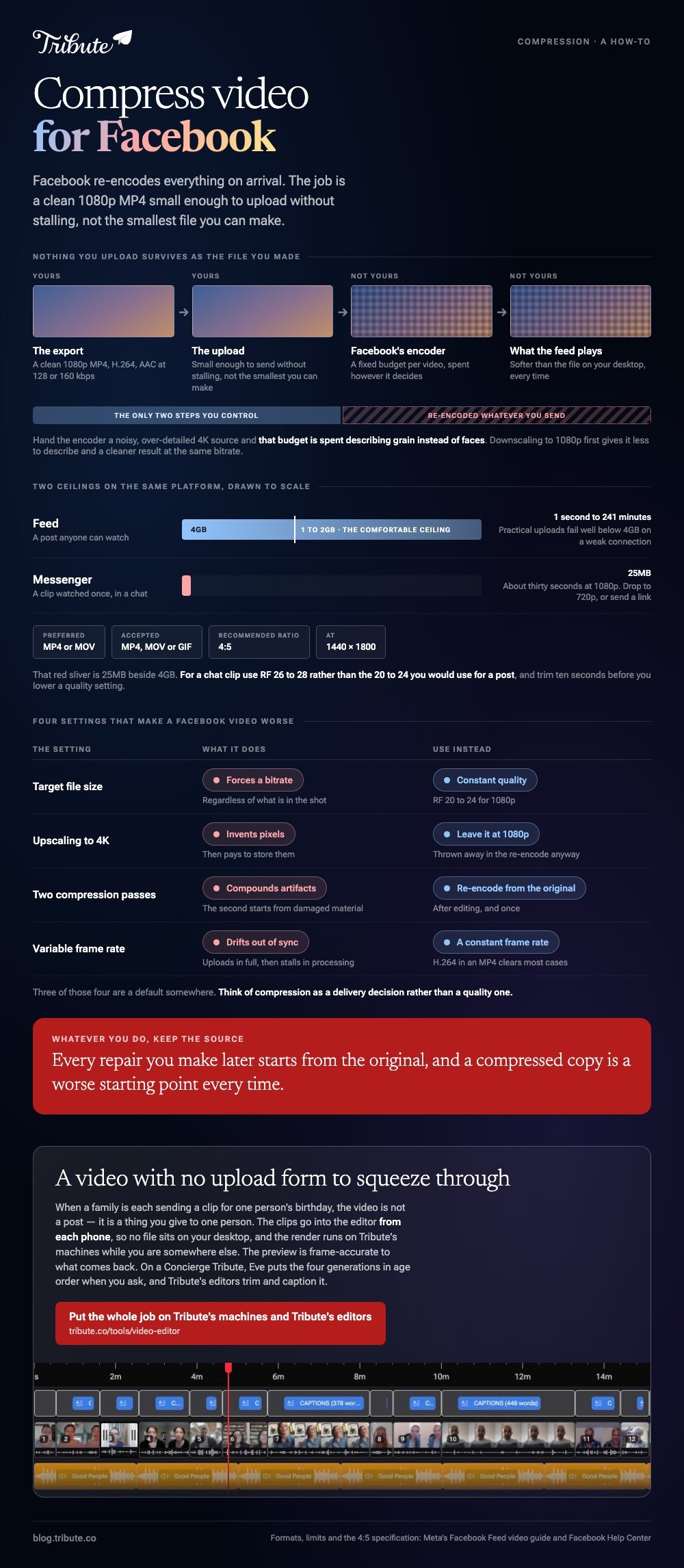
In most cases you do not need to compress video for Facebook, because Facebook re-encodes everything on arrival. The job is to hand it a clean 1080p MP4 that is small enough to upload without stalling, not the smallest file you can make.

Do you need to compress video for Facebook at all?
Only when the upload keeps failing or the file will not fit the connection you have.
Every video posted to Facebook is encoded again by Facebook before anyone watches it. Your file is the source for that pass, which means squeezing it first throws away detail the second pass then has to work from.
| Situation | Compress first? |
|---|---|
| A 4K phone video of three minutes | Yes, down to 1080p |
| An exported 1080p edit of 400MB | No |
| Anything over 4GB | Yes, it will be rejected |
| Uploading on hotel wifi | Yes, for your own sake |
Think of it as a delivery decision rather than a quality one. Unlike an export for archive, nothing you upload here survives as the file you made.
Why a bigger file can look worse
Facebook's encoder gets a fixed budget per video. Hand it a noisy, over-detailed 4K source and that budget is spent describing grain instead of faces.
Downscaling to 1080p before you upload gives the encoder less to describe and a cleaner result at the same bitrate.
What does Facebook accept?
More formats than you would guess, and two it prefers.
Facebook's help center lists around thirty container types and then states the preference outright: use the MP4 or MOV format. Everything else is converted on arrival with no say from you.
| Limit | Figure |
|---|---|
| Maximum file size | 4GB |
| Length, Feed | 1 second to 241 minutes |
| Recommended ratio | 4:5, at 1440 by 1800 pixels |
| Accepted types | MP4, MOV or GIF |
Those figures come from Meta's own Facebook Feed video specification, published for advertisers and the clearest numbers the company puts in one place. Check them before a campaign, since Meta revises the page without notice.
How do you compress video for Facebook in HandBrake?
Six steps, and only two of them involve a decision.
HandBrake is a dedicated encoder, it costs nothing, and it publishes the numbers most tools hide behind a slider.
- Open your file and pick a preset under Fast 1080p30 as a starting point.
- Set the format to MP4 on the Summary tab.
- On the Video tab, choose H.264 for the widest compatibility.
- Set Constant Quality. HandBrake recommends RF 20 to 24 for 1080p, where a lower number means better quality and a bigger file.
- Set the audio to AAC at 128 or 160 kbps. Nobody has ever noticed the difference on a phone speaker.
- Choose a destination and start the encode.
Start at RF 22. If the result looks soft on a large screen, drop to RF 20 and run it again, which costs you time and about a third more file.

The browser alternative
A web compressor is the right answer for one file on a machine you cannot install software on. The trade is that your video is uploaded to a stranger's server, processed, and downloaded again, which takes longer than the encode itself.
The options and their limits are covered in compressing a video file online free, and the full desktop walkthrough in compressing video with HandBrake.
What is different about Facebook Messenger?
A much smaller ceiling, and no second chance.
Messenger caps media attachments at 25MB, so the question of whether to compress video for Facebook Messenger answers itself: anything longer than about thirty seconds at 1080p needs work before it will send.
- Drop to 720p. On a phone screen in a chat, nobody can tell
- Trim before you compress. Ten seconds cut beats a quality setting lowered
- RF 26 to 28 for a chat clip, rather than the 20 to 24 you would use for a post
- Send a link instead when it is a real video rather than a moment
Compared with a Feed post, a Messenger clip is watched once on a small screen and never again, so the compromise costs you nothing.
Which settings make a Facebook video look worse?
Four, and three of them are defaults somewhere.
| Setting | What it does | Use instead |
|---|---|---|
| Target file size | Forces a bitrate regardless of content | Constant quality |
| Upscaling to 4K | Invents pixels, then pays to store them | Leave it at 1080p |
| Two compression passes | Compounds artifacts | Re-encode from the original |
| Variable frame rate | Drifts out of sync on re-encode | Set a constant frame rate |
Keep the source file. Every repair you make later starts from the original, and a compressed copy is a worse starting point every time.
For building the video in the first place, start at making a video montage.
What if fifteen people each send you a clip for the same post?
The Tribute video editor is a browser-based group video editor: people record clips on their phones and Tribute lays them on a timeline with the music already balanced under the voices.
It is ours, and it is the last thing on this page.
- Tribute renders the final video on its own servers, so the encode never runs on your laptop
- The preview is frame-accurate to the video you get back
- Clips arrive in order, already assembled, with a tick against the ones placed
- A Tools panel handles the bulk jobs: render, re-caption, find photo duplicates, loop music to fill the timeline
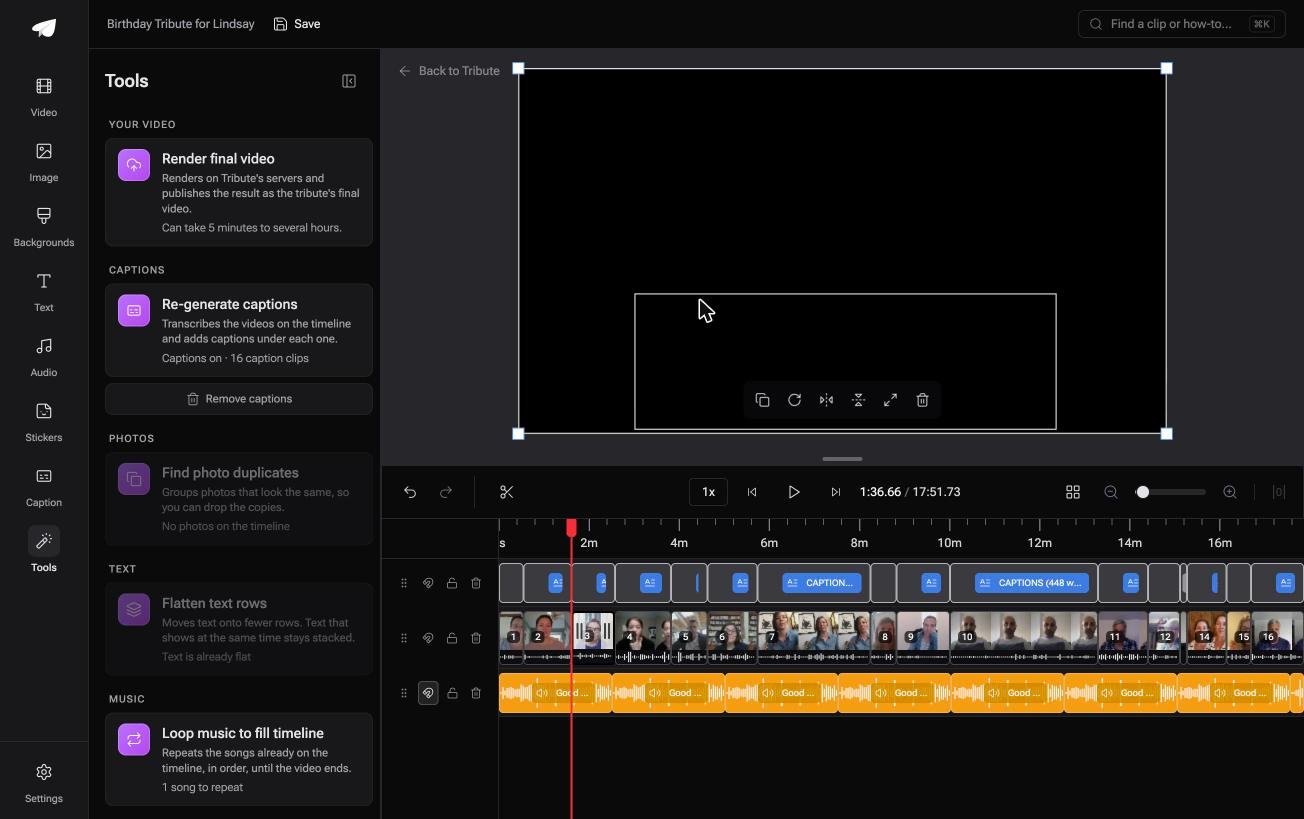
Best for: The person collecting clips from a whole family on a laptop that already complains about a single 4K file.
Why it works: Compared with encoding fifteen files yourself, the heavy pass happens somewhere else and you never watch a progress bar.
What if Facebook was never where this video was going?
Every step above assumes the finished video has to squeeze through an upload form.
File size, container, bitrate and a 4GB ceiling are all properties of the destination, not of the video. Change the destination and the whole page stops applying.
The case: the audience is one person, not a feed
You are in it when a group each record something for the same person.
Twelve neighbors for someone moving away. Four generations for a ninetieth birthday. The video is not a post, it is a thing you give to one person, and a public timeline is the wrong room for it.
Why the file size stops being a number you manage
When the clips upload straight into the editor and the Tribute video editor renders the result on its own machines, there is no file on your desktop to shrink.
Which means the search that brought you here, compress video for Facebook, is solving a delivery problem this video does not have.
What is not yours to do
- Not the upload. The clips go into the editor from each phone, so no file sits on your desktop.
- Not the render. It happens on Tribute's machines while you are somewhere else.
- Not the running order. Eve, the assistant on Concierge and Concierge + Video Book, puts the four generations in age order when you ask for it.
- Not the trimming or the captions. On a Concierge Tribute, Tribute's editors do both and send the video back.

When this is the wrong answer: the video is a post, and the point is that a lot of people see it. Then compress it and upload it. The editor also lives inside a paid Tribute, not on its own.
Frequently Asked Questions
Does Facebook reduce video quality after upload?
Yes. Every upload is encoded again on Facebook's side, which is why a file that looked sharp on your desktop can look softer in the feed.
What resolution should I upload?
1080p for almost everything. Meta's own specification points at 1440 by 1800 for a 4:5 feed video, and anything beyond that is thrown away during the re-encode.
Why does my video upload and then fail to process?
Check the container and the frame rate first. A variable frame rate file or an unusual codec can upload in full and then stall, and re-encoding to H.264 in an MP4 clears most cases.
How do I shrink a file without losing quality?
You cannot, beyond a point. What you can do is lower the resolution rather than the bitrate, because a clean 720p beats a blocky 1080p on a phone.
Is 4GB a hard limit?
It is the maximum Meta publishes for feed video. Practical uploads fail well below it on a weak connection, so treat 1 to 2GB as the comfortable ceiling.
Should I compress before or after editing?
After, and once. Editing from a compressed source bakes in artifacts that every later step has to carry.
Do live videos need compressing?
No, because the encoding happens as you stream. Your upload speed sets the quality there, not a file setting.
👉 Put the whole job on Tribute's machines and Tribute's editors if a family is sending clips for one person's birthday, and your evening stays yours.
