
Compress Video File Online Free: Which Free Tools Shrink a Large Video
To compress video file online free, open a free online tool, lower the bit rate or the resolution, and download the smaller copy. The upload is the slow part. The size you get back is decided by bit rate, not by the tool you chose.

Why does a phone video need compressing at all?
Because the places you want to send it have hard ceilings.
A personal Gmail account refuses anything over 25 MB of attachments and drops in a Drive link instead. Messaging apps re-encode on their own terms and hand the other person a soft, blocky copy.
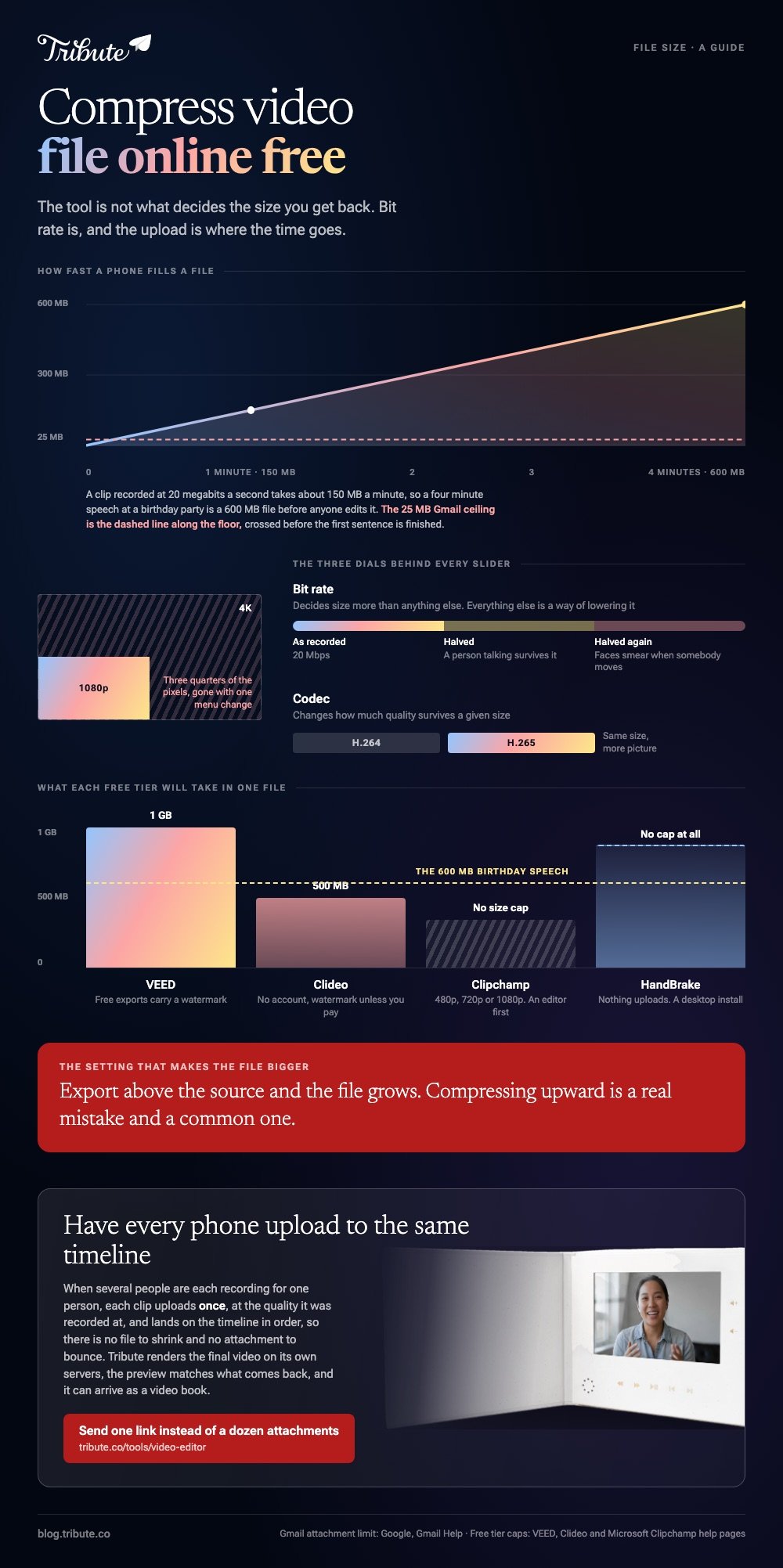
The arithmetic is unforgiving. A clip recorded at 20 megabits per second takes about 150 MB per minute of footage, so a four minute speech at a birthday party is already a 600 MB file before anyone has edited it.
Can you compress video file online free?
Free tools get you a long way, and the limits are about bit rate rather than brand.
Compression throws away detail the eye is least apt to miss. Halve the bit rate and most footage of a person talking survives it. Halve it again and faces start to smear whenever somebody moves.
Three dials sit behind every slider on every compressor:
- Bit rate decides size more than anything else. Everything below is a way of lowering it.
- Resolution cuts size hard. Dropping 4K to 1080p removes three quarters of the pixels.
- Codec changes how much quality survives a given bit rate. H.265 beats H.264 at the same size.
Microsoft's own guidance on Clipchamp makes the point from the other direction: an export can come out larger than the file you put in when the output frame rate, bit rate or resolution sits above the source.
Compressing upward is a real mistake and a common one.
Which tools compress video file online free?
Free online compressors all work the same way: upload, choose a target, download. What separates them is the cap on the upload and what they do to the output.
A free online mp4 compressor is the same machine with a different logo on the door, so judge one on its ceiling and its watermark rather than its home page.
| Tool | What the free tier gives you | The catch |
|---|---|---|
| VEED | Compression up to 1GB per file | Free exports carry a VEED watermark |
| Clipchamp | Export at 480p, 720p or 1080p | An editor first, a compressor second |
| Clideo | Up to 500MB per file, no account needed | A watermark unless you go premium |
| HandBrake | No cap, no watermark, no upload | A desktop install and a learning curve |
VEED states the ceiling on its own page: the free tool takes files up to 1GB, with larger uploads on a paid plan. That cap is generous for a speech and useless for an hour of 4K.
Check the output before you send it anywhere. A watermark in the corner is the single most common surprise with a free online tool, and you will not see it until the download finishes.

How do you compress an MP4 online, step by step?
The sequence is the same whichever page you land on.
- Trim before you upload. Thirty seconds of silence at the front is thirty seconds you are paying to send twice.
- Open the compressor and drop the file in. Wait out the upload: on home broadband this is most of the total time.
- Pick a target. Most tools offer a quality slider and a resolution menu with an estimated size that updates as you drag.
- Aim one step below what you need. If the limit is 25 MB, target 20.
- Download and watch ten seconds of it at full screen before you send it.
To compress mp4 video to smaller size online free, the free tools above all land in the same place: 1080p at a moderate bit rate keeps a talking head watchable. Go down to 720p only when the ceiling forces it.
When is a desktop compressor the better answer?
When the file is big, your connection is slow, or the video is private.
An online compressor has to receive the whole file before it can start. A desktop tool reads it off the disk. Compared with a browser upload, a local pass on a 2GB file finishes in minutes rather than an hour, and nothing leaves the machine.
Microsoft points Clipchamp users at HandBrake for this job, and it is free software on Windows, macOS and Linux.
Unlike a browser page, it keeps every pass on your own disk, and the trade is a window full of presets instead of one slider.
More on that in compressing with HandBrake, on the browser side in what VEED's compressor does to a file, and on assembling the pieces in making a video montage.
What if a dozen people each sent you a clip?
Then compression is not one job. It is twelve uploads, twelve downloads and twelve files that no longer match each other.
The Tribute video editor is a browser-based group video editor: contributors record clips on their phones and Tribute assembles them on a timeline with the music balanced under the voices. It is ours, and it is the last thing on this page.
- Clips arrive in order on the timeline, with a tick against the ones already placed
- Tribute renders the final video on its servers, so the heavy pass never runs on your laptop
- The preview is frame-accurate to the video that comes back
- Autosave and a restorable save history, so nothing is lost to a bad export

Best for: A dozen clips to shrink before a single one of them will send.
Why it works: One finished video replaces a dozen attachments, so the size problem stops being yours.
Can you skip the compression step altogether?
Every step above exists because you are moving files around.
Somebody sent a 900 MB clip, it will not fit in an email, and the only way through is to shrink it and send it again. There is one case where no file is ever sent.
The case: you are collecting, not shooting
That case arrives when several people each record something for one person.
A grandmother turning eighty. A colleague leaving after fifteen years. A memorial where the people who should speak are in four time zones. Nobody emails anybody a video.

Why the size question never comes up
Because each phone uploads once, to the same place.
Each clip goes straight onto the timeline at the quality it was recorded at, and what you hand round at the end is one link rather than a dozen attachments.
That is how the Tribute video editor handles it: not another free online video compressor for large files, but a way of never needing one.
What you do not have to do
- Not the chasing. Each person records from the link on their own phone.
- Not the shrinking. Every clip uploads once, at the size it was recorded.
- Not the edit. On a Concierge Tribute, Tribute's own editors trim, order and score it.
- Not the render. The compression pass happens on Tribute's servers, not yours.
It does not have to stay a file
The finished video can arrive as a video book: a hardcover case with a screen inside that plays when you open it. No upload, no link, nothing to lose.

When this is the wrong answer: you have one big file and one email to send. Then use a compressor at the top of this page.
The Tribute editor is not a compressor on its own: it lives inside a paid Tribute, and a video tribute is what it is built for.
Frequently Asked Questions
What is the best way to compress an MP4 online?
Upload to a browser compressor, set the resolution one step below what you need, and check the estimated size before you start. Watch ten seconds of the result at full screen before sending it on.
Does compressing a video lower the quality?
Always, by some amount. The question is whether the amount shows on the screen you will watch it on. A moderate cut to the bit rate is invisible on a phone and obvious on a television.
Why did my compressed file come out bigger?
The output settings were above the source. Microsoft documents this for Clipchamp: exporting 1080p from 480p footage, or at a higher frame rate than the original, grows the file rather than shrinking it.
How do I email a video that is too large?
Compress it below 25 MB, or let your mail service upload it to cloud storage and send a link. The link keeps full quality and the attachment never does.
Is a browser compressor safe for private footage?
Your file sits on someone else's server for as long as their retention policy says. For a memorial or anything sensitive, compress it on your own machine instead.
What size should a video be for social media?
Under 100 MB covers most upload forms, and platforms re-encode anything you give them. Send the highest quality the form accepts and let the platform do its own pass.
👉 Let every phone upload to the same timeline if several people are each recording for one person, and there is no file to shrink and no attachment to bounce.
