
HandBrake Compress Video: The Settings That Shrink a File Without Ruining It
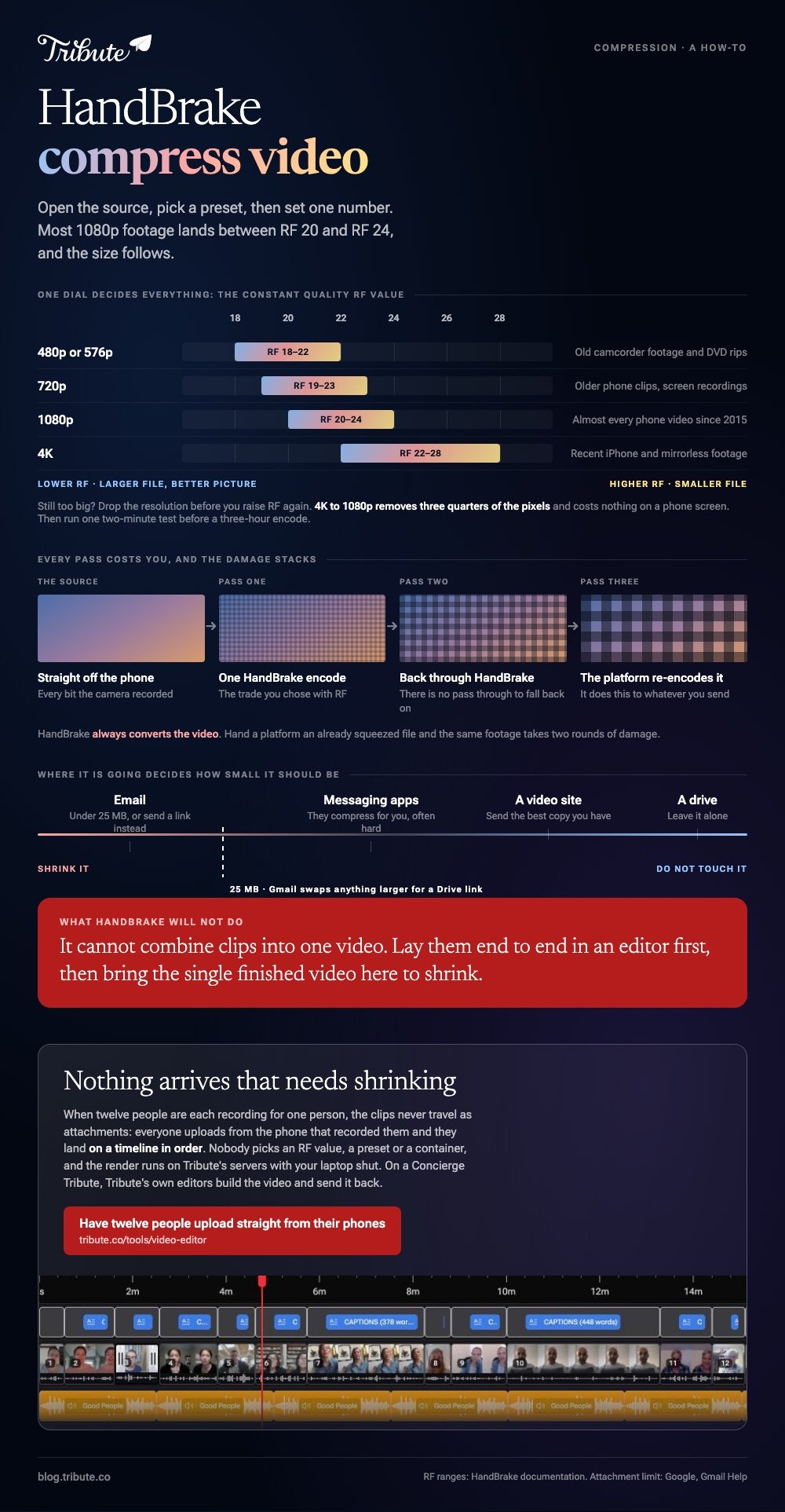
To make HandBrake compress video files well, open the source, choose a preset, then set one number: the constant quality RF value. A lower RF gives a larger, better looking file, and most 1080p footage lands between RF 20 and RF 24.

| Source resolution | RF range (x264 or x265) | What it suits |
|---|---|---|
| 480p or 576p | 18 to 22 | Old camcorder footage and DVD rips |
| 720p | 19 to 23 | Older phone clips, screen recordings |
| 1080p | 20 to 24 | Almost every phone video since 2015 |
| 4K | 22 to 28 | Recent iPhone and mirrorless footage |
What does HandBrake compress video mean in practice?
It re-encodes the picture at a quality you choose and lets the file size fall where it falls.
Most tools ask for a target size and then wreck whatever they have to in order to hit it. HandBrake asks the opposite question: how good should this look, and the size follows from the answer.
The project's documentation sets out those RF ranges per resolution and tells you to use constant quality unless you have a specific reason not to. Treat RF as the only dial that matters on a first pass.
One warning from the same docs: HandBrake always converts the video. There is no pass through, so a second trip through the app costs you quality a third time.
Which settings reduce video size in HandBrake?
Six clicks, and only one of them is a judgment call.
- Open Source and choose the video, or drag it onto the window.
- In the preset list, pick Fast 1080p30, or the preset matching your source resolution.
- On the Summary tab, set Format to MP4 and tick Web Optimized if the video is going online.
- On the Video tab, drag the Constant Quality slider to the RF value from the table above. Right is smaller, left is better.
- Move Encoder Preset one step toward Slower. Same quality, smaller file, longer wait.
- Set Save As, then press Start Encode.
If the result is still too big, lower the resolution on the Dimensions tab before you raise RF again. Dropping 4K footage to 1080p removes three quarters of the pixels and costs nothing on a phone screen.
Run one short test before a long encode. Two minutes of output tells you whether RF 22 looks right on your footage, and a three hour encode at the wrong number tells you nothing you wanted to know.

Can HandBrake merge video files or combine videos?
No, and the project says so itself.
Its documentation lists what the app does not do, and combining multiple video clips into one is on that list beside creating discs and working around copy protection.
HandBrake is a post production tool, and the docs point you at video editing software for changes to the source.
So the searches for a HandBrake merge video route, or for how to combine videos in HandBrake, end here. Lay the clips end to end in an editor first, then bring the single finished video to HandBrake to shrink.
Unlike an editor, HandBrake has no timeline, no second track and nothing to drag. That narrowness is why its output is better than a general purpose tool's.
The joining step is covered in building a video montage.
How do you trim a video in HandBrake?
With the range control, which the project calls point to point encoding.
Pick a range type, then a start and an end. The docs describe three:
- Chapters: the divisions in a disc or a file that carries them
- Seconds: a range of 60 to 180 encodes two minutes, starting one minute in
- Frames: 25 to 150 is about five seconds at 25 fps
Trimming video in HandBrake is not frame accurate. The documentation says as much, so leave a second of slack at each end when the cut has to land on a word.
This is enough to drop a long run-up or a shaky ending. It is not enough to cut the middle out of something, which needs an editor.
How small does the file need to be?
Smaller than wherever it is going, and no smaller.
Gmail caps personal attachments at 25 MB and swaps anything larger for a Drive link. That single number is behind most compression attempts, and a link avoids the work altogether.
Uploads are the other reason, and they run the other way. A platform re-encodes whatever you send, so handing it an already squeezed file means two rounds of damage on the same footage.
- Email: aim under 25 MB, or send a link
- Messaging apps: they compress for you, often hard
- Upload to a video site: send the best copy you have
- Archive on a drive: leave it alone
Browser tools do the same job for one short clip without a download. Compared with HandBrake, they give you fewer controls and a queue, which is covered in compressing a video file online and compressing with VEED.
What if the clips came from a dozen different people?
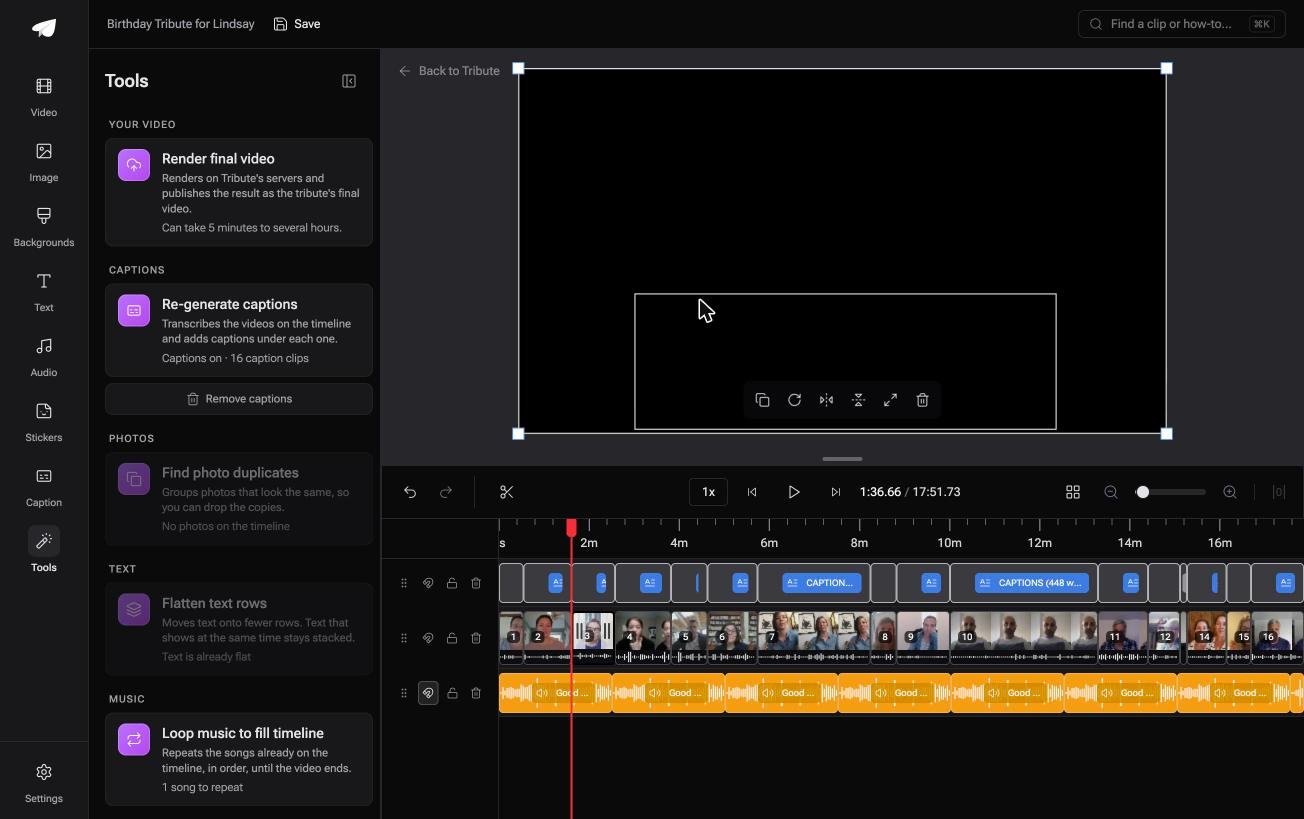
The Tribute video editor is a browser-based group video editor: contributors record clips on their phones and Tribute assembles them on a timeline with the music balanced under the voices.
It is ours, and it is the last thing on this page.
- Clips arrive on the timeline in order, uploaded from each phone, so nothing is emailed to you
- Tribute renders the final video on its servers, which the Tools panel puts at 5 minutes to several hours
- The preview is frame accurate to the video that comes back
- Blurred edges fill the frame behind vertical phone footage instead of black bars
Best for: A 4GB video that will not fit in an email, and one evening to deal with it.
Why it works: The encode happens on a server rather than on a laptop that has to stay open.
Can you avoid handling the enormous file at all?
Everything above assumes the video is sitting on your machine and has to get smaller to move.
There is a common situation where it never lands there.
The case: several people recording for one person
A retirement after twenty years. A ninetieth birthday. A memorial where the people who should speak live four time zones apart.
Each person records a message on their own phone. Nobody is shooting footage, and the job in front of you is assembly.
Which is where the problem behind this search starts: twelve people trying to email you 4K clips, and Gmail refusing most of them.
Why the compression step disappears
Because the clips never travel as attachments.
Everyone uploads from the phone that recorded the clip, and the Tribute video editor puts them on a timeline in order. Rendering happens on Tribute's servers, so no laptop spends an afternoon encoding.
What you do not have to do
Send one link, and on a Concierge Tribute the rest of the list stops being yours.
- No encode settings. Nobody picks an RF value, a preset or a container.
- No gathering. Clips upload from the phones that recorded them.
- No edit. Tribute's own editors build the video and send it back.
- No render queue. The encoding runs on Tribute's servers with your laptop shut.

It does not have to stay a file
The finished video can come back as a video book: a hardcover case with a screen inside that starts when it opens.
No attachment, no transfer service, nothing for a relative to fail to download. There is a wider look at the form in making a video tribute.

When this is the wrong answer: you have one long video of your own that has to fit under a size limit tonight. Then HandBrake and the settings above are the right tool.
Frequently Asked Questions
What RF value should I use for a phone video?
Start at RF 22 for 1080p and RF 24 for 4K, then judge the result on the screen it is going to. Move two points at a time, since one point is hard to see.
Does a slower encoder preset lower the quality?
No, it improves the trade. The same RF at a slower preset produces a smaller file of equal quality, and takes longer to make.
Is H.265 worth choosing over H.264?
For storage, yes: it reaches the same quality in a smaller file. For sending to other people, H.264 plays on more devices without an argument.
Can HandBrake compress a video without re-encoding it?
No. The documentation is explicit that video is always converted, which is why repeated passes on one file stack up damage.
Why did my file get bigger?
You set an RF lower than the quality of the source, so HandBrake spent bits describing noise. Raise the number and encode again.
Does compression affect the audio?
Only if you change the audio settings. Leave the preset's audio track alone unless the file has to be tiny.
What should I do with a video too large for email?
Send a link instead of an attachment. Compression that fits an hour of video under 25 MB will look worse than the limit is worth.
👉 Have twelve people upload straight from their phones if they are each recording for one person, and nothing arrives that needs shrinking.
