
How to Merge Videos Into One File (No Editing Experience Needed)
To merge videos into one file, open the clips in an editor, lay them end to end, and export once. The iPhone Photos app, where most people look first, has no merge button. Use iMovie on a phone, CapCut for more control, or a browser tool.

What does it mean to merge videos?
Merging places two or more clips back to back so they play as one continuous video and export as one file.
It is not a collage, where clips play at the same time in separate boxes, and not a cut, where you remove a section from the middle. Everything else people call editing sits on top of merging.
Tools use join, combine and stitch for the same action. If you searched for how to merge videos and landed on a page about joining two files, you are in the right place.
How do you merge videos on an iPhone?
Use iMovie, a free app from Apple that ships on most iPhones. The Photos app will build a slideshow and will trim a single clip, and it will not join two clips into one file.
- Open iMovie and tap Start New Project, then Movie.
- On the Moments screen, tap each clip you want. A blue checkmark appears on the ones you picked.
- Tap Create Movie. The clips land on a timeline in the order you selected them.
- Drag a clip along the timeline to move it, or tap it and drag its yellow edge to trim the start.
- Tap Done, then the share button, then Share Video, then Save Video.
Apple documents the project and export steps in its iMovie for iPhone guide. On Android the same job goes to Google Photos or CapCut, since the Gallery editor varies by handset.
Best for: Two to six clips you shot yourself, on the phone that shot them.
Why it works: The clips share a resolution and a microphone, so joining them is the whole job and nothing needs fixing afterwards.

How do you merge video clips in CapCut?
CapCut gives you a real timeline on a phone, which iMovie keeps shallow. It is the better choice when the clips came from different cameras and need separate volume levels.
- Tap New project and select every clip you want in the video.
- Drag the clips along the timeline until the order is right.
- Tap the small square at a cut to add a transition, or leave it for a hard cut.
- Tap a clip, then Volume, and set a level for that clip on its own.
- Tap Export at the top right and pick a resolution before you save.
On desktop and in the browser the flow is the same: import, arrange on the timeline, export. Check the export screen before you commit, because resolution and watermark rules differ between the app and the web version.
Best for: Clips from several phones where the sound levels do not match.
Why it works: Per-clip volume is the single control that stops a merged video sounding like four different rooms.
How do you merge videos free in a browser?
Browser tools such as Clideo, Adobe Express and CapCut's web editor upload your clips to a server, join them, and hand back a download. Nothing installs, and an old laptop performs as well as a new one because the work happens on the server.
Read the export rules before you upload. A free tier often adds a watermark, caps the export at 720p, or deletes your files after a few hours.
Upload time is the other cost: a 4K clip from a recent phone can take longer to send than the merge takes to run.
Best for: A work laptop or a Chromebook where you cannot install software.
Why it works: You trade render speed for upload time and get a finished file without an account on most tools.
We cover the browser route and its caps in more depth: merging videos online and editing in a browser with nothing to install.
How do you merge videos on a Mac or PC without uploading?
iMovie on a Mac handles the same job with a wider timeline, and QuickTime Player will append one clip to another from its Edit menu.
Both keep the work on your machine, so nothing uploads and a long video joins at the quality of the source.
Skip VLC for this, whatever the blogs say. VideoLAN's own wiki states that none of the ways VLC offers to combine streams appears to merge them with correct time signatures, which produces seeking errors even when you play the result back in VLC.
Straight concatenation works at times, and that is the problem: you cannot tell in advance.
Best for: Long footage, or clips from one camera that all share a format.
Why it works: Nothing uploads and nothing re-encodes, so quality and privacy both stay where they started.
What if the clips came from a dozen different people?
This is the case none of the tools above are built for. Twelve people send twelve files over text, email and WhatsApp, at twelve resolutions, and the merge is the smallest part of the problem.
Collecting them at full quality and getting them in a sensible order is the work.
The Tribute video editor is a browser-based group video editor: contributors record clips on their phones and Tribute assembles them on a timeline with the music balanced under the voices.
The clips arrive in order before you open the editor, so the merge is done when you sit down. It lives inside a paid Tribute and it is not a general purpose merger.
Best for: A merge you cannot start because four of the twelve files have not arrived yet.
Why it works: Unlike a file you merge yourself, the collecting, the ordering and the audio balance happen before the editing starts.

More on that case here: how a group video maker handles thirty phones, and the iPhone specifics in merging videos on iPhone.
Why do merged clips still look stitched together?
Joining is the easy half. Three things give away a merged video in any tool, and each has a fix that takes a minute.
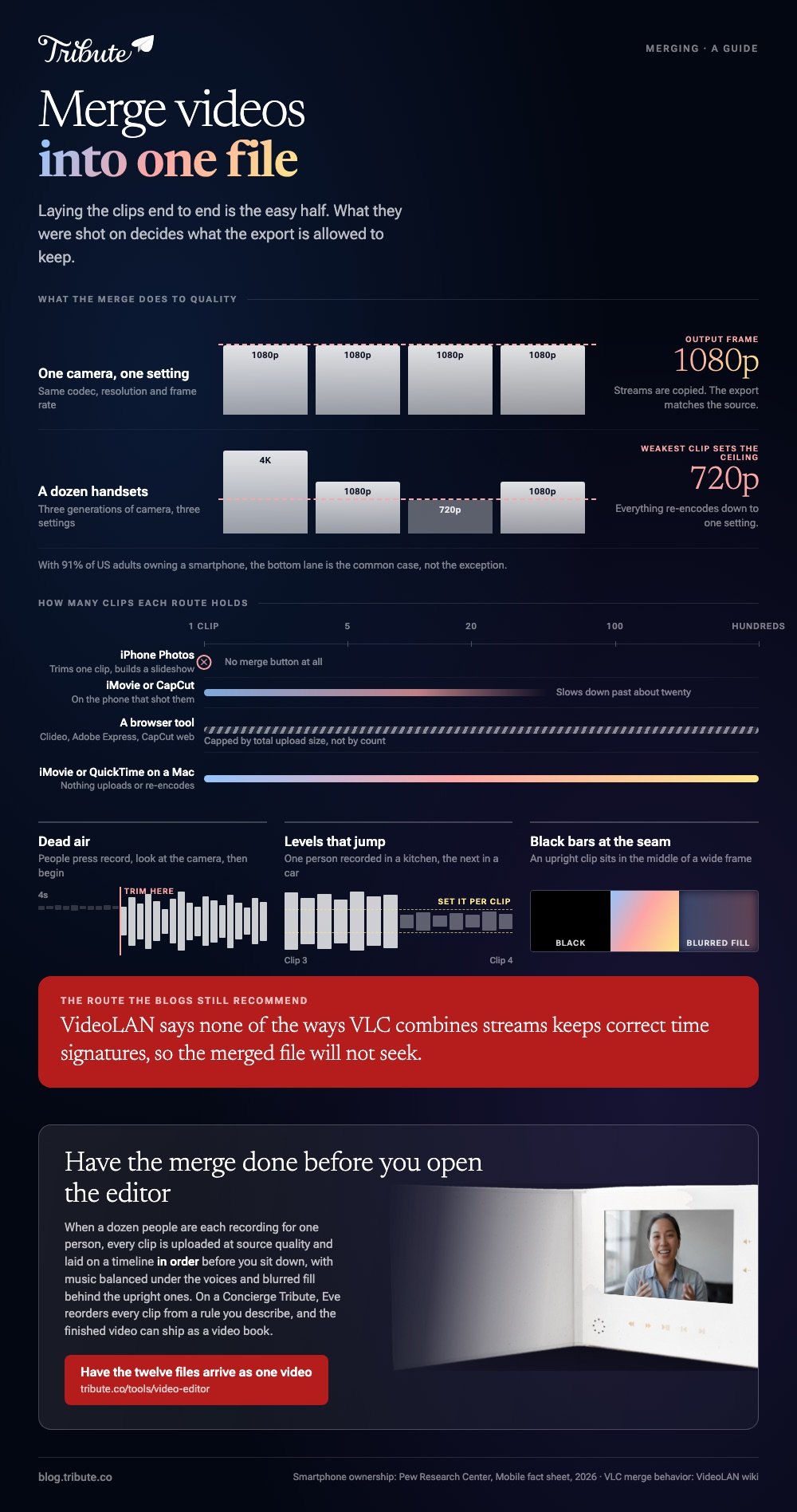
Dead air at the start of every clip. People press record, look at the camera, then begin. Four seconds of silence between clips reads as a mistake. Find the flat stretch in the waveform and drag the clip edge to the first word.
Volume that jumps. One person recorded in a kitchen, the next in a car. Set a level per clip rather than one level for the video, and drop any music under the speech so the voices stay in front.
Black bars where upright and wide clips meet. A phone held upright sits in the middle of a wide frame with empty space on both sides.
Filling that space with a blurred copy of the clip reads better than black, and most editors with a background setting will do it.

Does merging reduce video quality?
It can. When the clips share a codec, resolution and frame rate, the merge copies the streams and quality is identical to the source. When they differ, the tool re-encodes everything to one setting and the weakest clip sets the ceiling.
That is the common case, not the exception.
With 91% of US adults owning a smartphone, according to the Pew Research Center mobile fact sheet, a video built from friends and family is a video built from a dozen handsets across three generations of camera.
Export at the highest setting on offer and watch the first and last clip before you share. Compared to a photo, a video that lost quality in a render cannot be recovered from the output.
For the wider job of turning a folder of clips into a finished video, start with our main guide: making a video montage.
Frequently Asked Questions
Can I merge videos without a watermark?
Yes. iMovie, VLC and FFmpeg add nothing to the image. Watermarks come from browser tools and some mobile apps on a free tier, so read the export screen before you upload rather than after the render.
How do I merge videos of different sizes?
Pick one output frame for the whole project, then decide what fills the space around a clip that does not fit. A blurred copy of the clip is the standard choice and reads better than black bars.
What is the maximum number of clips I can join?
Phone apps slow down past about twenty clips, browser tools cap total upload size rather than count, and desktop editors handle hundreds. For a group video the real limit is your patience with reordering.
Can I merge video and audio from separate files?
Yes, in any tool with a timeline. Put the video on one track and the audio on another, then set the music under the speech so the voices stay in front.
Will merging change the file format?
Often. Most tools export MP4 with H.264 video whatever you fed them, because that combination plays everywhere. Keep the originals until you have watched the export start to finish.
Where should I put the finished video?
Upload rather than attach, because messaging apps compress video hard and email bounces above about 25MB. YouTube is the safe default, since an unlisted video stays out of search and the person opening your link does not need an account.
Google Drive and Dropbox work too if you would rather it never touched a public platform.
Do I need video editing experience?
No. Joining clips is a drag and a tap in every tool here. The skill people think they lack is the judgment about what to cut, and a waveform plus a preview gives you most of it.
👉 Have the twelve files arrive as one video if a dozen people are each recording for the same person, and the only file you handle is the finished one.
