
Group video maker: One Video From Thirty Different Phones
A group video maker is the tool that gets thirty people to send a clip and turns those clips into one video. The collecting is the hard half: thirty files arrive over two weeks at thirty resolutions, several from people you had to ask twice. Pick how clips reach you first.
One note before the options: we make the Tribute video editor, and it is one of the three routes below. The other two use tools we do not sell.

What does a group video maker have to do?
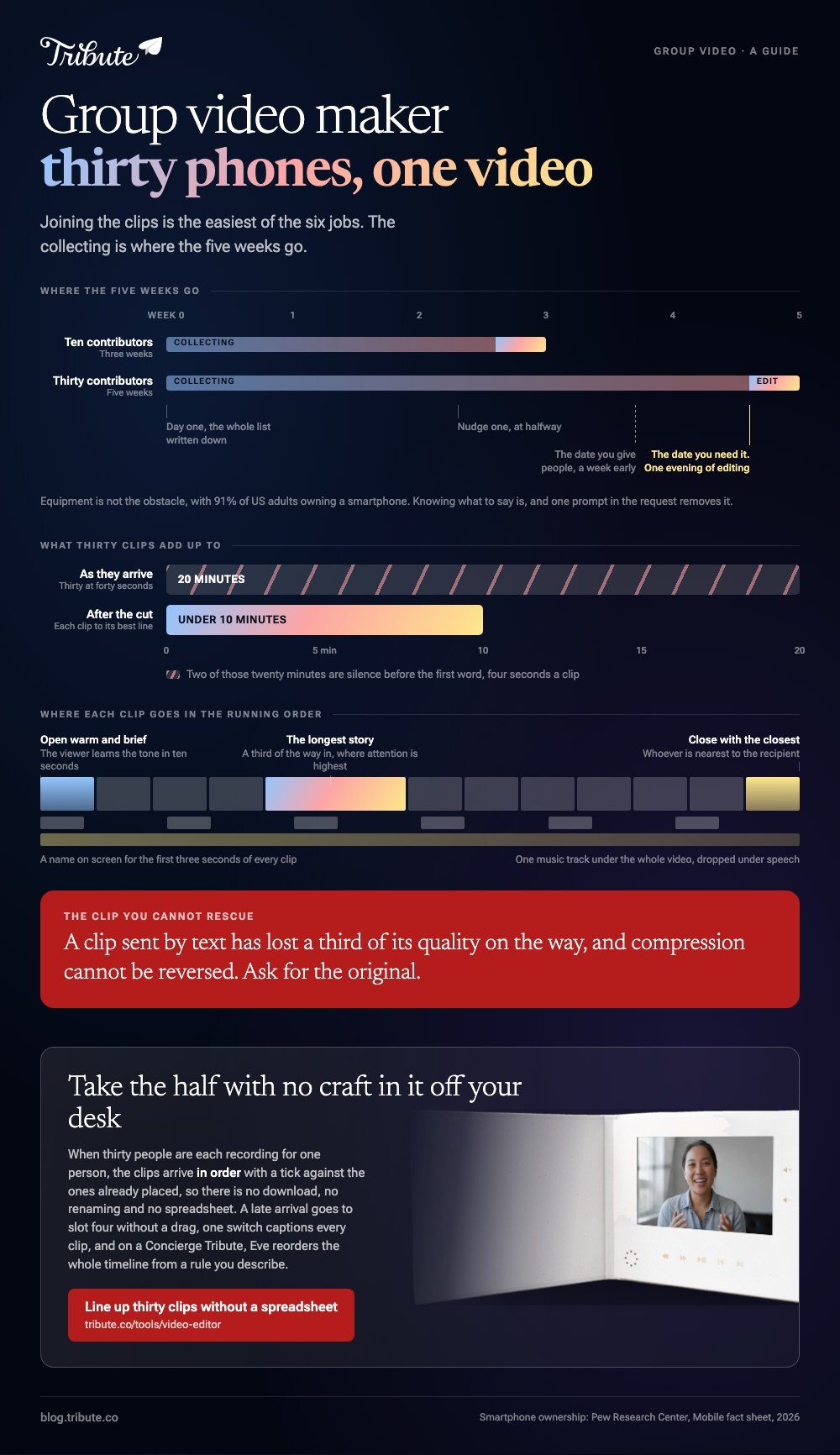
Six things, and joining the clips is the easiest of them.
You need a way in for people with no account, storage that will accept a 1.4GB file, a record of who has sent what, a sane way to reorder thirty items, audio that holds up across thirty rooms, and one link at the end that opens on a television.
Most editors solve the fifth and sixth. Unlike a video you shoot yourself, the first four are the reason a group project runs late, and no amount of editing skill touches them.
How do you collect clips from thirty people?
One destination, one deadline, one format of request. The moment people have a choice of how to send, clips start arriving by text and lose a third of their quality on the way.
A shared folder and a spreadsheet
Make a folder in Google Drive, Dropbox or iCloud, give the people you invite permission to add to it, and track names in a sheet beside it.
In Google Drive that means choosing Editor rather than Viewer when you share, and access you set on a folder is inherited by everything inside.
Best for: A family or a team who already share albums and documents in the same place.
Why it works: Nobody signs up for anything, which raises your reply rate more than any reminder you could send.
An upload link with a fixed destination
A Dropbox file request gives everyone a link that drops files straight into a folder you own, and the sender needs no Dropbox account.
Dropbox's file request help page gives the steps: log in at dropbox.com, click File requests, click New request, set a title and the Folder for uploaded files, click Create, then copy the link under Share a link instead.
Mind the cap. Dropbox documents 2GB per file on Basic, Plus and Family plans and 250GB on Professional and the business tiers, and a three minute 4K clip can pass 1GB on its own.
Best for: A long list where most people will upload from a phone and half of them are not technical.
Why it works: Every file lands in one folder and Dropbox can append the sender's name to each one, so your record of who has replied builds itself.
A group video service
These send each contributor a link, record or accept their clip in the browser, and hand you a timeline with the clips already on it. You pay a flat fee and skip the folder, the spreadsheet and the downloading.
Best for: Twenty or more contributors, or any list where you are chasing people you do not know well.
Why it works: Collection and assembly stop being two projects, which is where most of the fortnight goes.

What should the request say?
Four lines. Who the video is for and what the occasion is, how long each clip should be, one prompt so nobody freezes on camera, and the date you need it by, set a week earlier than you need it.
Add the three recording rules: phone held sideways, window in front rather than behind, arm's length so the microphone picks up the voice rather than the room.
Equipment is not the obstacle, since the Pew Research Center mobile fact sheet puts smartphone ownership at 91% of US adults. Knowing what to say is the obstacle, and one prompt removes it.
How do you keep track of who has sent what?
Write the list down on day one with every name on it, then mark three columns: asked, sent, downloaded. Without that sheet you will spend the last week messaging people who already replied and forgetting two who did not.
Rename every file as it arrives. A folder of thirty files called IMG_4471 is unworkable, and renaming to a number plus a name as you download takes seconds per clip and saves an hour at the timeline.
Chase once at the halfway point and once three days before your own deadline. Two nudges recovers most of the list; a third annoys people and recovers nobody.

How do you build the video once the clips are in?
Order first, edit second. Decide the running order in your spreadsheet, number the files to match, then import in that order so you are never dragging clip twenty-six past twenty-five others.
- Open with someone warm and brief so the viewer learns the tone in ten seconds.
- Trim the front of every clip to the first word. Thirty clips with four seconds of dead air each is two minutes of silence.
- Set a volume per clip rather than one level for the video, so the person in a car matches the person in a quiet room.
- Put the longest story a third of the way in, where attention is highest, and close with whoever is closest to the recipient.
- Add a name on screen for the first three seconds of each clip, which matters once the recipient stops recognizing faces.
- Lay one music track under the whole video and drop it under speech.
The tool-by-tool version of this, including iMovie, CapCut and the browser editors, is in combining videos from different people and in our main guide, turning everyone's clips into one video.
What does a dedicated group video maker change?
It moves the work that has no craft in it off your desk. The Tribute video editor is a browser-based group video editor: contributors record clips on their phones and Tribute assembles them on a timeline with the music balanced under the voices.
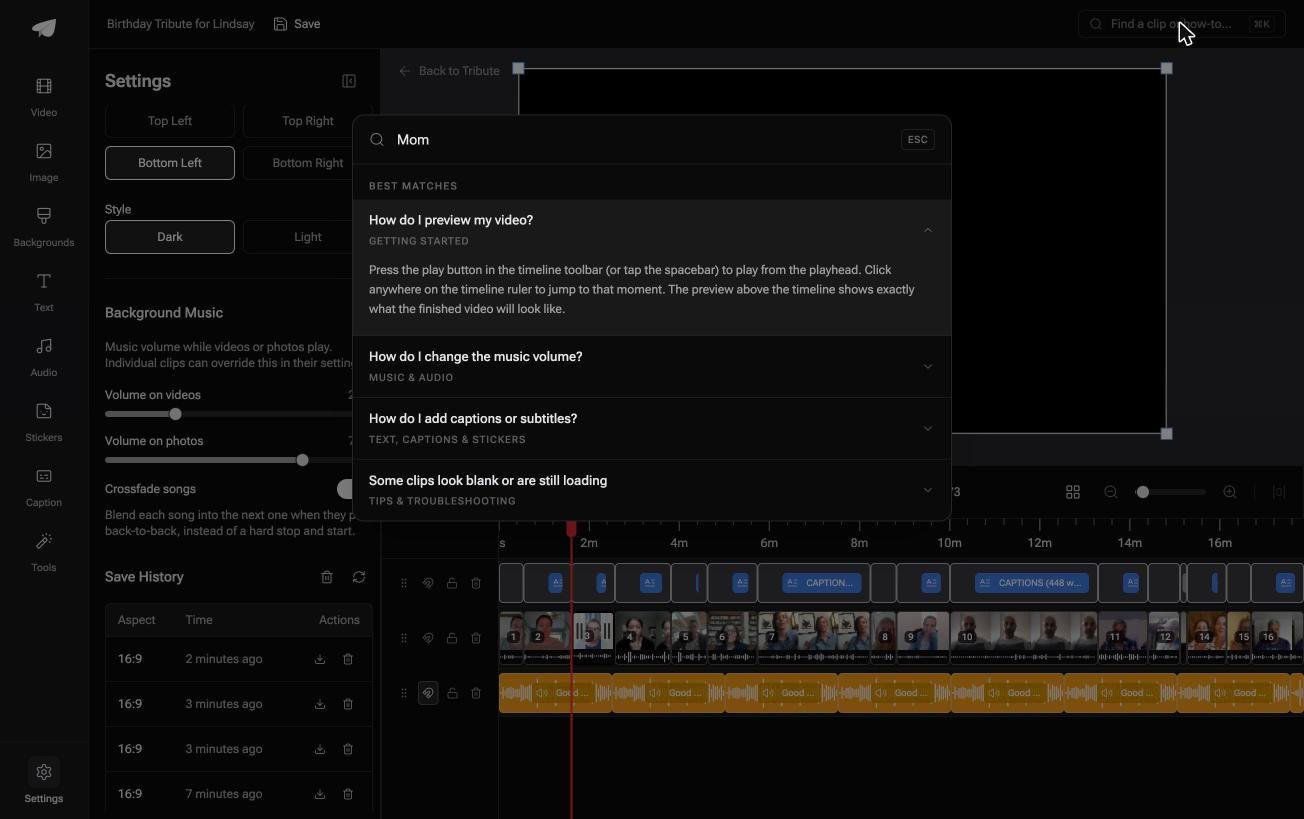
The clips are in order before you open the editor, with a tick against the ones already placed, so there is no download, no renaming and no spreadsheet.
Three details matter at thirty clips. The Reorder media window numbers every clip and offers move to front, move to back, move to position and bulk remove, so a late arrival goes to slot four without a drag.
One switch captions every clip, and the search box finds a clip and answers how-to questions from the same place. Save history keeps earlier versions you can restore, and removed clips are recoverable rather than deleted.

Music ducks to 25% under video and 75% under photos by default and can be overridden per clip, there are 39 licensed tracks and 83 occasion backgrounds, and blurred fill sits behind upright footage so the contributors who ignored the sideways rule leave no black bars.
It lives inside a paid Tribute rather than as a standalone editor, and if the edit itself is the part you dread, Tribute's own editors will do it for you.
The occasion versions of this job are covered in collecting clips and turning them into a video and making a birthday video from everyone's clips.
What makes a group video gift land?
Range, not polish. A group birthday video that moves between a sibling, a colleague from 1994 and a grandchild says something a single long message cannot, which is that these people were all asked and all said yes.
Keep it under ten minutes. Thirty contributors at forty seconds is twenty minutes, so cut each clip to its best line rather than running the lot. Compared with a longer video, a tight one gets watched twice and shown to other people.
Put the recipient's name on screen at the front and the contributors' names under their faces. A group video gift is in part a record of who turned up, and that only reads if the viewer can tell who is who.
How do you share it afterwards?
Send a link rather than a file, to the recipient and to everyone who contributed. Contributors want to see where their clip landed, and sending it round is the cheapest thing you can do for the people who helped.
YouTube set to unlisted keeps the video out of search while opening for anyone with the link, and Pew's social media fact sheet puts YouTube use at 84% of US adults and 65% of adults aged 65 and over.
Download a copy to the laptop that will play it if there is an event, because venue wifi is the usual reason a video does not start on time.
For the formats a finished video can take, and how long each should run, see what a video tribute is.
Frequently Asked Questions
How many contributors is too many?
Past about forty the video becomes a list. If your list is longer, group people into sections by era or by workplace and cut each clip to one sentence, or make two videos and send them a week apart.
What do I do about clips that arrive compressed?
Ask that person to upload the original to your folder instead of texting it. Compression cannot be reversed, and a re-sent original takes them two minutes.
How do I handle people who will not appear on camera?
Take a voice note or a written line and put it over a photograph of them. In a video of thirty faces, two still images read as variety rather than as gaps.
Can contributors see each other's clips?
That depends on the route. A shared folder shows everyone everything, which spoils surprises; upload links and group video services keep submissions private to the organizer.
How long does the whole project take?
Three weeks for ten people and five for thirty, with the collecting taking almost all of it. The editing is an evening once the clips are in order.
What if two people tell the same story?
Keep both and cut one to its last sentence. Separated by a few minutes, a repeated story reads as confirmation rather than as a mistake.
Can I add photographs as well as clips?
Yes, and a video of thirty talking heads needs them. Hold each still for three to five seconds and place them between the longer stories.
👉 Line up thirty clips from thirty phones without a spreadsheet if that many people each recorded something for one person, and a late arrival still goes into slot four.
