
How to Combine Videos From Different People Into One Video
To combine videos from different people, gather the files at full quality, lay them on one timeline in order, set a volume level for each clip, then export once. The joining takes a minute in iMovie, QuickTime Player or Clipchamp. Collecting the files and matching the sound takes an evening.

What makes combining clips from different people harder?
When you combine video clips you shot yourself, they share a camera, a microphone and a frame size, so the join is the whole job. Clips from twelve people share none of that.
One arrived through a messaging app at a quarter of its original size, one is upright, one was recorded in a moving car.
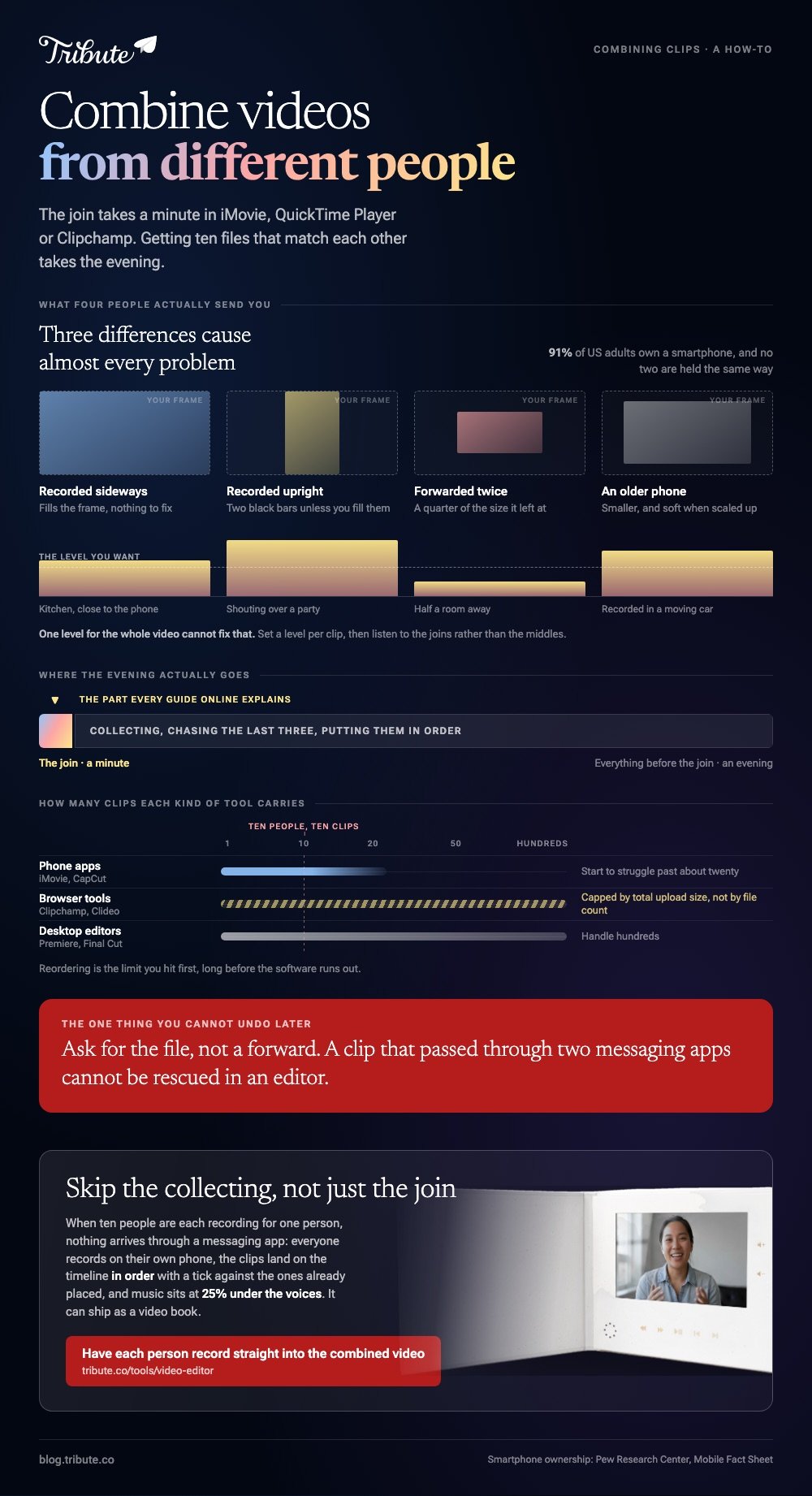
Three differences cause almost every problem: resolution, orientation and volume. Fix those and a combined video stops looking like a pile of attachments played back to back.
Each has a one minute fix in any editor with a timeline, and the rest of this page is those fixes in the tools people already have.
How do you collect everyone's clips at full quality?
Ask for the file, not for a forward. Messaging apps compress video hard, and a clip that passed through two of them before it reached you cannot be rescued in an editor.
A shared cloud folder, AirDrop, or email with the attachment left at original size all keep the recording intact.
Give people a deadline and one sentence of direction. "Thirty seconds, say your name first, hold the phone sideways" removes most of the reordering work later.
With 91% of US adults owning a smartphone, according to the Pew Research Center mobile fact sheet, nobody needs a camera and nobody has the same one.

How do you combine video clips on an iPhone?
iMovie does it and the Photos app does not. Photos will trim the start and end of a single clip, and joining two clips into one file is not something it offers. iMovie is a free app from Apple and ships on most iPhones.
- Open iMovie, tap Start New Project, then tap Movie.
- On the Moments screen, tap each clip you want. A blue checkmark appears on the ones you picked.
- Tap Create Movie. The clips land on a timeline in the order you tapped them.
- Drag a clip along the timeline to change its place, or tap it and drag a yellow edge to trim the start.
- Tap a clip, tap the Audio button in the inspector, and drag the volume slider for that clip on its own.
- Tap Done, tap the Share button, then tap Share Video and pick a resolution, then Save Video to put it in your photo library.
Apple sets out the project steps in its iMovie for iPhone guide. On Android the same job goes to CapCut: tap New project, select the clips, tap Add, then press and hold a clip to drag it into place.
Best for: Up to about a dozen clips, on the phone that already holds them.
Why it works: Everything stays on the device, so nothing uploads and nothing is recompressed on the way out.
How do you combine videos in QuickTime on a Mac?
QuickTime Player appends one file to another with no project to set up and no render settings to get wrong. You open the first clip and add the rest to the end of it.
- Open the first video in QuickTime Player, then choose View > Show Clips.
- With nothing selected, choose Edit > Add Clip to End.
- Find the next video, select it, and click Choose media.
- Repeat for each clip, then drag the thumbnails in the clip bar to reorder them.
- Click Done, then save the result.
Best for: Clips from one camera that already share a format.
Why it works: There is no timeline to learn, so a six clip job is five menu commands and a save.
How do you combine multiple videos on Windows or in a browser?
Clipchamp is built into Windows 11 and runs in a browser as well. Click My media, use the import button to bring in your files, then drag them onto the timeline side by side on the same track so they play one after another.
Hover over any gap between two clips and press the delete gap button to close it.
Every way to combine videos here is free, or has a free tier that covers a family video. Browser mergers such as Clideo take the same files: choose your videos, drag the thumbnails into order, pick an aspect ratio, then export and download.
Read the export screen before you upload, because watermark and resolution caps live there.
Best for: A work laptop, a Chromebook, or a PC with no editor installed.
Why it works: Both keep every clip on one track, which is the layout that produces one continuous video rather than a split screen.
How do you combine video and audio from separate files?
Put the picture on the video track and the sound on its own track underneath, then slide the audio until a clap or a first word lines up. Any timeline editor on this page supports it, iMovie and Clipchamp included.
Mute the camera audio on the clip if you are replacing that sound rather than layering over it.
Unlike a straight join, this one needs headphones: a sync error of a tenth of a second is invisible on a laptop speaker and obvious on a phone.

What if ten people each sent one clip?
This is the case the tools above were not designed around. The merge is a minute. Collecting ten files from ten people across text, email and WhatsApp, then getting them into a sensible order, is the evening.
The Tribute video editor is a browser-based group video editor: contributors record clips on their phones and Tribute assembles them on a timeline with the music balanced under the voices.
The clips arrive in order with a tick against the ones already placed, and music sits at 25% under video so the speech stays in front. It lives inside a paid Tribute and is not a general purpose merger.
Best for: Ten senders, three messaging apps, and one video owed to one person.
Why it works: Compared to merging the files yourself, the collecting, the ordering and the audio balance are done before you open the editor.

More on that case: one video from thirty different phones, and the wider job in our main guide to making a video montage.
Why does a combined video sound like four different rooms?
Because it was recorded in four rooms. One level for the whole video cannot fix that, so set a level per clip and listen to the joins rather than the middles.
Dead air is the other giveaway. People press record, look at the camera, then start talking, which leaves three seconds of silence at the head of every clip. Drag the clip edge in to the first word and the video tightens without losing a sentence.
Music helps, as long as it sits under the voices rather than beside them. If you are building a video of stills instead, the same rules hold: see creating a slideshow with music and our guide to making a slideshow from photos and clips.

Frequently Asked Questions
What is the best app to combine videos?
The one already on the device holding the clips. That is iMovie on an iPhone, CapCut on Android, Clipchamp on Windows and QuickTime Player on a Mac. Reach for something else when you need per clip volume or captions.
Can I combine videos side by side instead of one after another?
Yes, but that is a collage rather than a join. You put each clip on its own track and resize it to fill part of the frame, which most browser editors and CapCut both support. Clips play at the same time instead of in sequence.
Does combining videos reduce the quality?
Only when the clips differ. Matching codec, resolution and frame rate lets a tool copy the streams without rebuilding them, and mismatched clips force a re-encode where the weakest file sets the ceiling. Export at the highest setting offered either way.
How many clips can I combine into one video?
Phone apps start to struggle past about twenty clips, browser tools cap total upload size rather than file count, and desktop editors handle hundreds. For a video built from one clip per person, reordering is the limit you hit first.
Can I combine videos without creating an account?
On a phone or a desktop, yes: iMovie, CapCut, QuickTime Player and Clipchamp all work on files already on the device. Browser mergers vary, and several ask for sign in before the download rather than before the upload.
Where should I put the finished video?
Upload it rather than attaching it, since messaging apps compress video hard. YouTube is the safe default: 84% of US adults use it, per Pew's social media fact sheet, so whoever opens your link seldom needs an account.
Set it to unlisted for a family video.
What order should the clips go in?
Open with someone the viewer knows well and close with the person closest to them. Group the rest by relationship rather than by arrival time, because a video that moves from work to school to family reads as deliberate.
👉 Have each person record straight into the combined video if you are still waiting on three of them, and nothing arrives through a messaging app.
