
What Is a Video Tribute, and How Do You Make One?
A video tribute is a short video about one person, built from clips and photographs other people send in, for a birthday, a retirement, a wedding or a memorial. You collect the clips, order them as a story, set music under the voices, and share one link. Most run four to fifteen minutes.
One note before the steps: we make the Tribute video editor, and it appears once, near the end, for the one case it fits. Everything before that uses tools we do not sell.

What makes a tribute video different from a slideshow?
A slideshow is photographs with music over the top. A tribute video has people in it, talking, and the photographs sit between them as breathing room.
The difference the viewer feels is voice: a grandchild saying the thing they never say in person carries more than a caption under a picture of them.
The other difference is authorship. One person makes a slideshow. A tribute video is made by everyone who sends a clip, which is why the hardest part is never the editing.
What are the common video tribute ideas?
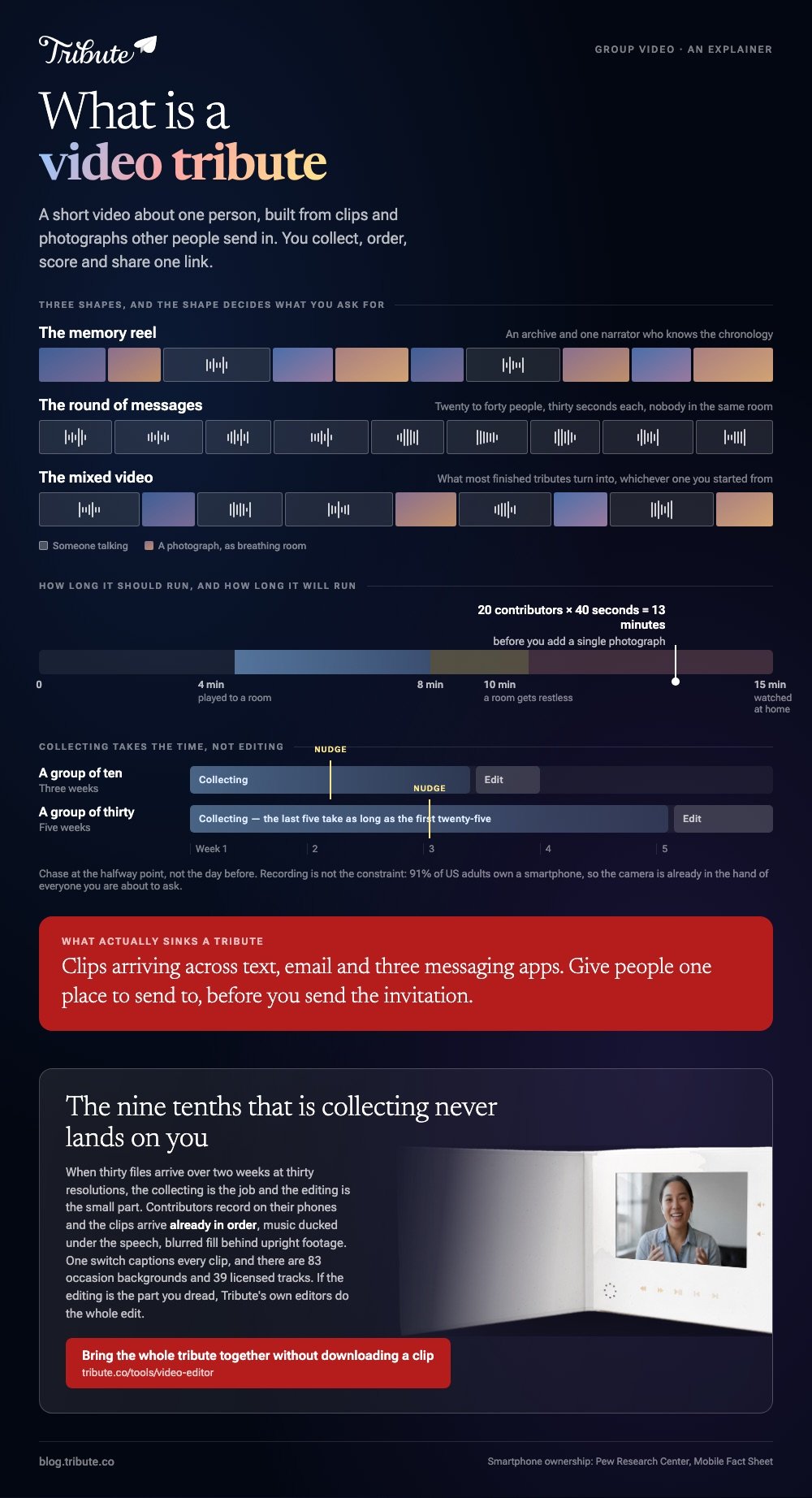
Three shapes cover almost every tribute video people set out to make. Pick one before you ask anyone to record, because the shape decides what you ask them for.
The memory reel
Old photographs and home footage in rough date order, with two or three voices reading over the top. You need an archive and one narrator who knows the chronology.
Best for: A milestone birthday or a retirement where the span of years is the point.
Why it works: The pictures already exist, so the work is sequencing rather than collecting.
The round of messages
Twenty to forty people each record a short piece to camera, one after another. No archive needed, and nobody has to be in the same room or the same country.
Best for: A farewell party, a wedding, or anyone whose people are scattered.
Why it works: Each contributor only has to be good for thirty seconds, which is a low bar that almost everyone clears.
The mixed video
Messages carry the spine and photographs break up the talking heads. This is what most finished tributes turn into, whichever of the other two you started from.
Best for: A memorial, where neither voices alone nor pictures alone sit right.
Why it works: A still image gives the viewer somewhere to rest between two people who are both close to tears.

How to make a video tribute, step by step?
The order below matters more than the tool. Skipping the first step is what turns a two-hour job into a three-week one.
- Write the invitation before you send it. Say who the video is for, how long each clip should be, what to mention, and the date you need it by. Thirty to sixty seconds is the right ask.
- Give people one place to send to. A shared folder, an upload link or a group video service. Clips arriving across text, email and three messaging apps is the thing that sinks tributes.
- Chase at the halfway point, not the day before. Half your list will have forgotten. A single nudge recovers most of them.
- Order the clips before you edit anything. Open with someone warm, put the longest story in the middle, close with the person closest to the one it is for.
- Trim the dead air. Everyone presses record, pauses, then begins. Cutting to the first word on every clip is the single edit that makes a tribute feel made rather than collected.
- Set one music bed under the whole video and drop its volume under speech so the voices stay in front.
- Watch it start to finish once before you send it anywhere.
Recording is no longer the constraint. The Pew Research Center mobile fact sheet puts smartphone ownership at 91% of US adults, so the camera is already in the hand of everyone you are about to ask.
How long should a tribute video be?
Four to eight minutes if it will be played to a room, and up to fifteen if people will watch it at home on their own. A room gets restless at the ten minute mark unless the video is funny.
Length is set by your clip count, not by your intentions. Twenty contributors at forty seconds each is already thirteen minutes before you add a single photograph, so either cut each clip to its best line or accept the runtime.
For the mechanics of assembling, trimming and scoring the video once the clips arrive, our main guide covers the whole job: making a video montage.
What should people say in their clip?
Left to themselves, most contributors say the name of the person it is for, go quiet, and finish with best wishes. One line of direction fixes it.
Ask for a specific memory with a place in it, or the thing they would say if they had to stand up and say it.
Unlike a written card, a video message rewards detail over sentiment, because the face is already doing the sentiment. Send everyone the same three prompts and the video gains a shape nobody had to edit in.
We have a longer set of prompts to paste into the invitation: what to say in a birthday video message.

What if the clips are coming from thirty people?
This is where a tribute stops being an editing job. Thirty files arrive over two weeks at thirty resolutions, four are upside down, two are 4K and take ten minutes each to download, and you have lost track of who still owes you one.
Compared to merging six clips you recorded yourself, the collecting is nine tenths of the work.
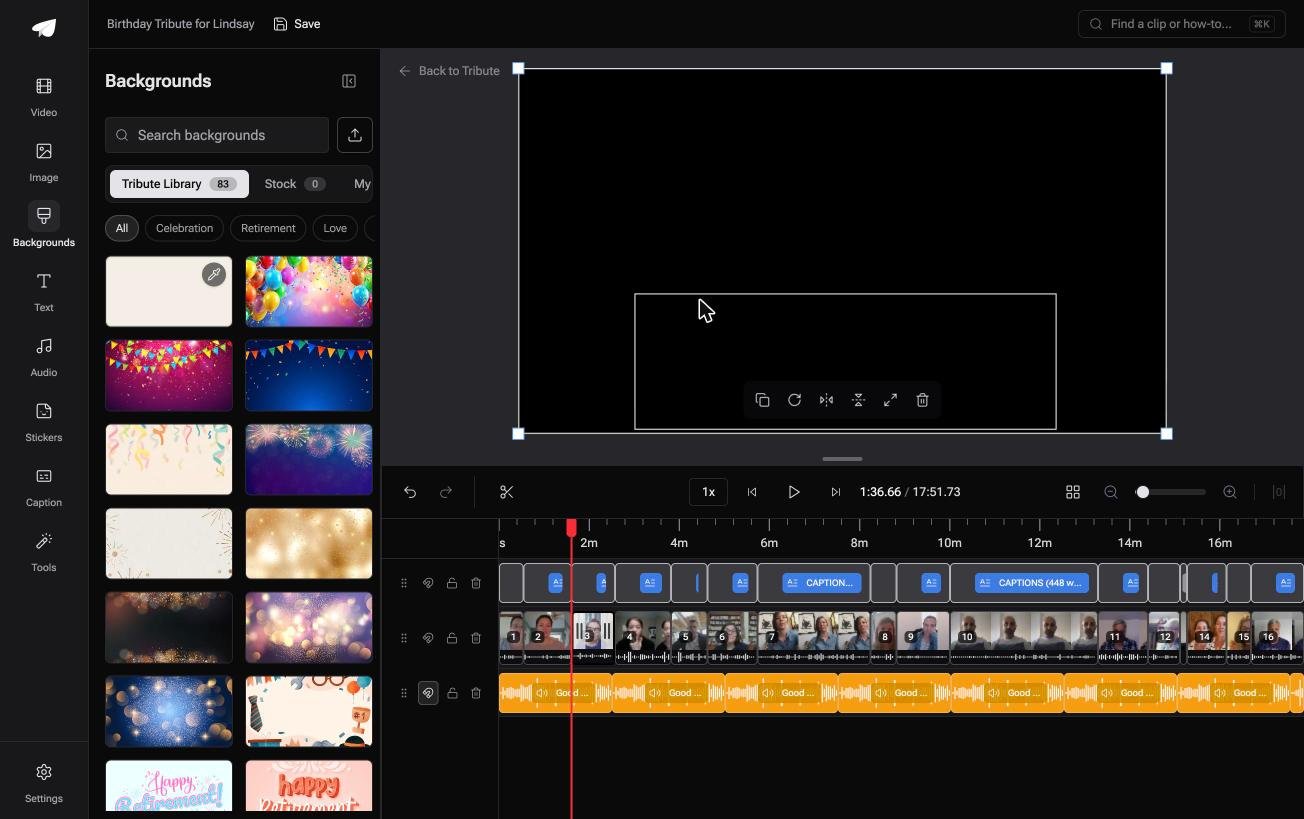
The Tribute video editor is a browser-based group video editor: contributors record clips on their phones and Tribute assembles them on a timeline with the music balanced under the voices.
The clips arrive in order with the music already ducked under the speech, and blurred fill behind upright phone footage so there are no black bars. It lives inside a paid Tribute rather than standing on its own.
Inside it you get the parts a tribute needs and nothing you have to learn: one switch that captions every clip, 83 occasion backgrounds grouped by Celebration, Retirement and Love, and 39 licensed tracks.
If the editing is the part you dread, Tribute's own editors will do the whole edit instead.

More on collecting at that scale: how to collect clips and turn them into a video.
Where should you share the finished video tribute?
Upload it somewhere and send a link. Messaging apps compress video hard, and email attachments bounce above about 25MB, so the file itself is the wrong thing to send.
YouTube set to unlisted is the safest default for a family audience.
Google's video privacy settings help page confirms an unlisted video stays out of search and off your channel, and that people you send the link to do not need a Google account to watch it.
That last part matters more than it sounds: 65% of US adults aged 65 and over use YouTube, per Pew's social media fact sheet, so the link opens on the first try for most of them.
If the tribute will be played at an event, download the file and put it on the laptop that will play it. Compared with streaming from a link, a local file does not care about the venue wifi.
On a phone, the editing side of this is covered here: iPhone video editors worth using.
Frequently Asked Questions
How much does a video tribute cost?
Nothing beyond your time if you collect the clips yourself and edit them in iMovie or CapCut. Paid group video services charge a flat fee for the collection links, hosting and the finished render, and a professional editor charges by the hour on top.
How far ahead should I start?
Three weeks for a group of ten, five weeks for a group of thirty. Collecting takes the time, and the last five contributors always take as long as the first twenty-five.
What if someone sends a terrible clip?
Keep it and cut it short. A clip where the lighting is poor but the sentence is good is worth more than a polished one that says nothing, and ten seconds of it will not hurt the video.
Can I make a tribute video on my phone alone?
Yes, up to about a dozen clips. iMovie and CapCut both handle that without strain on a recent phone. Past that the reordering becomes painful on a small screen and a laptop saves you an hour.
What music can I use without a copyright claim?
Licensed library tracks, or music from the audio library built into whichever editor you are using. A commercial song often still plays, though YouTube may place an ownership claim on the video and block it in some countries.
Should the person know it is being made?
For a retirement or a wedding, a surprise works. For a memorial, tell the family early, because several of them will want to contribute and some will want a say in what goes in.
What resolution should people video in?
Whatever their phone does by default, held sideways if they remember to. Mixed resolutions are normal and every editor resolves them to one output, with the lowest clip setting the practical ceiling.
👉 Bring the whole tribute together without downloading a clip if several people each want to be in it, and the nine tenths of the job that is collecting never lands on you.
