
iPhone Video Editors: What to Use on a Phone
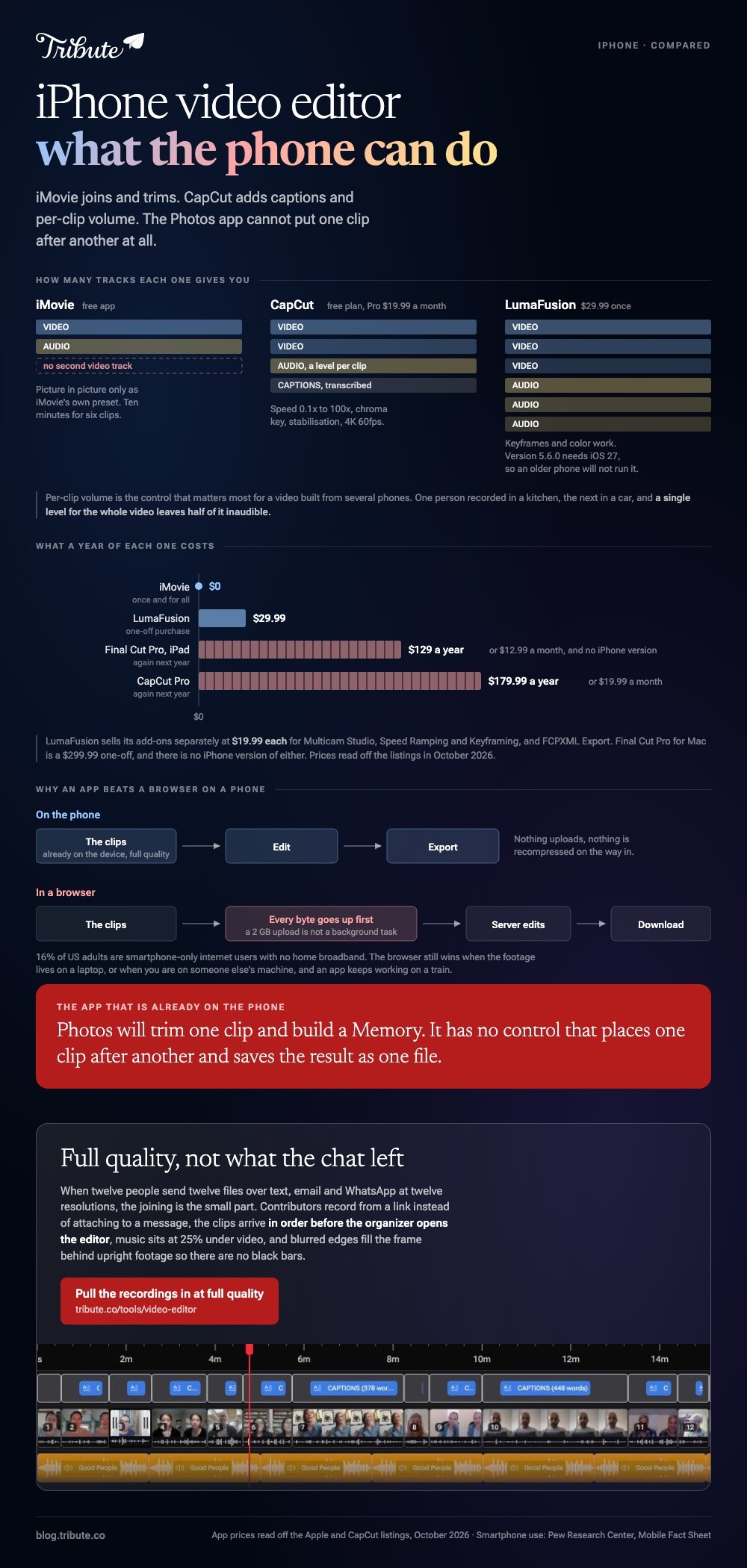
The default iPhone video editor is iMovie, a free app from Apple that joins clips, trims them and adds music. CapCut is the step up for captions and social clips, and LumaFusion is the one serious editors buy at $29.99. The Photos app is not on the list: it cannot join two clips.

Which iPhone video editing app fits which job?
Prices were read off Apple's own listings in October 2026. Every app below runs on the phone itself, so nothing uploads and nothing waits.
| App | Best for | Price (as of October 2026) | Watch out for |
|---|---|---|---|
| iMovie | Joining, trimming, music | Free app | One video track only |
| CapCut | Captions and social clips | Free plan; Pro $19.99/month | Export rules not stated on the pricing page |
| LumaFusion | Multi-track work on a phone | $29.99 one-off | Feature add-ons cost $19.99 each |
| Final Cut Pro for iPad | Long or layered projects | $12.99/month or $129/year | iPad, not iPhone |
| Tribute video editor | One video from many people's clips | Paid product | Browser, not an app |
Can the Photos app join two clips?
No, and this is where most people lose an evening.
The Photos app on an iPhone will trim a single clip and build a Memory from your library, and it has no control for placing one clip after another and saving the result as one file.
Apple puts that job in iMovie instead. If a blog post told you to select two videos in Photos and tap Merge, the button does not exist. Start with iMovie and the rest of this page.
Which iPhone video editor should you use?
Five choices cover almost everything, and the first one is already on most phones.
iMovie
Apple's own app costs nothing, and the current release is version 3.0.6. It offers three starting points: Magic Movie, which builds a cut for you, Storyboard, which fills in a template, and Movie, which gives you a plain timeline.
The Apple user guide for creating a Magic Movie project describes the fastest route to a finished video:
- Open iMovie and tap Start New Project, then Magic Movie.
- Tap Recents, Videos or an album you made, then tap the clips you want.
- Watch the number in the bottom-right corner of each clip: that is the order they will play in.
- Tap Create Magic Movie at the bottom of the screen.
- Reorder, trim or replace any clip, then tap Done.
- Tap the share icon and choose Save Video.
For a video you want full control over, pick Movie instead of Magic Movie. The clips land on a timeline in the order you tapped them, and dragging a clip's yellow edge trims it.
- Look for: the single video track, which rules out picture-in-picture beyond iMovie's own preset.
- Price: free app from Apple.
- Time needed: about ten minutes for six clips.
Best for: Two to eight clips you recorded yourself, finished on the phone that recorded them.
Why it works: The clips already share a camera and a microphone, so joining them is the whole job.

CapCut
CapCut gives you a real multi-track timeline on a phone, which iMovie keeps shallow. Its Google Play listing describes trimming, splitting and merging clips, speed from 0.1x to 100x, chroma key, stabilisation, automatic captions and export at 4K 60fps.
Per-clip volume is the control that matters most for a video built from several phones. One person recorded in a kitchen, the next in a car, and a single level for the whole video leaves half of it inaudible.
- Tap New project and select every clip you want.
- Drag the clips along the timeline until the order is right.
- Tap a clip, then Volume, and set a level for that clip on its own.
- Tap Captions to transcribe speech, then fix the names it got wrong.
- Tap Export at the top right and choose a resolution.
- Look for: the export screen, since CapCut's pricing page states neither a watermark rule nor a resolution cap for the free plan.
- Price: free plan at $0; Pro $19.99 a month or $179.99 a year as of October 2026.
Best for: Clips from several phones where the sound levels do not match.
Why it works: Compared with iMovie, per-clip audio and automatic captions turn two long jobs into two taps.
LumaFusion
LumaFusion is the app people buy when the phone has become the camera and the edit bay. Multiple video and audio tracks, keyframes and color work all sit in a layout built for a touchscreen rather than shrunk down from a desktop.
The App Store lists it at $29.99 as a one-off purchase, with optional add-ons at $19.99 each for Multicam Studio, Speed Ramping and Keyframing, and FCPXML Export. Version 5.6.0 requires iOS 27 or later, so an older phone will not run it.
- Look for: the add-on list, where the features a pro expects are sold one at a time.
- Price: $29.99 once, plus add-ons, as of October 2026.
Best for: Someone editing interviews or multi-camera footage away from a desk.
Why it works: A one-off price buys a genuine multi-track timeline, which nothing else on iOS matches at a one-off price.
Final Cut Pro for iPad
Apple sells Final Cut Pro for Mac as a $299.99 one-off purchase, and the iPad version through Apple Creator Studio at $12.99 a month or $129 a year after a 30 day trial. There is no iPhone version.
This only makes sense if you already own an iPad and expect to edit often. For one birthday video, the subscription costs more than the video is worth in effort saved.
The trial is the way to test that. Thirty days is long enough to finish a real project, and finishing one is the only way to learn whether the iPad layout suits your hands.
- Look for: the device requirement, since Final Cut Pro for iPad needs iPadOS 18.6 or later and a supported iPad model.
- Price: $12.99 a month or $129 a year through Apple Creator Studio as of October 2026.
Best for: Regular projects on an iPad that has become the main machine.
Why it works: The timeline, color tools and audio controls match the Mac version well enough to move a project between them.
Tribute, if several people recorded the clips
None of the four apps above is built for this. Twelve people send twelve files over text, email and WhatsApp, at twelve resolutions, and messaging apps compress most of them on the way.
The joining is the small part; gathering the files at full quality and putting them in order is the work.
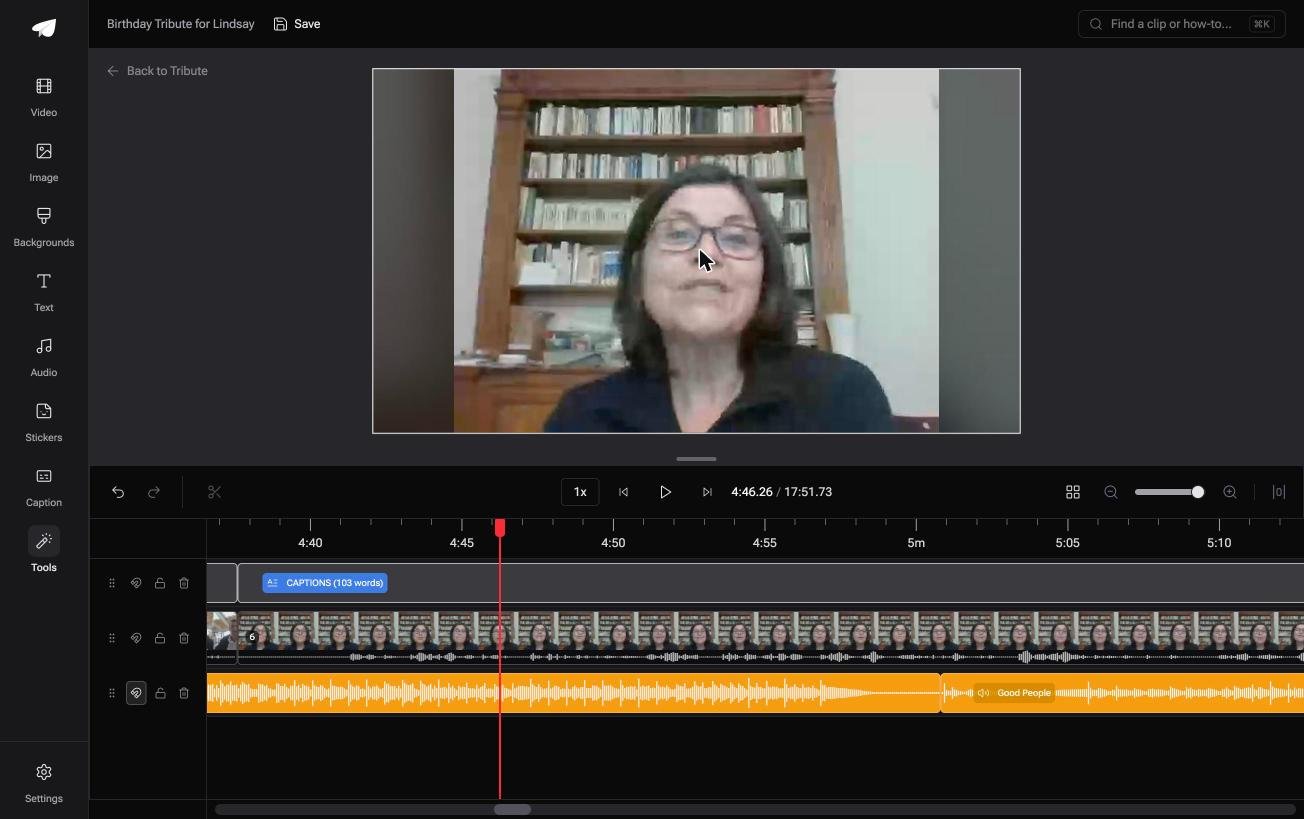
The Tribute video editor is a browser-based group video editor: contributors record clips on their phones and Tribute assembles them on a timeline with the music balanced under the voices.
Clips arrive in order before the organizer opens the editor, music sits at 25% under video and 75% under photos by default, and blurred edges fill the frame behind upright phone footage so there are no black bars.
It lives inside a paid Tribute and it will not open a video from your camera roll.
- Look for: the waveform under every clip, which shows the silence before the first word.
- Price: part of a paid Tribute; there is no standalone app.
Best for: An iPhone owner who is collecting the clips rather than shooting them.
Why it works: Unlike a folder of files you chase down yourself, the collecting, the ordering and the audio balance happen before the editing starts.
More on that case in how a group video maker handles thirty phones and in our guide to making a video montage.

What does a phone edit get wrong?
Three things, and each has a fix that takes a minute. Dead air at the start of every clip, because people press record, look at the camera, then begin. Volume that jumps between clips recorded in different rooms.
Black bars where an upright clip sits inside a wide frame.
Trim to the first word rather than to the start of the file. Set a level per clip instead of one level for the whole video.
Fill the space beside an upright clip with a blurred copy of itself, which reads better than black and is a setting in most editors with a background control.
Music is the other common trip. Our guide to adding music to a video on iPhone covers what the Music app will and will not let you use.

Is an app better than a browser on a phone?
On a phone, yes, almost always. The clips are already on the device at full quality, so nothing uploads and nothing is recompressed on the way in. A browser tool has to receive every byte before it can do anything.
Pew Research Center reports that 91% of US adults own a smartphone and 16% are smartphone-only internet users with no home broadband, according to its mobile fact sheet.
For that second group a 2 GB upload is not a background task, and the native app is the only sensible route.
The browser still wins when the footage lives on a laptop or when you are on someone else's machine.
We compare those tools in our roundup of online editors, and the no-cost options across every device in the best free video editors for people who are not editors.
One more thing in the app's favor: it keeps working on a train. A browser editor that uploads your footage stops the moment the signal does, and a render you started on a server is not something you can check from the timeline.

Frequently Asked Questions
What is the best iPhone video editor for a beginner?
iMovie, because it is already installed at no cost, and because Magic Movie produces a watchable cut from a pile of clips in one tap. Move to CapCut when you need per-clip volume or captions.
Can I edit video on an iPhone without a subscription?
Yes. iMovie costs nothing, CapCut has a free plan, and LumaFusion is a one-off $29.99 purchase. Only Final Cut Pro for iPad is sold on a recurring basis.
Does editing on a phone lower the quality?
Not by itself. Quality is lost at the export setting and when a messaging app compresses the file afterwards. Export at the highest setting offered, then upload rather than attach.
Why do my merged clips sound different from each other?
Because each one was recorded in a different room on a different microphone. Set a volume level per clip rather than one level for the video, and keep any music below the speech.
Can I put a vertical clip in a widescreen video?
Yes, and the fix is the fill behind it. A blurred copy of the clip reads better than black bars on both sides, and most editors with a background setting will do it for you.
How many clips can an iPhone handle?
iMovie slows past about twenty clips on an older phone, and CapCut handles more because it manages its own cache. For a video built from thirty contributors, the phone is the wrong tool whatever the app.
What should I do if the clips came from everyone in the family?
Collect them somewhere that does not compress them, which rules out most group chats. That collection problem, rather than the editing, is what a group video tool is for.
👉 Pull the recordings in at full quality rather than out of a group chat if you are editing on a phone because that is where the messages landed, and nothing reaches you already squeezed.
