
How to Add Music to Video: iPhone, Start to Finish
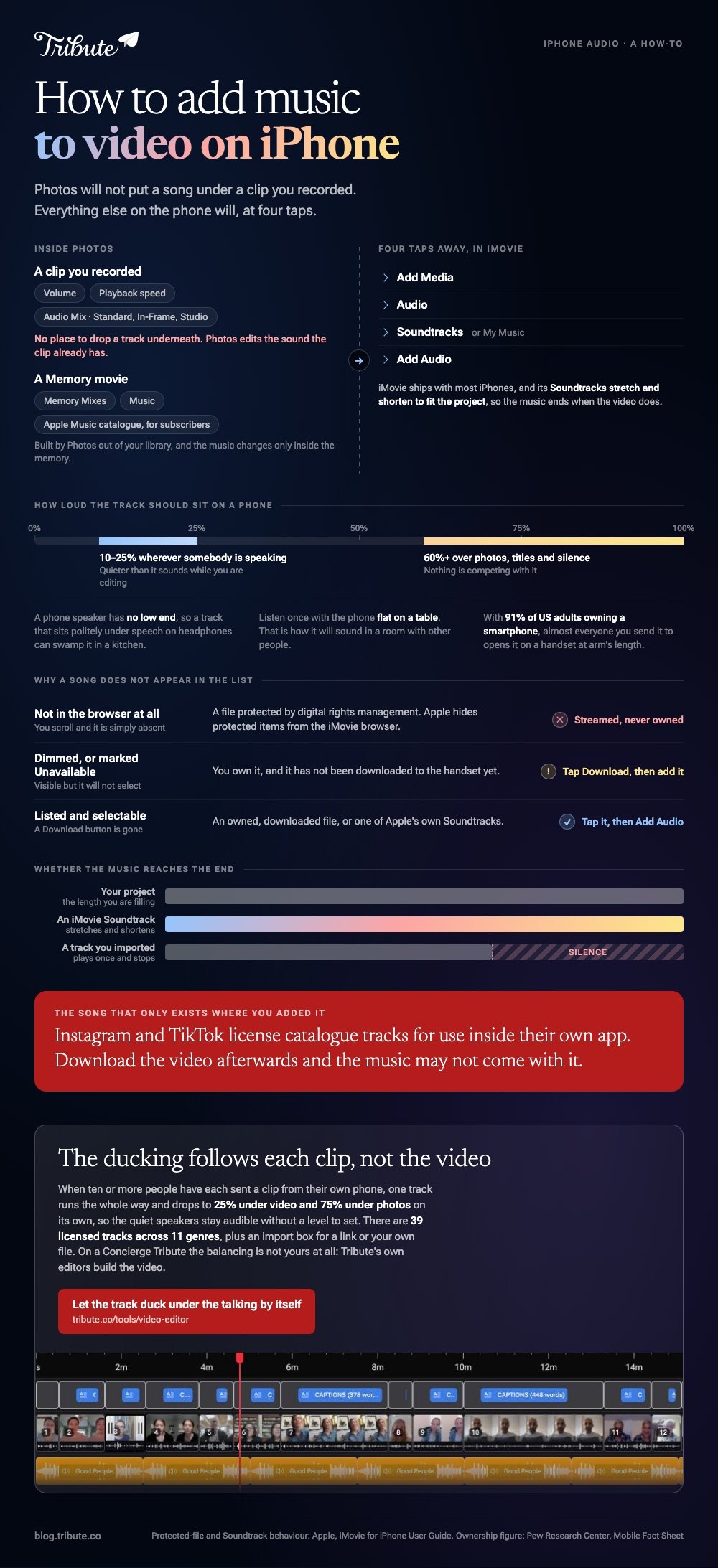
Use iMovie, which is already on most iPhones. Open your project, tap the Add Media button, tap Audio, then choose Soundtracks or My Music and tap Add Audio. The Photos app will not do this: it edits the sound a clip already has and puts music under Memories, not under a video you recorded.

Can the Photos app put a song under your video?
Not under a clip you shot. Photos edits a video's own audio: you get a volume control, a playback speed setting and, on newer models, an Audio Mix with Standard, In-Frame and Studio options. There is no place to drop a track underneath.
Memories are the exception, and they are a different thing. A memory movie is built by Photos out of your library, and you change its music by tapping the screen, then the Memory Mixes button, then the Music button.
Subscribers can search the Apple Music catalog from there, which works inside the memory and nowhere else.
So if you want to know how to put music to a video on iPhone, the answer starts with leaving Photos. Everything below is the leaving.

How do you add music in iMovie on an iPhone?
iMovie ships with most iPhones and the route is four taps deep.
- Open your movie project and scroll the timeline so the playhead, the white vertical line, sits where the music should begin.
- Tap the Add Media button, then tap Audio.
- Tap Soundtracks for Apple's own music, or My Music for tracks synced to the phone. Theme music sits further down the Soundtracks list.
- Tap a track to hear it. A Download button appears beside anything not yet on the device.
- Tap the track, then tap the Add Audio button that appears next to it.
Apple lists the same path, including the iCloud Drive route for a file someone emailed you, in its guide to adding music and soundtracks in iMovie on iPhone.
Soundtracks have one property worth the trip: they stretch and shorten to fit the project, so the music ends when the video does.
Why will some songs not appear in the list?
Because they are protected files. Apple is direct about it: songs protected by digital rights management cannot be used in iMovie, and protected items in your Music library do not show up in the browser at all.
That rules out anything you stream rather than own.
A second case looks like the same problem and is not. A song that appears dimmed or marked Unavailable is one you own but have not downloaded, so tapping the Download button fixes it.
Apple covers both situations in its article on adding songs and other audio files to an iMovie project, which also notes that using a purchased track means holding the copyright or having the owner's permission.

How to add music to video (iPhone): which app should you use?
Four routes, and the right one depends on where the video is going and who recorded it.
Two of them cost nothing and sit on the phone already, one wants a download, and the last is for the case where the clips are not yours to begin with. Work down the list and stop at the first one that matches your situation.
iMovie
Already on the phone, no account to make, and the shortest path from a clip in your camera roll to a video with a soundtrack. Its library music flexes to the length of your project, which removes the one edit beginners get wrong.
Best for: One or two clips you shot, going to a family group chat.
Why it works: No account, no upload, and nothing to learn before the first result.
CapCut
More control at the cost of a download. Start a New project, import the clip, tap Audio on the bottom toolbar and pick a track, then tap the track to set its volume and add a fade in and a fade out.
Tap Export when the balance sounds right on the phone speaker.
Best for: Several clips at different volumes, or anything going to social media.
Why it works: You can split the music track and give each section its own level, which iMovie makes harder.
Instagram, TikTok and in-app music
If the video is going straight to a feed, add the music where you post it. Both license catalog tracks for use inside their own app on personal accounts, so a song you cannot put in iMovie is there in the Reels or TikTok editor.
The track stays in that app: download the video afterwards and the music may not come with it.
Best for: A short clip for a public feed, where the song is the point.
Why it works: The license problem belongs to the platform rather than to you.
The Tribute video editor
The Tribute video editor is a browser-based group video editor: contributors record clips on their phones and Tribute assembles them on a timeline with the music balanced under the voices.
Music ducks to 25% under video and sits at 75% under photos, and there are 39 licensed tracks across 11 genres plus an import box that accepts a YouTube link or your own file.
It lives inside a paid Tribute, so it is for the group video, not for a clip on your camera roll. On a Concierge Tribute the balancing is not yours: Tribute's own editors build the video.
Best for: A birthday or retirement video where ten or more people each sent a clip from their phone.
Why it works: Unlike a single track laid over a finished video, the ducking follows each clip, so the quiet speakers stay audible.

More on that case in how a group video maker handles thirty phones, and on the wider edit in making a video montage.
How loud should the music be on a phone video?
Quieter than it sounds while you are editing. Set the track to 10% to 25% wherever somebody is speaking, and lift it to 60% or more over photos, titles and silence.
Compared to a laptop, a phone speaker has no low end, so a track that sits under speech on headphones can swamp it in a kitchen.
Listen once with the phone flat on a table, which is how it will sound in a room with other people. Check the result the way it will be watched.
With 91% of US adults owning a smartphone, according to the Pew Research Center mobile fact sheet, almost every person you send the video to will open it on a handset held at arm's length.

Once the music is in, captions make the words land with the sound off, the desktop and browser routes cover the same job on a laptop, and iPhone video editors compares the apps in full.
Frequently Asked Questions
Can you add music to a video on iPhone without an app?
Not to a video you recorded. Photos adjusts a clip's own sound and will set music on a memory movie, so adding a soundtrack to your own footage means iMovie or another editor.
Can I use Apple Music or Spotify tracks?
No. Both stream protected files, and iMovie hides protected items from its browser. Buy the track, use the built-in soundtracks, or pick something from an editor's own library.
Why is a song in my library greyed out in iMovie?
It has not been downloaded to the phone yet. Tap the Download button beside it, wait for it to finish, and it becomes selectable.
How do I add music to an iPhone video already in my camera roll?
Import it into iMovie as a new project, add the track, then share the result back to Photos. The original clip stays where it is, untouched.
Will the music keep playing if the video is longer than the song?
Not on its own. iMovie's own soundtracks adjust to the project length, while an imported track stops when it ends unless you duplicate it or loop it.
Can two people add music to the same video?
iMovie keeps the project on one device, so no. A browser editor is the way around that, since the project lives on a server and the link can be shared.
👉 Let the track duck under the talking without a level to set if the clips were sent to you by other people, and the one audio track stops being a limit.
