
How to Add Music to Video Without Drowning Out the Voices
To add music to video, put the track on its own audio line under the picture, then set its volume between 10% and 25% wherever someone is speaking and raise it elsewhere. CapCut, Canva, Clideo and iMovie all work this way. One volume for the whole thing ruins most family videos.

Where should the music sit against the voices?
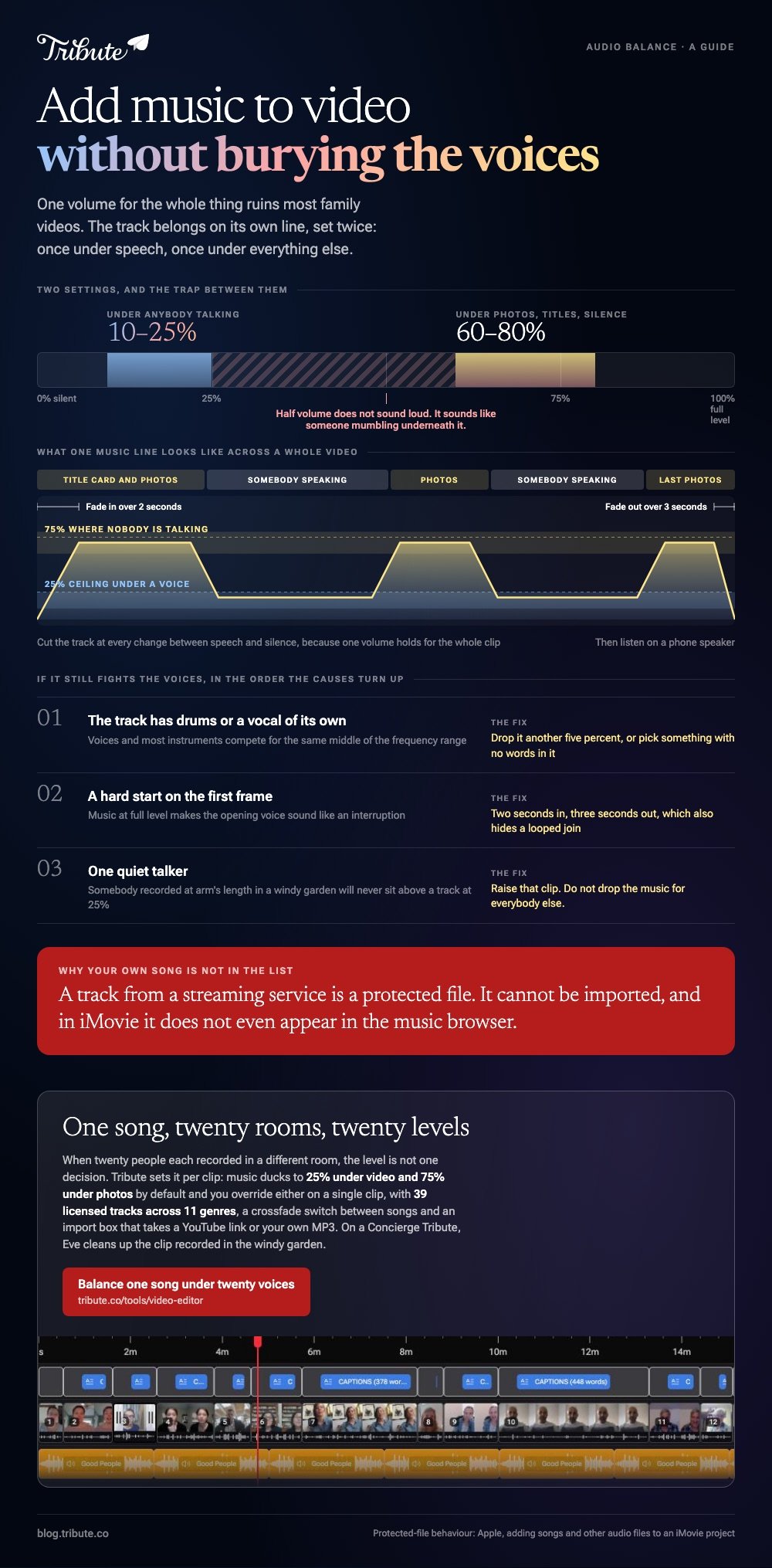
Under them, and much further under than feels right while you are editing. Voices and most instruments compete for the same middle of the frequency range, so a track at half volume does not sound loud: it sounds like someone mumbling underneath it.
Two numbers to work from. Set music to 10% to 25% under anybody talking, and 60% to 80% under photos, titles and anything silent.
Then listen once on a phone speaker, because that is where most people will watch it and it has no bass to hide behind.
The question of how to add music to a video has the same answer in every editor. The question of how loud is the one that separates a video people watch to the end from one they skip.
How do you add music to a video in CapCut?
CapCut keeps audio in its own tab on the bottom toolbar on a phone and in the left panel on desktop.
- Tap New project and import your video.
- Tap Audio on the bottom toolbar, then pick a track from the music library or one of your own files.
- Drag the track along the timeline until it starts where you want it.
- Tap the track to open its controls, set the volume, and add a fade in and a fade out so it does not begin and end with a jolt.
- Tap Export and pick a resolution.
For speech over music, set the music track volume first, then play the loudest talker and the quietest talker back to back.
CapCut holds one volume for the whole track unless you split it, so cut the track at each point where the picture changes between speech and silence.
Best for: A phone edit where you want per-clip control without learning an editor.
Why it works: Splitting the music track is quicker than rebalancing every voice clip under it.
How do you add music to video in a browser?
Clideo's tool is the shortest path when all you need is one song under one video. Choose your file, click Add audio to pick the track, set the video and audio volumes on their own sliders, and export.
A shorter song loops to fill the video unless you switch the loop off, and files up to 500MB go through on the free tier.
Canva takes longer and gives you more. Audio sits in its own section of the timeline, you trim a track by opening its menu and choosing Adjust, and fades come from the Audio tools button, where Fade in and Fade out are sliders.
Popular chart music is capped at 60 seconds inside a design, so a long video needs library music or your own file.
Best for: A laptop with nothing installed, or a Chromebook.
Why it works: Separate sliders for video and music are the whole ducking job in one screen.

How do you choose background music for a video?
Match the tempo to the pace of the cutting, not to the mood of the occasion. A slow piano under quick cuts feels like two videos at once, and an upbeat track under long, quiet clips feels like an advert for something.
iMovie solves the length problem for you: its built-in soundtracks stretch and shorten to fit the project, so the music lands on the last frame rather than stopping halfway through the final clip.
Compared to dropping an MP3 on the timeline, that saves you cutting the track to length by hand.
One limit worth knowing before you plan around your own library.
Songs protected by digital rights management cannot be used in iMovie, and protected files in your Music library do not even appear in the browser, which Apple states in its page on adding songs and other audio files to an iMovie project.
Best for: Mac and iPhone users who want the track to end when the video does.
Why it works: Music written to flex removes the one edit most people get wrong.
Can you add any song to a video?
You can add it. Whether it stays up is a different question, and it depends where the video goes afterwards. A private file you text to one person is not the same as an upload.
YouTube scans every upload with Content ID, and Google's explanation of the system says a match gives the rights holder the choice to block the video, run ads on it, or track its viewing figures.
Blocking can be set per country, so a video that plays for you may be dark for a relative abroad. With 84% of US adults using YouTube, per Pew's social media fact sheet, that is where most shared videos end up.
Licensed library music inside an editor avoids the whole question. So does asking a friend who plays.
What if twenty people each sent you a clip?
Then the music is not one decision, it is twenty. Each voice was recorded in a different room at a different distance, and a single music level that suits the clip recorded in a kitchen will bury the one recorded in a car.
The Tribute video editor is a browser-based group video editor: contributors record clips on their phones and Tribute assembles them on a timeline with the music balanced under the voices.
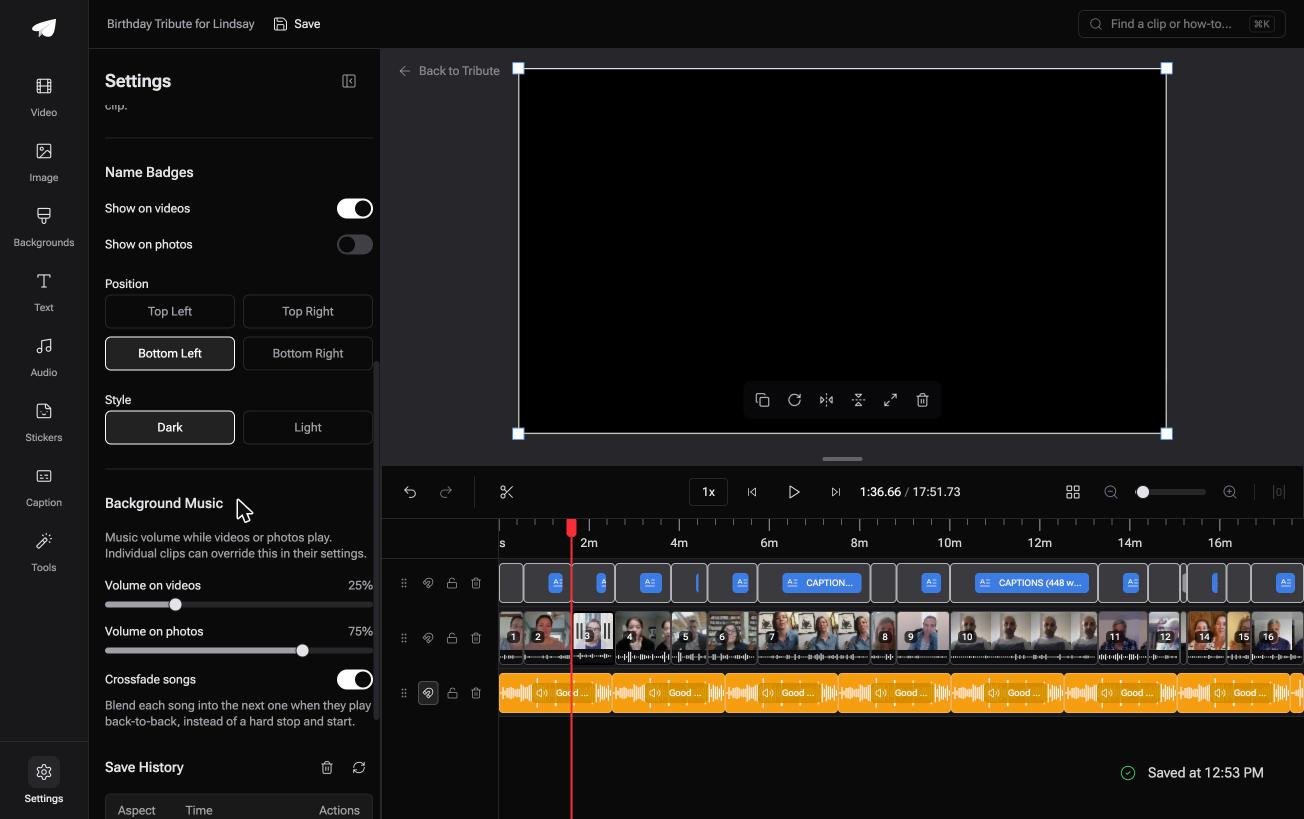
Music ducks to 25% under video and sits at 75% under photos by default, and you can override either on a single clip.
There are 39 licensed tracks across 11 genres, a switch that crossfades one song into the next, and an import box that takes a YouTube link or your own MP3.
None of that helps if you are scoring a video you shot yourself. It lives inside a paid Tribute and only earns its place when the clips arrived from several people.
Best for: Twenty voices recorded in twenty rooms, all of them sitting under one song.
Why it works: Unlike one volume applied to the whole timeline, a per-clip level follows the room each person recorded in.

More on that case in how a group video maker handles thirty phones, and on the whole edit in making a video montage.
Why does the music still fight the voices?
Three causes, in the order they turn up. The track has drums or a vocal of its own, so it competes with speech for the same space. Drop it another five percent or pick something without words.
The second is a hard start. Music that begins at full volume on the first frame makes the opening voice sound like an interruption, so fade in over two seconds and fade out over three at the end.
Last comes the quiet talker. One person recorded at arm's length in a windy garden will never sit above a track at 25%, and the answer is to raise that clip rather than drop the music for everyone.

For a video of stills rather than clips, a slideshow maker with music handles the timing another way, and adding music on an iPhone covers the phone route step by step. If the framing is off too, start with cropping the clip.
Frequently Asked Questions
What volume should background music be under speech?
Between 10% and 25% of the track's full level in most editors, and lower if the song has vocals. Check it on a phone speaker rather than headphones, since that is the harder test.
Can I add music to a video for free?
Yes. CapCut, Canva and iMovie all include a music library on their free tier, and Clideo adds a track to a file of up to 500MB without payment. Check the export screen for resolution caps before you start.
How do I keep the music from ending before the video does?
Either loop the track, which most browser tools offer with a single switch, or use library music written to flex to the project length. Fading out over the last three seconds hides a join either way.
Can I use a song from Apple Music or Spotify?
No. Streaming tracks are protected files and editors cannot import them, which is why a song you can play on your phone may not appear in iMovie's browser. Buy the file, use library music, or record your own.
Should every part of the video have music?
Not all of it. Let one or two moments play with nothing under them, which gives the music somewhere to return from and stops the video sounding like a montage of adverts.
Can I add a song to a video on my phone?
Yes, in CapCut or iMovie on either platform. The steps are the same as on a laptop: import the clip, open the audio tab, pick the track, set the level, export.
👉 Set the song per clip so each room sits right if one music level buries the voice recorded in a car, and on a Concierge Tribute Eve, the assistant inside the editor, cleans up that recording for you.
