
How to Merge Videos Online for Free
To merge videos online, open a browser merger such as Clideo, Adobe Express or Clipchamp, upload your clips, drag the thumbnails into order, then export one file. Nothing installs, because the joining happens on a server. The cost is upload time and whatever the export screen says about watermarks.

What happens when you merge videos online?
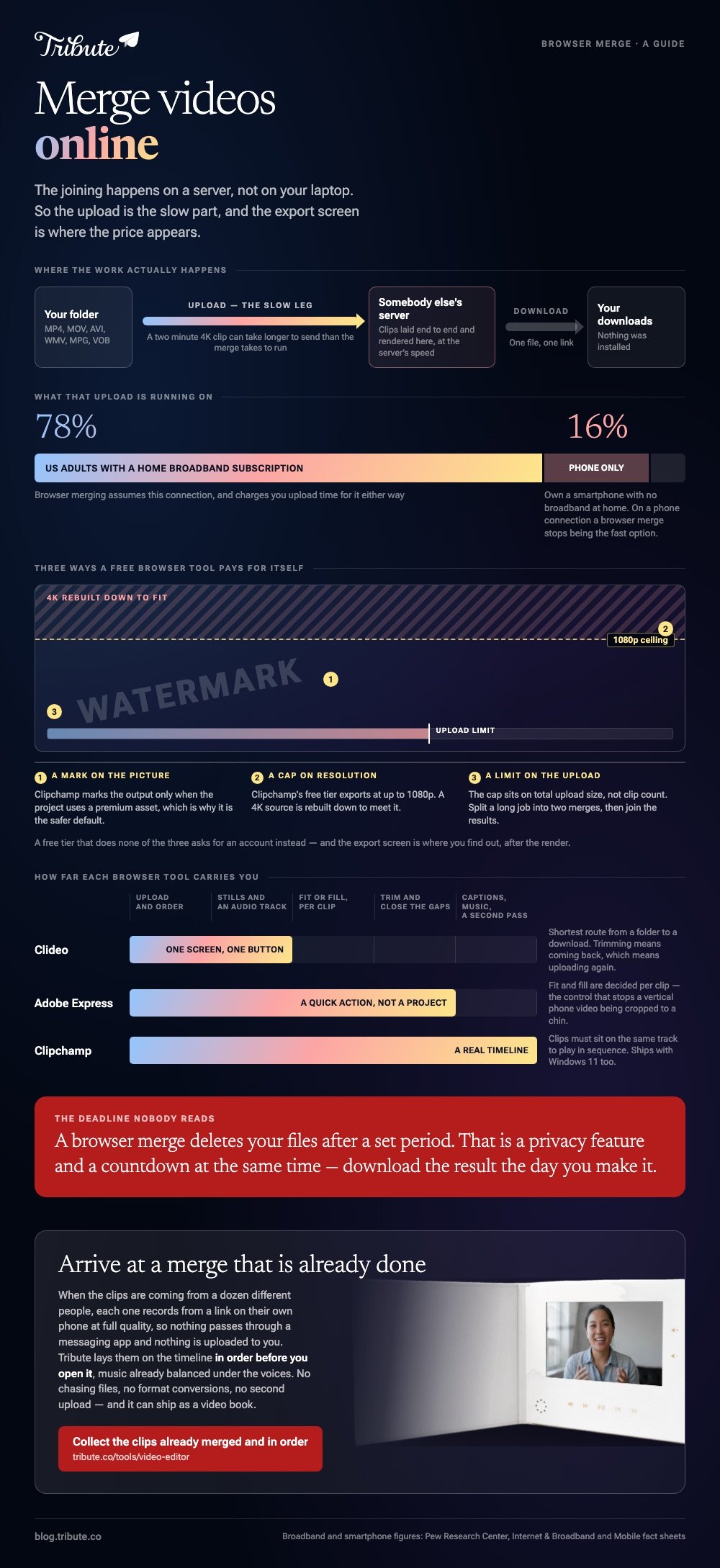
Your clips leave the machine. A browser merger sends each file to a server, lays them end to end there, renders one output and hands back a download link.
Nothing is installed, no account is needed on several of them, and the render finishes at the speed of the server rather than the speed of your laptop.
Two consequences follow. Your footage sits on somebody else's computer for a while, which matters for a medical video or a legal one and matters less for a birthday message.
And the upload is the slow part: a two minute 4K clip can take longer to send than the merge takes to run.
How do you merge video clips online in Clideo?
Clideo's merger is the shortest route from a folder of files to a single download. It accepts MP4, MOV, AVI, WMV, MPG and VOB, and it mixes photos into the same timeline if you want stills between the clips.
- Open the Clideo merge tool and click Choose file, then select your videos. Add more one at a time after the first upload.
- Drag the thumbnails into the order you want them to play.
- Set a duration for any still images, and add or trim an audio track if you want music under the video.
- Pick an aspect ratio for the output frame, then click Export.
- Watch the preview. Click Edit to go back, or Download to save the file.
Best for: A handful of clips and no interest in learning a timeline.
Why it works: There is one screen, one order to set and one button at the end of it.

How do you join videos online in Adobe Express?
Adobe Express keeps merging in its quick actions rather than burying it in the full editor, so you never open a project file.
- On the Adobe Express home page, choose the Video tab, then scroll to Video Quick Actions.
- Select Merge videos.
- Browse your device for the first video or image, then use the add media control to bring in the rest.
- Drag a clip to reorder it. Each clip carries its own icons for muting, trimming, fitting or filling the frame, duplicating and deleting.
- Select Download and choose a format and resolution.
Best for: Clips of mixed shapes, where some need to fill the frame and some need to fit inside it.
Why it works: Fit and fill are decided per clip, which is the control that stops a vertical phone video getting cropped to a chin.
How do you combine videos online in Clipchamp?
Clipchamp is the browser tool with a real timeline, and it ships with Windows 11 as well. Use it when a plain append is not enough and you want to trim, caption or layer music.
- Click My media, then the import media button, and bring in files from the device or OneDrive.
- Drag the clips onto the timeline side by side on the same track so they play one after another.
- Click a clip and drag its trimming handles, or hold shift, click several clips and trim them together.
- Hover over a gap between two clips and press the delete gap button to close it.
- Export from the top right and pick a resolution.
Microsoft sets the sequence out in its guide to combining videos in Clipchamp, including the note that clips must sit on the same track to play in sequence.
Best for: A video you will keep editing: captions, music, titles, a second pass next week.
Why it works: Unlike a one screen merger, a timeline lets you change your mind without uploading everything again.

Can you merge videos online without a watermark?
Sometimes, and the export screen is where you find out. Browser tools fund themselves in one of three ways: a watermark on the output, a resolution cap, or a file size limit on the upload.
A free tier that does none of those asks for an account instead.
Read the download step before you upload rather than after the render, because that is the moment the terms appear.
Clipchamp exports at up to 1080p on its free tier and marks the picture only when a project uses a premium asset, which makes it the safer default for a video going to a family group chat.
Compared to a desktop editor, a browser merge also deletes your files after a set period, which is a privacy feature and a deadline at the same time. Download the result the day you make it.
What does an online merge cost you in quality?
Clips that match in codec, resolution and frame rate can be copied rather than rebuilt, and quality holds. Clips that differ force a re-encode to one setting, and the weakest file in the set sets the ceiling for the whole video.
Upload speed is the other tax. Only 78% of US adults have a home broadband subscription, according to Pew Research Center, and 16% own a smartphone with no broadband at home, per Pew's mobile fact sheet.
On a phone connection, a browser merge stops being the fast option.
If that describes your setup, do the job on the device instead: merging videos into one file covers the phone and desktop routes. For the wider set of browser tools, see online editors compared and joining clips in a browser.
What if the clips came from a dozen people?
Then the upload box is the wrong shape for the problem. Twelve people send twelve files by message, by email and through a shared album, two arrive compressed past rescue, and three land the night before.
Dragging thumbnails into order is the last ten minutes of a job that took a week.
The Tribute video editor is a browser-based group video editor: contributors record clips on their phones and Tribute assembles them on a timeline with the music balanced under the voices.
Each person records from a link on their own phone, so nothing passes through a messaging app, and the clips are in order before the organizer opens the editor.
It runs in a browser like the tools above, and it lives inside a paid Tribute rather than standing alone.
Best for: A video where no file is on your laptop yet and eleven people have to be asked twice.
Why it works: The collecting, the ordering and the audio balance are done before the editing starts.

That case has its own guide: one video from thirty different phones, and the full picture sits in making a video montage.

Frequently Asked Questions
Is it safe to merge videos online?
For ordinary family footage, yes, with the understanding that your files sit on a server until the tool deletes them. For anything confidential, join the clips on your own machine instead. Check the retention wording on the tool's own page before you upload.
Can I trim and merge videos online in one pass?
Yes in Clipchamp and Adobe Express, which both trim on the same screen as the join. A single purpose merger will join first and ask you to come back for trimming, which means a second upload.
What is the largest file I can upload?
It varies by tool and by tier, and the limit sits on total upload size rather than on clip count. If a long video keeps failing, cut it into two merges and join the two results.
Can I merge videos online on a phone?
Yes. Every tool here runs in a mobile browser, and you pick the clips from the photo library the same way you would pick a photo. The upload is the only part that changes.
Why does my merged video look soft?
The output resolution was set lower than the source, or a free export capped it. Check the resolution on the download step and re-export at the highest setting on offer.
Do browser mergers keep the audio?
Yes, and they keep each clip's own audio at its own level, which is why a merged video jumps in volume at the cuts. Set a level per clip in a timeline tool if that bothers you.
What format should I download?
MP4 with H.264 video plays on every phone, browser and TV that matters, and most tools default to it. Keep the originals until you have watched the download from start to finish.
👉 Have everyone upload at full quality to the same video if half the clips are compressed by the time they reach you, and the merge is done before you open it.
