
Free Video Editor Online: Free Tools Compared
The strongest free video editor online is Clipchamp: it exports HD with nothing stamped on the image, and Microsoft preinstalls it on Windows 11. Canva comes second for photos and titles, CapCut third for a social clip. Kapwing, Clideo and VEED all stamp or cap their exports.

Which free tool is the best free browser video editor?
Every figure here was read off each company's own pricing page in October 2026. These limits move, so treat the table as a starting point and open the export screen before you build anything long.
| Tool | Watermark at no cost | Export cap | Paid plan (October 2026) |
|---|---|---|---|
| Clipchamp | None | 1080p | 4K with Microsoft 365 |
| Canva | Premium elements only | None stated | Pro US$144/year |
| CapCut | Not stated on pricing page | Not stated | Pro $19.99/month |
| Kapwing | Yes | 720p, 4 minutes | Pro $16/month |
| Clideo | Yes | 720p, 500 MB upload | $9/month billed at $108/year |
Is there a free video editor online, free of watermarks?
Yes, and the list is shorter than the search results suggest. Three of the five tools below put nothing on your video.
The other two treat the watermark as the price of the no-cost tier, which is a fair trade for a thirty second clip and a bad one for a wedding video.
Clipchamp
Microsoft's documentation calls Clipchamp the built-in video editor for Windows 11 and says it comes preinstalled, with a browser version at app.clipchamp.com in Edge or Chrome.
The same page lists Windows, Mac, Linux and Chromebook support, so the browser version is the fallback on any machine you are handed.
- Go to app.clipchamp.com and click create a new video.
- Drag your clips into My media, or use the import media button.
- Click the green + on each clip to add it to the timeline in order.
- Select a clip and drag the green bars inward to cut the silence at the start.
- Open content library, then audio, and drag a track beneath the clips.
- Click export at the top right and choose a quality.
One line in Microsoft's page on editing a video in Clipchamp also says the app processes video on your own device instead of uploading it to a server.
That single fact removes the upload wait that makes every other browser tool feel slow on a long video.
- Look for: the export quality menu, where 4K sits behind a Microsoft 365 Personal or Family subscription.
- Price: free plan with HD export; premium features arrive with Microsoft 365.
Best for: Anyone who wants a finished file with nothing added to the picture.
Why it works: A real timeline, HD output and local processing, with no account tier standing between you and the render.
Canva
Design came first at Canva and the timeline came later, which is visible in both directions. Titles, text animation and photo layouts beat everything else here, while audio control is thin.
The watermark rule is narrow and worth knowing. Canva's help center says premium elements carry a crosshatch pattern on the free plan until you buy them, one design at a time.
Clips and photos you uploaded yourself are never marked, so a video cut from family footage downloads clean.
- Look for: the crosshatch on any stock element, which tells you the download will be marked.
- Price: free plan at US$0; Pro US$144 a year for one person as of October 2026.
Best for: A photo-led video with real titles, made by someone who has never opened an editor.
Why it works: Unlike a timeline-first tool, Canva makes the text look designed before you have learned anything.

CapCut
CapCut's browser and desktop versions share the phone app's strengths: automatic captions, trending effects, a color wheel and a multi-track timeline. Projects sync through a cloud Space, so a clip started on a phone can be finished on a laptop.
Its pricing page lists a free plan at $0 with templates and basic editing tools, Pro at $19.99 a month or $179.99 a year, and Ultra at $79 a month.
What the page does not say is whether no-cost exports carry a watermark or a resolution ceiling, so check the export panel first rather than at the end of an edit.
- Look for: template-based projects, which have been the ones that add branding in the past.
- Price: free plan at $0; Pro $19.99 a month as of October 2026.
Best for: A social clip where styled captions matter more than archival quality.
Why it works: Captions, cuts and music live in one panel each, which keeps a short edit to about ten minutes.
Clideo
Clideo belongs to a different category: one page per job, no timeline, no learning. You upload, press the button, and download. For joining three clips or cutting thirty seconds off the front, that is the whole task.
Its pricing page is blunt about the trade. The no-cost tier exports with a watermark at up to 720p, keeps files for 14 days, caps uploads at 500 MB and gives 10 credits a month.
The paid plan is $9 a month billed yearly at $108, which removes the watermark and allows 4K.
- Look for: the 500 MB upload ceiling, which a single 4K phone clip can exceed on its own.
- Price: free tier at $0 with a watermark; $9 a month billed at $108 a year.
Best for: One quick operation on a short clip when you do not mind the badge.
Why it works: There is nothing to learn, which beats a timeline when the job is a single cut.
Tribute, the paid pick
Here is the honest part. If you came to this page to join your own clips without paying, close this entry and use Clipchamp. A Tribute is a paid product and it will not help you edit an unrelated video.
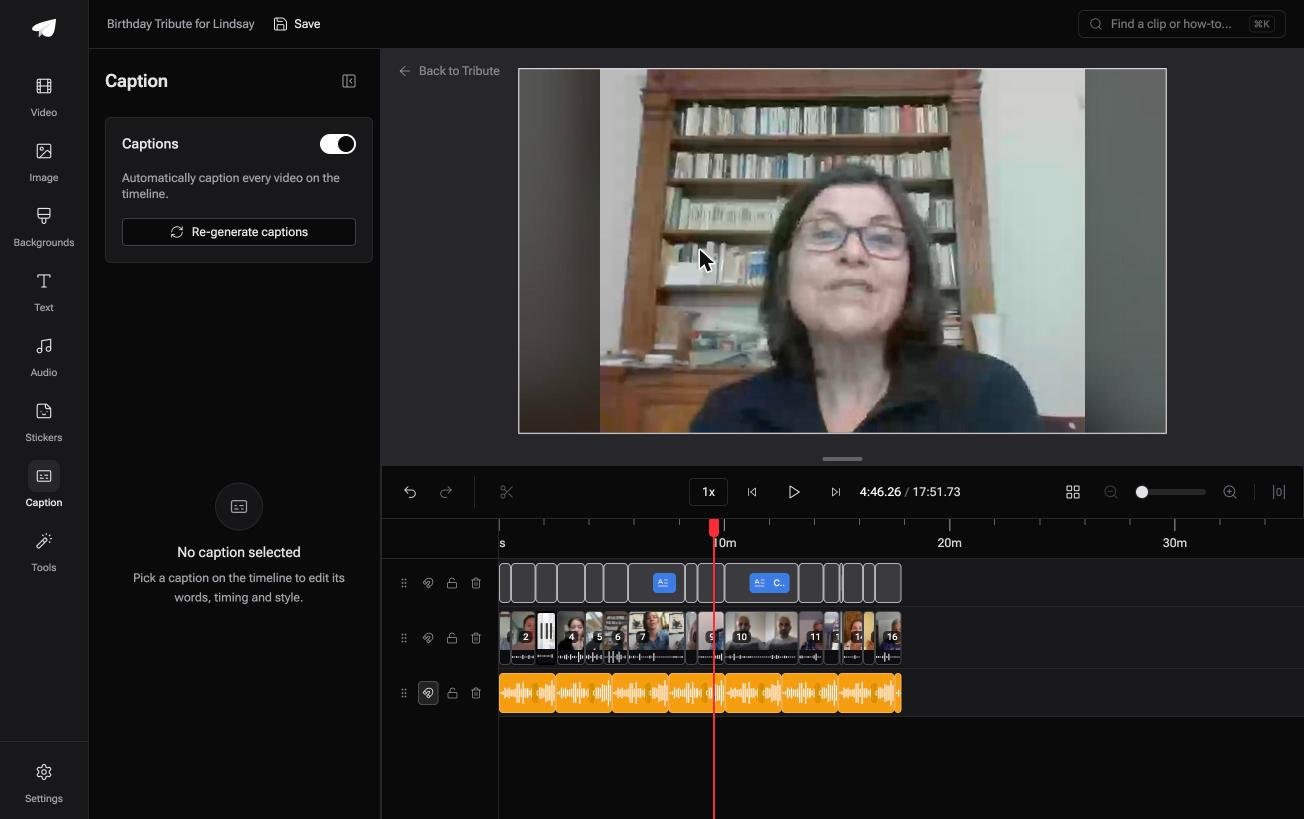
It exists for one situation: several people each recorded something for one person. The Tribute video editor is a browser-based group video editor: contributors record clips on their phones and Tribute assembles them on a timeline with the music balanced under the voices.
Clips arrive in order, music sits at 25% under video and 75% under photos by default, and one switch captions every clip on the timeline.
- Look for: the Reorder media window, where every clip is numbered and can be moved to front, moved to back or sent to a position.
- Price: paid, as part of a Tribute; there is no standalone editor to sign up for.
Best for: The one job no browser tool on this page does: gathering twenty clips that sit on twenty other phones.
Why it works: Compared with collecting files over text and email yourself, the gathering and the ordering are finished before the editing starts.
That case is covered in how a group video maker handles thirty phones and in our guide to making a video montage.
What does a no-cost plan hold back?
Five things, and tools pick two or three of them rather than all five:
- A watermark. Kapwing and Clideo both stamp exports. VEED lists "No watermark" as a paid feature, with plans from $147 per user a year.
- Resolution. 720p is the common ceiling, including at Kapwing and Clideo.
- Length. Kapwing caps a no-cost export at four minutes and 30 minutes of export time a month.
- Upload size. Clideo stops at 500 MB, which one 4K clip can fill.
- Storage. Clideo keeps files for 14 days, then they are gone.
Read those in pairs. A 720p cap is harmless on a clip destined for a phone screen and painful on a video someone will watch on a television. A four minute ceiling is irrelevant for a reel and fatal for a retirement video.
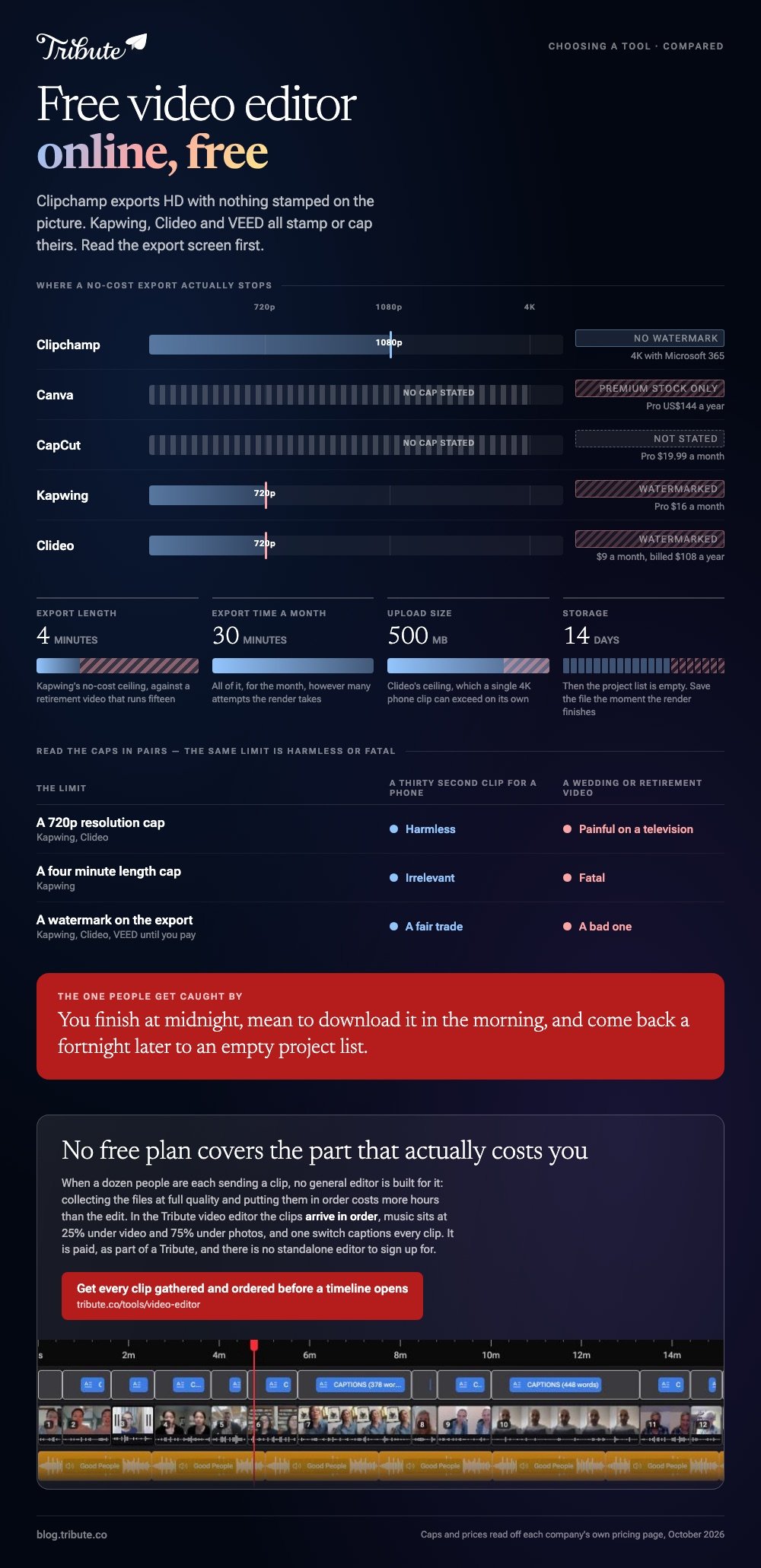
The storage window is the one people get caught by. You finish at midnight, mean to download it in the morning, and come back a fortnight later to an empty project list. Save the file to your own machine the moment the render finishes.

Is a phone app a better free tool than a browser?
Often, yes. Pew Research Center reports that 91% of US adults own a smartphone, and that 16% are smartphone-only internet users with no home broadband at all, according to its mobile fact sheet.
For that group, uploading 2 GB of footage to a browser tool is the slowest route to a finished video.
iMovie on an iPhone and CapCut on Android both do the join, the trim and the music at no cost and with no upload.
The browser route wins when you are on a work laptop, a Chromebook or someone else's machine, and when the clips are already sitting on that machine.
There is a second reason to stay on the phone. The clips are already there at full quality, so nothing is compressed by a messaging app on the way in, and nothing waits on an upload bar.
For a side by side view of the browser tools without the price filter, see our roundup of online editors, and for the no-cost options across phone and desktop, the best free video editors for people who are not editors.
Where should the finished video go?
Upload it rather than attaching it, because messaging apps compress video hard.
YouTube set to unlisted is the safe default for a family video: Pew's social media fact sheet puts YouTube use at 85% of US adults aged 50 to 64 and 65% of those 65 and over, so the person opening your link seldom needs to learn anything.
Keep the source clips until the recipient has watched it. Compared with a photo, a video that lost quality in a render cannot be rescued from the output file.

Frequently Asked Questions
Which free online video editor has no watermark?
Clipchamp exports HD with nothing added, and Canva marks only premium stock you did not upload. Kapwing and Clideo both stamp their no-cost exports, and VEED sells watermark removal as part of a paid plan.
Can I use a free video editor without signing up?
Single-task sites sometimes let you finish one job before asking for an account at the download step. Anything with a timeline needs an account, because the project has to be stored between sessions.
What is the catch with a free plan?
It is one of five things: a watermark, a resolution cap, a length cap, an upload size cap or a storage window. Find out which before you start, because every one of them bites at the export step.
Is 1080p enough for a family video?
Yes for a phone, a laptop and most televisions. Shoot in 4K if the camera offers it, then export at the highest setting your tool allows, because the export sets the ceiling and the source cannot raise it afterwards.
Can I edit a long video in a browser?
Clipchamp can, since it works on your own machine. Server-side tools are the ones that struggle, because a long video has to be uploaded before anything happens and downloaded again afterwards.
Do no-cost editors sell my footage?
Read the terms rather than guessing. The practical risk is simpler than ownership: most server-side tools delete your files on a timer, and Clideo states 14 days on its lowest tier.
What should I use if a dozen people are sending clips?
No general editor is built for that. Collecting the files at full quality and putting them in order will cost more hours than the edit, which is the one case where a group video tool earns its price.
👉 Get every clip gathered, ordered and balanced before a timeline opens if you would pay to skip the collecting rather than the editing, which no free plan covers.
