
How to Merge Videos on iPhone
To merge videos on iPhone, use iMovie: tap Start New Project, tap Movie, select your clips, then tap Create Movie and export one file. The Photos app cannot do it. Photos trims, rotates and changes speed one clip at a time, with no control that joins two clips.

Can the Photos app merge videos on iPhone?
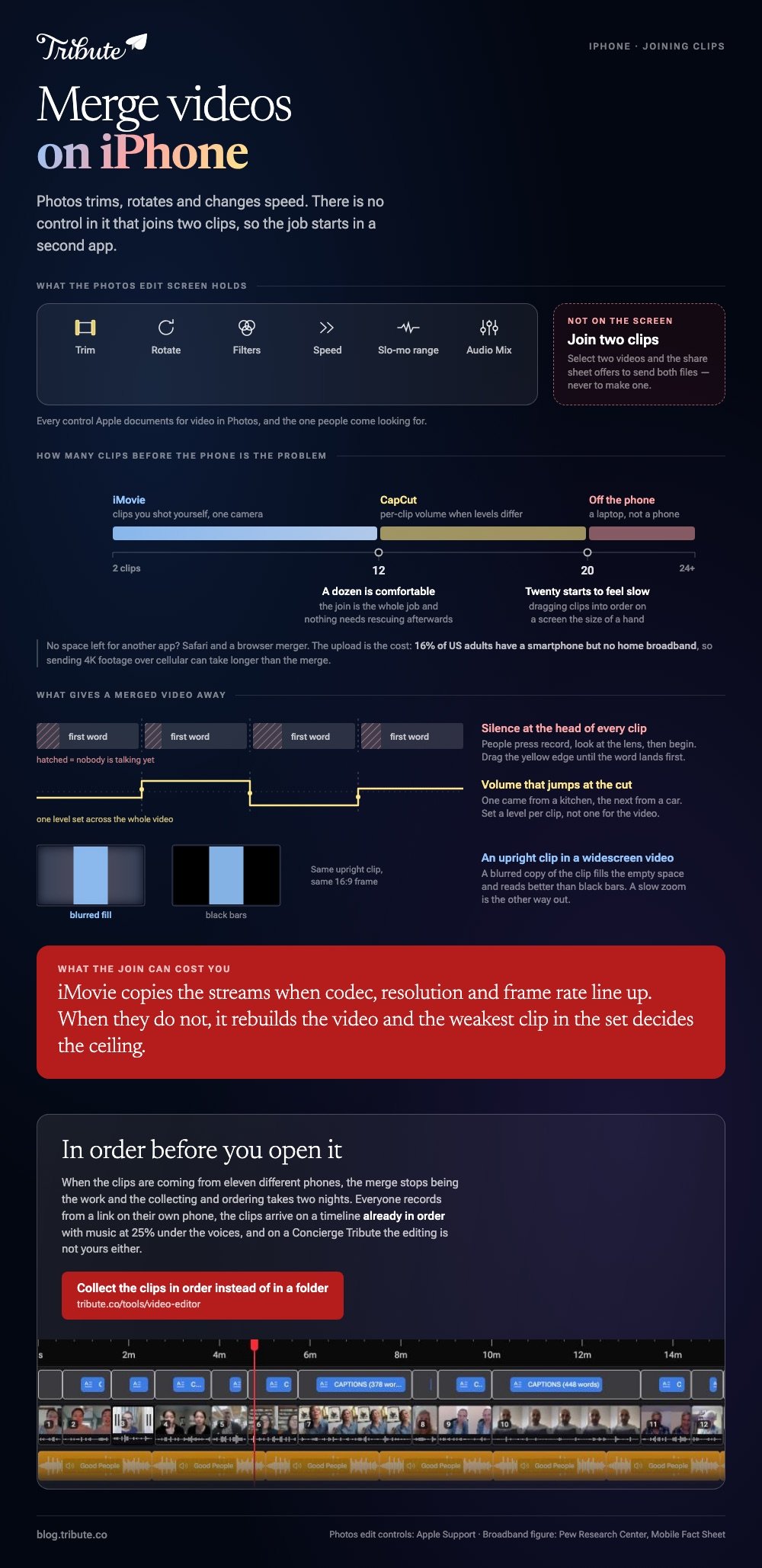
No, and this is where most people lose twenty minutes. Apple's own guide to editing videos on iPhone lists what Photos offers: trim with the timeline sliders, rotate, filters, playback speed, the slo-mo range, and Audio Mix on recent models.
Joining two clips is absent from that list.
Select two videos in Photos and the share sheet will offer to send both files. It will not offer to make one. Every blog post that tells you otherwise is describing an app that does not exist.
Which app should you use to merge videos on iPhone?
Three answers cover almost everyone, and a fourth covers the case where the clips are not yours. All four start from files already in the camera roll.
iMovie, the free app from Apple
- Open iMovie, tap Start New Project, then tap Movie.
- On the Moments screen, tap each clip you want. A blue checkmark appears on your picks, and tapping Media at the top switches to albums.
- Tap Create Movie. The clips land on a timeline in the order you tapped them.
- Drag a clip sideways to move it, or tap it and drag a yellow edge in to cut the silence at the start.
- Tap a clip, tap the Audio button in the inspector, and drag the volume slider for that clip alone.
- Tap Done, tap the Share button, tap Share Video, and choose a resolution before you save, then Save Video to put it in your photo library.
Apple documents the project steps in the iMovie for iPhone guide. If iMovie is not on the phone, it is a download from the App Store at no cost.
Best for: Two to ten clips you shot yourself, joined on the phone that shot them.
Why it works: The clips share a camera and a microphone, so the join is the whole job and nothing needs rescuing afterwards.
CapCut, when you want more control
- Tap New project and select every clip you want.
- Tap Add. The clips arrive on a timeline in selection order.
- Press and hold a clip, then drag it into a new position.
- Tap a clip, tap Volume, and set a level for that clip on its own.
- Tap Export at the top right, set resolution and frame rate, then save or share.
Compared to iMovie, CapCut gives you a deeper timeline, automatic captions and more audio control, at the cost of an account and an export screen with a paid tier on it. Check that screen before you render.
Best for: Clips from several phones where the sound levels do not match.
Why it works: Per clip volume and captions are the two controls a mixed set of recordings needs most.

A browser merger in Safari
You can join videos on iPhone without installing anything. Open Clideo or Adobe Express in Safari, choose the clips from the photo library, drag the thumbnails into order, then export and download the result back to the camera roll.
The catch is the upload. A minute of 4K footage from a recent iPhone is a large file, and 16% of US adults have a smartphone but no home broadband, per Pew Research Center, so a cellular upload can take longer than the merge.
Read the export screen for watermark and resolution caps before you start.
Best for: An iPhone with no storage left for another app.
Why it works: The rendering happens on a server, so an older iPhone finishes as fast as a new one.
How do you fix the clips once you combine videos on iPhone?
Joining is the easy half. Three things give away a merged video, and each takes under a minute in iMovie.
Silence at the head of every clip. People press record, look at the lens, then begin. Drag the yellow edge in until the first word lands straight away.
Volume that jumps at the cut. One clip came from a kitchen, the next from a car. Set a level per clip rather than one level for the video.
Upright clips in a widescreen video. A vertical phone video sits in the middle of a 16:9 frame with empty space on each side.
A blurred copy of the clip in that space reads better than black bars, and iMovie's Ken Burns style zoom is the other way out.

What if the clips came from other people's phones?
When an iPhone has to join videos from eleven relatives, the problem stops being the merge. The files arrive through text, email and WhatsApp at different sizes, two of them upside down, and three people send theirs the night before.
Getting them collected and ordered is the part that takes two nights.
The Tribute video editor
The Tribute video editor is a browser-based group video editor: contributors record clips on their phones and Tribute assembles them on a timeline with the music balanced under the voices.
Everyone records on their own phone from a link, the clips arrive in order, and music sits at 25% under video so the speech stays in front.
It runs in a browser rather than on the phone, and it lives inside a paid Tribute rather than standing alone. On a Concierge Tribute the merging is not yours either: Tribute's own editors build the video and send it back.
Best for: Clips that never touched your iPhone, because everyone recorded on a phone of their own.
Why it works: Unlike a folder of attachments, the collecting, the ordering and the audio balance are done before you open the editor.

More on that: one video from thirty different phones, and the wider job in making a video montage.
Does merging on an iPhone lower the quality?
Not when the clips match. iMovie copies the streams where codec, resolution and frame rate line up, so the output looks like the source. Mismatched clips force a rebuild, and the weakest file in the set decides the ceiling.
Mismatch is the normal case rather than the exception. With 91% of US adults owning a smartphone, per the Pew Research Center mobile fact sheet, a family video is a video shot on three generations of camera.
Export at the highest resolution offered and watch the first and last clip before you share.
If the phone is not where you want to do this, the same job in a browser is covered in merging videos online, and the cross platform version in merging videos into one file.

Frequently Asked Questions
What is the best app to combine videos on iPhone?
iMovie for most people, because it is already there and adds nothing to the image. CapCut when you need captions or separate volume per clip. A browser tool when the phone has no space left.
How do I join videos on iPhone without a watermark?
Start with iMovie, which adds nothing to the picture. Watermarks come from browser tools and from some apps on a free tier, and the export screen says which before you render rather than after.
Can I merge videos on iPhone without an app?
Only through a browser. Safari can open a merging tool, upload your clips and download the finished file, which avoids an install but trades it for upload time. Nothing built into iOS joins two clips.
How many clips can iMovie handle on a phone?
A dozen is comfortable and twenty starts to feel slow, and the bottleneck is dragging clips into order on a screen the size of a hand. Beyond that, move to a laptop or to a tool that orders the clips for you.
Why is my merged video sideways?
One clip was recorded in a different orientation, and the project frame follows the first clip you added. Rotate the odd clip with a two finger twist on the viewer, or rebuild the project starting from a clip in the orientation you want.
Can I add music when I merge videos on iPhone?
Yes. In iMovie, tap the Add Media button, tap Audio, then pick from Soundtracks or My Music and tap Add Audio. iMovie loops a soundtrack to fit the length of the video.
Which iPhone editor should I use for everything else?
That depends on whether you want captions, speed ramps or a second audio track, and we compare the options in our guide to iPhone video editors. For joining alone, iMovie is enough.
👉 Merge the clips in a browser instead of on the phone if your camera roll is filling up with other people's footage, and nothing has to download first.
