
YouTube Cut Video and Download: Which Routes Hand You a File
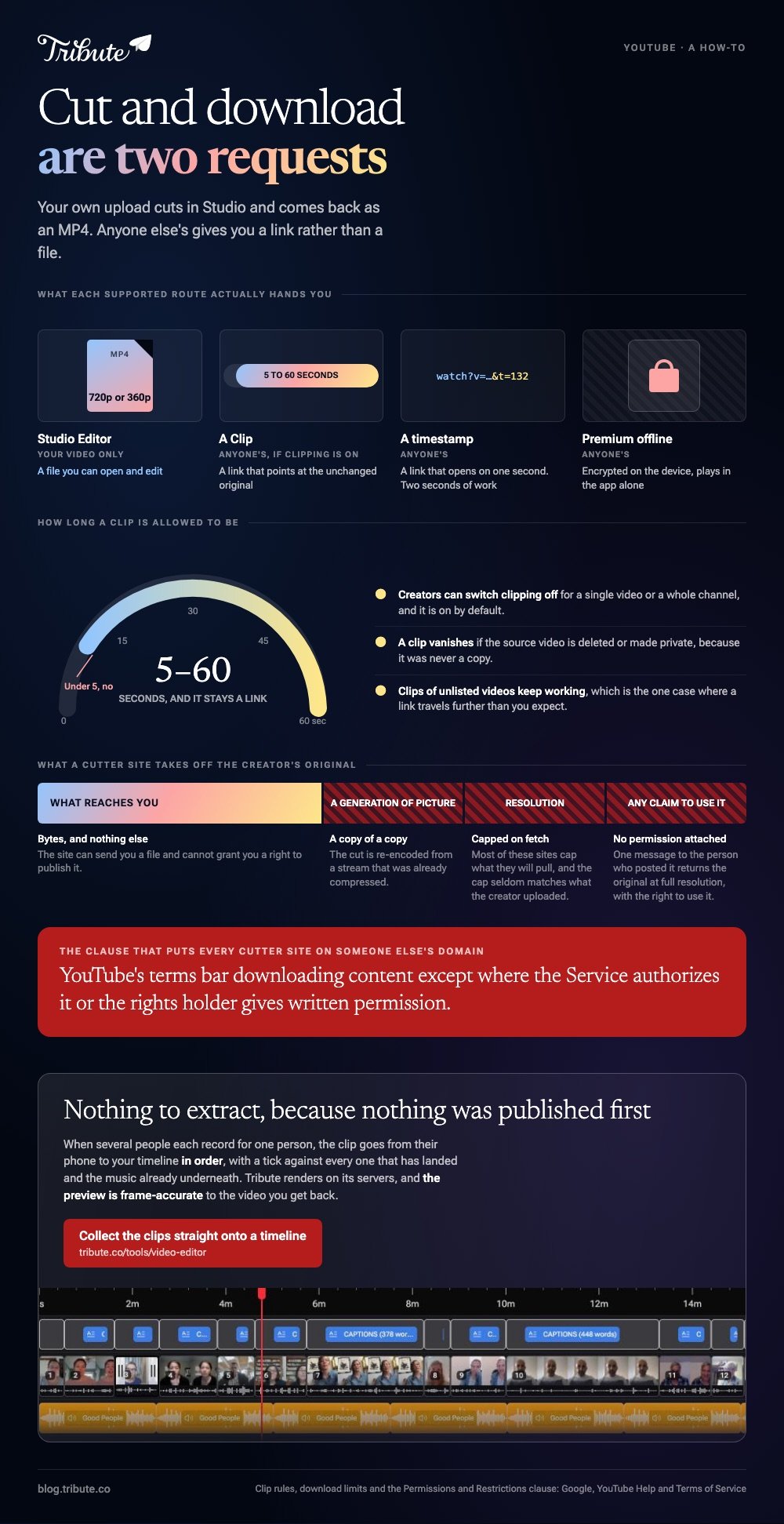
YouTube cut video and download is two requests, and YouTube answers them in different places. Your own upload cuts in Studio and comes back as an MP4. Anyone else's gives you a link rather than a file.

| Route | What it hands you | Whose video |
|---|---|---|
| Studio Editor | An MP4 at 720p or 360p | Yours |
| Clip | A 5 to 60 second link | Anyone's, if clipping is on |
| Timestamp | A link that opens at a second | Anyone's |
| Premium offline | An encrypted copy inside the app | Anyone's |
What does a YouTube cut video and download site do?
It fetches the stream on a server, cuts it to your two timestamps and sends back a file.
The YouTube MP4 download time cut fields are the whole interface: a URL at the top, a start, an end, a format menu. Queries like youtube video cutter odownloader and mp4 youtube downloader cut land on the same shape of page.
A YouTube video cutter and download MP4 button sitting side by side is the entire promise, and every YouTube downloader cut video option works through the same fetch.
Why none of them is inside YouTube
YouTube's Permissions and Restrictions section bars accessing, reproducing, downloading or distributing content except as the Service authorizes, or with written permission from YouTube and the rights holder.
That clause is why the feature lives on somebody else's domain. It is also why the file it returns carries no license: the site can send you bytes and cannot grant you a right to publish them.
Which YouTube cut video and download route does YouTube support?
Four, and each gives you a different kind of thing.
1. Your own upload, cut and downloaded
Studio has both halves. Content, then the video, then Editor, then Trim & cut to remove a section; then back in Content, the three dot Menu and Download.
The full steps and limits are in trimming a YouTube video and downloading it, including the 720p ceiling on what comes back.
2. A Clip
Clips run between 5 and 60 seconds and travel as a link.
YouTube sets the rules: creators can switch clipping off, a clip vanishes if the source video is deleted or made private, and clips of unlisted videos keep working.
3. A timestamped link
Right-click the player and choose Copy video URL at current time. For showing somebody a moment, this beats every tool on this page and takes two seconds.
The same parameter works by hand. Add a question mark, the letter t and a number of seconds to the end of a watch URL and the player opens there.
4. Premium offline
Downloads are stored encrypted on the device, outside your gallery, and YouTube says they can only be watched in the YouTube app. There is no MP4 to open or edit.

What do you give up when a cutter site hands you an MP4?
Three things, and only one of them is about quality.
- A generation of picture. The cut is re-encoded from an already compressed stream, so the file is a copy of a copy.
- Resolution. Most of these sites cap what they will fetch, and the cap seldom matches the resolution the creator uploaded.
- Any claim to use it. Compared to a file the creator sends you, a fetched copy comes with no permission attached to it.
The ad layers on those pages are their own argument. You are handing a URL to a stranger's server and taking back an executable-adjacent download, which is a poor trade for ten seconds of footage.
What if you need the segment for a montage?
Then the honest route is to get the source, not the stream.
People cut clips out of YouTube because the footage they want is sitting in somebody else's upload: a wedding speech, a match, a recital a cousin posted four years ago. The person who posted it has the original.
Ask them. One message beats every workaround here, and the file they send is full resolution with permission attached.
If the footage is a family event rather than a public channel, the person holding it is a relative, and the request costs nothing. Compared to a fetched copy, an emailed original also arrives with its own audio intact rather than re-encoded.
Where the clip is already yours, the shaping side of the job is in cropping a downloaded YouTube video.
What if the footage has to come from twenty people?
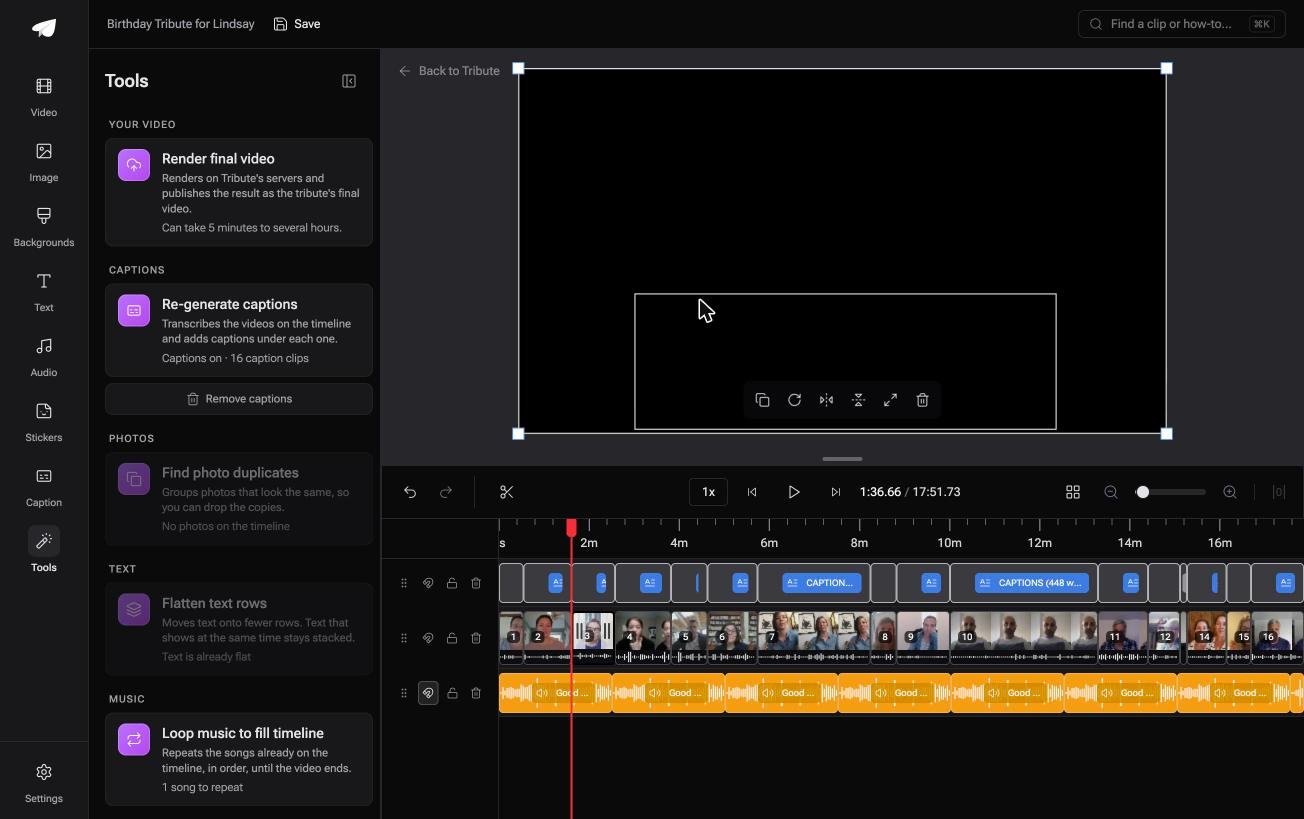
The Tribute video editor is a browser-based group video editor: contributors record clips on their phones and Tribute assembles them on a timeline with the music balanced under the voices.
Ours, and the last section here.
- Clips arrive on the timeline in order, with a tick against the ones already placed
- A Reorder media window numbers every clip and moves one to the front, the back or a chosen position
- Tools panel bulk actions including Render final video, Re-generate captions and Find photo duplicates
- Tribute renders on its servers, and the preview is frame-accurate to the video you get back
Best for: A video assembled from what people sent you rather than from what you found online.
Why it works: Unlike a file fetched from a third party, every clip arrives at full quality with the right to use it attached.
Who does the cutting instead of you?
This whole page assumes the moment you want is locked inside a video somebody else published.
Every route above is a way of getting at footage you did not shoot and do not hold. There is one way of making a video where that problem is never created.
The case: you collect, you do not extract
You are in it when several people each record something for one person.
A fiftieth birthday. A manager leaving after twenty years. A memorial where the people who should speak are in four time zones. Each person records once, straight to you.

Why nothing needs downloading
The clip goes from their phone to your timeline, in order, with the music already underneath.
No URL is pasted and no server is asked. The Tribute video editor shows a tick against every clip that has landed, so the collecting is visible rather than guessed at.
What you do not have to extract
- Nothing from anyone's upload. The clip goes from their phone to your timeline, in order.
- No trimming pass on a Concierge Tribute: Eve, the assistant inside the editor, cuts the silence off every clip, or a shorter version of the whole video, from a prompt.
- Nothing, on Concierge: Tribute's editors build the video and you share the link.
Where the finished video lands
As a video you can play anywhere, or as a video book: a hardcover case with a screen inside that plays when you open it.
The group version of the job is in making a video tribute and the wider one in building a video montage.

When this is the wrong answer: the footage you need already exists on a public channel. Then ask the creator for the source file, or settle for a Clip and a timestamp.
Frequently Asked Questions
Can I cut a section out of a YouTube video I did not upload?
Not in a way that changes the video. You can make a clip of 5 to 60 seconds or share a timestamped link, and both point at the unchanged original.
Does cutting in Studio reset the view count?
No. The URL, the views and the comments stay where they are, which is the whole reason to cut in place rather than re-upload.
What resolution does the Studio download give me?
MP4 at 720p or 360p, depending on the size of the original. Keep the master file if you need anything higher.
Are downloader sites illegal?
Using one breaches YouTube's Terms of Service. Whether it also breaches copyright depends on the video, the use and where you live.
Can I turn a Premium download into a file?
No. Offline copies are encrypted on the device and play inside the YouTube app alone.
How do I stop people clipping my videos?
Clipping is on by default and can be switched off per video or per channel in Studio.
What is the quickest way to show somebody one moment?
A timestamped link. It takes two seconds, needs no tool, and it opens on the exact second you were watching.
👉 Collect the clips straight onto a timeline if the video is built from messages rather than somebody else's upload, and there is nothing to cut out of one.
