
Trim YouTube Video and Download: What Is Allowed and What Works
To trim YouTube video and download the result, the answer turns on whose video it is. Your own upload trims inside YouTube Studio and comes back as an MP4. Someone else's does not.

| Whose video | What you can get | Where |
|---|---|---|
| Yours | A trimmed MP4 at 720p or 360p | YouTube Studio |
| Someone else's | A link that starts and stops where you want | Clip, or a timestamp |
| Either, offline | An encrypted copy inside the app | Premium downloads |
| Licensed to you | Whatever the license grants | Ask the creator |
What is a trim YouTube video and download tool?
One text box, two time fields and a format menu.
You paste a URL, type a start and an end, pick MP4, and a server somewhere fetches the stream, cuts it and hands you a file. The same sites surface for a YouTube MP4 downloader trim search and for a YouTube video downloader trimmer search.
Switch the output box from video to audio and the YouTube to MP3 cut trim download version of the page is the same form with a different label.
People look for a way to trim and download a YouTube video online because the alternative looks like work. The catch is not technical.
What YouTube's terms say about it
The Terms of Service are short on this point.
YouTube's Permissions and Restrictions section bars you from accessing, reproducing, downloading or distributing content except as the Service itself authorizes, or with written permission from YouTube and the rights holder.
That is the whole reason a YouTube video downloader and trimmer lives on a third-party domain rather than inside YouTube. Compared to the routes below, it also gives you no license to use what it hands over.

Can you trim YouTube video and download your own upload?
Yes, and it is two separate jobs in the same place.
Step one: trim it
- Open YouTube Studio and select Content in the left panel.
- Click the video, then Editor in the left menu.
- Select Trim & cut and drag the sides of the blue box over the part you are keeping, or type the start and end times into the boxes.
- Click Preview, then Save.
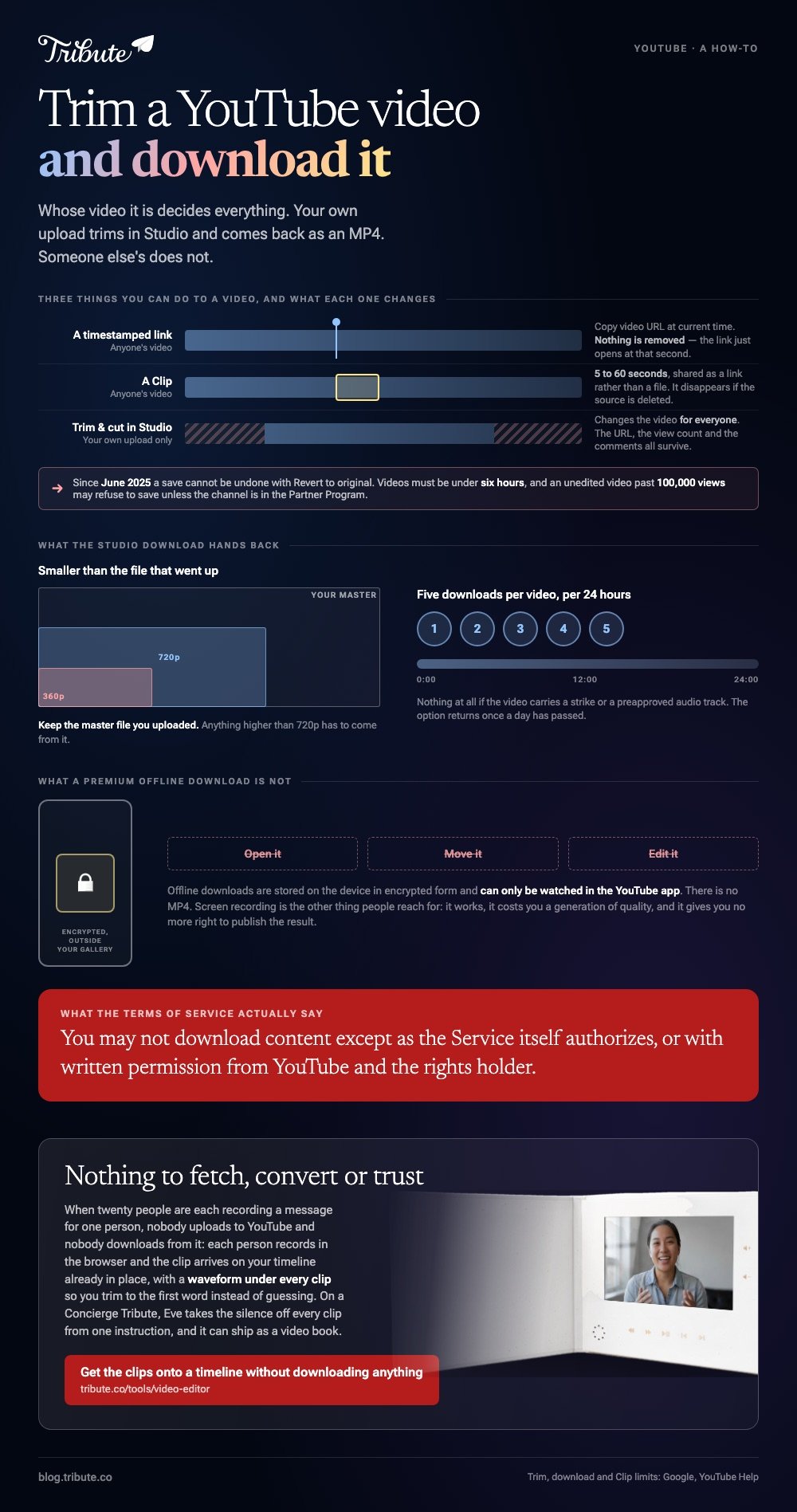
YouTube documents three limits here. The video has to be shorter than six hours, and an unedited video past 100,000 views may refuse to save unless the channel is in the Partner Program.
Since June 2025, a save cannot be undone with Revert to original. Check the preview before you commit.
The URL, view count and comments all survive. Nothing is re-uploaded.
Step two: download it
- Back in Content, hover the video and open the three dot Menu.
- Choose Download.
YouTube's own page sets the shape of what you get: an MP4 at 720p or 360p depending on the source, five downloads per video per 24 hours, and nothing at all if the video carries a strike or a preapproved audio track.
That 720p ceiling is the part people miss. Keep the master file you uploaded, because the copy coming back is smaller than the one that went up.
How do you take a section of someone else's video without a file?
Three ways, and all three are built into YouTube.
A timestamped link
Right-click the player and choose Copy video URL at current time. The link opens at that second, which covers most of what people want a cut for.
A Clip
Clips run between 5 and 60 seconds and share as a link rather than a file. Creators can switch clipping off, and a clip disappears if the source video is deleted or set to private.
Permission
Ask. A creator who wants their work in your video will send the file, and that one message replaces every workaround on this page.
For the pixel side of the same question, see cropping a downloaded YouTube video. The cut-a-section variant is covered in cutting and downloading from YouTube.
Do Premium downloads give you a file?
No, and that surprises people who pay for them.
Offline downloads are stored on the device in encrypted form, outside your gallery, and YouTube states they can only be watched in the YouTube app. There is no MP4 to open, move or edit.
Screen recording is the other thing people reach for. It works, it costs you a generation of quality, and it gives you no more right to publish the result than a downloader does.
Once you have a legitimate clip, the editing is ordinary: trimming a video works the same whatever it came from.
What if the clip you want is one of twenty people's?
The Tribute video editor is a browser-based group video editor: contributors record clips on their phones and Tribute assembles them on a timeline with the music balanced under the voices.
Ours, and the last section on this page.
- Clips arrive on the timeline in order, with a tick against the ones already placed
- A waveform under every clip, so you can trim to the first word instead of guessing
- A Reorder media window that numbers every clip and moves one to the front, the back or a position
- Autosave and restorable version history, so a trim you regret is recoverable

Best for: Gathering clips from twenty people who are not in the same city and never will be.
Why it works: Unlike a downloader, nothing has to be fetched, converted or trusted before you can start cutting.
What if the footage came to you instead?
All of the work above is work you are doing to somebody else's upload.
What you want is a piece of a video sitting on a server you do not control, and every route on this page works around that one fact. It disappears in one situation.
The case: the footage was recorded for you
You are in it when several people each record something for one person.
A fiftieth wedding anniversary. A coach retiring after thirty seasons. A leaving video for someone whose colleagues are in six cities. Nobody uploads to YouTube and nobody downloads from it.

Why the download step never happens
Each person records in the browser, and the clip arrives on your timeline already in place.
There is no URL to paste and no server to ask. The Tribute video editor puts the cut where it belongs, on the timeline, with the waveform showing where the speech starts.
What you do not have to download
- Nothing from a server. Each clip arrives on the timeline from the phone that recorded it.
- No dead air by hand on a Concierge Tribute: Eve, the assistant inside the editor, takes the silence off every clip from one instruction.
- No sitting down to it on Concierge, where Tribute's editors cut it and you choose where it ends up.
It does not have to be a file at all
As a video you can play on any screen, or as a video book: a hardcover case with a screen inside that plays when you open it.
The full shape of the job is in building a video montage.

When this is the wrong answer: the clip you need is a public video somebody else made. Then ask the creator, or use a Clip and a timestamp, and keep your own montage built from footage you hold.
Frequently Asked Questions
Is downloading a YouTube video illegal?
It is a breach of YouTube's Terms of Service, which bar downloading except where the Service authorizes it. Whether it also breaches copyright depends on the video and on where you live.
Can I download a video I made but deleted from YouTube?
No. The download option disappears once a video is removed, so keep the master file on your own machine.
What quality does the Studio download give me?
MP4 at 720p or 360p, depending on the size of the original. Anything higher has to come from the file you uploaded.
How many times can I download the same video?
Five times in any 24 hour window. The option returns once a day has passed.
Can I trim a YouTube Short the same way?
The Studio editor covers videos shorter than six hours, Shorts included. The download limits are the same.
Does trimming in Studio reset my views?
No. The URL, the view count and the comments stay where they are, which is the main reason to trim in place instead of re-uploading.
What is the difference between a Clip and a trim?
A trim changes the video for everyone. A clip is a 5 to 60 second window onto the unchanged original, shared as a link.
👉 Get the clips onto a timeline without downloading anything if twenty people are each recording a message, and the trimming is the only job left.
