
Download Crop YouTube Video: The Order That Works
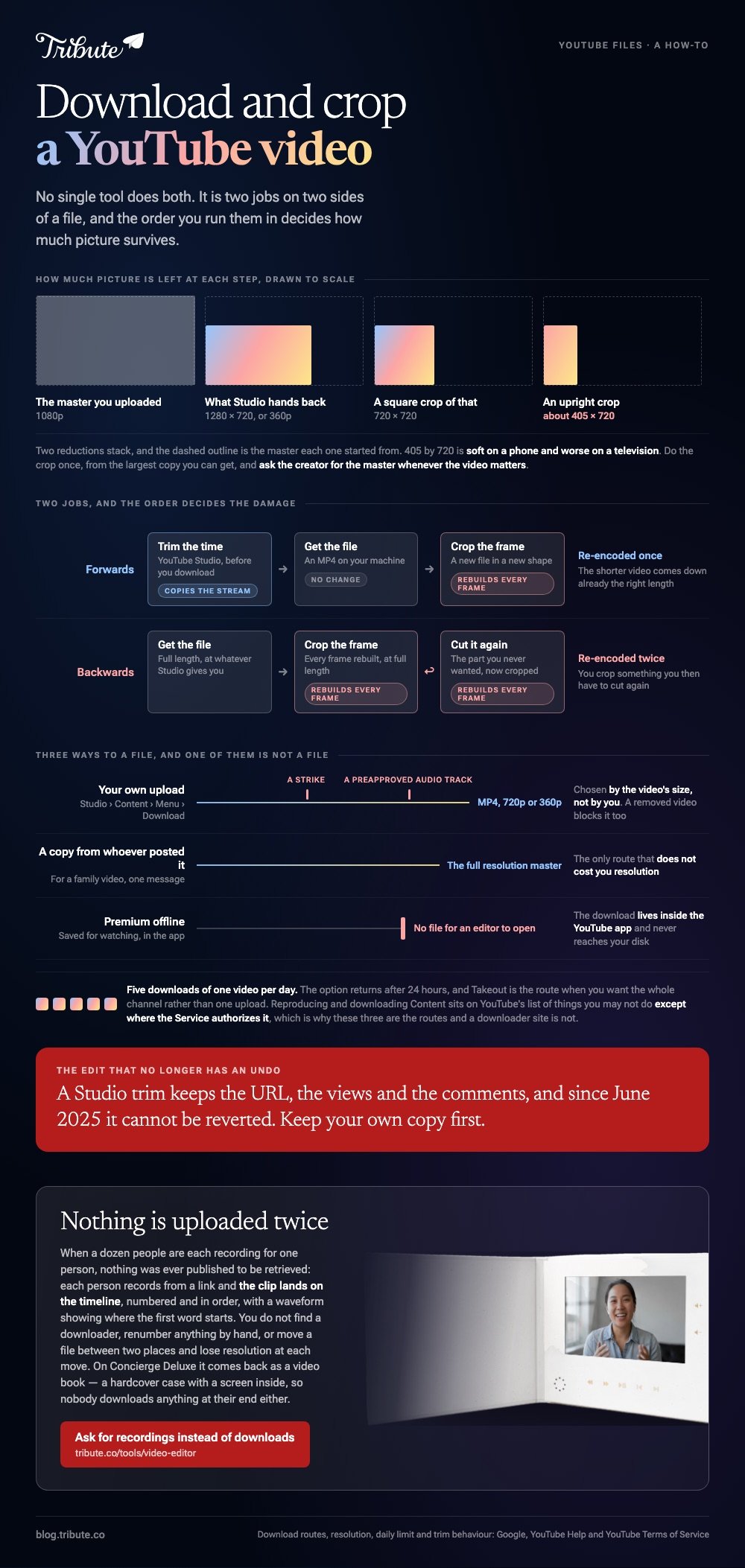
No single tool will download crop YouTube video files for you. It is two jobs: get a copy, which YouTube's terms allow where the service offers it, then reshape that copy in an editor. Your own uploads come out of Studio as MP4.

Can you download crop YouTube video clips in one place?
No, and the sites that promise it are the ones to avoid.
YouTube has no crop control at all, and no editor can reach inside a page to reshape a stream. Those are two tools on two sides of a file.
| Step | Where it happens | What you end up with |
|---|---|---|
| Trim the time | YouTube Studio, before download | A shorter published video |
| Get the file | Studio, or from the creator | An MP4 on your machine |
| Crop the frame | Clipchamp, iMovie or similar | A new file in a new shape |
Run them in that order and you re-encode once. Run them backward and you crop something you then have to cut again.
How do you get the file inside YouTube's terms?
Three routes, and a third-party downloader is not one of them.
YouTube's terms list reproducing and downloading Content among the things you are not allowed to do, except where the Service authorizes it or YouTube gives written permission.
- Your own upload. In Studio, open Content, select the video, then Menu and Download.
- A copy from whoever posted it. For a family video, this is one message and it gets you the full resolution master.
- Premium offline. The download lives inside the YouTube app for watching, so there is no file for an editor to open.
Google sets out the Studio route in detail. You get an MP4 at 720p or 360p depending on the video's size, up to five downloads of one video per day, and nothing at all if it carries a strike or uses a preapproved audio track.
Takeout pulls a whole channel at once when you want every upload rather than one of them.
Where does the download crop YouTube video job go wrong?
On resolution, almost every time.
Two reductions stack. Studio hands back 720p rather than the 1080p you uploaded, and then a crop throws away part of what is left.
- A 720p file is 1280x720 pixels.
- A square crop of it keeps 720x720.
- An upright crop keeps about 405x720, which is soft on a phone and worse on a television.
Unlike a trim, which copies the stream, a crop rebuilds every frame. Do it once, from the largest copy you can get, and ask the creator for the master whenever the video matters.

How do you crop the copy once you have it?
In a browser, or in the editor already on the machine.
Both routes crop and download the video again as a new file, and neither asks for a card to try it.
Clipchamp
- Open My media, add the MP4, and drag it onto the timeline.
- Click the 16:9 button and choose the output shape. Presets run 16:9, 9:16, 1:1, 4:3 and 4:5.
- Select the clip, then click crop on the floating toolbar above the preview.
- Drag the edge or corner handles and click done.
- Export at a resolution that matches the shape you picked.
Pick this when: The finished video is going somewhere that is not 16:9.
iMovie
- Drop the MP4 into a project and select the clip on the timeline.
- Click the Cropping button above the viewer.
- Click Crop to Fill, drag the frame, and click Apply.
- Click Fit to undo it, or Reset to clear crop and rotation together.
Best when: The output is staying wide and the Mac is already in front of you.
Compared with iMovie, where the crop frame is locked to 16:9, a browser editor lets you choose the rectangle you are cropping into. More options in cropping video online.
Should you trim before you crop?
Yes, and trim it before you download if the video is yours.
Studio's Editor cuts time on a published video without changing its URL or its view count, so the copy you download is already the right length.
- In Studio, open Content, click the video, then Editor.
- Select Trim & cut and drag the blue box around the part you keep.
- For a middle section, use New Cut and drag the red box over what goes.
- Click Save, then download the trimmed version.
Google's trim page carries three limits: videos under six hours, no saving on an unedited video past 100,000 views except a face blur, and no revert to original since June 2025.
Related routes in trimming and downloading a YouTube video and cutting a section out before you save it.
What if the source is a dozen phone clips and not a link?
Then there is no download step to get right, and no frame to reshape.
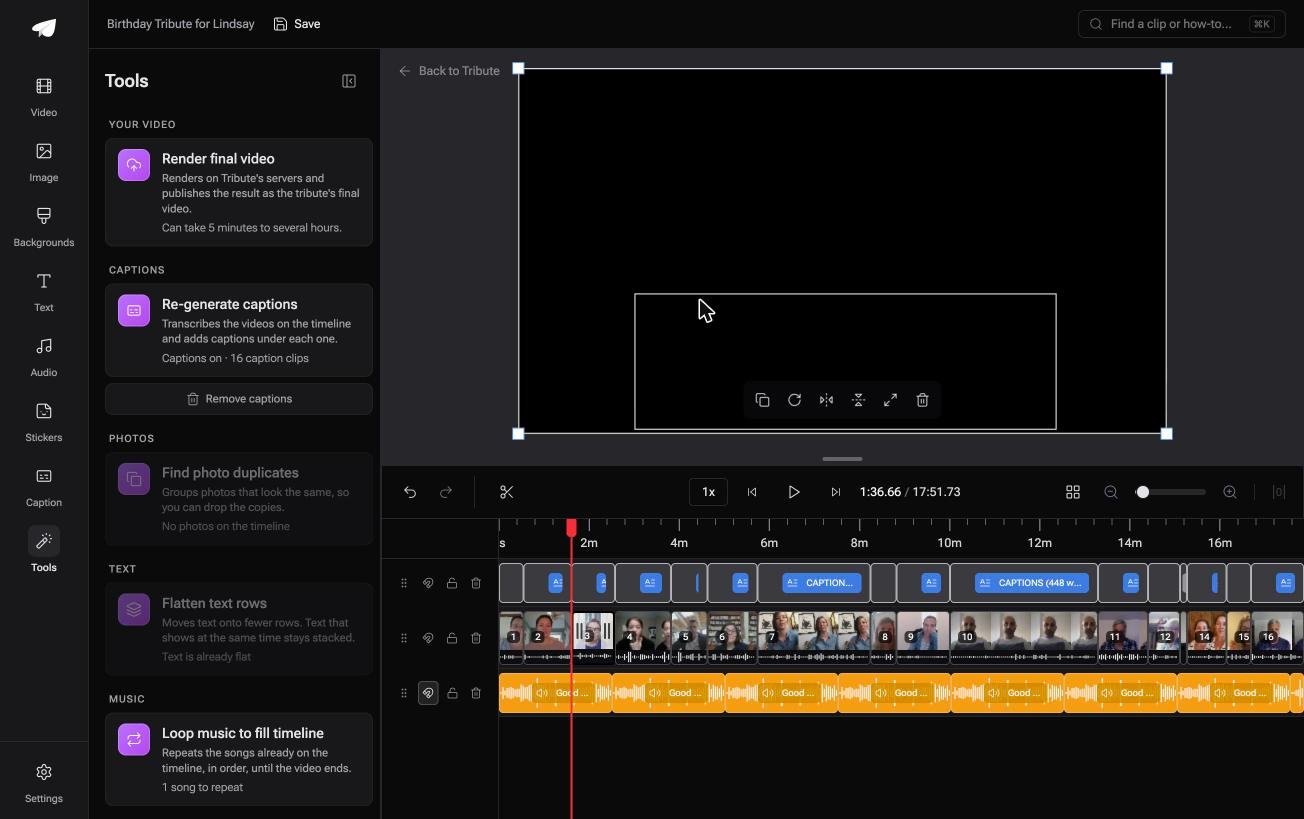
The Tribute video editor is a browser-based group video editor: contributors record clips on their phones and Tribute assembles them on a timeline with the music balanced under the voices. It is ours, and it is the last thing on this page.
- Clips arrive in order, each with a tick showing it is already on the timeline
- Reorder media numbers every clip and offers select all, move to front, move to back and move to position
- Blurred edges fill the frame behind upright phone footage, on by default
- Tribute renders the final video on its servers, and the Tools panel gives the estimate

Best for: Material you would otherwise pull down, crop and put back up before anyone sees it.
Why it works: Nothing is uploaded twice, because the clips land where the edit happens.
What if there is nothing to download in the first place?
Each instruction above moves one file between two places.
Out of YouTube, into an editor, back out again. Each move costs resolution, and the first move is the one with terms attached to it.
The case: the recordings are coming to you
You are in it when several people each record something for one person.
A grandmother turning eighty. A colleague leaving after fifteen years. A memorial where the people who should speak are in four time zones.
Nobody posted anything to YouTube. Everyone recorded a message, and the footage has never been published to be retrieved.
Why the download question never arrives
Because the clips are uploaded to the timeline, not to a platform you then take them back out of.
They land in order, already placed. That is how the Tribute video editor handles collection: not a download to manage, but an arrival.
What you do not have to do
- Find a downloader. Each person records from a link and the clip lands on the timeline.
- Number anything by hand. The clips arrive numbered, with bulk moves in one window.
- Hunt the silence. A waveform under each clip shows where the first word starts.
- Do the edit, on a Concierge Tribute. Tribute's editors cut it, and Concierge Deluxe returns it as a video book.
It does not have to stay a file
The finished video can arrive as a video book: a hardcover case with a screen inside that plays when you open it.
No link to send, no file to save, nothing anyone has to download at their end.

When this is the wrong answer: you want a square cut of a video somebody posted. Then get permission, get the file, and crop it with the steps above.
The editor is not a downloader: it lives inside a paid Tribute. For an edit that mixes clips and photographs, see the video montage maker guide.
Frequently Asked Questions
Can I crop and download a YouTube video online without software?
You can crop a file you already hold in a browser editor and download the result. Getting that file out of YouTube is the separate step, and the terms govern it.
What resolution do I get from YouTube Studio?
MP4 at 720p or 360p, chosen by the video's size rather than by you. Ask the uploader for the master when you need more than that.
How many times can I download my own video?
Five times per video per day. The option returns after 24 hours, and Google Takeout is the route when you want the whole channel.
Why can I not download one of my own uploads?
Three reasons block it: the video was removed, it carries a copyright or Community Guidelines strike, or it uses a preapproved audio track.
Does trimming in Studio change the video's link?
No. The URL, the views and the comments all survive a trim. Since June 2025 the edit cannot be reverted, so keep your own copy first.
Is it safe to use a downloader site?
Set the malware question aside and it still sits outside YouTube's terms. The three routes near the top of this page cover the cases that matter without that risk.
👉 Ask for recordings instead of downloads if a dozen people are each recording for one person, and no converter site ever touches the footage.
