
How to Add Music to Video, iPhone or Browser
On an iPhone the song goes on in iMovie, not in Photos: tap Add Media, then Audio, then Soundtracks or My Music. Apple Music tracks will not load at all, and that is where most people stop before they have placed a single song.

| Route | Best for | The catch |
|---|---|---|
| iMovie | A clip already on the phone | Apple Music tracks are blocked |
| CapCut | A track that is trending | Delete the branded ending clip |
| Clipchamp or Canva in Safari | Many clips and a longer edit | Sign in before exporting |
| Photos | Trimming and cropping only | It has no audio track |
Why will the Photos app not add a song to a video?
Because it has nowhere to put one.
Photos edits the picture and the sound that came with it. Apple's own guide to editing videos on iPhone covers trimming, rotating and filters, and stops there.
The Memories feature does put music under your photos, which is where the confusion starts. That is a slideshow Apple assembles, not an edit you control, and you cannot drop your own clip into it and keep the track.
So the answer on Apple's platform is iMovie, which costs nothing and is made by the same company. You can add music to a video for free on the phone itself, with no computer involved.
How do you add music to a video in iMovie?
Six taps, and the longest part is choosing the song.
- Open iMovie and tap Start New Project, then Movie.
- Select your clip or clips, then tap Create Movie.
- Tap the Add Media button, then tap Audio.
- Tap Soundtracks for iMovie's own tracks, or My Music for songs synced to the phone from a computer.
- Tap a track to preview it, tap it again, then tap the Add Audio button.
- Tap Done, then the share button, then Save Video.
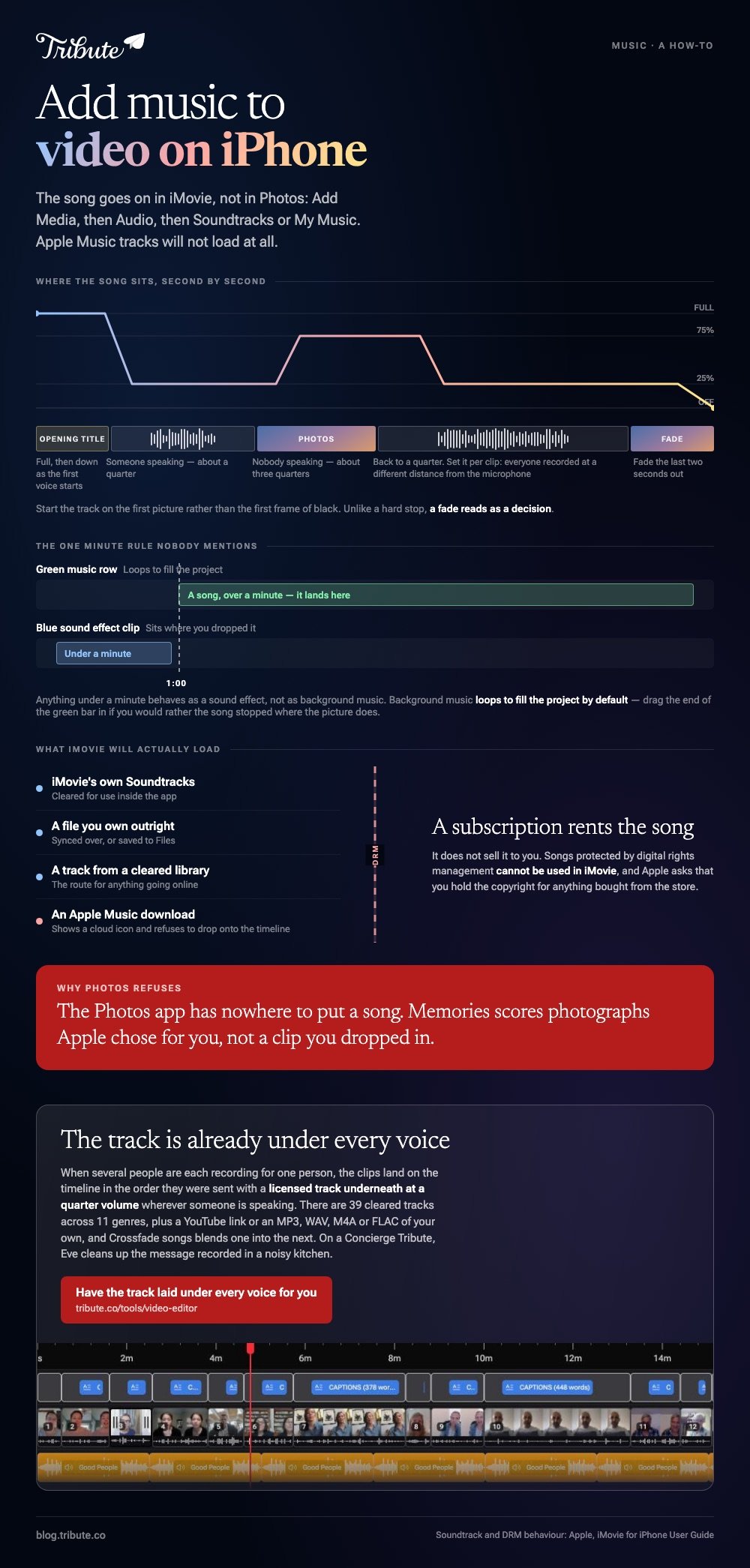
Apple documents those steps and adds a detail worth knowing: anything under a minute behaves as a sound effect and lands on a blue clip rather than the green music row.
Background music loops to fill the project by default. Drag the end of the green bar in if you would rather the song stopped where the picture does.
Why will Apple Music tracks not load?
Because a subscription rents the song rather than selling it to you.
The same Apple guide states that songs protected by digital rights management cannot be used in iMovie. A downloaded Apple Music file carries that protection, so it appears in the list with a cloud icon and refuses to drop onto the timeline.
Apple also asks that you hold the copyright, or permission from whoever does, for anything bought from the store. Buying a song grants you a listen, not a license to publish it inside a video.
Three things do work:
- iMovie's own soundtracks, cleared for use inside the app
- A file you own outright, synced over or saved to Files
- A track from a cleared library, which is the route for anything going online
The upload case has its own rules, covered in adding music to a YouTube video.
Which app should add music to video, iPhone or browser?
Stay on the phone for one clip. Move to a browser once there are more than four.
Pew Research puts smartphone ownership at 91% of US adults, so the footage is almost always on a phone to begin with. Dragging a dozen clips around a four inch timeline is the point where that stops being an advantage.
A free tool in the browser will add music to a video online and export with no watermark. Clipchamp and Canva both add music to a video online without a watermark, and a free plan covers it.
An online video editor that is free to use will also add music under a photo slideshow, which the phone apps handle with less grace. Compared with iMovie, a browser editor gives you more tracks and a timeline wide enough to see them.
There is a longer version of the phone route in adding music to a video on iPhone, the Canva path in adding music to a video in Canva, and the assembly side in building a video montage.
How loud should the song be, and where should it start?
Quieter than it sounds right at, and later than you think.
Music is mastered to stand on its own. A phone recording of someone talking in a kitchen is not, so the song has to come down or the voice disappears underneath it.
| Underneath | Music level |
|---|---|
| Someone speaking | About a quarter |
| Photos, nobody speaking | About three quarters |
| The opening title | Full, then down as the first voice starts |
Start the track on the first picture rather than the first frame of black, and fade the last two seconds out. Unlike a hard stop, a fade reads as a decision.
Set the level per clip where the app allows it. Every person recorded at a different distance from the microphone, so one project wide number is wrong somewhere.
What if the clips came from a dozen different people?
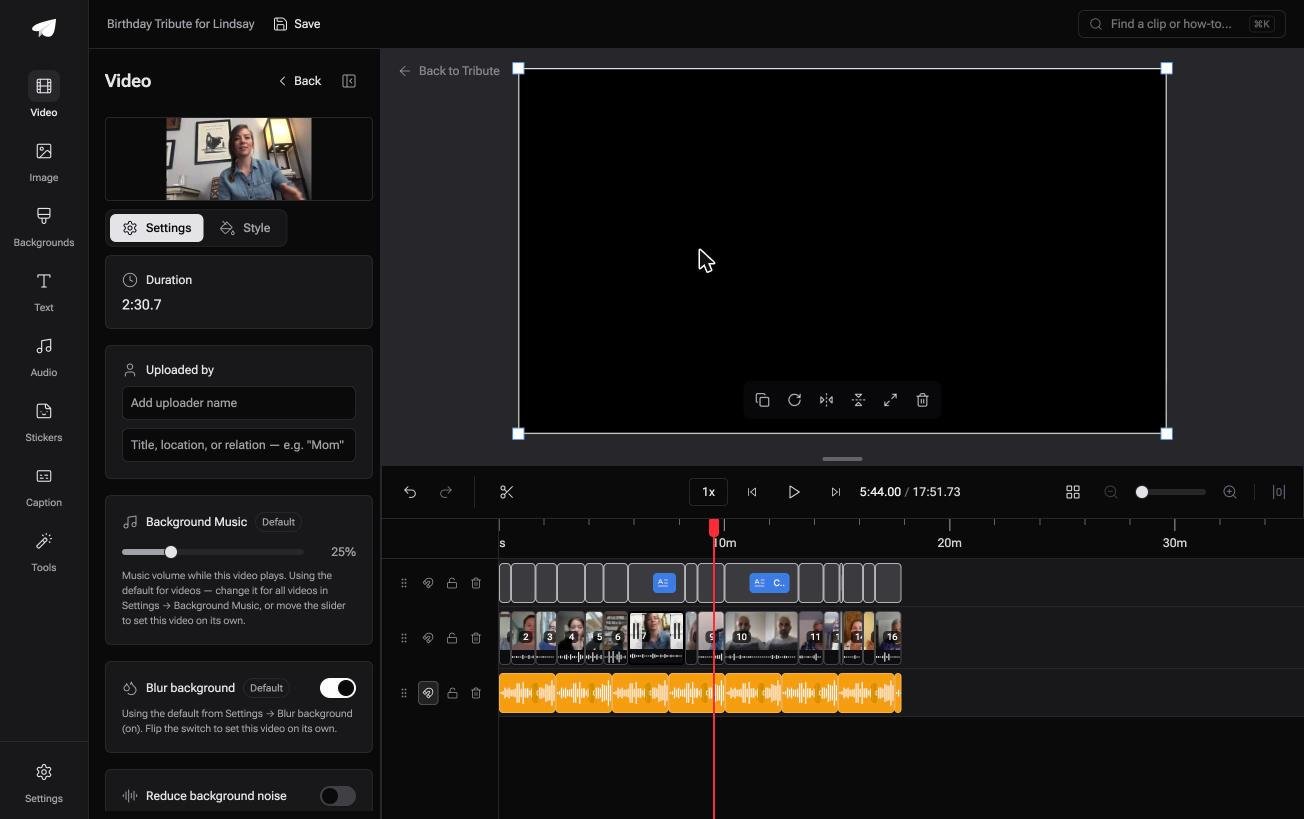
The Tribute video editor is a browser-based group video editor: contributors record clips on their phones and Tribute assembles them on a timeline with the music balanced under the voices.
It is ours, and it is the last thing on this page.
- 39 licensed tracks across 11 genres, cleared for use inside the editor
- Your own audio too: a YouTube link, or an MP3, WAV, M4A or FLAC upload
- 25% under speech and 75% under photos by default, changeable on any clip
- Crossfade songs blends one track into the next when the video outlasts one song

Best for: A song sitting on your iPhone that the Photos app refuses to put behind a video.
Why it works: Nobody has to move a file off a phone, and no song is blocked halfway through the job.
Can the music be there before you open the video?
Everything above starts with an empty audio track and a song you have to go and find.
One situation removes both steps.
The case: several people recording for one person
A grandmother turning eighty. A colleague leaving after fifteen years. A memorial where the people who should speak live four time zones apart.
Each person records a message on the phone in their hand, wherever they are. Nobody is shooting footage, and the work waiting for you is assembly.
Which means the search that brought you here, adding music to a video on an iPhone, describes a step that has already happened.
Why the song is never blocked
Because it comes from a shelf that was cleared before you arrived.
Clips land on the timeline in the order they were sent, with a licensed track underneath at a quarter volume wherever someone is speaking. The Tribute video editor makes that the starting state, so no track refuses to load.
What you do not have to do
On a Concierge Tribute the music is not the only part handled for you.
- Not the collecting. Each person records on their own phone from a link.
- Not the ordering. The clips reach the timeline in sequence, music underneath.
- Not the bad audio. Eve, the AI assistant inside the editor, cleans up the message recorded in a noisy kitchen.
- Not the edit. Tribute's editors balance and finish it, and the video comes back to you.
When this is the wrong answer: you shot one video yourself and want one specific song under it. Then iMovie and the six steps above are the shortest route.
Frequently Asked Questions
Can I add music to a video on iPhone without an app?
Not in Photos, which has no audio track. iMovie is made by Apple, costs nothing and takes about two minutes to learn.
Why does my Apple Music song have a cloud icon in iMovie?
It is protected by digital rights management, and Apple blocks those tracks. Use an iMovie soundtrack or a file you own outright.
Can I add music to a slideshow on iPhone?
Yes. Bring the photos into an iMovie project, set their durations, then add the track the same way you would on a video.
How do I keep the original sound and the music?
Leave the clip's own audio on and lower the music to about a quarter. Muting the clip is a separate control, so nothing is lost unless you choose it.
Which browser editors work on an iPhone?
Clipchamp and Canva both run in Safari, though a small screen makes a long timeline awkward. An iPad is the comfortable middle.
Does adding music reduce the video quality?
Only through the export settings, since the file is re-encoded on the way out. Choose the highest quality the destination accepts.
What happens if I upload a video with a commercial song?
It is matched against a rights database, and the owner chooses whether to monetize, track or block it. Most choose to monetize, which costs you nothing on a private video.
👉 Have the track laid under every voice for you if several people are recording for one person, and no song is refused.
