
Add Music to YouTube Video: Before Upload, After Upload, and Shorts
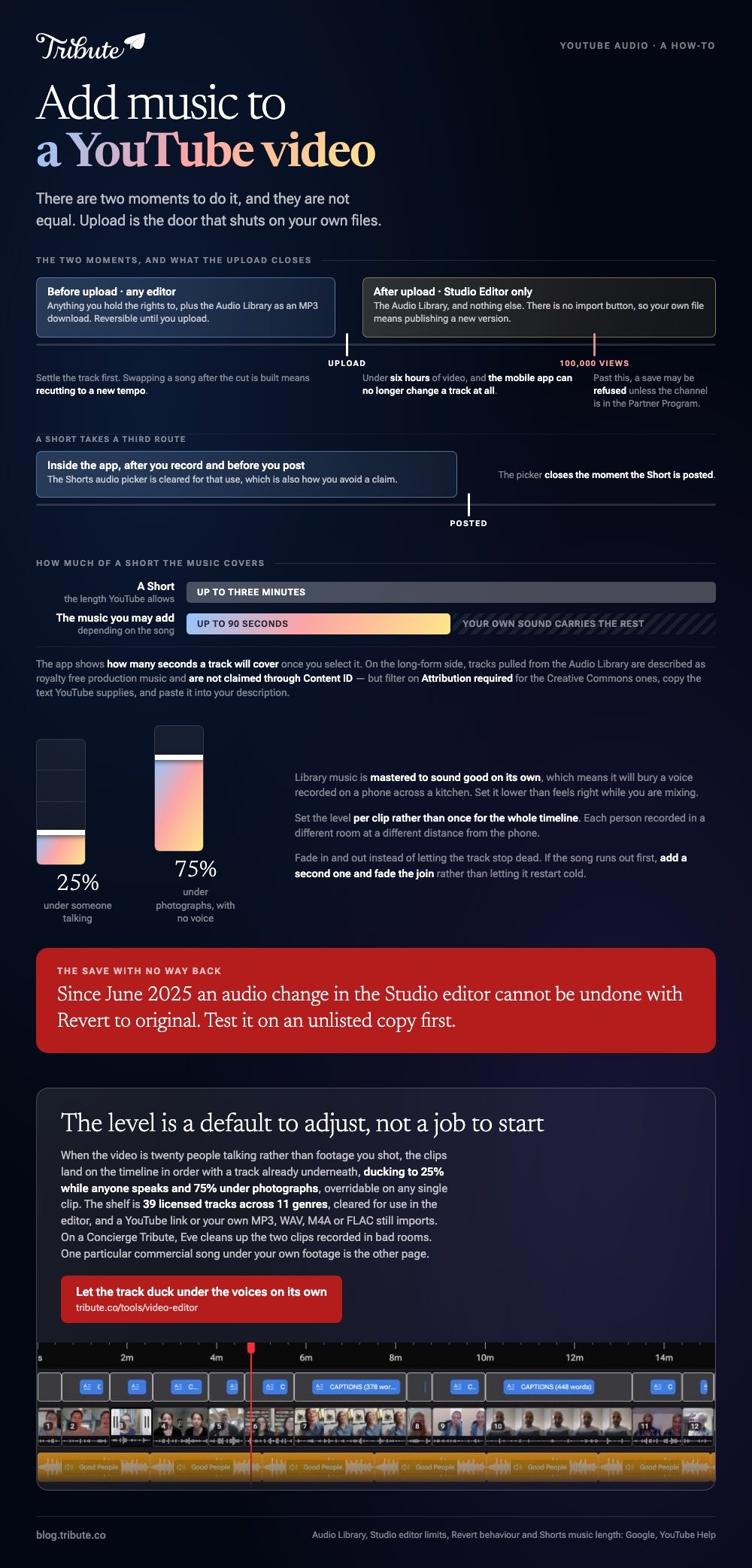
Two moments exist to add music to YouTube video projects. Before upload you can use any editor and any track you hold the rights to. After upload, YouTube Studio offers its Audio Library and nothing else.

| When | Where | Which tracks | Reversible |
|---|---|---|---|
| Before upload | Any editor | Anything you have cleared | Yes, until you upload |
| After upload | Studio Editor | Audio Library only | Once, through Revert |
| Shorts | The YouTube app | The Shorts audio picker | Before you post |
How do you add music to YouTube video uploads before they go up?
Settle the track before you open an editor.
The source decides whether a claim lands on the finished upload, and swapping a song after the cut is built means recutting to a new tempo. Pick first, then edit to it.
Pulling a track out of the Audio Library
- Sign in at studio.youtube.com and open the Audio Library in the left menu.
- Stay on the Music tab and search by title, artist or keyword, or filter by genre, mood, attribution and duration.
- Click Play to preview.
- Hover the track's date and click DOWNLOAD to save it as an MP3.
YouTube calls this royalty free production music and says downloaded tracks are not claimed through Content ID. Some tracks carry a Creative Commons license and need a credit.
Filter on Attribution required to see those, click the Creative Commons icon in the License type column, press Copy, and paste the text into your description.
Then drop the MP3 under your footage in whatever editor is already on the device. The phone version of that job is covered in putting music under a clip on an iPhone and step by step in the iPhone walkthrough.
Can you add music to YouTube video files after publishing?
Yes, on a computer, from one library.
- Open YouTube Studio and select Content.
- Click the video, then Editor in the left menu.
- Select Audio and use the filters to find a track. Click Play to preview it.
- Click Add. Drag the track to set when it starts, drag the box edges to set how much of it plays, and zoom in for finer control.
- Click Save.
YouTube sets four boundaries on this. The video has to run under six hours, and one past 100,000 views may refuse to save changes unless the channel is in the Partner Program.
The mobile app can no longer change a track at all. Since June 2025, a save cannot be undone with Revert to original.
One question YouTube does not answer on that page is what happens to the sound that was already there. Test on an unlisted copy before you touch a video people are watching.
There is no import button here either. To add music in a YouTube video from a file of your own, you edit before upload and publish a new version.
How do you add music to YouTube Shorts?
Inside the app, after you record and before you post.
- Tap Create in the YouTube app and choose Short.
- Hold or tap Capture to record, then tap again to stop.
- Add music, filters or effects to the recording.
- Tap Done, then add sounds, text to speech and other effects on the next screen.
- Tap Next, fill in the details, and tap Upload Short.
YouTube's own page puts a Short at up to three minutes and says you may add up to 90 seconds of music depending on the song. The app shows how many seconds a track will cover once you select it.
Using the Shorts audio picker is also how you avoid a claim, since the library is cleared for that use. Compared to the Studio editor, the picker is faster and it closes the moment the Short is posted.
How loud should the music sit under the voices?
Lower than feels right while you are mixing it.
Library music is mastered to sound good on its own, which means it will bury a voice recorded on a phone across a kitchen.
| Underneath | About |
|---|---|
| Someone talking | A quarter of full volume |
| Photographs, no voice | Three quarters |
Set the level per clip rather than once for the whole timeline. Each person recorded in a different room at a different distance from the phone.
Fade in and out instead of letting the track stop dead. Where the song is a commercial release, read what a copyright claim does to the upload before you commit to the cut.
What if the video is twenty people talking?
The Tribute video editor is a browser-based group video editor: contributors record clips on their phones and Tribute assembles them on a timeline with the music balanced under the voices.
Ours, and the last thing on the page.
- 39 licensed tracks across 11 genres, cleared for use inside the editor
- Your own audio too: a YouTube link, or an MP3, WAV, M4A or FLAC upload
- Ducking by default: 25% under video and 75% under photos, overridable per clip
- A Crossfade songs switch that blends one track into the next when the video outlasts a song

Best for: A video where twenty people speak and one track has to sit under all of them.
Why it works: Unlike a track you download, drop in and then level by ear, the volume under each voice is set before you open the timeline.
Is there a case where the music is already under the voices?
Everything above assumes the video exists and the music comes afterwards.
Maybe you shot something, then went looking for a song, and now you are setting levels one clip at a time. One kind of video arrives with that work done.
The case: the video is messages, not footage
You are in it when several people each record something for one person.
A fortieth wedding anniversary. A teacher retiring from the school her children went to. A memorial where the people who should speak are in four time zones. Nobody shot anything, so nobody has to score it.

Why the music question closes itself
The shelf of 39 cleared tracks is a much smaller decision than an open web.
Clips land on the timeline in order with a track already underneath, ducking to a quarter while anyone speaks. The Tribute video editor treats the level as a default to adjust rather than a job to start.
What you do not have to do
- No Content ID gamble. The 39 tracks are licensed for the video, and a YouTube link or your own file still imports.
- No ducking by hand. Music sits at 25% under anyone speaking and 75% under photos.
- No mix evening. On a Concierge Tribute, Eve cleans up the two clips recorded in bad rooms.
- No edit, if you would rather not. Tribute's editors build it on Concierge and hand it back for approval.
What the finished video becomes
On a screen in a room with people in it, or as a video book: a hardcover case with a screen inside that plays when you open it.
The wider job is covered in building a video montage.

When this is the wrong answer: you shot the video yourself and you want one particular commercial song under it. Then you are back on the Audio Library, a subscription library, or a conversation with the rights holder.
Frequently Asked Questions
Can I add music to a YouTube video I already posted?
Yes, through the Audio tab in the Studio editor, using Audio Library tracks. Your own file is not an option there, so it would mean a new upload.
Does the Audio Library cost anything?
No. YouTube describes it as royalty free production music, and tracks downloaded from it are not claimed through Content ID.
Do I have to credit the artist?
Only on tracks under a Creative Commons license. Filter on Attribution required, copy the text YouTube supplies, and paste it into the description.
How do I add music on a YouTube video from my phone?
For a Short, use the audio picker in the app before you post. For a regular upload, the mobile app can no longer change the audio track, so use a computer.
Why does my music stop before the video ends?
The track is shorter than the timeline. Add a second song after it, or loop the first one and fade the join rather than letting it restart cold.
Will adding music stop my video being monetized?
Audio Library tracks are cleared for monetized video. A commercial release can attract a claim that sends the revenue elsewhere, which is a different outcome from a takedown.
Can I change the volume of music on a published video?
The Studio editor positions and trims a track rather than mixing it. Balance between music and speech belongs in the edit you do before upload.
👉 Let the track duck under the voices on its own if the video is twenty people talking, and the mix is two nudges rather than an evening.
