
Using Copyrighted Music in YouTube Videos: Claims, Strikes and the Way Out
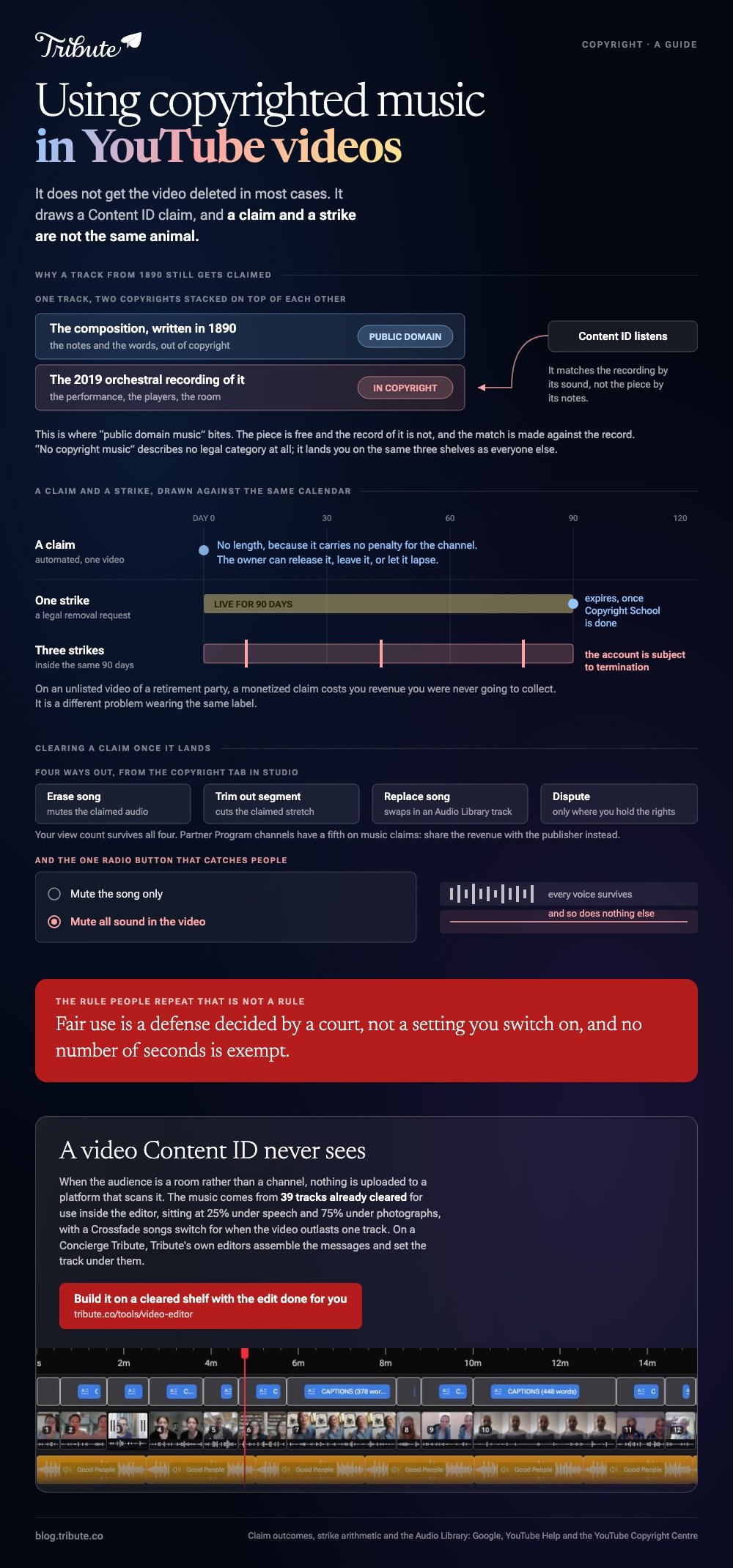
Using copyrighted music in YouTube videos does not get the video deleted in most cases. It draws a Content ID claim, and the owner then decides whether the video is monetized for them, tracked, or blocked.

| Outcome | What it means for you | Video stays up |
|---|---|---|
| Monetized | Someone else collects the ad revenue | Yes |
| Tracked | Nothing visible happens | Yes |
| Blocked | Viewers cannot watch, sometimes per country | No |
| Strike | A removal request, not a claim | No, and the channel is penalized |
What happens when using copyrighted music in YouTube videos?
Content ID matches your upload against a database of recordings before anyone watches it.
Music use in YouTube videos divides into those three outcomes, and the copyright owner picks which one applies. Most of them are not takedowns.
On a channel, a monetized claim is lost income. On an unlisted video of a retirement party, it costs you revenue you were never going to collect, which makes it a different problem wearing the same label.
Shorts do not behave like long uploads here, and YouTube's guidance on them has changed more than once. Test on an unlisted Short before you post one to an audience.
Is a claim the same as a copyright strike?
No, and the gap between them is the single most useful thing on this page.
A claim is automated. It attaches to one video, it carries no penalty for the channel, and the owner can release it, leave it, or let it lapse.
Strikes work the other way. One follows a valid legal removal request, the video comes down, and the channel is marked.
YouTube publishes the arithmetic: a strike expires after 90 days once you have completed Copyright School, and three strikes inside 90 days leave the account subject to termination.
How do you clear a claim once it lands?
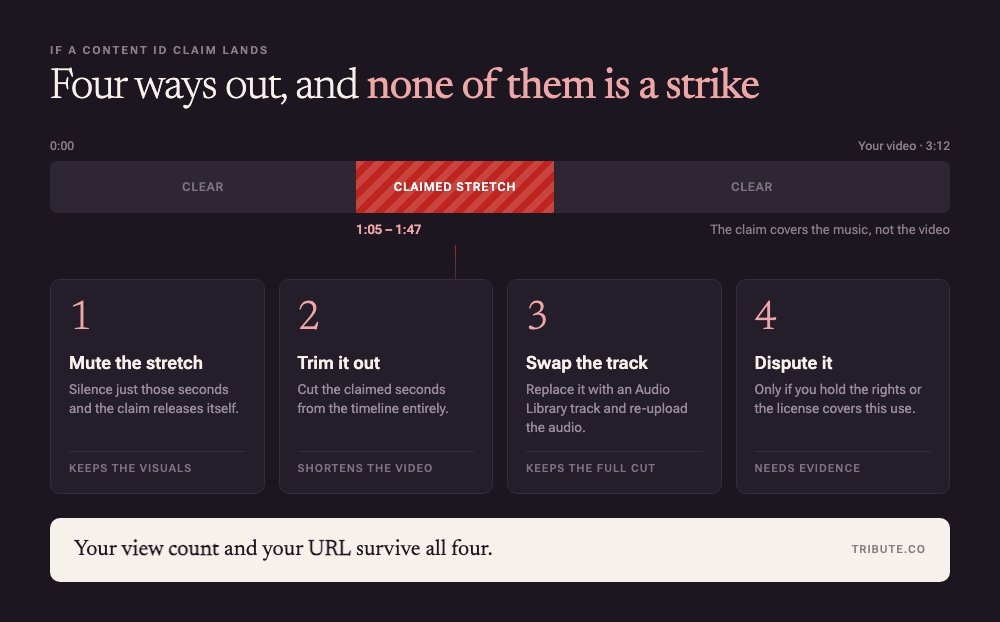
Four tools, and your view count survives all of them.
YouTube names three of the four in the Copyright tab of Studio.
- Erase song: mutes the claimed audio, either the song on its own or every sound in the video
- Trim out segment: cuts the claimed stretch out of the upload
- Replace song: swaps the track for one from the Audio Library
- Dispute: for when you hold the rights and the match is wrong
Partner Program channels have a fifth option on music claims, which is to share the revenue with the publisher rather than fight over it.
Erase song is the one to be careful with. Muting every sound in the video is one radio button away from muting the song, and people reach the far one by accident.
Is using copyrighted music in YouTube videos ever allowed?
Yes, with permission, and permission comes from one of three shelves.
1. The Audio Library
Licensed music for YouTube videos starts here because it costs nothing and it is already inside Studio.
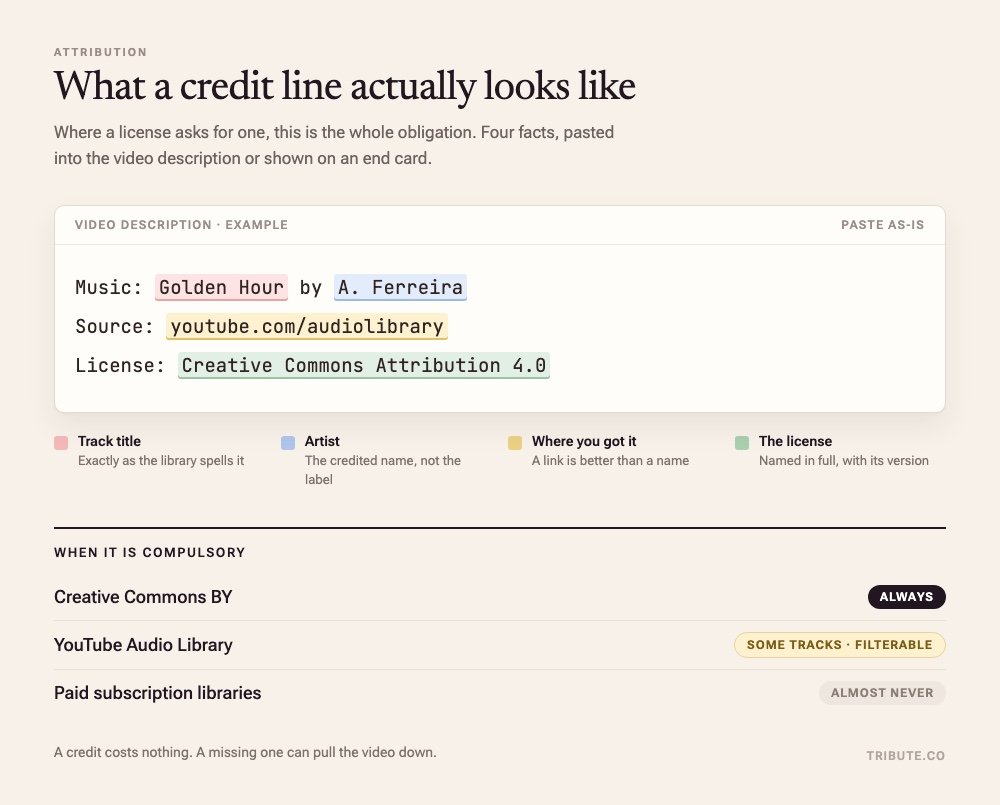
YouTube calls it royalty free production music and says downloaded tracks are not claimed through Content ID. Some tracks carry a Creative Commons license and need a credit in the description.
Best for: a one-off video where the song is background rather than the point.
Why it works: Unlike a track you clear yourself, the permission arrives with the file.
2. A subscription library
Epidemic Sound, Artlist and Soundstripe sell a monthly license rather than a track.
The catalog is wide and the cover lapses when you stop paying, which makes sense for a channel and little sense for one wedding video.
3. A direct license
Write to the publisher and the label, because a recording has two copyrights sitting on top of each other.
This is slow and it is the only route that gets a specific commercial song onto a video you intend to publish.
What about public domain and "no copyright" music?
Public domain music for YouTube videos is where the two copyright trap bites.
A composition from 1890 is out of copyright. The 2019 orchestral recording of it is not, and Content ID knows that recording by its sound rather than by its notes.
Searches for non copyright music for YouTube videos and for no copyright music for YouTube videos land on the same shelves above, under a name that describes no legal category at all.
And fair use?
Fair use is a defense decided by a court, not a setting you switch on.
No duration makes a clip safe. The rule people repeat about a few seconds being allowed has no basis, and Content ID matches a recording whatever its length.
More on the sources in royalty free music for videos and on the mechanics in adding music to a YouTube video.
What if the video is eleven people and one song?
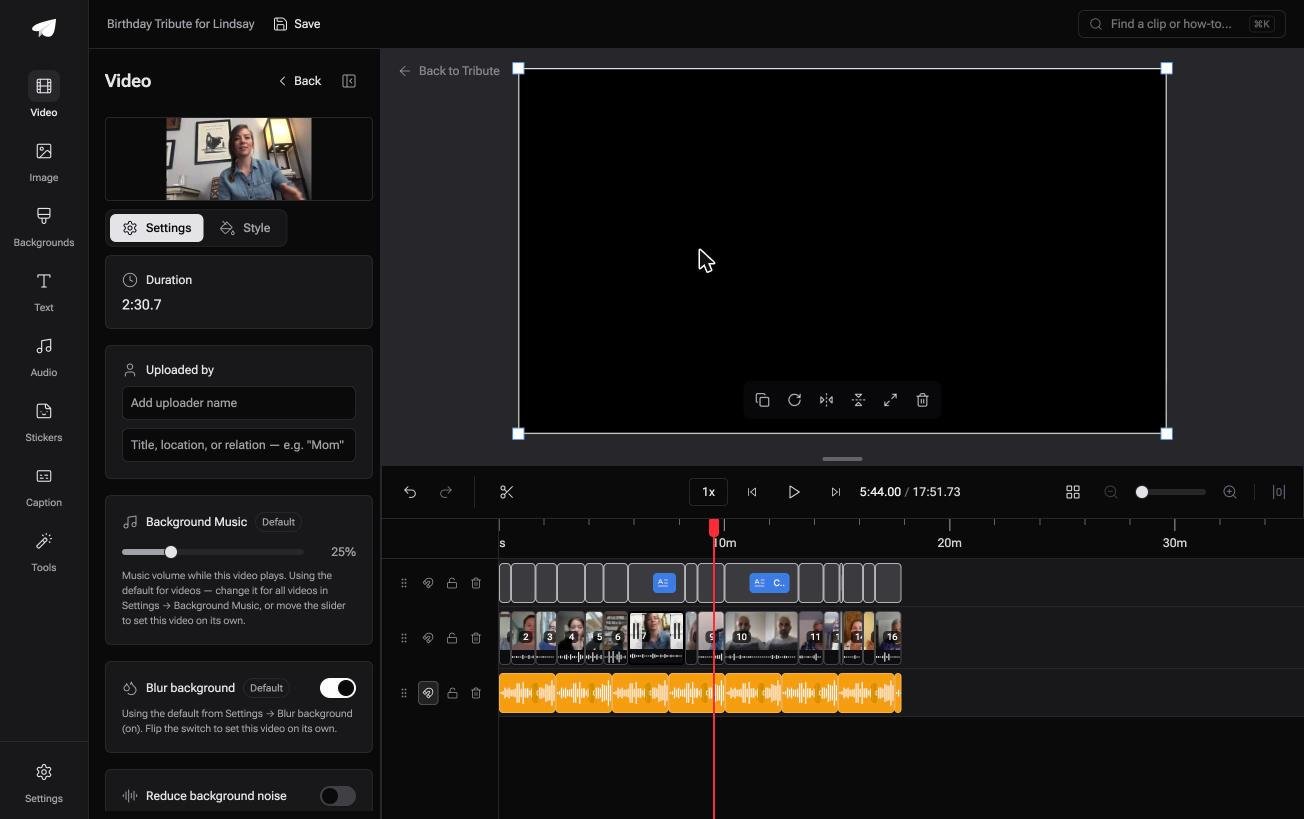
The Tribute video editor is a browser-based group video editor: contributors record clips on their phones and Tribute assembles them on a timeline with the music balanced under the voices.
It is ours, and it sits at the end of the page for a reason.
- 39 licensed tracks across 11 genres, cleared for use inside the editor
- Your own audio too: a YouTube link, or an MP3, WAV, M4A or FLAC upload
- 25% under speech and 75% under photos by default, overridable per clip
- A Crossfade songs switch for when the video outlasts a single track

Best for: A private video for one person, shown in a room rather than posted to a channel.
Why it works: Compared to clearing a track yourself, the license is settled and the level under each voice is already set.
Whose video never meets Content ID at all?
Each route above ends at a rights holder.
Licenses, strikes and shelves all matter because the video is headed for a platform that checks. One kind of video never goes onto one.
The case: the audience is a room, not a channel
You are in it when several people each record something for one person.
An eightieth birthday. A coach leaving after thirty seasons. A memorial where the people who should speak are in four time zones. The video is played once, to the person it was made for.

Why the claim never arrives
Nothing is uploaded to a platform that scans it.
The music comes from a shelf of 39 tracks already cleared for use inside the Tribute video editor, so clearance is settled before you arrive rather than contested afterwards.
What you do not have to do
- Not the clearing. All 39 tracks are licensed for use inside the video.
- Not the edit. On a Concierge Tribute, Tribute's editors assemble the messages and set the track under them.
- Not the trimming. Eve, the assistant on Concierge and Concierge + Video Book, takes the silences out of every clip on one instruction.
More on the wider job in building a video montage, and on the photo version in a slideshow with music.
When this is the wrong answer: the video is for a channel, or you want one particular commercial song. Then you are back on the three shelves above, and a direct license is the only route to that song.
Frequently Asked Questions
How many seconds of a song can I use without a claim?
None. Content ID matches a recording by its sound, and no duration is exempt. The rules people repeat about short clips describe nothing in law or in the system.
Will a copyright claim delete my video?
Only if the owner has set the policy to block. Monetizing and tracking both leave the video up, and the owner can change their choice later.
Does buying a song on iTunes let me use it in a video?
No. Buying a copy grants the right to listen, and publishing it inside a video is a separate license. This is the gap most people fall into.
Can I use a song if I credit the artist?
A credit is not permission. It is required by some licenses and it never creates one where none exists.
What happens if I dispute a claim and lose?
The claim is reinstated and the owner may escalate to a removal request, which is what becomes a strike. Dispute only where you hold the rights.
Is music in a private or unlisted video still scanned?
Treat it as scanned. The practical difference is that a monetized claim on a video with no ads attached costs you nothing you were earning.
Which library should I start with?
The Audio Library inside YouTube Studio. It is the only shelf YouTube itself vouches for, and tracks downloaded from it are not claimed through Content ID.
👉 Build it on a cleared shelf with the edit done for you if the video is for one person rather than a channel, and no claim has anything to match against.
