
Royalty Free Music for Videos: What the License Covers and Where to Get It
Royalty free music for videos means you clear a track once and never pay again per play or per view. It does not mean the music is unowned. The three sources below cover almost everyone, and two of them cost nothing.
| Source | Cost | The catch |
|---|---|---|
| YouTube Audio Library | Nothing | Some tracks need a credit |
| Your editor's own library | Nothing | Cleared only inside that editor |
| Creative Commons | Nothing | License differs per track |
| Subscription library | A monthly subscription | Cover ends if you cancel |
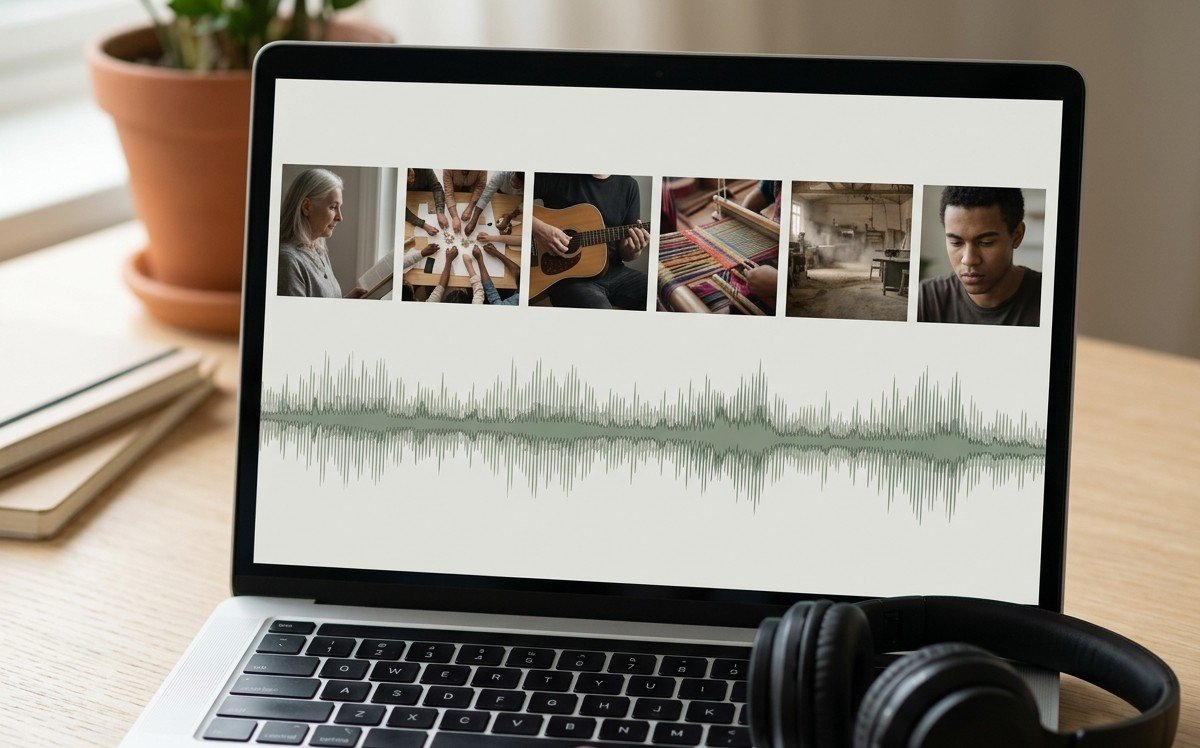
What does royalty free music for videos cover?
It describes how you pay, not how much.
A royalty is a fee owed every time a work is used, the way a radio station pays per airing. Royalty free removes the recurring part: clear it once and the license carries you.
Two things that catch people out
- Someone still owns it. Royalty free is not public domain. You still need permission.
- The permission has edges. Almost always around commercial use, broadcast, and whether the video sits behind a paywall.
Where can you get copyright free music clips without paying?
1. The YouTube Audio Library
Inside YouTube Studio. YouTube describes it as royalty-free production music, and you can filter for tracks where attribution is not required.
Best when: the video is going on YouTube anyway.
2. The music already in your editor
iMovie, CapCut, Clipchamp and Canva all ship with cleared tracks.
Best when: you want the licensing question settled before you start.
3. Creative Commons
The Free Music Archive and similar.
Read the license on each track rather than the collection: some forbid commercial use, some require a credit.
Best when: you want something that does not sound like everyone else's video.
Compared to the stock libraries, Creative Commons takes more reading and gives you music nobody else is using.
Free background music clips are easy to find in all three, so the choice is about how distinctive you want the result to sound.
What about the paid libraries?
Epidemic Sound, Artlist and Soundstripe sell a subscription rather than a track.
You get a wide catalog and a license that covers monetized video, and the cover lapses if you stop paying.
Worth it when you publish often. Hard to justify for one retirement video, where the editor's own library does the same job for nothing.
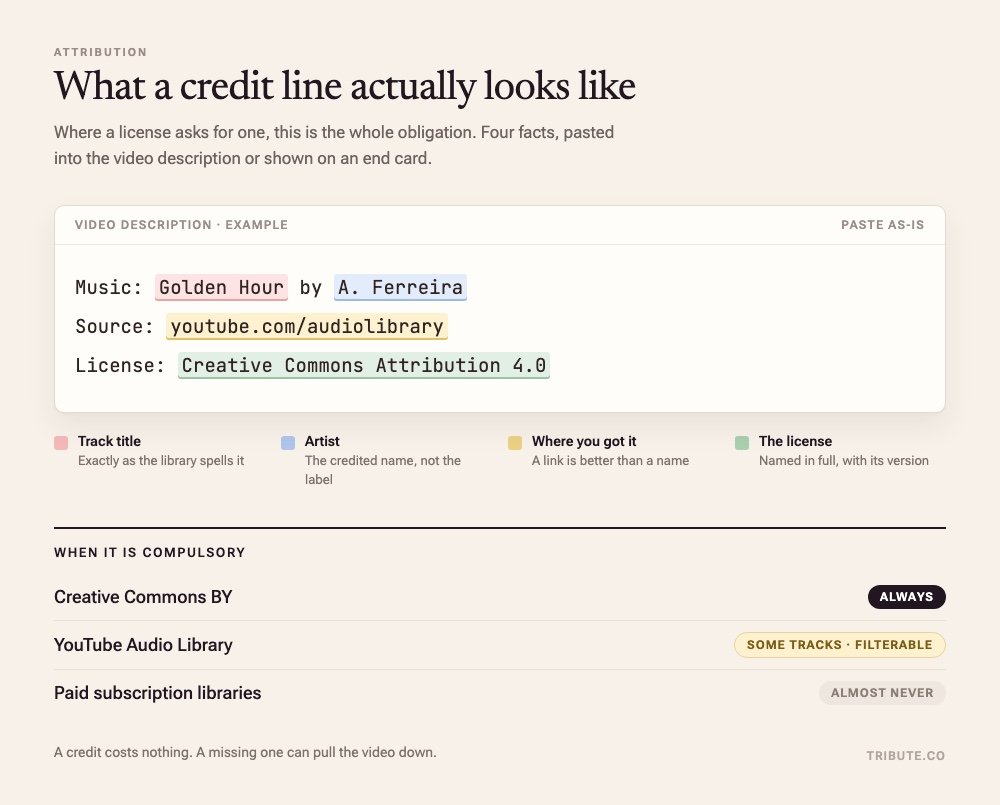
When does a credit become compulsory?
Only when the license says so, and it will say so in plain words.
- Creative Commons BY: always
- YouTube Audio Library: some tracks, and it is filterable
- Paid libraries: almost never
Where it is required, name the track and the artist in the description or on an end card. A credit costs nothing and a missing one can pull the video down.
What happens if you use a commercial song anyway?
This is the case royalty free music for videos exists to avoid.
On YouTube, Content ID matches your upload against a database of recordings. YouTube documents three outcomes, and the owner picks:
| Outcome | What it means for you |
|---|---|
| Monetized | The video stays up. Someone else collects the ad revenue. |
| Tracked | Nothing visible happens. The owner watches the numbers. |
| Blocked | The video cannot be viewed, sometimes only in certain countries. |
Blocking is the exception.
YouTube's copyright transparency report records over 2 billion Content ID claims in 2025, and rightsholders chose to monetize more than 90% of them.
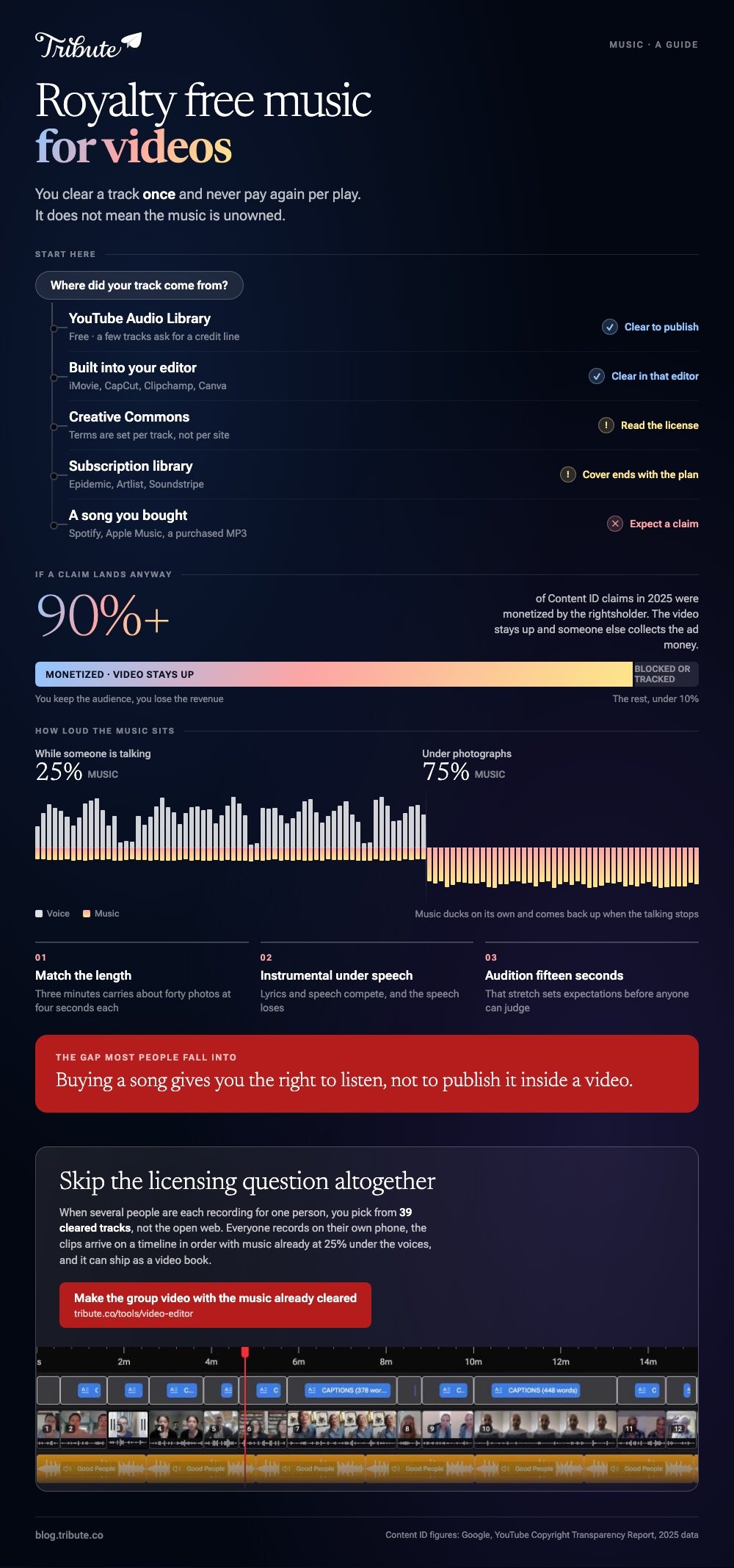
So the usual outcome is lost ad revenue. That matters a great deal on a channel and not at all on an unlisted video of a retirement party.
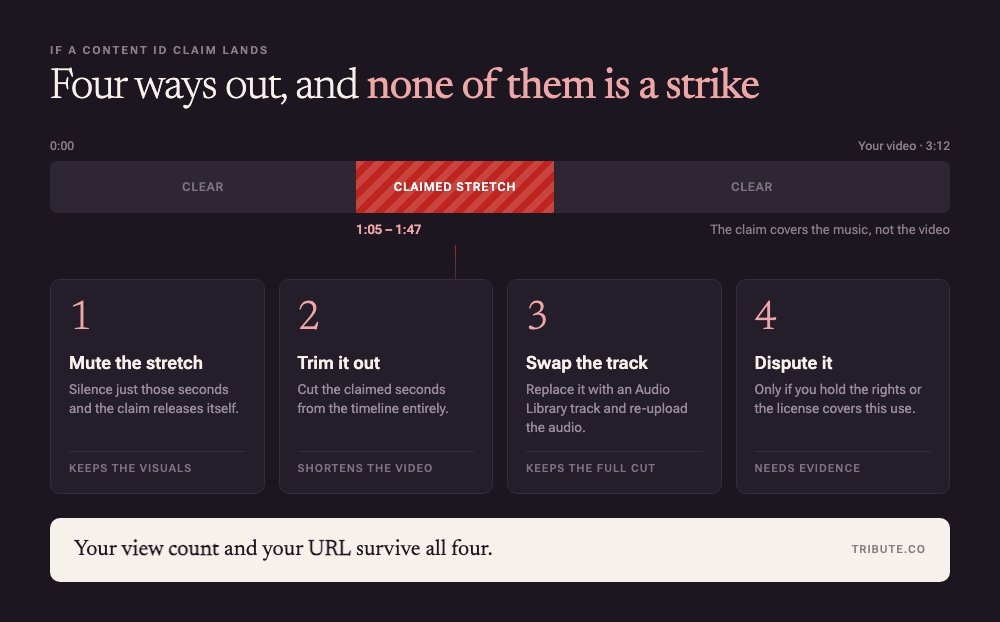
Four ways to clear a claim
- Mute the claimed stretch
- Trim it out
- Swap in an Audio Library track
- Dispute it, if you hold the rights
Your view count and URL survive all four. A claim is not a strike.
How do you choose royalty free music for videos that fits?
Say your aunt is retiring and eleven people have sent clips.
The song you want is the one playing at her leaving party twenty years ago, and it is a commercial release.
That is when the decision lands. Swapping early costs nothing. Swapping late means recutting everything.
Pick the royalty free track first and cut to it. The reverse never works as well.
Three rules that do most of the work
- Match the length first. Three minutes carries about forty photos at four seconds each. Past sixty, the video becomes a queue and people start checking their phones.
- Go instrumental wherever anyone speaks. Lyrics and speech compete for the same attention, and the speech loses.
- Audition the first fifteen seconds alone. That stretch sets expectations before anyone has seen enough to judge.
How loud should music sit under speech?
Lower than feels right. Free stock music for videos is mastered to sound good on its own, which means it will bury a voice recorded on a phone in a kitchen.
| Underneath | About |
|---|---|
| Someone talking | A quarter of full volume |
| Photographs, no voice | Three quarters |
Set the level per clip, not once for the whole timeline. Each clip was recorded in a different room at a different distance.
Fade in and out rather than letting the music stop dead. Unlike a hard cut, a two second fade reads as a decision rather than a mistake.
More in putting music into a video and adding music on an iPhone.
Which free slideshow maker with music should you use?
The one already on the device holding the photos.
- iPhone: iMovie
- Android: Google Photos or CapCut
- Browser: Clipchamp
All four carry music cleared for use inside them, which removes the licensing question before you start. None of them asks for an account or a card.
To create a free slideshow with music, divide the song length by the number of photos to get your duration. Let the last image hold while the music resolves.
Most editors loop a background track when the video outruns the song, and a loop with a fade beats a hard stop.
More in making a slideshow with music and making a video montage.
What if the clips came from a dozen different people?
The Tribute video editor is a browser-based group video editor: contributors record clips on their phones and Tribute assembles them on a timeline with the music balanced under the voices.
It is ours, and it is the last thing on this page.
- 39 licensed tracks across 11 genres, royalty free inside the editor, so clearance never arises
- Your own audio too: a YouTube link, or MP3, WAV, M4A and FLAC
- 25% under speech, 75% under photos by default, overridable per clip
- Crossfade blends one song into the next when the video outlasts a track

Best for: A birthday, retirement or memorial video built from clips by ten or more people.
Why it works: Unlike a track you clear yourself, the license is settled and the level under each voice is already set.
Can you skip the royalty free music question altogether?
Everything above exists because you chose the song.
You went looking, read a license, and checked whether a credit was compulsory. That is the cost of choosing your own song.
One case avoids it.
The case: you are assembling, not shooting
You are in it when several people each record something for one person.
A grandmother turning eighty. A colleague leaving after fifteen years. A memorial where the people who should speak are in four time zones. Nobody is shooting anything: everyone is recording a message, and your job is assembly, not authorship.
Which means the search that brought you here, royalty free music for videos, solves a problem you do not have.
Why the license question never comes up
A cleared shelf is a much smaller problem than an open web.
When the music lives inside the tool that assembles the video, clearance is settled before you arrive. You pick from thirty-nine tracks already cleared for it.
That is how the Tribute video editor handles it: not a fifth source for the list, but a way of never needing it.
What you do not have to do
On a Concierge Tribute, none of it is yours.
- No clearing. The 39 tracks are licensed before you pick one.
- No building. Tribute's editors cut the video and hand it back for approval.
- No mixing. Music sits at 25% under speech, and Eve cleans a clip recorded in a bad room.
- No render to manage. The preview matches the video you get back.

It does not have to stay a file
The finished video can arrive as a video book.
A hardcover case with a screen inside that plays when you open it. No phone to hand over, no link to lose. For an eightieth birthday or a retirement, the object is the point.

When this is the wrong answer: you shot the video yourself, or you want one specific commercial song. Then you are back on the list above. The editor is also not a music source on its own: it lives inside a paid Tribute.
Frequently Asked Questions
Is royalty free music free?
Sometimes. The term describes the payment model, not the price. Plenty of royalty free libraries charge a monthly subscription.
Can I use royalty free music on a monetized YouTube video?
In most cases yes. The YouTube Audio Library marks which tracks need attribution. Subscription libraries differ, so confirm your plan covers monetization first.
Where do I find copyright free video game music?
Some studios release soundtracks under permissive licenses, and the Free Music Archive carries chiptune and synth work. Check each track's license rather than the collection's.
Do I have to credit the artist?
It depends on the license. Creative Commons BY always requires it, YouTube flags which of its tracks do, most paid libraries do not.
The credit belongs in the description or at the end.
What happens to a Content ID claim if I replace the song?
Swapping the claimed audio for a cleared track removes the claim. Muting or trimming does the same. Your view count and URL survive.
Can I use a song I bought?
Buying a copy grants the right to listen, not to publish it inside a video. That is a separate license, and it is the gap most people fall into.
How do I create a free slideshow with music in one sitting?
Choose the track, cull to about forty photographs, set one duration for all of them, drop the music underneath, export. The editor on your phone does all five without an account.
👉 Make the group video with the music already cleared if several people are recording for one person, and never open a license page again.
