
Canva Add Music to Video: The Audio Panel, Start to Finish
In Canva, add music to video from the Audio panel on the left: click a track and it drops onto the timeline under your clips. Set the level with the volume icon on the toolbar, soften the ends with Fade, then download as MP4.

Canva add music to video: where does the audio live?
Two places, and people only find one of them.
The Audio panel holds Canva's own catalog. The Uploads panel holds anything you bring in yourself. Both drop a track on the same timeline row under the video.
| Where the track comes from | Panel | What to watch |
|---|---|---|
| Canva's catalog | Audio | Some tracks are Pro only |
| A file on your computer | Uploads | You hold the license, not Canva |
| Sound already inside a clip | The clip itself | Set its level on its own |
Knowing which panel a track came from matters later, because a Canva track is cleared for use inside a Canva design and a song you uploaded is not cleared by anything.
How do you add music to a Canva video from its own catalog?
Five steps, and the first four take about a minute.
- Open the design and click Audio in the side panel.
- Filter by mood or genre, or search for the feel you want.
- Hover a track to preview it, then click it. Canva lays it on the timeline below your video.
- Drag either end of the audio bar to trim it, and drag the middle to move it.
- Select the track and use Fade on the toolbar to soften the start and the end.
Canva documents the volume and fade controls on its page about trimming audio and adjusting volume, including a Balance all button that levels every audio and video element in one click.
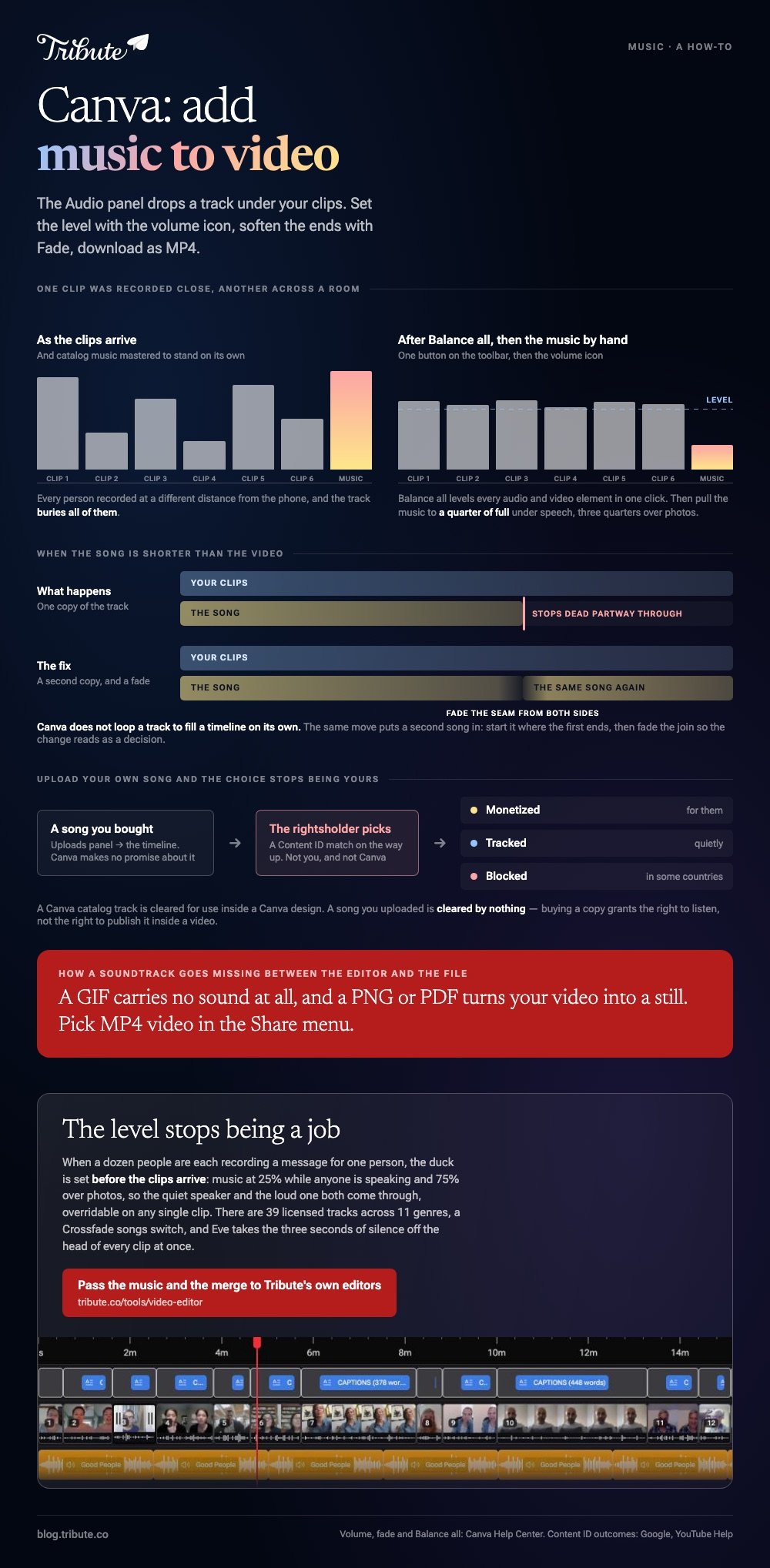
Balance all is worth a try before you touch anything by hand. On a design where one clip was recorded close and another across a room, it gets you most of the way in a click.
Best for: A video that has to be done today, with no licensing question attached to it.
Why it works: The catalog is cleared for use inside Canva, so the track and the design travel together.
How do you upload your own song instead?
Through Uploads, with one thing to settle first.
Click Uploads, then the audio section, then drag your MP3 or WAV in. Once it appears, click it to drop it on the timeline, where it behaves like any catalog track.
The thing to settle is whether you are allowed to publish it. Buying a song grants the right to listen, not the right to put it under a video that goes on a public channel.
On YouTube that shows up as a Content ID match. YouTube describes three outcomes and the owner picks: monetized for them, tracked, or blocked.
That matters because 84% of US adults use YouTube, according to the Pew Research Center social media fact sheet, and it is where most of these videos end up.
Unlike a Canva track, an uploaded song carries its license with it and Canva makes no promise about it.
How loud should the music sit under a voice?
Lower than it feels right to set it.
Catalog music is mastered to sound good on its own, which means it will bury someone talking to a phone in a kitchen. Select the track, click the volume icon on the toolbar, and pull it down to about a quarter.
| Underneath | Set the music to about |
|---|---|
| Someone speaking | A quarter of full |
| Photos with no voice | Three quarters |
Set it per section rather than once for the whole design. Each clip was recorded in a different room at a different distance from the phone.
There is more on this in adding music on an iPhone and in adding music to a YouTube video.
Canva add music to video: what happens when you download?
The audio is baked in, and the choice of format decides whether it survives.
Pick MP4 video in the Share menu. A GIF carries no sound at all, and a PNG or PDF turns your video into a still, which is the most common way a soundtrack goes missing between the editor and the file.
Check the length before you export. If the song is shorter than the video the track stops dead partway through, and the fix is to drop a second copy of it after the first.
What if the clips came from a dozen different people?
Then the music is the small part. Collecting the clips, ordering them and setting a level on each one is the rest of the afternoon.
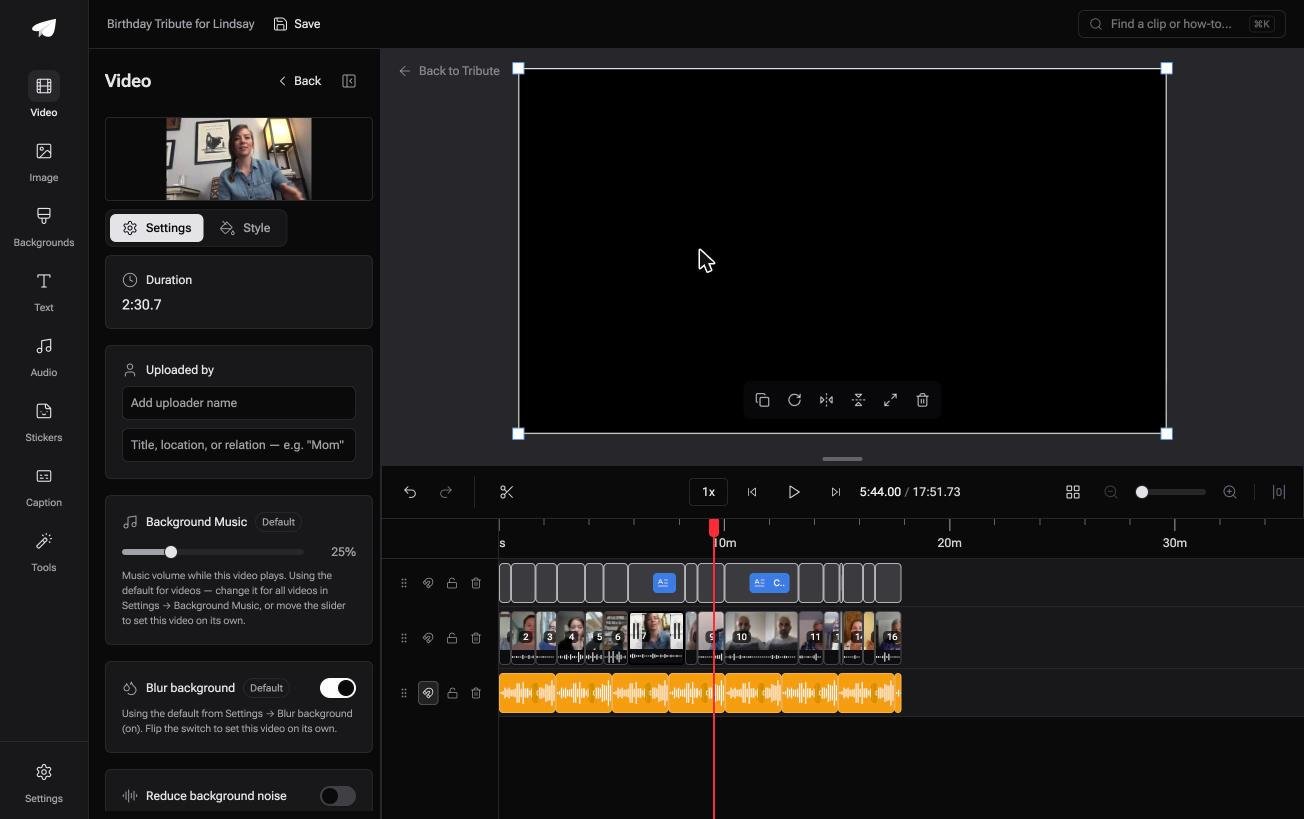
The Tribute video editor is a browser-based group video editor: contributors record clips on their phones and Tribute assembles them on a timeline with the music balanced under the voices.
- 39 licensed tracks across 11 genres, cleared for use inside the editor
- Your own audio too: a YouTube link, or MP3, WAV, M4A and FLAC
- 25% under video and 75% under photos by default, overridable per clip
- A Crossfade songs switch that blends one track into the next when the video outlasts a song

Best for: A soundtrack over clips from fifteen people, each one recorded at a different volume.
Why it works: Compared to setting a level on each clip by hand, a default that already ducks under speech leaves you correcting two or three.
What if the music was already under the voices?
All of that is the work of matching a song to a video you already made.
Finding a track, trimming it, pulling it under the speech, checking it does not stop dead: that is a fair hour. There is one case where none of it starts.
The case: several people recording for one person
You are in it when the video is a collection of messages rather than something you shot.
A father turning sixty. A manager leaving after eleven years. Everyone records on their own phone, in their own room, at their own distance from it.
If the video is yours and the song is a choice you want to make, Canva above is the right tool and this section is not for you.
Why the level question answers itself
Because the duck is set before the clips arrive.
Music sits at 25% while anyone is speaking and lifts to 75% over photos, so the quiet speaker and the loud one both come through.
The Tribute video editor lets you override that on any single clip, which is the only place it tends to need it.

What is not your job here
Three jobs, and hunting for a track is not among them.
- Not the ducking. The track sits at 25% under speech and 75% over photos from the start.
- Not the assembly. On a Concierge Tribute, Tribute's editors order the messages and caption them.
- Not the three seconds of silence at the head of every clip. Eve, the assistant on Concierge and Concierge + Video Book, takes them off the whole timeline at once.
When this is the wrong answer: you made the video yourself, or the song is the point and has to be one specific commercial release. Then Canva, and a license. The editor is not a standalone music tool either: it lives inside a paid Tribute.
For the wider job, see making a video montage.
Frequently Asked Questions
Is Canva's music library included on the free plan?
Part of it. A share of the catalog is marked Pro, and those tracks carry a badge in the Audio panel. Filter and preview before you build the edit around one.
Can I put a song I bought under a Canva video?
You can upload it, and whether you may publish it is a separate question. Buying a copy grants the right to listen rather than the right to distribute it inside a video.
Why did my music disappear after downloading?
Check the format. GIF carries no audio, and PNG, JPG and PDF are still formats. Choose MP4 video in the Share menu.
How do I fade music out at the end in Canva?
Select the audio track on the timeline and click Fade on the toolbar above the editor, then set the length with the slider. For a video clip's own sound, use the audio tools on the toolbar instead.
Can I use two songs in one Canva video?
Yes. Add the second track and drag it so it starts where the first one ends, then fade the join from both sides so the change reads as a decision.
What if the song is shorter than my video?
Drop a second copy of the same track after the first and fade the seam. Canva does not loop a track to fill a timeline on its own.
How do I lower a clip's own sound without muting it?
Select the clip rather than the music, then use the volume control on the toolbar. Canva's Balance all button will also level everything in the design in one step.
👉 Pass the music and the merge to Tribute's own editors if a dozen people are recording messages for one person, and the level stops being a job.
