
How to Combine Videos in QuickTime on a Mac
To combine videos in QuickTime Player, open the first clip, choose View > Show Clips, then Edit > Add Clip to End and pick the second file. Click Done, then File > Export As. Nothing to install, no account.

Can you combine videos in QuickTime Player?
Yes, and joining is the one edit QuickTime handles without complaint.
The app sits on every Mac, opens in a second and never asks who you are. What it gives you is a short list of edits, which is the point: you are not opening a timeline, you are putting two files in a row.
| QuickTime Player does | QuickTime Player does not |
|---|---|
| Add a clip to the end, start or middle | Add music or a second audio track |
| Drag clips into a new order | Add titles, captions or animations |
| Trim and split | Export an MP4 |
| Rotate and flip | Run on Windows |
How do you combine videos in QuickTime step by step?
Open the clip you want first, because everything attaches to it.
- Double-click the first video so it opens in QuickTime Player.
- Choose View > Show Clips. A filmstrip appears under the picture.
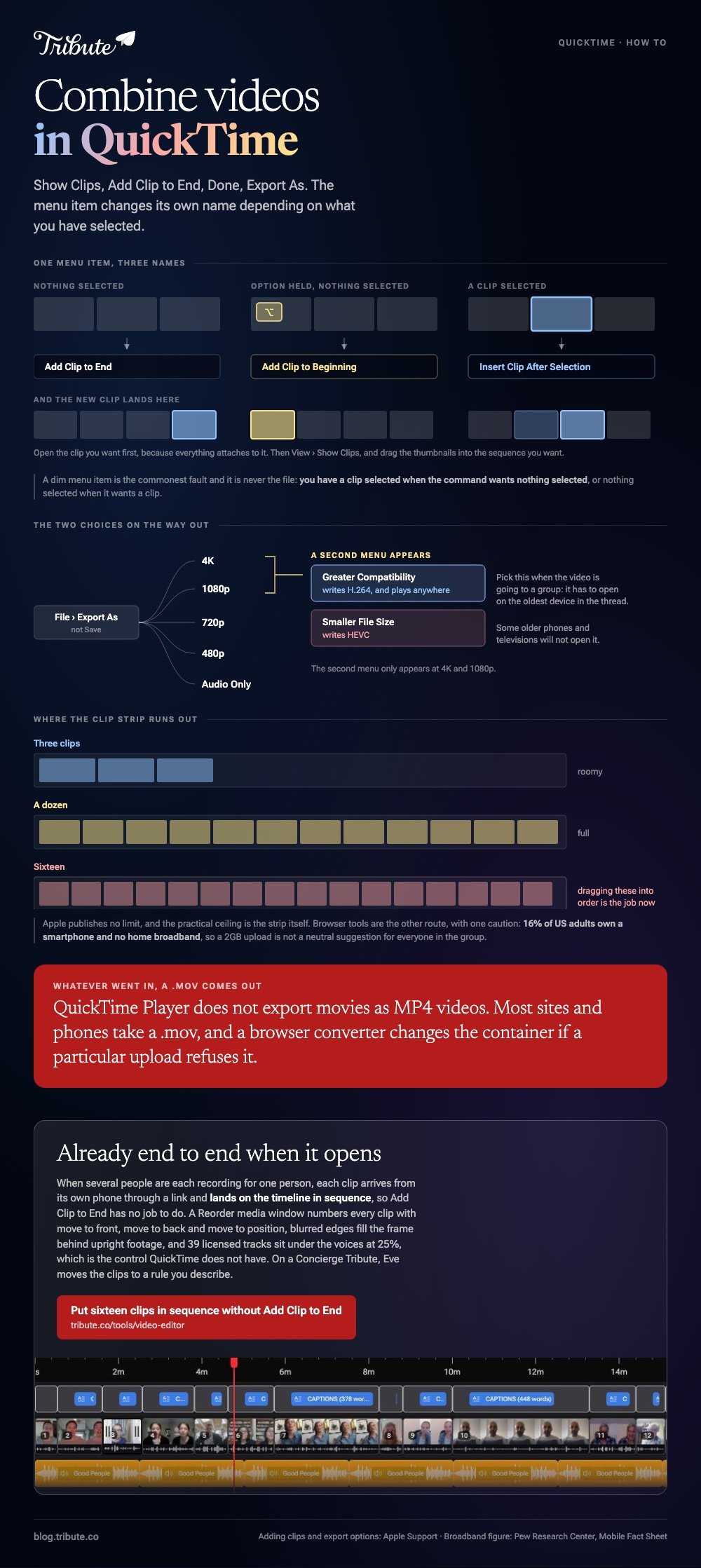
- With nothing selected, choose Edit > Add Clip to End.
- Find the second file, select it, then click Choose media.
- Click Done.
Apple sets the same path out in its guide to adding a movie or clip, which also covers the two variants most people miss.
Putting a clip somewhere other than the end
Hold Option with nothing selected and the menu reads Add Clip to Beginning. Select a clip in the strip first and it reads Insert Clip After Selection.
That second one is how you combine two videos in QuickTime around a third later on, without starting again.
Reordering and trimming before you export
Drag the thumbnails in the clip strip into the sequence you want, then click Done.
To cut the dead air at the front of a clip, select it and choose Edit > Trim, then drag the yellow handles in. Most phone clips carry two or three seconds of someone reaching for the record button.
Edit > Split Clip cuts at the playhead if you need to drop a middle section.

What file do you get at the end?
A .mov, whatever the two originals were.
Export with File > Export As rather than Save. Apple's page on exporting movies lists 4K, 1080p, 720p, 480p and Audio Only, and states that QuickTime Player does not export movies as MP4 videos.
At 4K and 1080p a second menu appears. Greater Compatibility writes H.264, which plays anywhere. Smaller File Size writes HEVC, which some older phones and televisions will not open.
Pick Greater Compatibility when you are sending the video to a group. Unlike a file you keep for yourself, one that travels has to open on the oldest device in the thread.
Why will QuickTime not combine two videos?
Almost always because of what the clips are, not what you did.
- The file will not open at all. QuickTime plays a short list of formats. An MKV or an AVI from a camcorder needs converting first.
- The menu item is dim. You have a clip selected when the command wants nothing selected, or nothing selected when it wants a clip.
- The second clip has no sound. Screen recordings and clips with unusual audio tracks are the common culprits. Play the whole thing through before you export.
- The picture jumps size. Combining a vertical phone clip with a horizontal one leaves you with one of them boxed in.
That last one is worth a moment. With 91% of US adults owning a smartphone, per the Pew Research Center mobile fact sheet, two clips from two people are two cameras held two ways, and QuickTime has no control for blending them.
What should you use instead of QuickTime Player?
Anything with a real timeline, the moment you want more than a join.
| Tool | Best for | Cost |
|---|---|---|
| QuickTime Player | Two or three clips, no music, Mac only | Already installed |
| iMovie | Music, titles, a longer sequence | Included with macOS |
| Clipchamp | The same job in a browser tab | Free tier, sign-in |
| Clideo | One merge and nothing else | Free tier, watermark |
Skip VLC for this. VideoLAN's own documentation says none of the methods VLC offers appear to merge with correct time signatures, which shows up as a file that plays but will not seek.
One caution on the browser row: 16% of US adults own a smartphone and no home broadband, per the same Pew fact sheet, so a 2GB upload is not a neutral suggestion for everyone in the group.
Browser options are covered in our guide to combining video clips online, and the phone version in combining videos on an iPhone.
What if the clips came from a dozen different people?
The Tribute video editor is a browser-based group video editor: contributors record clips on their phones and Tribute assembles them on a timeline with the music balanced under the voices.
It is ours, and it is the last thing on this page.
- Clips arrive in order, with a tick against the ones already on the timeline
- A Reorder media window numbers every clip, with move to front, move to back and move to position
- Blurred edges fill the frame behind upright phone footage, on by default, so no clip sits in black bars
- 39 licensed tracks sit under the voices at 25%, which is the control QuickTime does not have

Best for: A download folder of clips that have to go end to end in one particular order.
Why it works: Compared to a folder of downloads, the collecting and the ordering are finished before any editor opens.
What if the clips were never on your Mac?
Every step above assumes a folder you can point at.
You asked for the clips, they came through four apps, you dragged them to the desktop and renamed them so they would sort. Then you opened QuickTime.
There is one case where that half hour never happens.
The case: several people each recorded for one person
You are in it when the footage was never yours to gather.
A grandmother turning eighty. A colleague leaving after fifteen years. A memorial where the people who should speak are in four states and nobody is going to hand you a hard drive.

Why there is nothing to add to the end
The clips are already end to end when the page loads.
Each one arrives from its own phone through a link and lands on the timeline in sequence, so Add Clip to End has no job to do.
That is how the Tribute video editor handles it: not a faster join, but a video that arrives joined.

What you do not have to do
- No Add Clip to End. The clips are on one timeline in order before you open it.
- No order to fix. On a Concierge Tribute, Eve moves the clips to a rule you describe.
- No silence to hunt. Eve takes it off every clip from a prompt.
- No edit at all, if you want none. Tribute's editors build it and hand it back for approval.
When this is the wrong answer: you shot both clips yourself, or you want the file in ten minutes. Then stay in QuickTime Player. The editor is not a standalone joiner and lives inside a paid Tribute.
The wider version of the job is in making a video montage, and the plain two-file case in combining videos.
Frequently Asked Questions
Can I combine two QuickTime videos on Windows?
Not in QuickTime. Apple stopped supporting QuickTime for Windows in 2016 and the installer is no longer offered. Use Clipchamp, which ships with Windows 11 and runs in a browser otherwise.
Does combining videos in QuickTime reduce the quality?
Exporting re-encodes, so some loss is possible. Choose the highest size the export sheet offers and keep the originals until you have watched the result the whole way through.
Can I add music to a QuickTime merge?
No. QuickTime Player has no second audio track and no volume control per clip. iMovie is the shortest route to music on a Mac.
How do I combine two videos in QuickTime without losing the audio?
Play the join before you export. Screen recordings are the clips that turn up silent, and swapping the order so the problem clip is first makes the fault obvious in the first second.
Why is my combined video a .mov and not an .mp4?
QuickTime Player exports QuickTime movies and nothing else. Most sites and phones accept a .mov, and a browser converter will change the container if a particular upload refuses it.
Can I combine videos in QuickTime on an iPhone?
There is no QuickTime app on iOS. iMovie does the same job on a phone, and the Photos app will trim a clip but will not join two.
How many clips can I add?
Apple sets no published limit, and the practical ceiling is the clip strip. Past a dozen thumbnails, dragging them into order is slower than doing it in a timeline.

👉 Put sixteen clips in sequence without Add Clip to End if several people are each recording for one person, and QuickTime stays shut.
