
Combine Videos on iPhone: The App to Use and the Mismatch Nobody Warns You About
Use iMovie. Tap Start New Project, tap Movie, select the clips, tap Create Movie, and export one file. Photos cannot do it, and the part that goes wrong is never the joining: it is three clips shot at three different settings.

Why does the Photos app not combine clips?
Because Apple never put that job there.
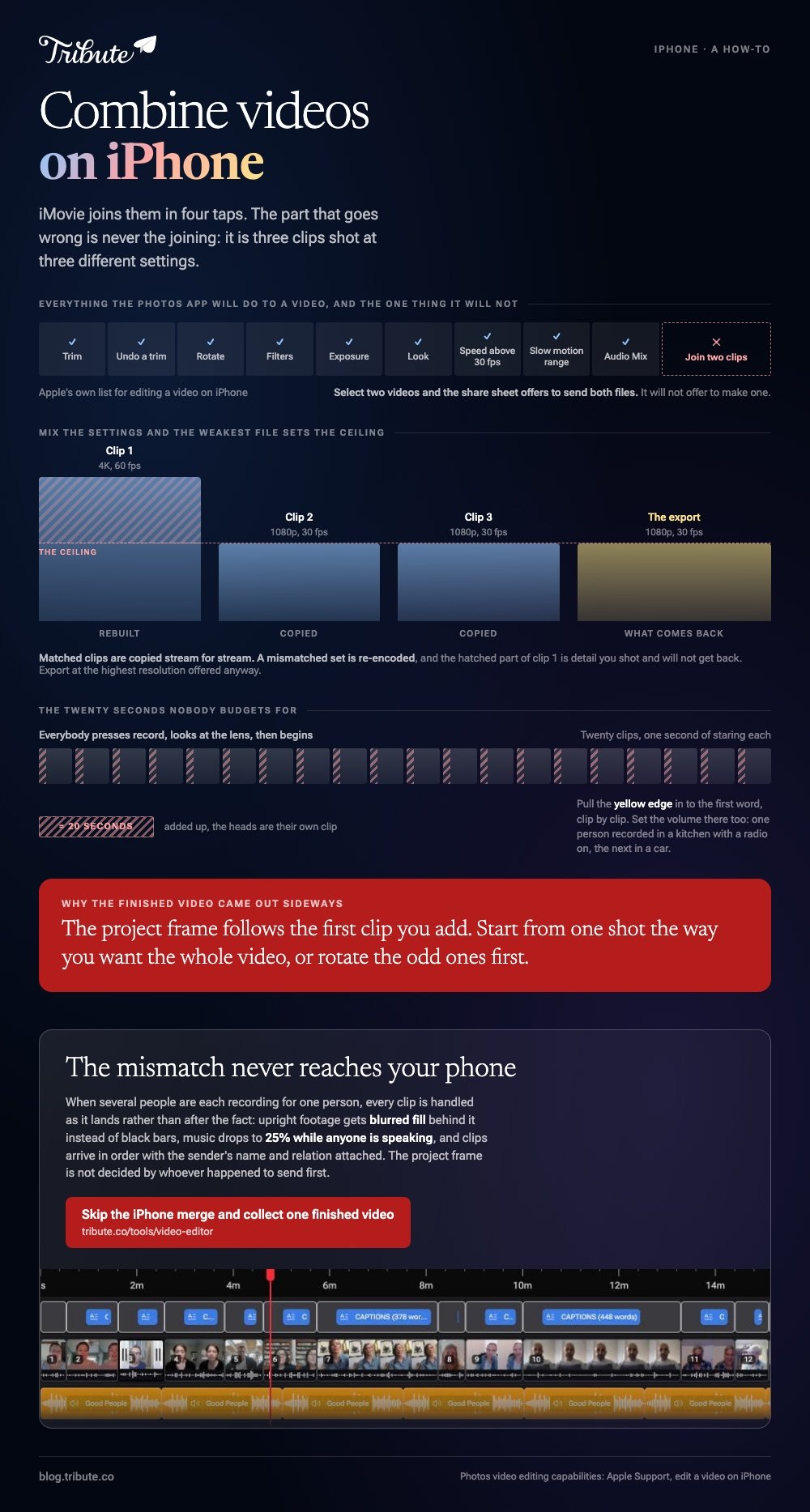
Apple's guide to editing a video on iPhone lists what Photos can do: trim, undo a trim, rotate, filters, exposure and look, playback speed above 30 fps, the slow motion range, and Audio Mix on recent models. Joining two clips is absent.
Select two videos in Photos and the share sheet offers to send both files. It will not offer to make one.
That is the twenty minutes most people lose before they start. Apple's own answer on the same page is to use another app, and on an iPhone that means iMovie.
Which app can combine videos on iPhone?
iMovie, the free app from Apple
- Open iMovie, tap Start New Project, then tap Movie.
- On the Moments screen, tap each clip in the order you want it. A blue checkmark marks your picks, and Media at the top switches to albums.
- Tap Create Movie. The clips land on a timeline in the order you tapped them.
- Drag a clip sideways to move it, or tap it and pull the yellow edge in to cut the silence at the head.
- Tap a clip, tap the Audio button, and set the volume for that clip alone.
- Tap Done, tap Share, tap Share Video, pick a resolution, then tap Save Video.
Apple documents the project steps in the iMovie for iPhone guide. iMovie calls every project a movie, which is why so many people end up searching for how to combine movies on iPhone rather than clips.
Best for: Two to ten clips shot on the phone you are editing on.
Why it works: Nothing is uploaded and nothing is added to the picture, so the output looks like the source.
CapCut, when the sound is uneven
Tap New project, select every clip, tap Add, and they arrive in selection order.
Press and hold a clip to drag it elsewhere. Tap a clip, tap Volume, and set a level for that one on its own. Tap Export at the top right and read the screen before you render.
Best for: Clips from several phones where one voice is half the volume of the next.
Why it works: Per clip volume and automatic captions are the two controls a mixed set needs most.
Can you combine videos on iPhone without an app?
Only through Safari, and it is a real option.
Every browser video combiner works online and is free to use up to a size cap, which is the trade: you skip the install and pay in upload time instead.
| Route | Install | Upload | Watch out for |
|---|---|---|---|
| iMovie | One app | None | Nothing |
| CapCut | One app | None | The export screen |
| Safari and a web tool | None | Every clip | Size caps and watermarks |
Upload is the part people underestimate, because a minute of 4K from a recent iPhone is a heavy file.
And 16% of US adults have a smartphone but no home broadband, per the Pew Research Center mobile fact sheet, so a cellular upload can outlast the edit.
Read the export screen before you commit. Compared to an app, a web tool hides its resolution cap and its watermark rule on that screen rather than on the page that sold you the idea.
The browser route in full is in combining video clips online.
What happens when the clips do not match?
This is the question the tutorials skip.

An iPhone records at whatever the settings said that day, and a family set is three generations of handset. Four mismatches account for almost every bad result.
- Orientation. The project frame follows the first clip you add. Start from one shot the way you want the whole video, or rotate the odd ones first.
- Upright clips in a wide frame. A blurred copy of the clip in the gutters reads better than black bars on both sides.
- Frame rate and resolution. Mix 4K at 60 fps with 1080p at 30 and the project is rebuilt, with the weakest file setting the ceiling.
- Slow motion. A slo-mo clip carries its ramp into the project. Set the slow section in Photos before you import, not after.
Unlike a set shot on one camera in one afternoon, a set collected from relatives has no shared settings at all, so export at the highest resolution offered and watch the first and last clip before sending it anywhere.
How do you combine clips on iPhone and keep the sound even?
Set the level per clip, never once for the project.
One person recorded in a kitchen with a radio on, the next in a car, the next in a quiet room at arm's length. A single volume for the whole timeline buries the quietest of them.
Trim the heads as well. Everybody presses record, looks at the lens, then begins, and twenty clips carry twenty seconds of staring.
More iPhone options are compared in video montage apps for iPhone, and the merge itself in merging videos on an iPhone.
What if the clips came from a dozen different people?
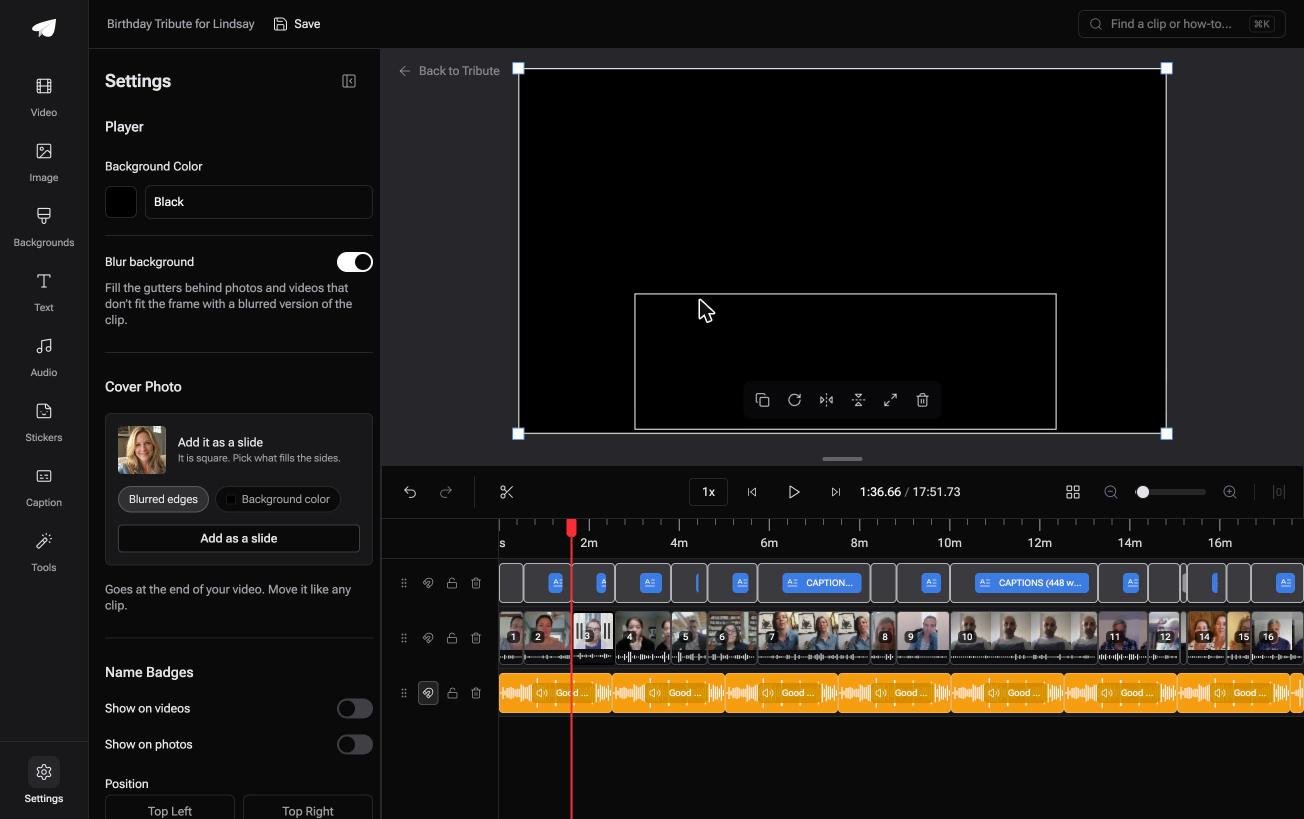
The Tribute video editor is a browser-based group video editor: contributors record clips on their phones and Tribute assembles them on a timeline with the music balanced under the voices.
It is ours, and it is the last thing on this page.
- Clips arrive auto-assembled in order, with a tick against the ones already on the timeline
- Blurred edges fill the frame behind upright phone footage, on by default, so no clip sits between black bars
- Music ducks to 25% under video and 75% under photos, overridable on any single clip
- Name badges from an uploaded-by name and relation, in four corner positions, dark or light
- A waveform under every clip so the silence before the first word is visible rather than guessed
Best for: A reunion recorded on six phones and edited on the one in your hand.
Why it works: The mismatch is handled on arrival rather than clip by clip after the merge.
Can the combining happen before you open anything?
Everything above assumes the clips reach your phone first.
They came through text, email and a shared album, at four sizes, two of them upside down, and three arrived the night before. That collection is the evening, not the merge.
There is one case where it does not happen at all.
The case: several people each recorded for one person
You are in it when none of the footage is yours.
A father turning seventy. A nurse leaving a ward after eleven years. A memorial with relatives in three countries and four models of phone.

Nobody is combining anything yet. Everyone is recording a message, and your job is assembly, not camera work.
Why the mismatch never reaches you
Each clip is handled as it lands rather than after the fact.
Upright footage gets blurred fill behind it, music drops to 25% while anyone speaks, and every clip arrives already in order with the sender's name attached. The project frame is not decided by whoever happened to send first.
That is how the Tribute video editor handles it: not a faster way to combine clips on an iPhone, but a video with the combining already done.

What you do not have to do
- No AirDropping. One link, and each person records on their own phone wherever they are.
- No ordering pass. Clips are numbered, and on Concierge Eve moves them to a rule you describe.
- No typing. One switch captions every clip, and a badge carries each person's relation.
- No edit, if you would rather not. Tribute's editors build it on a Concierge Tribute and hand it back.

When this is the wrong answer: you shot every clip yourself, or you want to stay on the phone. Then open iMovie. The editor runs in a browser, not as an iPhone app, and it lives inside a paid Tribute.
The wider job is covered in making a video montage.
Frequently Asked Questions
What is the fastest way to combine two videos on iPhone?
iMovie, in four taps: Start New Project, Movie, tap both clips, Create Movie. Export with Share, then Share Video, then Save Video.
Can I combine videos on iPhone without a watermark?
Yes, with iMovie, which adds nothing to the picture. Watermarks come from browser tools and from some apps on a free plan, and the export screen states the rule before you render.
Why is my combined video sideways?
The project frame follows the first clip you added, and one of the others was shot the other way up. Rotate the odd clip with a two finger twist on the viewer, or rebuild starting from a clip in the orientation you want.
How many clips will iMovie handle on a phone?
A dozen is comfortable and twenty begins to feel slow, because the limit is dragging clips into order on a screen the size of a hand. Past that, move to a laptop.
Does combining clips lower the quality?
Not when they match in codec, resolution and frame rate, because the streams are copied. A mismatched set is re-encoded and the weakest file decides the ceiling.
Can I add music while I combine clips?
Yes. In iMovie, tap Add Media, tap Audio, then choose Soundtracks or My Music and tap Add Audio. A built-in soundtrack adjusts itself to the length of the project.
What about combining a photo and a video?
Both sit on the same timeline in iMovie and CapCut. Give each photograph about four seconds and add a slow zoom so it does not read as a frozen frame.
👉 Skip the iPhone merge and collect one finished video if several people are each recording for one person, and the resolution mismatch never reaches your phone.
