
How to Combine Video Clips Online Without Installing Anything
To combine video clips online, drag your files onto one timeline track in a browser editor, close the gaps between them, then export a single file. Clipchamp, Clideo and Canva all do this. The export screen decides the result, not the join.

What happens when you combine video clips online?
Your files go to a server, get laid end to end, and come back as one new video.
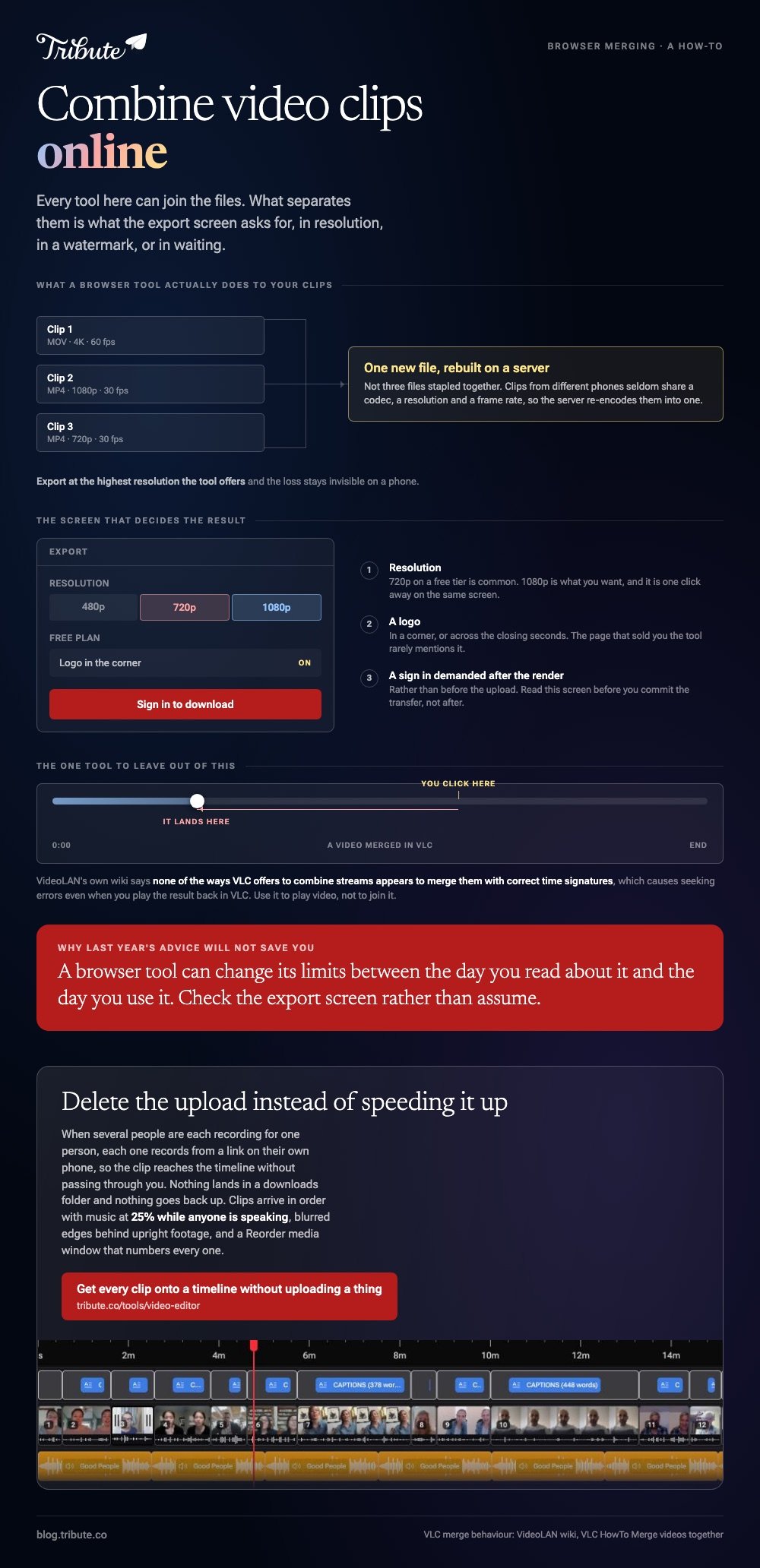
That last word is the one that matters. A browser tool rebuilds the footage, because clips from different phones seldom share a codec, a resolution and a frame rate.
Which is why the interesting question is never whether a tool can join the files. They all can. The question is what the export screen asks for in resolution, in a watermark, or in waiting.
| Tool | Where it runs | What to watch |
|---|---|---|
| Clipchamp | Browser, and built into Windows 11 | Wants a sign in |
| Clideo | Browser | A free plan with limits on features |
| Canva | Browser | Built for design, awkward past a few clips |
| VLC | Desktop | Skip it, and the reason is below |
How do you combine two videos together online in Clipchamp?
Clipchamp is the closest thing this job has to a default, because it runs in a browser and ships with Windows 11.
- Select My media on the toolbar, then the import media button, and browse to your files on the device or OneDrive.
- Drag the clips onto the timeline side by side on the same track, in the order you want them to play.
- Select a clip and drag its trimming handles in to cut the dead air at the head. Hold shift to trim several at once.
- Move the cursor over any gap between two clips and press the delete this gap button. A gap plays as blank video.
- Export from the top right of the editor and pick the highest resolution offered.
Microsoft documents the gap button on Windows and Mac alike, and Clipchamp warns you when gaps are left on the timeline.
Read that warning. A one second gap in the middle of a speech is the kind of thing nobody spots until the video has been sent.
Best for: A Windows laptop, a Chromebook, or any machine where you cannot install software.
Why it works: One track, no layers, and no render settings to get wrong.
How do you combine MP4 files online in a single purpose tool?
When all you want is the join, a merger beats an editor.
Clideo, Adobe Express and the rest take the same shape: choose your videos, drag the thumbnails into order, pick a frame size, then export and download. To combine MP4 files online this way is four clicks and however long your upload takes.
Read the export screen before you upload rather than after. Clideo publishes a free plan with limits on its features, and the download step is where those limits introduce themselves.
Upload is the real cost here. A minute of 4K phone footage is a large file, and 16% of US adults reach the internet through a smartphone with no home broadband, per the Pew Research Center mobile fact sheet.

Best for: Two or three clips that already match in size and format.
Why it works: Nothing to learn and nothing to install, so a five minute job stays five minutes.
Is there an online video combiner without watermark surprises?
Yes, and it is the one already on your computer.
Clipchamp on Windows 11 and iMovie on a Mac both export without adding anything to the picture. Among browser-only tools, a free tier tends to earn its keep with a logo or a resolution cap, and the export screen says which.
Three things to check there before you commit the upload:
- Resolution. 720p on a free tier is common, and 1080p is what you want.
- A logo in a corner, or across the closing seconds.
- A sign in demanded after the render rather than before the upload.
Unlike a desktop editor, a browser tool can change its limits between the day you read about it and the day you use it. Check rather than assume, and you will not lose an evening to a watermark.
What should you fix before you combine video clips online?
Three faults give away a video that was joined rather than edited.
Silence at the head of every clip. People press record, look at the lens, then begin. Drag the clip edge in to the first word.
Volume that jumps at the cut. One clip came from a kitchen, the next from a car. Set a level per clip rather than one level for the whole video.
Upright clips in a wide frame. A phone video shot in portrait sits in the middle of a 16:9 frame with empty space on each side, and a blurred copy of the clip fills that space better than black bars.
One tool to leave out of this. VideoLAN's own wiki says none of the ways VLC offers to combine streams appears to merge them with correct time signatures, which causes seeking errors even when you play the result back in VLC.
More on the jobs either side of this one: merging video clips online and combining videos into one file.
What if the clips came from a dozen different people?
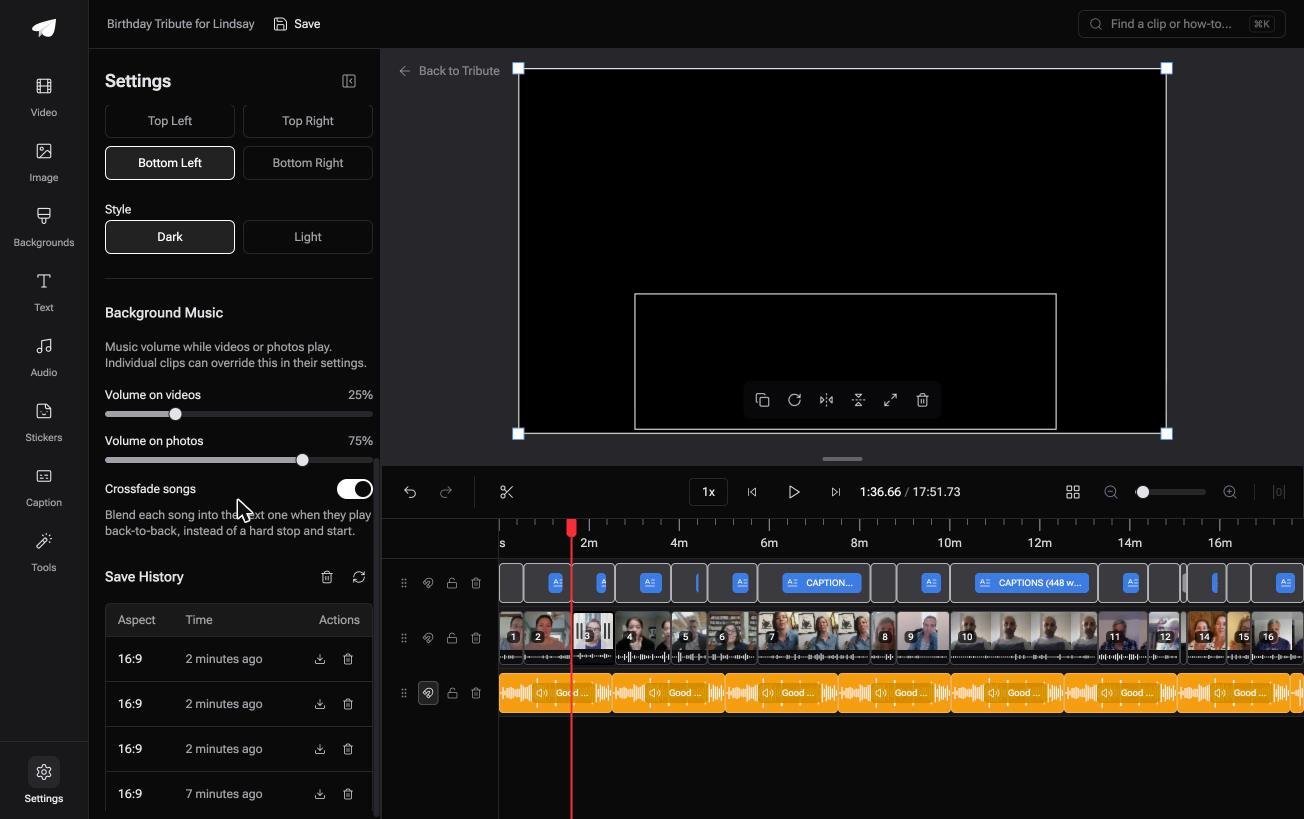
The Tribute video editor is a browser-based group video editor: contributors record clips on their phones and Tribute assembles them on a timeline with the music balanced under the voices.
It is ours, and it is the one tool on this page that is not a general purpose merger.
- Clips arrive in order on the timeline, with a tick against the ones already placed
- Music at 25% under video and 75% under photos by default, overridable per clip
- Blurred edges fill the frame behind upright phone footage, switched on from the start
- A Reorder media window that numbers every clip: move to front, move to back, move to position

Best for: A work laptop that installs nothing and a dozen clips waiting to be joined.
Why it works: Compared to a browser merger, the collecting and the ordering are finished before you open anything.
Can you skip the uploading altogether?
Everything above starts with files you already hold.
You chased them, saved them, and now you are pushing them back up to a server. That round trip is most of what a browser merge costs you.
There is one case where it never happens.
The case: the clips are not yours
You are in it when several people each record something for one person.
A grandfather turning ninety. A teacher leaving after twenty years. Nobody is shooting a video: twelve people are each recording a message, and your job is assembly.

Which means the search that brought you here, combine video clips online, names a step you can delete rather than a step you can speed up.
Why the upload never happens
Each person records from a link on their own phone, so the clip arrives on the timeline without passing through you.
Nothing lands in a downloads folder and nothing goes back up. That is how the Tribute video editor handles it: not a faster combiner, a shorter route.

What you do not have to do
- No upload. Each clip reaches the timeline from the phone it was recorded on.
- No merge step. The clips are in order, with music underneath at 25% while anyone is speaking.
- No pass over the whole timeline on a Concierge Tribute: Eve, the assistant inside the editor, trims the silence off every clip when you ask it to.
- No evening on the timeline, on Concierge: Tribute's editors build the video and you send the link.
When this is the wrong answer: you shot the clips yourself, or you have two files to join today. Then a browser merger is the right tool and this is not, because the editor lives inside a paid Tribute.
Frequently Asked Questions
What is the best way to combine two videos together online?
Clipchamp for anything past three clips, because the timeline shows you the order you are building. A single purpose merger when the two files already match and you want the download inside a minute.
Can I combine MP4 online without creating an account?
Some sites render first and ask for a sign in at the download, so read the export screen before you upload. Clipchamp asks up front, which at least tells you where you stand before the transfer.
Does combining clips in a browser lower the quality?
A little, because the server re-encodes mismatched clips into one new file. Export at the highest resolution the tool offers and the loss stays invisible on a phone.
How many clips can a browser tool handle at once?
Total upload size is the limit rather than the file count, and the browser tab is the next one. Past about twenty clips, a desktop editor or a tool that orders them for you is the better bet.
Can I combine videos online on a phone?
Yes, through the browser, though the upload drags on cellular. On an iPhone, iMovie does the same job on the device with no transfer at all, which we cover in combining videos on an iPhone.
Why should I avoid VLC for this?
Use it to play video, not to join it. VideoLAN's wiki says its merge methods do not produce correct time signatures, so the file you get back misbehaves as soon as anyone drags the playhead.
Should the music go on before or after the join?
After, once the order is settled, so you time it once instead of twice. Our guide to making a video montage covers the whole sequence from files to finished video.
👉 Get every clip onto a timeline without uploading a thing if several people are recording for one person, and the combining step stops existing.
