
Merge Video Clips Online: Which Browser Tool, and What the Export Costs
Clipchamp is the one to open first. It runs in Edge or Chrome, joins clips on a single timeline track and exports at 1080p with nothing stamped on the picture. Clideo and Canva do the same job with more conditions attached.

How do you merge video clips online in a browser?
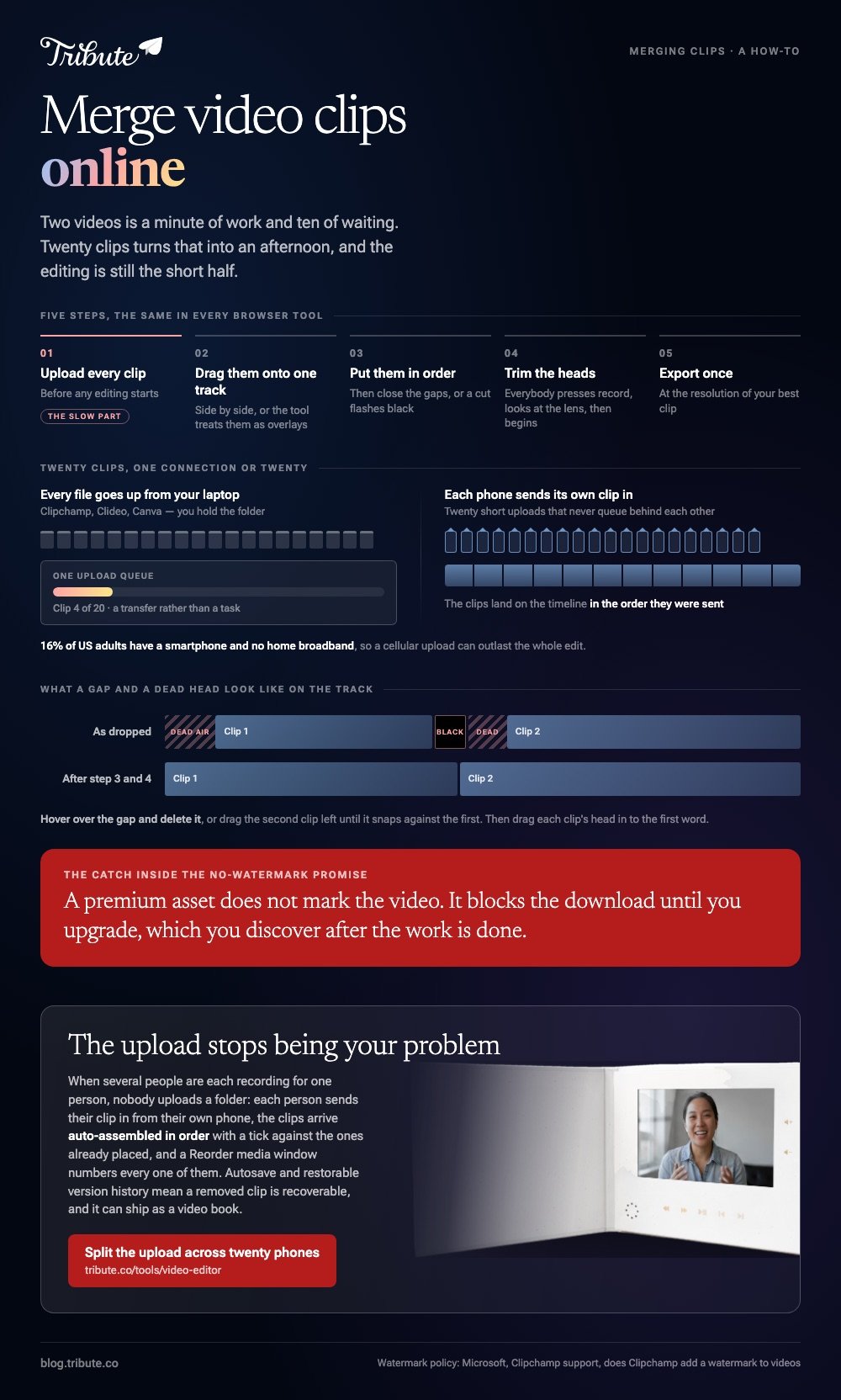
Five steps, and they are the same in every tool.
- Upload every clip. This is the slow part, and it happens before any editing.
- Drag them onto one track, side by side rather than stacked, or the tool treats them as overlays.
- Put them in order by dragging, then close the gaps so there is no black flash at a cut.
- Trim the heads. Everybody presses record, looks at the lens, then begins.
- Export once, at the resolution of your best clip, and read the screen before you commit.
An MP4 merger online is doing the same job as a desktop editor, and to merge mp4 files online you still have to send every one of them up first.
To merge two videos together online is about a minute of work and ten of waiting. Twenty clips turns that into an afternoon, and the editing is still the short half.
Which tool should you use to merge video clips online?
Clipchamp
Microsoft preinstalls it on Windows 11 and runs the same editor in a browser on Windows, Mac, Linux and Chromebook.
- Open My media on the toolbar, click the import media button, and browse your device or OneDrive.
- Drag the clips onto the timeline, side by side on one track.
- Click a clip and drag its trimming handles. Hold shift or command to trim several at once.
- Hover over a gap between clips and press the delete this gap button.
- Select Export, choose a quality such as 1080p, then Export again.
Those steps come from Microsoft's guide to combining videos in Clipchamp, which also covers dragging a transition onto the point between two clips.
Best for: Ten or more clips and a laptop you would rather not install anything on.
Why it works: A full-width timeline turns reordering into dragging rather than guessing.
Clideo
A single-purpose merger rather than an editor, which suits a job with no editing in it.
Upload the clips, drag the thumbnails into order, set image durations, add audio and choose an aspect ratio, then press Export. The result page offers Edit to go back or Download to finish.
Clideo lists MP4, AVI, MPG, VOB, WMV and MOV among its inputs and says mismatched formats are converted to a compatible output. Unlike Clipchamp, it publishes no file size cap, only that paid plans allow larger ones.
Best for: Three or four clips that need nothing done to them.
Why it works: There is no project to set up, so the whole thing is one page.
Canva
Worth opening only when the merge is part of a design job.
Drop the clips on a Video design timeline, drag their edges to trim, then download as MP4. Canva's help center puts free accounts at MP4 export up to thirty minutes and paid plans at two hours, with 1080p as the default quality.
Best for: A merge that also needs titles, captions or a logo.
Why it works: The typography is the reason to be there, and the join comes along with it.

What does the export cost?
This is the part that decides which tool you should have opened.
| Tool | At no cost | Watermark | Sign-in |
|---|---|---|---|
| Clipchamp | 480p, 720p, 1080p | None | Microsoft account |
| Clideo | Upload, arrange, export | Read the export screen | Yes for download |
| Canva | MP4 up to 30 minutes | From premium elements | Canva account |
To merge videos online without a watermark, Clipchamp is the one that publishes the rule rather than leaving you to find out. Microsoft states that the editor adds no visual, audio or other watermark to an export.
There is a catch inside that sentence. Using a premium asset does not mark the video; it blocks the download until you upgrade, which you discover after the work is done.
When is a browser the wrong place to merge?
Three times, and all three are about the upload rather than the editing.
- Large files. A minute of 4K from a recent phone is heavy, and twenty of them is a transfer rather than a task.
- A weak connection. 16% of US adults have a smartphone but no home broadband, per the Pew Research Center mobile fact sheet, so a cellular upload can outlast the whole edit.
- Footage you would rather not send. A memorial recording belongs on your own machine, and a desktop editor never uploads anything.
Compared to iMovie or Clipchamp's Windows app, a browser trades install time for upload time. That trade is worth taking for three clips and worth refusing for thirty.
Two nearby cases are covered in merging videos online and combining video clips online.
What if the clips came from a dozen different people?
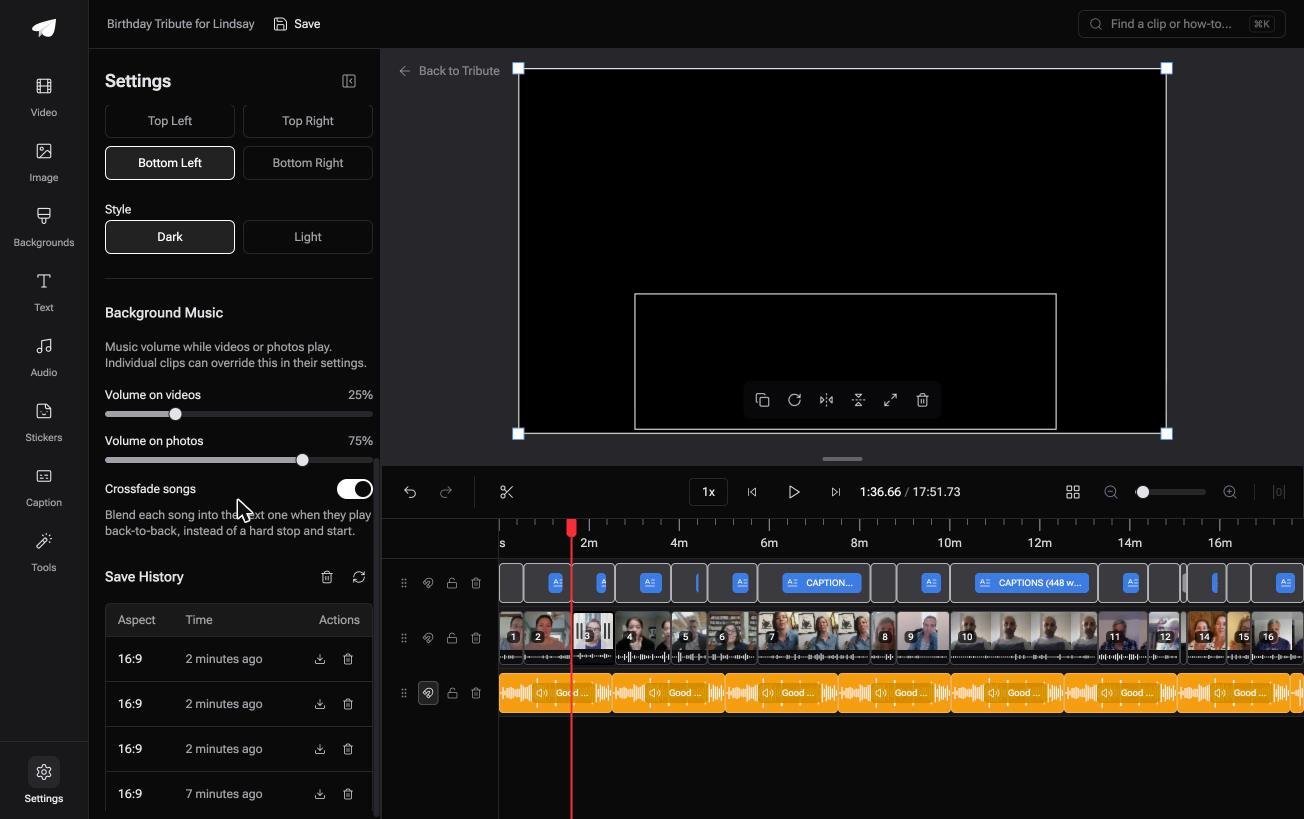
The Tribute video editor is a browser-based group video editor: contributors record clips on their phones and Tribute assembles them on a timeline with the music balanced under the voices.
It is ours, and it is the last thing on this page.
- Each person uploads from their own phone through a link, so you never upload twenty files yourself
- Clips arrive auto-assembled in order, with a tick against the ones already on the timeline
- A Reorder media window numbers every clip, with select all, move to front, move to back, move to position and bulk remove
- Autosave and restorable version history, so a clip you removed is recoverable rather than gone
- Tribute renders the final video on its servers, and the preview is frame-accurate to what comes back

Best for: Twenty clips to merge and an upload bar you would be watching all evening.
Why it works: The upload is split across twenty phones rather than queued on one laptop.
Can the upload stop being your problem?
Everything above begins with you holding the files.
You chased them through text, email and a shared album, waited for each one to climb to a server, and found out at the export screen what the download would cost.
There is one case where that chain never starts.
The case: several people each recorded for one person
You are in it when the clips were never yours to gather.
A head teacher retiring in July. A sister moving abroad. A memorial where the people who should speak are spread over three time zones.
Nobody is uploading a folder. Each person records on their own phone and sends it straight in, and your job is assembly, not transfer.
Why the merge is finished before you arrive
Clips land on the timeline in the order they were sent, with the name and relation of whoever sent each one.
Music sits at 25% under anyone speaking and 75% under photographs, and a waveform under every clip shows the silence before the first word.
That is how the Tribute video editor handles it: not a faster browser merger, but a timeline that was merged while you were asleep.
When this is the wrong answer: the clips are already on your laptop and you want them joined today. Then open Clipchamp. The editor is not a standalone merger, and it lives inside a paid Tribute.
The wider job is covered in making a video montage.
Frequently Asked Questions
Is there a YouTube video merger online?
No, not inside YouTube. Studio trims and blurs a video that is already uploaded, and it will not join two of them, so the merge happens before the upload. Merging YouTube videos covers the detail.
Can I merge clips online without an account?
Not in practice. Every tool here asks for a sign-in before it hands back the finished file, and the ones that skip it tend to stamp the export instead.
How many clips can a browser tool handle?
The upload is the limit, not the editor. Ten short clips is comfortable, and thirty long ones is a transfer you should start before dinner.
Will merging online reduce the quality?
Only through the export setting. Choose the highest resolution offered, and avoid running the file through a second tool afterwards, because each pass discards detail the last one left.
Why is there a black flash between my clips?
There is a gap on the timeline. Hover over it and delete the gap, or drag the second clip left until it snaps against the first.
Can I merge clips of different sizes online?
Yes, and the tool picks one frame for all of them. Decide what happens to the clips that do not fit, because blurred fill behind an upright clip reads better than black bars.
Is a browser tool safe for private footage?
It is a judgment call rather than a yes or no. The files sit on somebody else's server for as long as the job takes, so a desktop editor is the safer choice for anything sensitive.
👉 Split the upload across twenty phones if several people are each recording for one person, and the queue on your laptop never forms.
