
Which Video Montage App iPhone Owners Should Use
iMovie is the video montage app iPhone owners should start with: a download from Apple at no cost, one timeline, and an export back to the camera roll. CapCut is the step up when you want captions. Photos cannot join two clips.

Is there one video montage app iPhone owners should default to?
For most people, yes, and the reason is the timeline rather than the features.
A montage is clips and photos cut to music. The app you want is the one that shows them in a row you can drag, lets you set a volume per clip, and gives the finished video back at full size.
| App | Joins clips | Captions | Best suited to |
|---|---|---|---|
| iMovie | Yes | Typed by hand | Two to twenty clips you shot |
| CapCut | Yes | Generated from speech | Mixed sources, mismatched sound |
| Photos | No | No | Trimming one clip |
| A browser tool | Yes | Varies | A phone with no storage left |
Photos is the surprise in that table. Apple's guide to editing videos on iPhone lists trim, rotate, filters, playback speed, the slow motion range and Audio Mix. Joining two clips is absent, and no setting hides it.
How do you make a video montage on iPhone in iMovie?
Six steps, and the longest one is choosing what to leave out.
- Open iMovie, tap Start New Project, then tap Movie.
- On the Moments screen, tap each clip and photo you want. A blue checkmark lands on your picks, and tapping Media at the top switches to albums.
- Tap Create Movie. Everything arrives on a timeline in the order you tapped it.
- Drag a clip sideways to move it, or tap it and drag a yellow edge in to cut the silence before the first word.
- Tap a clip, tap the Audio button in the inspector, and set the volume for that clip on its own.
- Tap Done, tap Share, tap Share Video, choose a resolution, then Save Video.
Apple sets out the project steps in its iMovie for iPhone guide. To add the music, tap the Add Media button, tap Audio, then pick from Soundtracks or My Music.
Best for: A montage of your own footage, built on the phone that shot it.
Why it works: Nothing uploads, so a twenty clip project finishes at the speed of your thumb.
When is CapCut the best video montage app?
When the clips did not all come from your phone.
CapCut writes captions from speech, which iMovie does not. A caption in iMovie is a title you type and time by hand, and twelve clips of typing is an evening nobody enjoys.
- Tap New project and select every clip and photo you want.
- Tap Add. They arrive on a timeline in selection order.
- Press and hold a clip, then drag it into a new position.
- Tap a clip, tap Volume, and set a level for that clip alone.
- Tap Export at the top right, set resolution and frame rate, then save.
Unlike iMovie, CapCut wants an account, and its export screen carries a paid tier. Read that screen before you render rather than after.
Best for: Clips from several phones where the sound levels disagree.
Why it works: Per clip volume and spoken captions are the two controls a mixed set of recordings needs most.

What is the best way to make a video montage people watch to the end?
Pick the song before you pick the clips.
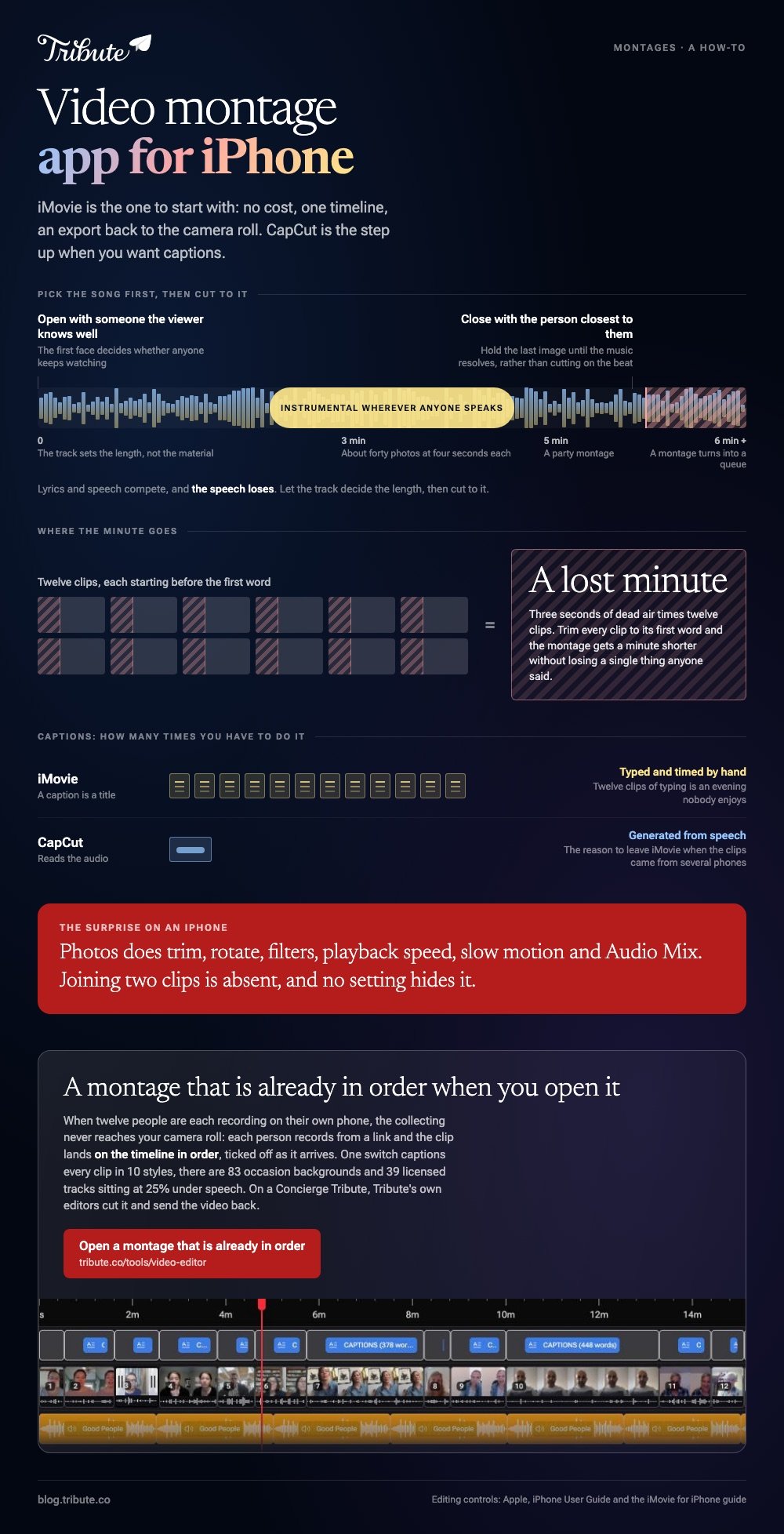
The best way to create a video montage is to let the track set the length, then cut to it. Three minutes carries about forty photos at four seconds each, and past six minutes a montage turns into a queue.
Four rules do most of the work:
- Open with someone the viewer knows well, and close with the person closest to them.
- Go instrumental wherever anyone speaks. Lyrics and speech compete, and the speech loses.
- Trim every clip to its first word. Three seconds of dead air times twelve clips is a lost minute.
- Hold the last image until the music resolves rather than cutting on the beat.
Phone footage is the raw material whether you planned it or not. With 91% of US adults owning a smartphone, per the Pew Research Center mobile fact sheet, a family montage is a montage shot on three generations of camera.
Is desktop still the best video editing software for montages?
Only once the project outgrows your thumb.
A hundred photos is a different job from twenty clips. Dragging items into order on a hand sized screen is the bottleneck, not the rendering, and iMovie for Mac or Clipchamp on Windows gives you a wider timeline.
Compared to the phone, a desktop editor buys you room and costs you the camera roll being right there. Start on the phone, and move only when the ordering starts to hurt.
More on the wider job in making a video montage, and the stills version in building a photo montage video.
What if the clips came from a dozen different people?
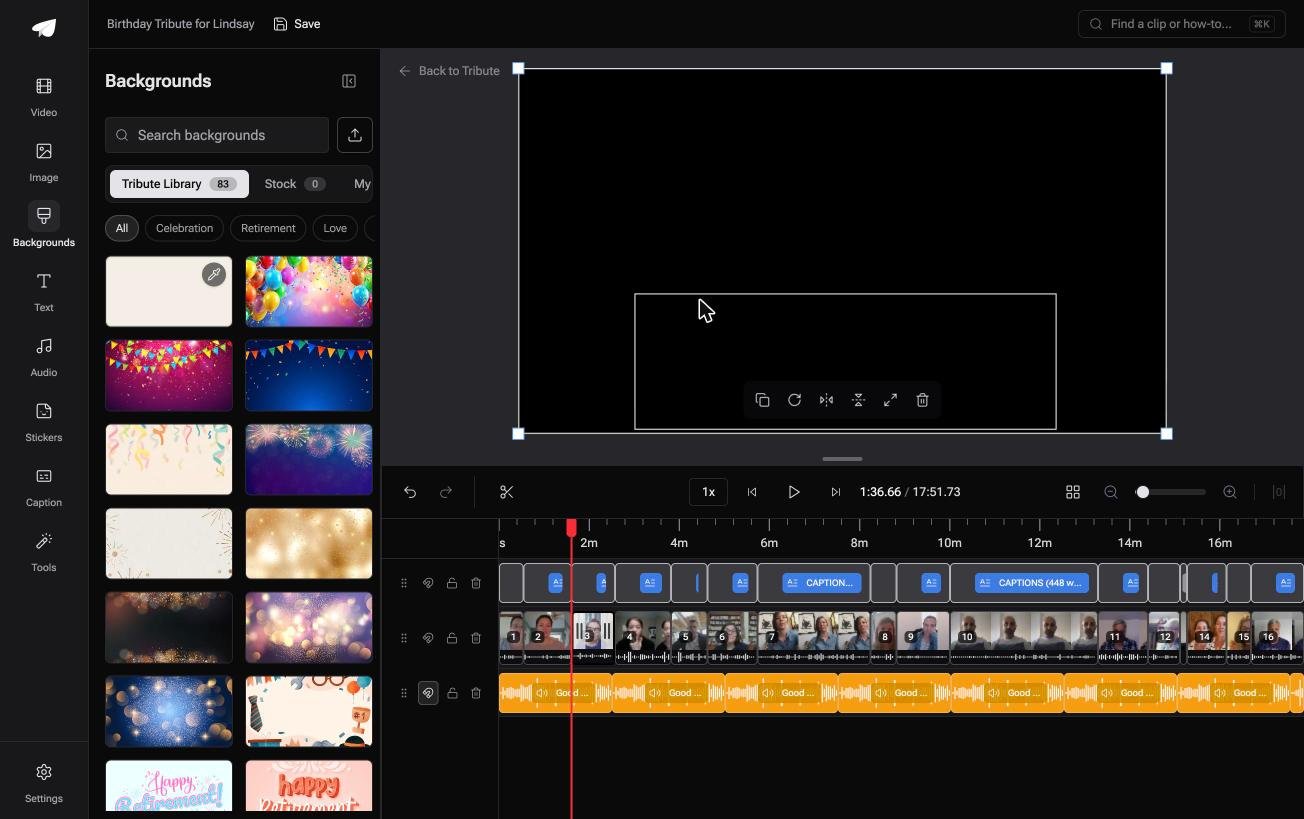
The Tribute video editor is a browser-based group video editor: contributors record clips on their phones and Tribute assembles them on a timeline with the music balanced under the voices.
It is ours, and it answers one case rather than the general one.
- Clips arrive in order, with a tick against the ones already on the timeline
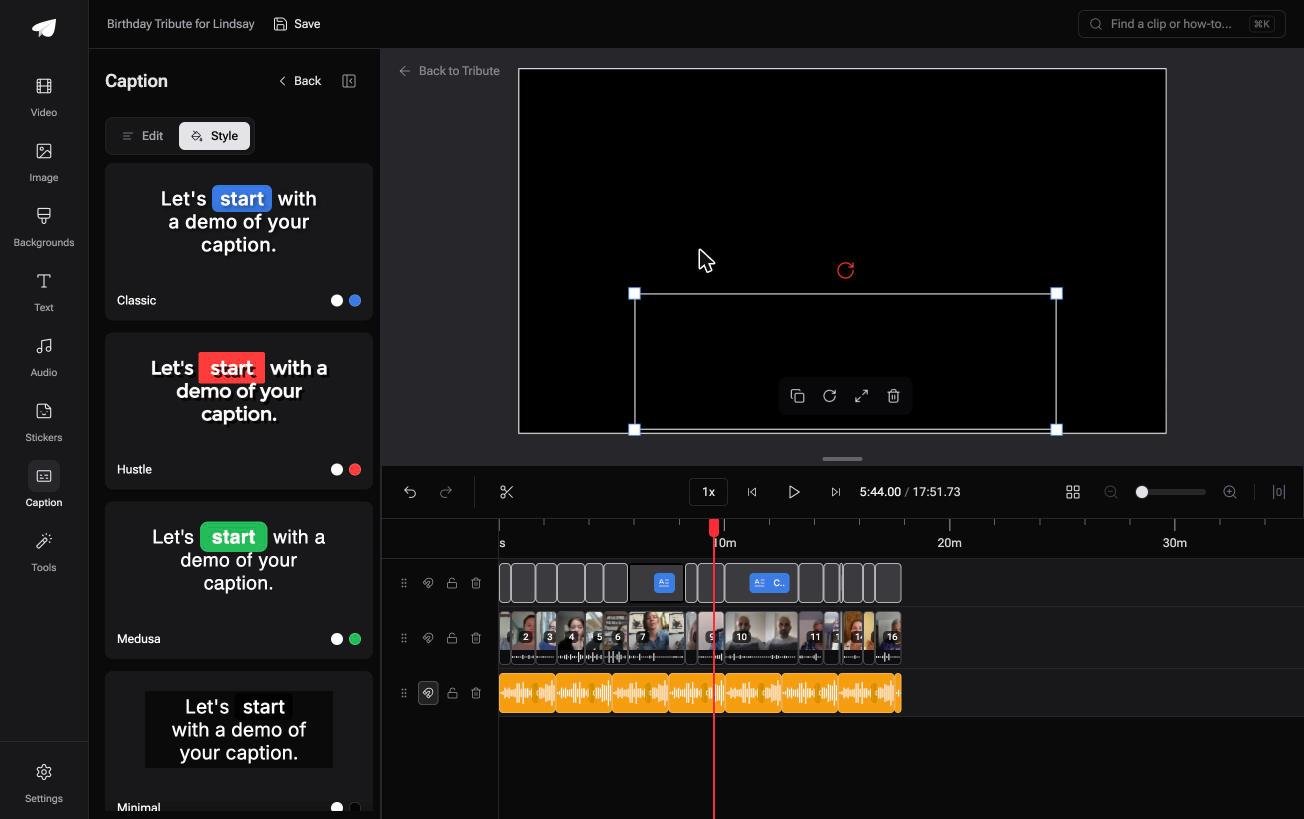
- One switch captions every clip, with 10 caption styles and the spoken word highlighted
- 83 occasion backgrounds grouped by Celebration, Retirement and Love
- 39 licensed tracks across 11 genres, sitting at 25% under speech
Best for: A montage assembled on your phone out of clips other people shot on theirs.
Why it works: The captions and the music levels are set before the organizer opens the editor.
Can a video montage app iPhone side skip the collecting?
No app on the phone can, and that is the honest limit of this page.
iMovie starts from the camera roll. If the montage is for one person and the material is in other people's hands, the editing was never the slow part.
The case: twelve people, twelve phones
You are in it when several people each record something for one person.
A grandmother turning eighty. A coach retiring after fifteen seasons. Nobody is shooting a montage: everyone is recording a message, and the assembling is yours.

Why the camera roll stops mattering
Each person records from a link on their own phone and the clip lands on the timeline in order.
No text threads, no download folder, no twelve files to put in a sensible sequence. The Tribute video editor opens with the montage already roughed out, and your job starts at trimming.

What you do not have to do
- No downloads. Nothing lands in the camera roll on your own phone.
- No caption pass. One switch covers every clip, in ten styles.
- No montage to assemble. On a Concierge Tribute, Tribute's own editors cut it and send the video back.
- No export settings. The preview is frame-accurate to what arrives.
When this is the wrong answer: the footage is yours and already on the phone. Then iMovie is the better tool, and the Tribute editor is not a general montage app anyway, since it lives inside a paid Tribute.
Frequently Asked Questions
What is the best video montage app for an older iPhone?
iMovie, because it renders on the device and asks less of it than a browser tool does. An older phone finishes a short montage at much the same speed as a new one.
Can I make a video montage on iPhone without an app?
Only through Safari and a browser editor, which trades the install for an upload. Nothing built into iOS joins two clips into one file.
How long should a video montage be?
Three to five minutes for a party, and under two for anything going on social media. Length is set by the song more often than by the material.
Does iMovie add a watermark?
No. It exports the picture untouched, which is the main reason it stays the default pick on an iPhone.
Can I mix photos and video in the same montage?
Yes, in iMovie and CapCut both. Give photos three to five seconds each, and lift the music under them, since there is no speech to sit beneath.
How do I get everyone's clips off their phones?
Ask for the original file rather than a forward, because messaging apps compress video hard. A shared cloud folder or AirDrop keeps the recording intact, and combining videos on an iPhone covers what to do once they land.
What is the best way to make video montage files play on a TV?
Export at 1080p and hand over the file rather than a link, or upload it unlisted and open that on the TV. AirPlay from the camera roll works for anyone in the room.
👉 Open a montage that is already in order if twelve people are recording it on twelve phones, and the collecting never reaches your camera roll.
