
Put Music Over Video Online: The Browser Tools and the Real Steps
You can put music over video online in a browser tab, with nothing to install. Clipchamp and Canva both do it in four steps and both ship cleared tracks, so the license question is settled before you start.

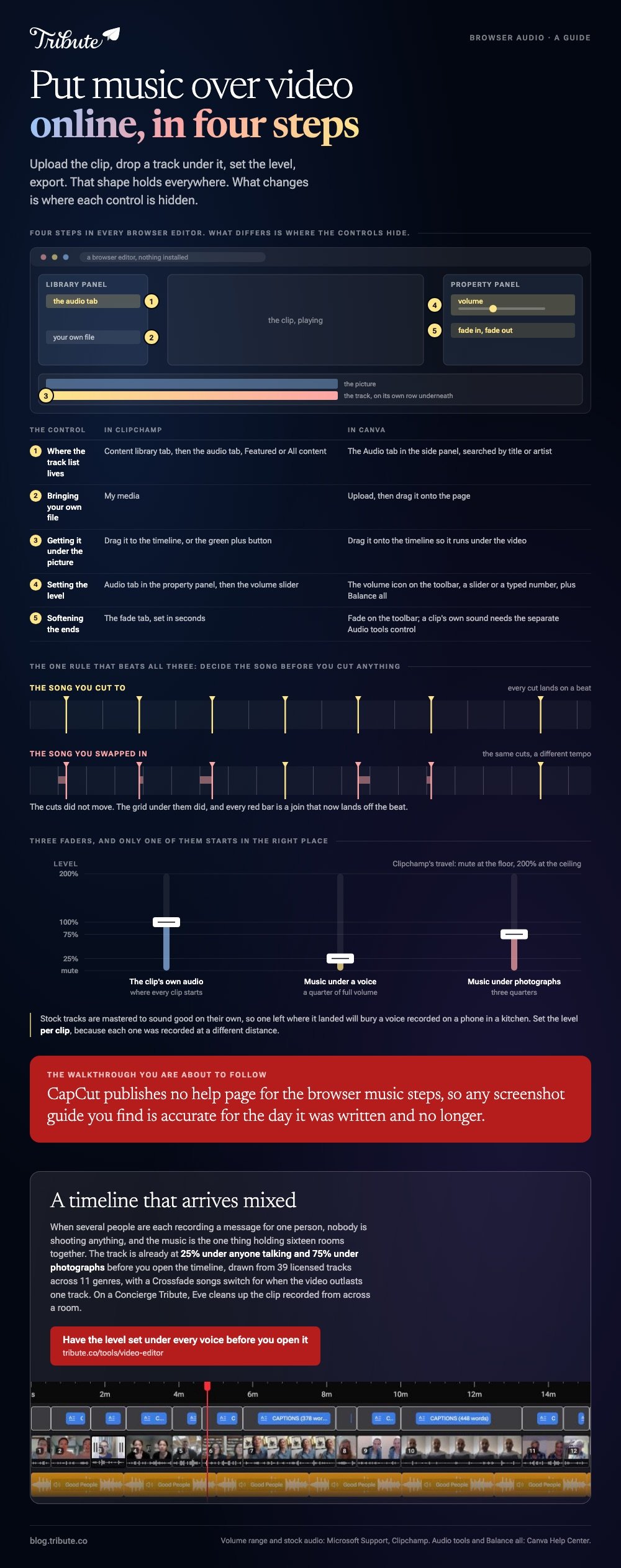
How do you put music over video online in four steps?
Upload the clip, drop a track under it, set the level, export.
That shape holds in every browser editor. What differs is where the controls hide and what the output costs you.
| Tool | Own track | Stock library | Best when |
|---|---|---|---|
| Clipchamp | Yes | Featured and All content | You are on Windows or a browser |
| Canva | Yes | Built into the editor | The video is built from photos and text |
| CapCut web | Yes | Audio tab | The video is going to a phone feed |
One rule beats all three. Decide the song before you cut anything, because changing it afterward means recutting to a new tempo.
Which tool should you use to put music over video online?
The one whose output shape matches where the video is going.
Both sets of steps below take a few minutes, and neither asks you to insert music in video online by hand on a timeline you have to build first.
1. Clipchamp
- Open the content library tab on the toolbar, then the audio tab.
- Preview tracks in Featured or All content, or add your own file from My media.
- Drag the track onto the timeline below the video, or use the green + button.
- Select it, open the audio tab in the property panel, and drag the volume slider.
- Open the fade tab and set a fade in seconds, then export.
Microsoft documents the library on its stock audio page and the levels on a separate volume page: clips start at 100%, mute is the floor and 200% the ceiling.
Best when: You want the music to add to video online and keep the original speech underneath it.
2. Canva
- Add the clip to the page, then find a track in Canva's audio library.
- Drag the track onto the timeline so it runs under the video.
- Select it and click the volume icon on the toolbar above the editor.
- Set the level with the slider or type a number, and use Balance all when one clip is louder than the rest.
- Click Fade on the toolbar to soften the start and the end.
Canva's audio help page adds one caveat worth reading first: fading a video clip's own sound uses a separate Audio tools control and needs a recent app version on iOS.
Best when: The project is already a Canva design and the video is one part of it.
3. CapCut in a browser
CapCut's web editor carries an Audio tab with its own library and accepts your own files. CapCut publishes no help page for the browser music steps, so any screenshot walkthrough you find is dated the day it was written.
Best when: The same project will finish on your phone in the CapCut app.

How loud should the music sit under a voice?
Lower than it feels right to set it.
Stock tracks are mastered to sound good on their own, which means one at a comfortable level will bury a voice recorded on a phone in a kitchen.
| Underneath | About |
|---|---|
| Someone talking | A quarter of full volume |
| Photographs, no voice | Three quarters |
Set the level per clip rather than once for the whole timeline. Each clip was recorded at a different distance, so one setting cannot be right for all of them.
Fade in and out instead of letting the track stop dead. Unlike a hard cut, a two second fade reads as a decision rather than a mistake.
More craft in putting music into a video and in making a slideshow with music.
Where does the track come from if you do not own a song?
From the editor you are already in, which is the shortest safe answer.
Every tool above ships music cleared for use inside it. An online music video creator that carries its own library has settled the question before you pick a track, and a commercial song you love has not.
- The editor's library: cleared inside that editor, nothing to read
- YouTube Audio Library: costs nothing, some tracks ask for a credit
- Creative Commons: read the license per track, not per collection
- A song you bought: buying a copy grants the right to listen, not to publish
That last line is the gap most people fall into. The full version of this question is in royalty free music for videos.
What if the video is other people's clips and not your footage?
Then the music is not the hard part. Sixteen voices at sixteen levels is.
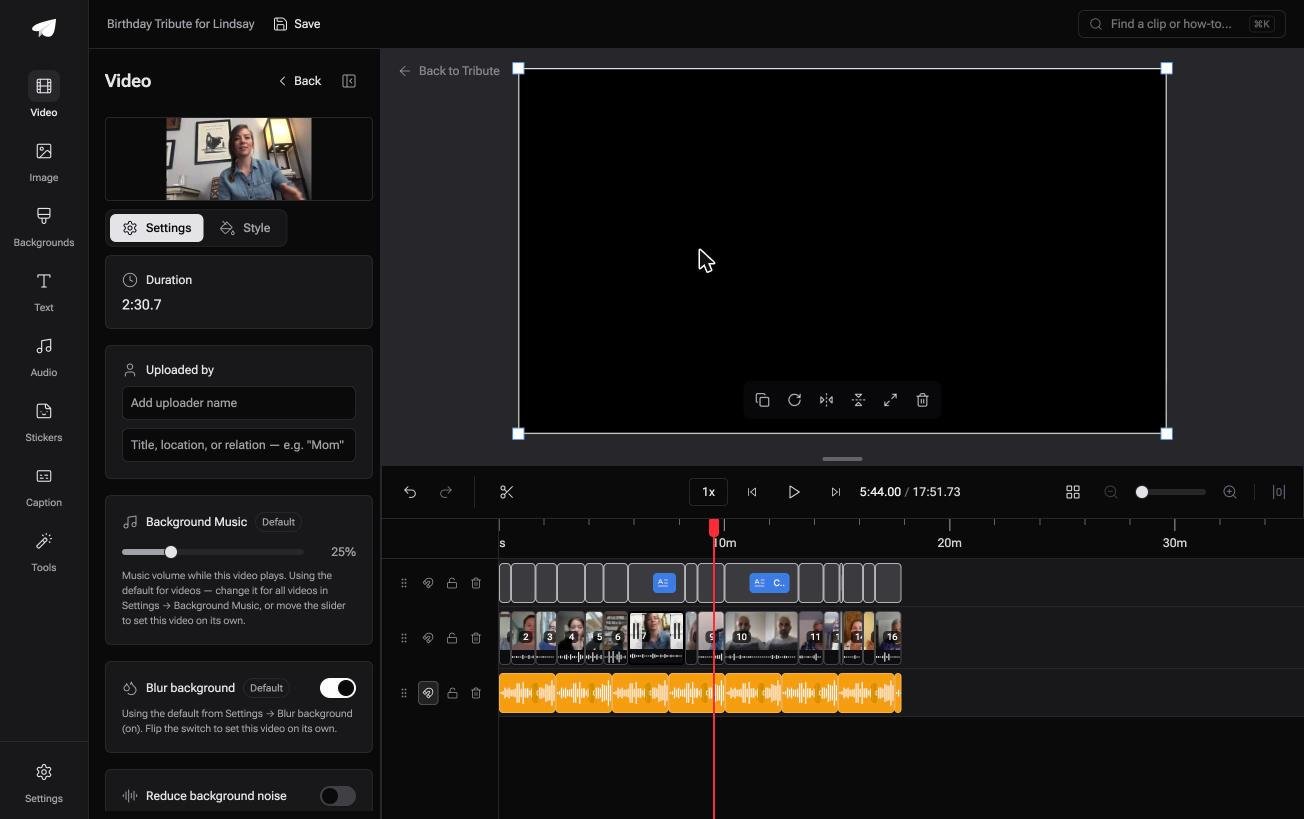
The Tribute video editor is a browser-based group video editor: contributors record clips on their phones and Tribute assembles them on a timeline with the music balanced under the voices. It is ours, and it is the last thing on this page.
- 39 licensed tracks across 11 genres, cleared inside the editor
- Your own audio too: a YouTube link, or MP3, WAV, M4A and FLAC
- 25% under speech and 75% under photos by default, overridable per clip
- Crossfade songs blends one track into the next when the video outlasts a song

Best for: Eleven voices recorded in eleven rooms, each needing the same track at a different level underneath.
Why it works: Compared with a track you drop under a finished video, the level under each separate voice is already set.
Who picks the track when the video is a present from a group?
All of this starts with you holding the footage.
Upload, drop a track, set a level. That is the right shape when the video is yours to build.
The case: you are assembling, not shooting
You are in it when several people each record something for one person.
A grandmother turning eighty. A colleague leaving after fifteen years. A memorial where the people who should speak are in four time zones.
Nobody is shooting anything. Everyone is recording a message, and the music is the one thing that has to hold sixteen rooms together.
Why the level question never reaches you
Because the track is under the voices before you open the timeline.
It sits at a quarter of its volume while anyone speaks and rises under photographs. That is how the Tribute video editor works: not a music video maker online you have to assemble first, but a timeline that arrives mixed.
What you do not have to do
- No level to set. The track sits at 25% under anyone talking.
- No license to read. Thirty-nine tracks are cleared inside the editor.
- No rescue pass. On a Concierge Tribute, Eve cleans up a clip recorded from across a room.
- No build. Tribute's own editors make the video on that same tier.
It does not have to stay a file
The finished video can arrive as a video book: a hardcover case with a screen inside that plays when you open it.
Music starts when the cover opens, and nobody has to find a link.
When this is the wrong answer: you shot the video yourself and you want one specific song under it. Then Clipchamp or Canva at the top of this page is the whole job.
The editor is also not a standalone music tool: it lives inside a paid Tribute. For an edit that mixes clips and photographs, see the video montage maker guide.
Frequently Asked Questions
Can I add music to a video online without watermarks?
In Clipchamp and Canva, yes on the standard export. Some browser tools mark their output instead of charging, so check the export screen before you spend an hour editing.
What is the best online music video creator for a beginner?
Clipchamp, because the timeline is one row deep and the audio controls sit in one panel. Canva suits you better when the project is already a design with photos and text.
Will the original sound be removed when I add a track?
No. The track lands on its own row and both play at once, which is why the level matters. Mute the clip if you want music on its own.
How long should the music be?
As long as the video, and no longer. Most editors loop a short track to fill a longer timeline, and a loop with a fade beats a hard stop at the join.
Can I put music over a video on a phone instead?
Yes, and the steps are shorter. A music video creator online makes more sense when the footage is already on a laptop or came to you as files.
Does adding music re-encode the video?
It re-encodes the audio and leaves the picture at the resolution you export. Choose the same resolution you imported and nothing visible changes.
👉 Get the music balanced under the voices before you start if a dozen people are each recording for one person, and the level is one thing you never set.
