
Crop Videos Android: Where the Tool Is and What It Costs the Picture
To crop videos Android already has in Google Photos, open the clip, tap Edit, tap Crop, and drag the frame or pick an aspect ratio. Nothing installs. Every crop throws pixels away, which is the part worth thinking about first.
| What you want | Where to do it | What you give up |
|---|---|---|
| Change the shape | Google Photos, Crop then Aspect ratio | Whatever sits outside the new frame |
| Trim off a status bar | Google Photos, freehand crop | A little resolution, no more |
| Frame a moving subject | CapCut, which can keyframe the crop | An app install and a learning curve |
| Crop several at once | Clipchamp in a browser | Getting the files onto a computer |
How do you crop videos Android saved to Google Photos?
Four taps, and the original stays where it is.
- Open the video in Google Photos and tap Edit.
- Tap Crop.
- Drag the corner handles, or tap the Aspect ratio button to move to a shape such as square.
- Tap the Rotate button to turn the frame 90 degrees if the clip came in sideways.
- Tap Save at the top, which writes a copy and leaves the original alone.
Google documents those steps in its guide to editing videos in Google Photos, along with one requirement.
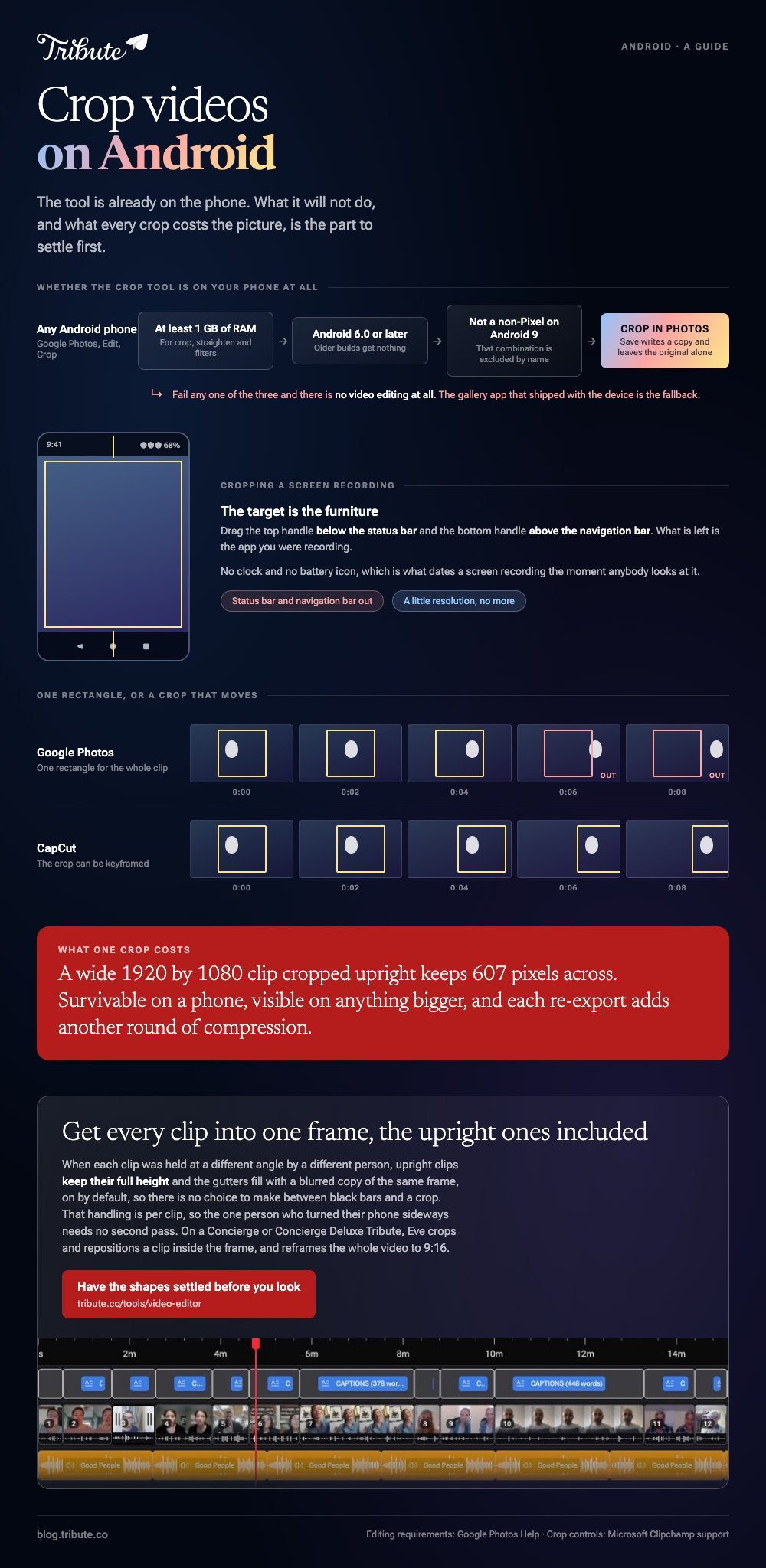
Crop, straighten and filters need a device with at least 1 GB of RAM running Android 6.0 or later, and non-Pixel phones on Android 9 get no video editing at all.
Best for: One clip that needs a different shape before it goes anywhere.
Why it works: It is already on the phone, it saves a copy rather than overwriting, and nothing uploads.
To crop a screen recording on Android
The same Crop tool does it, and the target is the furniture.
Drag the top handle below the status bar and the bottom handle above the navigation bar. What is left is the app you were recording, with no clock and no battery icon to date the clip.
Can you crop videos Android recorded without installing anything?
Yes, and the limit is what the built-in tool will not do.
Google Photos crops one rectangle for the whole clip. A subject who walks across the frame needs the crop to move with them, and that is a keyframe, which means CapCut or a desktop editor.
CapCut, when the crop has to follow something
CapCut publishes no help center article for its Android app, so read the labels on your own screen rather than any walkthrough, this one included.
The shape of the job is stable: import the clip, choose the output ratio for the whole project first, then crop each clip inside that frame. Setting the ratio first saves re-cropping everything later.
Best for: A clip where the thing you care about does not stay in one corner.
Why it works: The project ratio is a single decision, and every crop after it is measured against the same frame.
Clipchamp, when there are twenty of them
- Import the clips from your device or OneDrive and drag one onto the timeline.
- Click the asset so it highlights, then click the crop button on the floating toolbar over the stage.
- Drag the freehand handles on the sides, top and bottom.
- Click the done button, or the fill button to remove black borders instead.
Microsoft sets those out in its guide to cropping videos in Clipchamp.

The browser versions are compared in cropping video online and online crop tools, and the desktop route in cropping in Premiere Pro.
What does a crop cost the picture?
Resolution, and more of it than people expect.
Take a wide 1920 by 1080 clip and crop it to an upright 9:16. The height holds at 1080 and the width falls to 607 pixels, so you are posting a clip two thirds narrower than the one you shot.
That is survivable on a phone and visible on anything bigger. Two rules keep it in hand.
- Crop once. Each crop and re-export costs another round of compression on top of the pixels.
- Shoot in the shape you will post. The crop you avoid is the only one that costs nothing.
Compared to cropping a wide clip down, filling the sides with a blurred copy of the same clip keeps every pixel you recorded and keeps faces the shape they were recorded in.

What if the clips came from a dozen different phones?
The Tribute video editor is a browser-based group video editor: contributors record clips on their phones and Tribute assembles them on a timeline with the music balanced under the voices.
It is ours, and it is the last thing on this page.
- Blurred edges fill the frame behind upright phone footage, on by default, with no black bars
- Per-clip appearance controls: fit, border radius, brightness and a filter preset
- Clips arrive in order, with a tick against the ones already on the timeline
- Autosave and restorable version history, so a clip you removed is recoverable
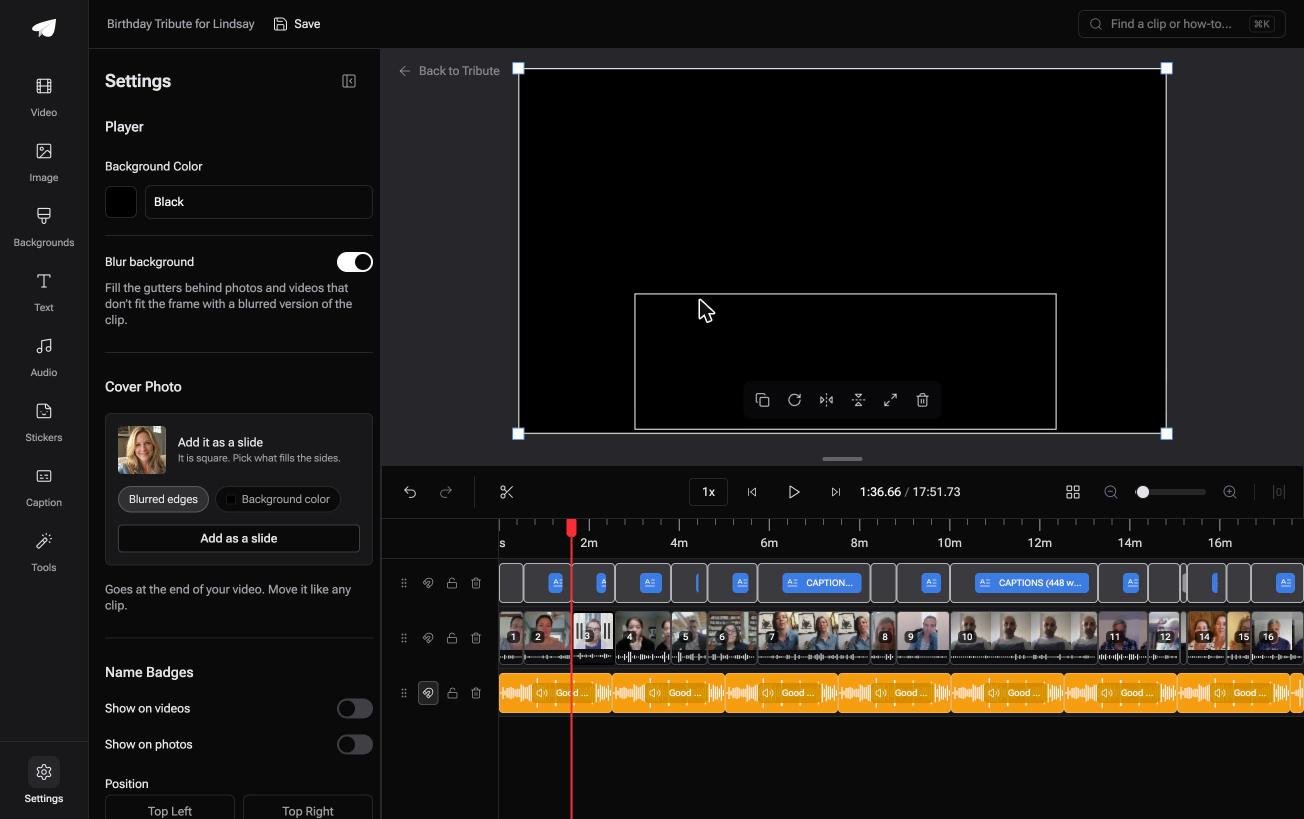
Best for: A video where half the clips came in upright and half came in wide, from fifteen different phones.
Why it works: Half of them will be upright and half will be wide, and the frame is handled before you look at any of them.
Is there a version of this with no cropping step?
A crop is a decision made once per clip, then made again for the next clip.
With two clips that is nothing. With sixteen it is an afternoon, because each one was held at a different angle by a different person. There is a case where none of it happens.
The case: the clips are messages, not footage
This is the case when several people each record a message for one person.
A coach retiring after twenty seasons. A sister getting married in August. Everyone holds a phone at arm's length and talks to it, which means every clip is upright and every face is centered.
Nobody is composing a shot. The framing question answers itself before it is asked.
Why the shape stops mattering
Mixed shapes are handled rather than fixed.
Upright clips keep their full height and the gutters fill with a blurred copy of the same frame, so the Tribute video editor never asks you to choose between black bars and a crop.
Unlike a project ratio you set once and crop everything into, that handling is per clip. A wide clip from the one person who turned their phone sideways sits in the same timeline without a second pass.

What you do not have to do
- No crop box. Blurred edges fill the frame behind every upright clip.
- No caption pass per clip. One switch covers the lot, in ten styles.
- No reordering by hand. Ask for the grandchildren together and Eve moves them.
- No edit at all. Both of those belong to a Concierge Tribute, where Tribute's own editors build the video and send it back.
When this is the wrong answer: you shot the footage, you need a square post for a grid, or the crop is the creative decision. Then Google Photos is three taps away.
A DIY Tribute has no aspect ratio switcher and no crop control, and the editor lives inside a paid Tribute.
On a Concierge or Concierge Deluxe Tribute, Eve crops and repositions a clip inside the frame, and reframes the video to 9:16 or another aspect ratio.

Assembly itself is covered in making a video montage.
Frequently Asked Questions
Does cropping in Google Photos change the original?
No. Tapping Save writes a copy, and the clip you recorded stays in the library untouched. That also means your storage holds two copies.
Which video crop app for Android is worth installing?
None, for one clip. CapCut earns its place once you need the crop to move during the shot or the same ratio applied across a dozen clips.
Why is there no crop option on my phone?
Video editing in Google Photos needs at least 1 GB of RAM and Android 6.0 or later, and non-Pixel devices on Android 9 do not get it. On those phones the gallery app that shipped with the device is the fallback.
Can I crop a video to a square for Instagram?
Yes. Tap Crop, then Aspect ratio, and choose the square. Export at 1080 by 1080 so the platform has nothing left to resize.
Does cropping reduce the file size?
A little, and not in proportion. Fewer pixels means fewer to encode, though the re-export can hand back most of what the crop saved.
How do I get rid of black bars instead of cropping?
Put a blurred copy of the clip behind it so the gutters are filled rather than empty. Most phone editors call it a background blur, and it keeps the whole frame.
Can I crop a video someone sent me on WhatsApp?
Yes, once it is saved to the gallery. It will already have been compressed in transit, so crop with a light hand and expect less room to work with.
👉 Get every clip into one frame, upright ones included if each was held at a different angle by a different person, and there is nothing to crop.
