
Free Music Download for Videos: Which Files You May Keep
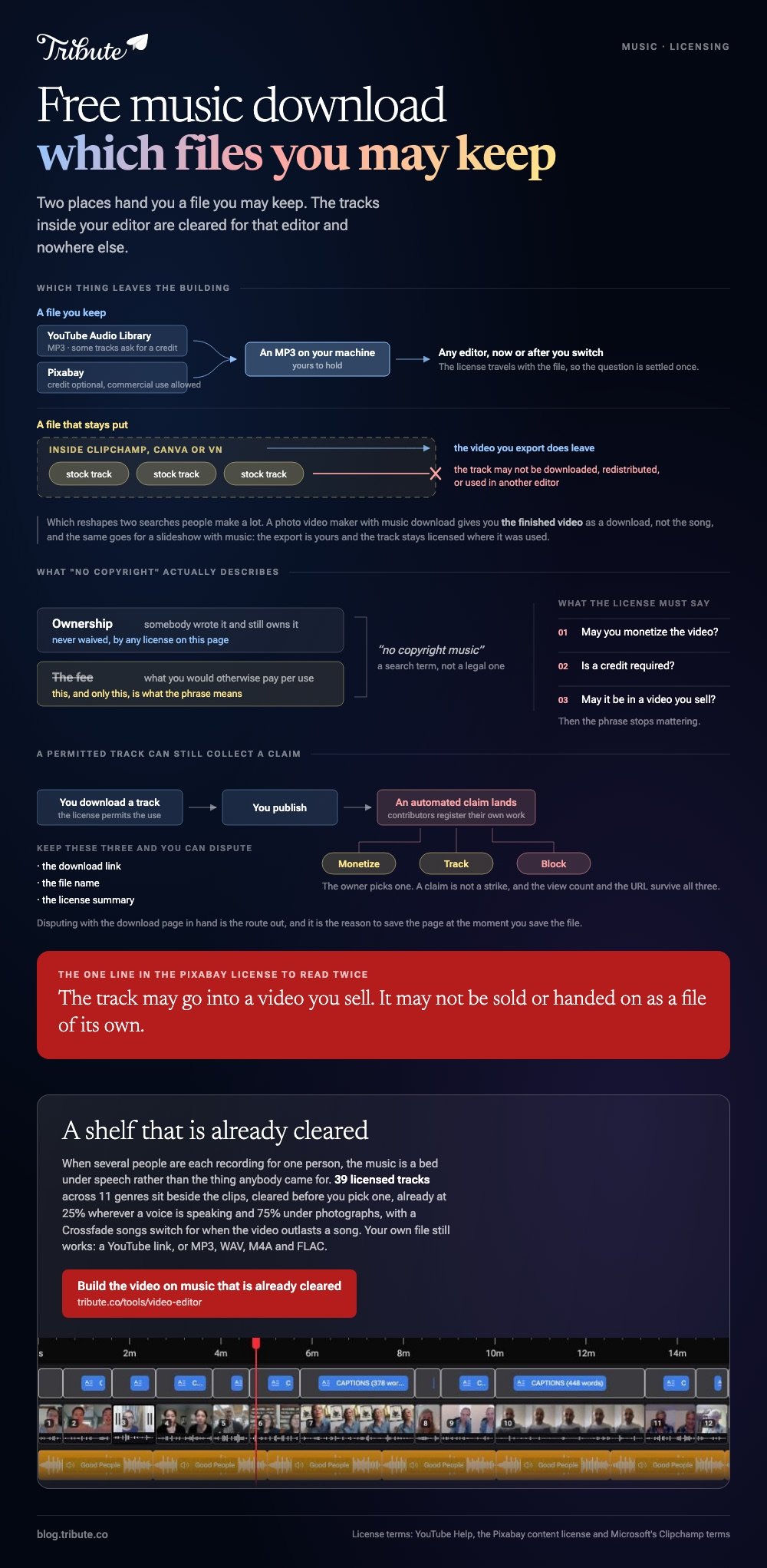
Two places hand you a music file you may keep and use: the YouTube Audio Library and Pixabay. The tracks inside Clipchamp, Canva or iMovie are cleared for videos you export from them and are not yours to download.

Where does a free music download for videos come from?
From a library that publishes its license in plain words, and nowhere else.
The question is never whether a file will download. It is whether you can point at the terms afterward if somebody asks.
| Source | Get the file? | Credit | The catch |
|---|---|---|---|
| YouTube Audio Library | Yes, as MP3 | Some tracks | Lives inside YouTube Studio |
| Pixabay | Yes | Not required | Some tracks are in Content ID |
| Your editor's library | No | No | Cleared in that editor only |
| Creative Commons | Yes | Depends on the track | Read each license |
How do you get a track out of the YouTube Audio Library?
Sign in to YouTube Studio and open Audio Library in the left menu.
Google describes the collection as copyright-safe and puts the collection inside YouTube Studio and nowhere else, though youtube.com/audiolibrary takes you straight there.
- Open Audio Library in YouTube Studio.
- Press Play on a track to audition it before you commit.
- Filter the list by Attribution not required if you would rather skip writing a credit.
- Hover over the date column and click DOWNLOAD. An MP3 lands in your downloads folder.
- For a Creative Commons track, use the icon in the license column to copy the attribution text.
You do not need a channel of any size to use it, and the files work in any editor once they are on your machine.
Is Pixabay music free to use in a video you sell?
Yes for commercial projects, with one limit and one risk.
Pixabay's content license grants a worldwide, non-exclusive, royalty free right to use the audio, and crediting the artist is optional rather than required.
One limit is that you may not sell or hand on the track as a file. Music inside a video you publish is fine; the same MP3 offered as a download of its own is not.
The risk is Content ID. Some contributors register their own tracks with it, so an upload can collect an automated claim even where your use is permitted. Keep the download link, the file name and the license summary.
YouTube's documentation on those claims lists three outcomes the owner can choose: monetize, track or block. Disputing with the download page in hand is the route out.
What does a free music download for videos not include?
The library inside the editor you are already using.
Microsoft allows Clipchamp's stock audio inside videos you save from Clipchamp, and forbids downloading the individual files, redistributing them, or using them in another editor. Canva's tracks work the same way.
Which reshapes two searches people make a lot. A photo video maker with music download gives you the finished video as a download, not the song.
The same goes for a download slideshow with music: the export is yours, and the track stays licensed where it was used.
Unlike those in-app libraries, an Audio Library or Pixabay file is a file you hold, so it survives a change of editor.
Does "no copyright" mean anything?
As a legal term, no. As a search term, it is everywhere.
No vlog download is copyright free music in the strict sense, because somebody wrote it and still owns it. What the phrase describes is a license where the owner waived the fee, which is a different thing from waiving ownership.
Read what the license says about three points and the phrase stops mattering: whether you may monetize, whether a credit is required, and whether the track may be used in a video you sell.
Tracks that live in an app
Some editors keep their music in the app on purpose.
A VN Video Editor music download is not how that one works either: the catalog sits inside the app. Check VN's own terms before you carry one of its tracks anywhere else.
Compared with an app library, a downloaded MP3 costs you one extra step and removes every question about where it is allowed to go.
More on the wider job in what a royalty free license covers, putting music into a video, making a slideshow with music, and building a montage around the track you chose.
What if the video is built from a dozen people's clips?
The Tribute video editor is a browser-based group video editor: contributors record clips on their phones and Tribute assembles them on a timeline with the music balanced under the voices.
It is ours, and it is the last thing on this page.
- 39 licensed tracks across 11 genres, cleared inside the editor, so no license page opens
- Your own audio too: a YouTube link import, or MP3, WAV, M4A and FLAC upload
- Music at 25% under speech and 75% under photos by default, overridable per clip
- A Crossfade songs switch that blends one track into the next when the video outlasts a song

Best for: An hour lost to license pages before a single clip has been cut.
Why it works: The shelf is small and already cleared, which is a faster decision than an open web of maybes.
Who chooses the track when nothing is downloaded?
You did not come here to read licenses.
Opening a library, playing fifteen seconds of forty things, reading a license, saving a file you hope you may use: that is the evening. One kind of video skips it.
The case: the voices are the content
It arrives when several people each record something for one person.
A grandmother turning eighty. A colleague leaving after fifteen years. A memorial where the people who should speak are in four time zones. The music is a bed under speech, not the thing anybody came for.

Why no download happens
Because the shelf arrives with the timeline.
Thirty-nine cleared songs sit beside the clips, already set to a quarter of full volume wherever a voice is speaking.
That is how the Tribute video editor handles it: not a fifth place to get a free music download for videos, but a video where you never needed one.
What you do not have to do
- No downloading. The 39 tracks sit inside the editor, with a YouTube link or your own file as the alternative.
- No license page. They are cleared for the video before you choose one.
- No level pass. Music sits at 25% under speech, and on Concierge Eve cleans up a clip recorded in a noisy room.
- No edit, if you would rather not. Tribute's editors build the video and hand it back for approval.
Where it ends up
On a screen with the person it is for in front of it, or inside a video book with a display set into the cover.

When this is the wrong answer: you are cutting your own footage and the song is the point. Then go back up this page and download one you may keep.
The Tribute editor is not a music source on its own: it lives inside a paid Tribute.
Frequently Asked Questions
Can I use Audio Library tracks outside YouTube?
Yes. The MP3 sits on your machine and works in any editor. Check the license column on the track, because the Creative Commons ones ask for a credit wherever they end up.
Do I have to credit a Pixabay track?
No. Pixabay treats crediting as optional, and suggests a format if you want to do it anyway.
Why did my video get a claim on a no copyright song?
Some contributors register their own work with Content ID, which matches the recording whatever permission you were given. Dispute it with the download page and the license summary.
What happens to a video that gets claimed?
The owner picks: monetize it, track it, or block it. A claim is not a strike, and your view count and URL survive all three.
Can I pull the music out of a video editor I use?
No. In-app catalogs are licensed for videos you export from that tool, and Microsoft's terms for Clipchamp spell out that the files may not be taken and used elsewhere.
Is there a size or length limit on these downloads?
Neither library caps you. Most tracks run two to four minutes, which covers a slideshow of about forty photographs at four seconds each.
What should I look for in a track for a tribute video?
Instrumental, slow, and quiet in its first fifteen seconds. Lyrics and speech compete for the same attention, and the speech loses.
👉 Build the video on a shelf of music that is already cleared if several people are each recording for one person, and no license page opens at all.
