
Merge Videos on Windows: Clipchamp on 11, and What Changed on 10
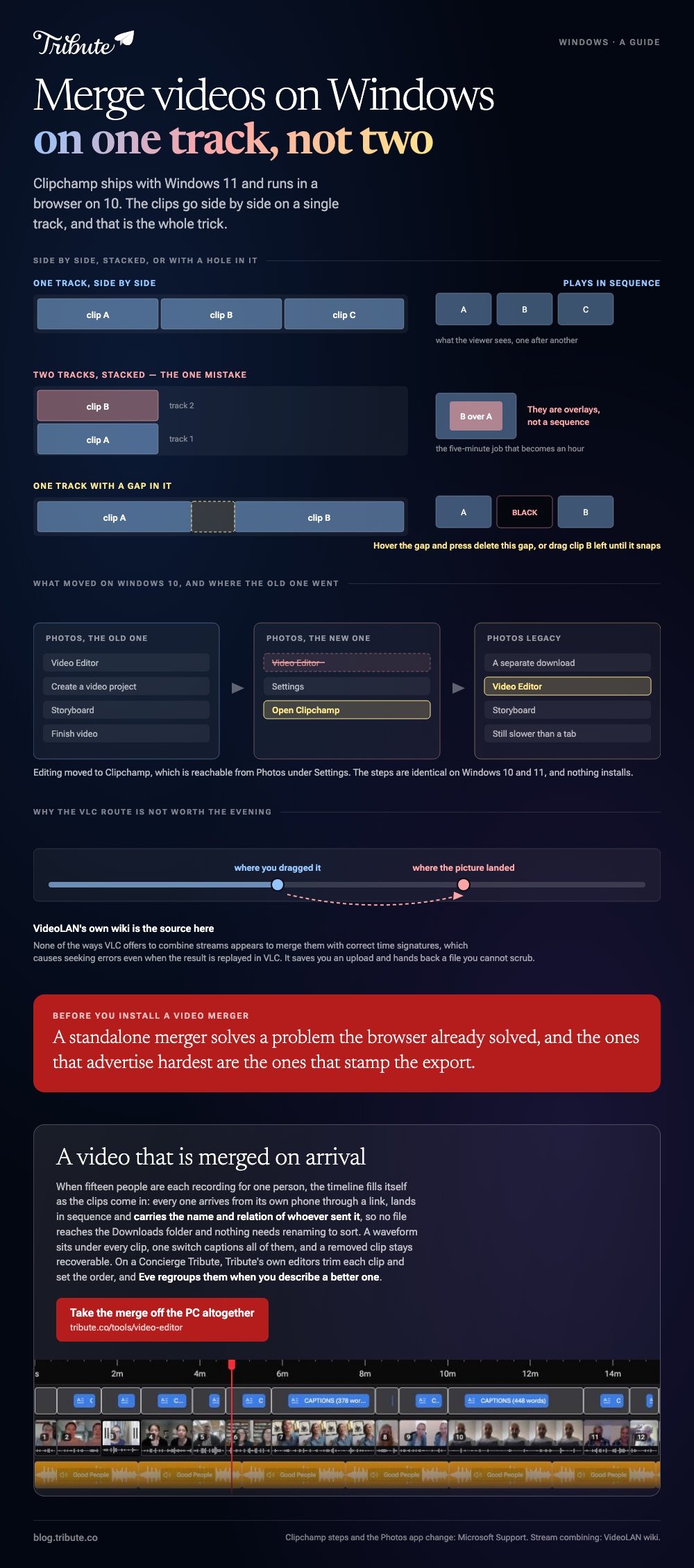
To merge videos on Windows 11, open Clipchamp and drag the clips side by side on one timeline track. On Windows 10 the old Photos Video Editor has gone from the new Photos app, so the same Clipchamp runs in a browser instead.

What is the built-in way to merge videos on Windows 11?
Clipchamp, which Microsoft includes with the operating system.
- Open My media on the toolbar and click the import media button to browse your device or OneDrive.
- Drag the clips onto the timeline side by side on the same track, so they play in sequence.
- Click a clip and drag its trimming handles. Hold shift while clicking to trim several at once.
- Hover over a gap between two clips and press the delete this gap button.
- Select Export and choose a quality such as 1080p.
Those steps are Microsoft's own, from its guide to combining videos in Clipchamp. Stacking clips on separate tracks makes them overlays rather than a sequence, which is the one mistake that turns a five-minute job into an hour.
Best for: Any number of clips on a Windows 11 machine, including a set that needs captions after.
Why it works: It is already there, and the timeline is wide enough to reorder twenty clips by eye.
How do you merge mp4 files on Windows 10 now that Video Editor has gone?
Two routes, and the browser is the shorter one.
Microsoft's note on changes in the new Photos app says editing moved to Clipchamp, reachable from Photos under Settings then Open Clipchamp. Anyone who wants the old experience, Video Editor included, can download Photos Legacy.
To merge mp4 files on Windows 10 in Photos Legacy, start a new video project, add the files to the project library, drag them into the storyboard in order, then choose Finish video. It still works and it is still slower than the browser.
Where most Windows merge mp4 files searches end is Clipchamp in Edge, because the steps above are identical on 10 and 11 and nothing has to be installed first.

Which video merger software for Windows 10 is worth installing?
Almost none of it.
A standalone video merger for Windows 10 solves a problem the browser already solved, and the ones that advertise hardest are the ones that stamp the export. Install something only when you need a feature a browser editor cannot reach.
| What you need | Use | Why |
|---|---|---|
| A straight join, any version | Clipchamp | Built in on 11, browser on 10 |
| The old storyboard workflow | Photos Legacy | Video Editor is still in it |
| Hundreds of files, scripted | A command line tool | No interface to drag through |
| Clips from twenty people | Something that collects them | The merge was never the work |
Best for: Choosing once and never thinking about merger software again.
Why it works: Every row above is maintained by someone with a reason to keep maintaining it.
Browser options are compared in merging video clips online, and the wider app picture in video editors for Windows.
Does VLC merge videos on Windows?
Skip it, and the reason comes from VideoLAN rather than from us.
VLC is on half the Windows machines in the world and it does offer stream combining: a gather output module on the command line, plus a file-append alternative.
VideoLAN's own wiki then says none of the ways VLC offers to combine streams appears to merge them with correct time signatures, which causes seeking errors even when the result is replayed in VLC.
Unlike a browser editor, VLC saves you an upload and hands back a file you cannot scrub through. Use the Clipchamp tab instead.
Will merging reduce the quality of the video?
Only where the clips disagree with each other.
Matching codec, resolution and frame rate lets an editor copy the streams end to end, so the output looks like the source. Mix a 4K clip at 60fps with a 1080p clip at 30fps and the project gets rebuilt around the weakest file.
Export once, at the resolution of your best clip. Compared to a second pass through an encoder, a single export at 1080p holds up far better on a television.
What if the files were never on the PC?
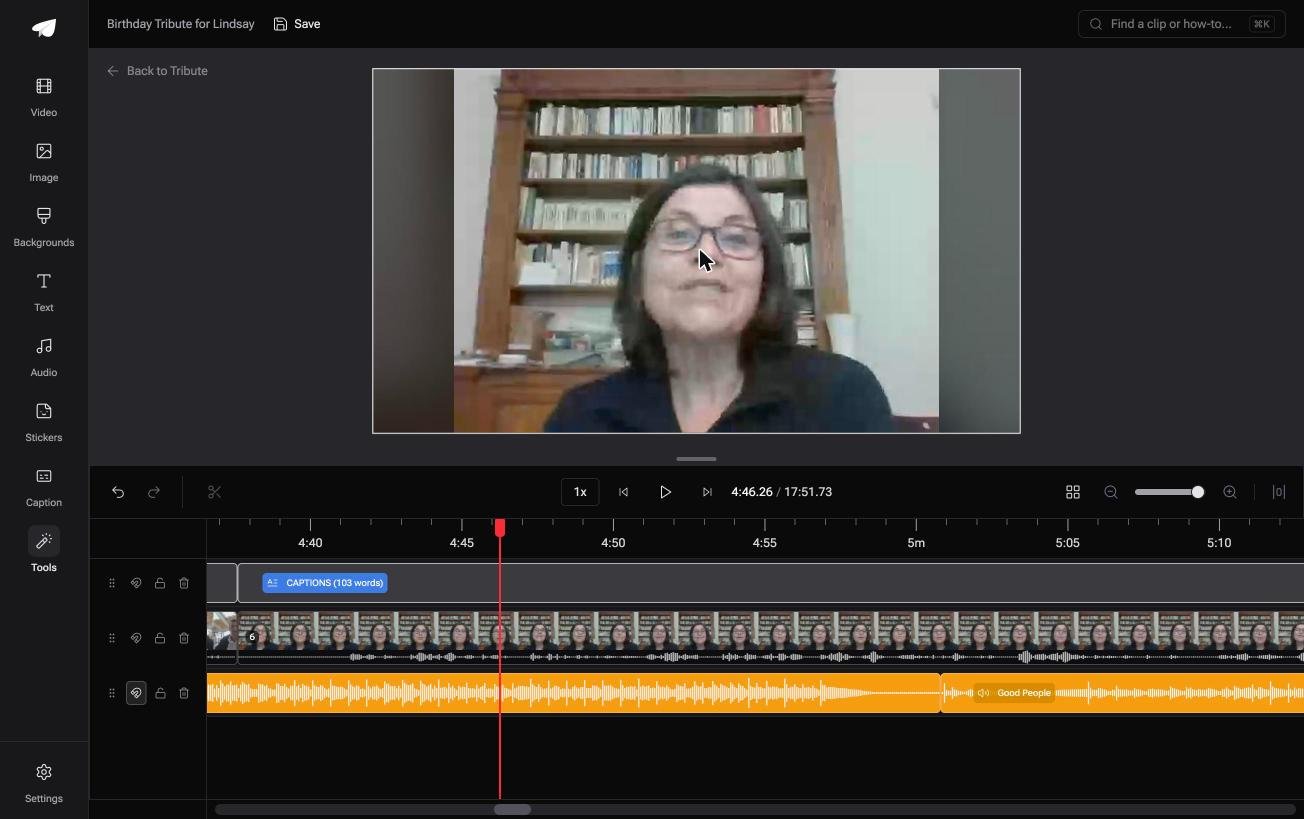
The Tribute video editor is a browser-based group video editor: contributors record clips on their phones and Tribute assembles them on a timeline with the music balanced under the voices.
It is ours, and it is the last thing on this page.
- Clips arrive auto-assembled in order, with a tick against the ones already on the timeline
- A waveform under every clip, so the silence before the first word is visible rather than guessed at
- A reorder window numbering every clip, with move to front, move to back, move to position and bulk remove
- One switch captions every clip: 17 minutes across 16 contributors in under a minute, in 10 caption styles
- Autosave and restorable version history, so a clip you removed is recoverable rather than gone
Best for: A Windows machine and sixteen senders, where chasing the files takes longer than joining them.
Why it works: Nothing is downloaded to the PC, so the merge never depends on which Windows version you are running.
Can a merge finish before the files reach Windows?
Clipchamp opens on an empty timeline and waits for you to fill it.
Getting them there is the part nobody writes a guide for: the shared folder, the two people who send a link instead of a file, the clip that arrives after you exported.
One situation removes that part of the job altogether.
The case: several people each recorded for one person
You are in it when the clips were never on your PC.
A grandmother turning eighty. A manager leaving after fifteen years. A memorial where the people who should speak are in four states.
Nobody is merging anything yet. Everyone is recording a message, and your job is assembly, not collection.
Why the merge is done before Windows is involved
The timeline fills itself as the clips come in.
Each one arrives from its own phone through a link, lands in sequence, and carries the name and relation of whoever sent it. No file ever reaches the Downloads folder, so no file needs renaming to sort.
That is how the Tribute video editor handles it: not better video merger software for Windows 10, but a video that is merged on arrival.

What you do not have to do
- Not the collecting. Each clip arrives from its own phone, named by whoever sent it.
- Not the merge. The timeline fills in sequence, so nothing waits in a Downloads folder.
- Not the edit. On a Concierge Tribute, Tribute's editors trim each clip and set the running order, and Eve, the assistant on Concierge and Concierge + Video Book, regroups them when you describe a better one.
Where it ends up
It can stay a link, or arrive as a video book: a hardcover case with a screen inside that plays when the cover opens.
When this is the wrong answer: you shot the clips yourself, or you want control over every cut. Then open Clipchamp, which is already on the machine. Tribute's editor is not a general merger and it lives inside a paid Tribute.

The wider job is covered in making a video montage.
Frequently Asked Questions
Is Clipchamp already installed on Windows 11?
On most machines, yes. Open Start and search for Clipchamp, and if nothing comes up it is a download from the Microsoft Store at no cost.
Can I still get Video Editor on Windows 11?
Through Photos Legacy, which Microsoft keeps available as a separate download. The new Photos app points you to Clipchamp instead.
How do I merge mp4 files on Windows 11 without an account?
You will be asked to sign in before the export in most browser editors, Clipchamp included. A local tool avoids that, at the cost of installing something.
Does Windows Media Player merge videos?
No. It plays files and manages a library, and it has never had a timeline or an export, which is why the old searches for it lead nowhere.
How many clips can one project hold?
Twenty is comfortable in a browser editor on a normal laptop. Past that the limit is memory rather than the editor, and splitting the work into two exports is faster than fighting it.
Why is there a black flash between two clips?
There is a gap on the timeline. Hover over it and delete the gap, or drag the second clip left until it snaps against the first.
What resolution should the finished video be?
1080p in an H.264 MP4 plays on everything, including older televisions and messaging apps. Go to 4K only when every source clip was shot at 4K.
👉 Take the merge and the edit off the PC altogether if fifteen people are each recording for one person, and which version of Windows you run stops mattering.
