
Windows Movie Maker Transition: How to Add One, and What to Use Instead
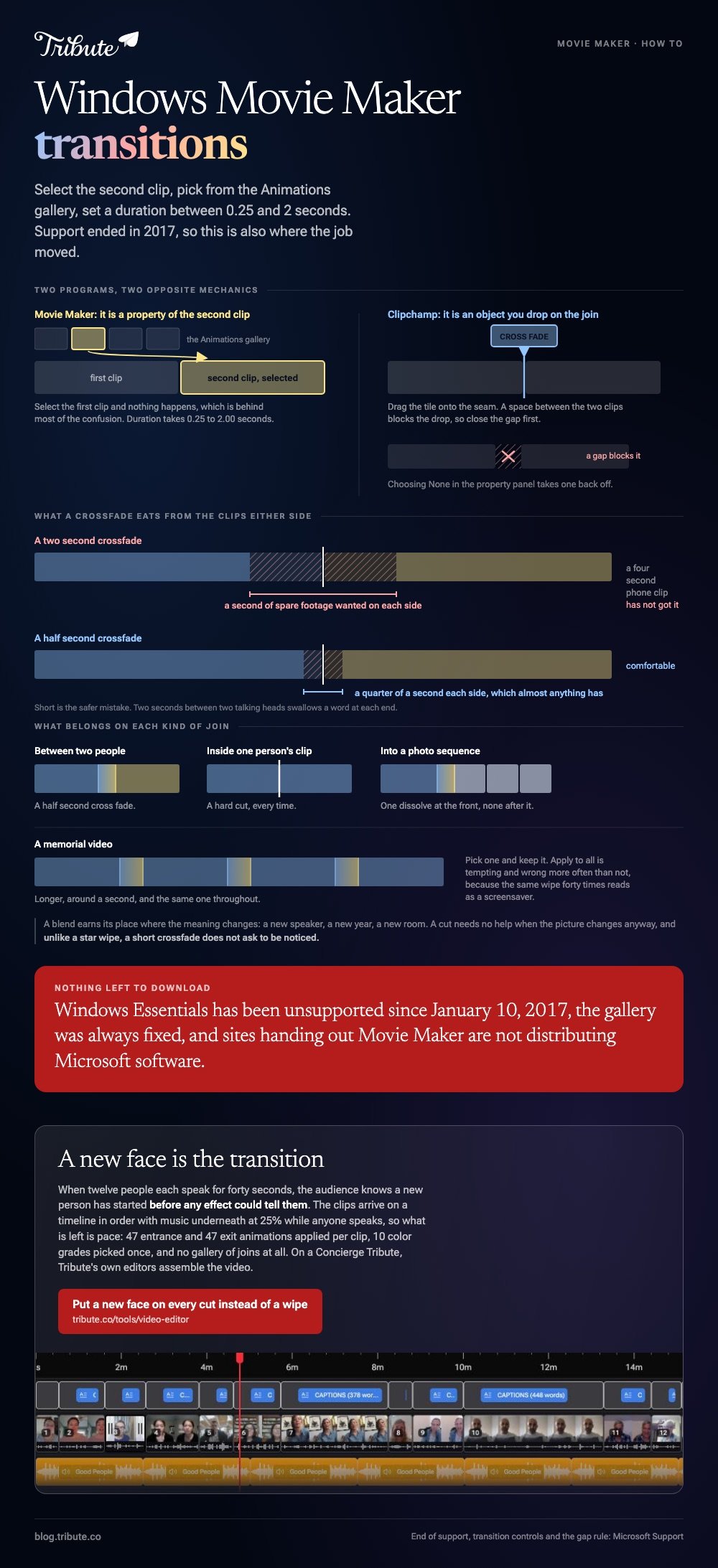
A Windows Movie Maker transition lives on the Animations tab: select the second clip, pick one from the gallery, then set a duration between 0.25 and 2 seconds. Movie Maker lost support in 2017, so this page also covers where that job moved.

How do you add a Windows Movie Maker transition?
You attach it to the clip that comes second, never to the one before it.
That single detail is behind most of the confusion. Movie Maker treats a transition as a property of the incoming clip, so selecting the outgoing one does nothing.
- Drop your clips and photos on the storyboard in the order you want them.
- Click the second of the two clips you want to join.
- Open the Animations tab at the top.
- Hover over a thumbnail in the Transitions gallery to preview it on that clip.
- Click the one you want, then set Duration to the right of the gallery.
Duration accepts anything from 0.25 to 2.00 seconds. Short is the safer mistake: a two second blend between two talking heads swallows a word at each end.
There is an Apply to all button beside the gallery. It is tempting and it is wrong more often than not, because the same wipe forty times reads as a screensaver.
Where the related controls hide
- Fade in and out from black or white: the Visual Effects tab, not Animations.
- Pan and zoom: also on Animations, with its own Apply to all and a duration you cannot change.
- Music fades: the Options tab that appears when a track is selected.
Why will a Windows Movie Maker transition not apply?
Four causes cover almost every case, and three of them are about the clip rather than the program.
| What you see | The cause | The fix |
|---|---|---|
| Nothing happens on click | The first clip is selected | Select the clip after the join |
| The blend looks cut short | The clip is shorter than the duration | Lower the duration or lengthen the clip |
| A thumbnail shows a red X | The source file moved or was renamed | Point Movie Maker back at the file |
| Preview stutters or goes black | A codec the player cannot read | Convert the clip to WMV or MP4 first |
A transition eats material from both sides of the cut. Two seconds of crossfade needs a second of spare footage on each clip, which a four second phone clip does not have.
Sound breaking at the same moment is a separate fault with a separate cause. That one is covered in Movie Maker music not playing.
Is a Windows Movie Maker transitions download worth chasing?
No, and there is nothing to download.
Movie Maker transitions were always fixed: what shipped in the gallery is what exists. No official pack was ever sold or published, so every result for that search is somebody else's installer.
Microsoft's own position is on its support page for Windows Essentials apps: the suite has been unsupported since January 10, 2017, it is no longer offered for download, and sites handing out Movie Maker are not distributing Microsoft software.
Copies already installed keep running. Nothing stops you using movie maker transitions on a machine that still has the program, and nothing will patch it either.
What replaced Movie Maker for transitions on Windows?
Clipchamp, which Microsoft ships inside Windows 11.
The gallery is bigger and the mechanics are the reverse of Movie Maker: you drag the transition onto the join rather than selecting a clip and clicking a thumbnail.
- Place two clips side by side on the timeline with no gap between them.
- Open the Transitions tab on the toolbar.
- Hover a tile to preview it, then drag it onto the seam between the clips.
- Cross fade is picked for you. Change it in the property panel if you want another.
- Select the transition and set the length with the slider or the duration box.
Microsoft's transitions and fades page notes the gap rule: a space between two clips blocks the drop, so close it first. Choosing None in the property panel removes one.

The same job in CapCut
Tap the small white square sitting on the join between two clips, pick a transition, drag the duration slider, and use Apply to all if every cut should match.
CapCut's gallery is longer than anything Movie Maker had, and its paid tier gates some of the showier ones.
| Tool | Where transitions live | Duration control |
|---|---|---|
| Movie Maker | Animations tab, applied to the second clip | 0.25 to 2.00 seconds |
| Clipchamp | Transitions tab, dragged onto the join | Slider or a typed value |
| CapCut | The square icon on the join | Slider, with Apply to all |
How many transitions should one video carry?
Fewer than the gallery wants you to use.
Pick one and keep it. A cut needs no help when the picture changes anyway, and a blend earns its place where the meaning changes: a new speaker, a new year, a new room.
- Between two people: a half second cross fade.
- Inside one person's clip: a hard cut, every time.
- Into a photo sequence: one dissolve at the front, none in the middle.
- A memorial video: longer, around a second, and the same one throughout.
Compared with a hard cut, a short crossfade reads as a breath. Unlike a star wipe, it does not ask to be noticed.
Longer builds are easier to plan before you start: see making a video montage and photo transition makers online.
What if a dozen clips arrived already in order?
Then the joins are between people, and nobody has to design them one at a time.
The Tribute video editor is a browser-based group video editor: contributors record clips on their phones and Tribute assembles them on a timeline with the music balanced under the voices. It is ours, and it is the last thing on this page.
- Clips arrive in order, already on the timeline, with a tick against the ones that are placed
- 47 entrance and 47 exit animations, including Slow zoom, Drift and Breathe
- 83 occasion backgrounds grouped by Celebration, Retirement and Love
- 10 color grades previewed on the real clip rather than on a sample
What it does not carry is a transition control. The choice is an entrance and an exit per clip, which is the right unit when every clip is a different person.
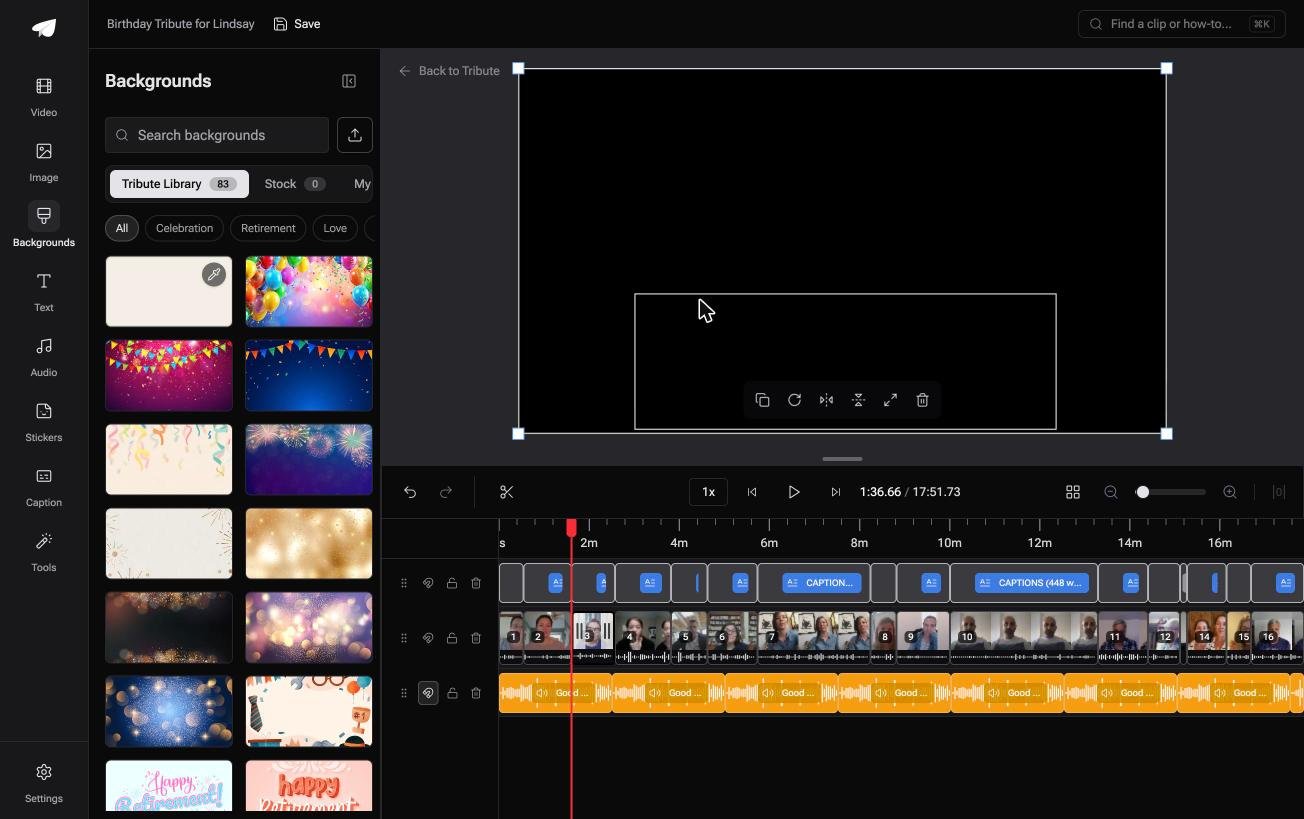
Best for: A retirement or birthday video stitched from a dozen separate phone recordings, where no two clips were shot alike.
Why it works: Compared to joining a dozen files by hand, there is no seam to design, because the change of face is the change of scene.
Does a clip need a transition when the next face is a new person?
Every setting above exists to soften a join you decided to make.
You chose the order, so you have to smooth the edges. That is the cost of being the one who built the sequence.
There is one case where nobody pays it.
The case: the clips are not yours
You are in it when several people each record something for one person.
A grandmother turning eighty. A colleague leaving after fifteen years. A memorial where the people who should speak are in four time zones.
Nobody is shooting anything. Everyone is recording a message, and the sequence writes itself out of who sent what.

Why the join stops being a decision
Because a new face already announces itself.
Twelve people each speaking for forty seconds need no wipe between them. The audience knows a new person has started before any effect could tell them.
What is left is pace, and pace is an entrance and an exit per clip rather than a blend across a cut.
That is how the Tribute video editor treats it: 47 ways in and 47 ways out, applied per clip, with no gallery of joins at all.
What you do not have to do
- Open a transition gallery. The change of face between clips is doing that work already.
- Build the sequence. The clips arrive on a timeline in order, music underneath at 25% while anyone speaks.
- Match the looks. Ten color grades, previewed on the real clip, picked once.
- Cut it, on a Concierge Tribute. Tribute's editors assemble the video, and Concierge Deluxe returns it as a video book.
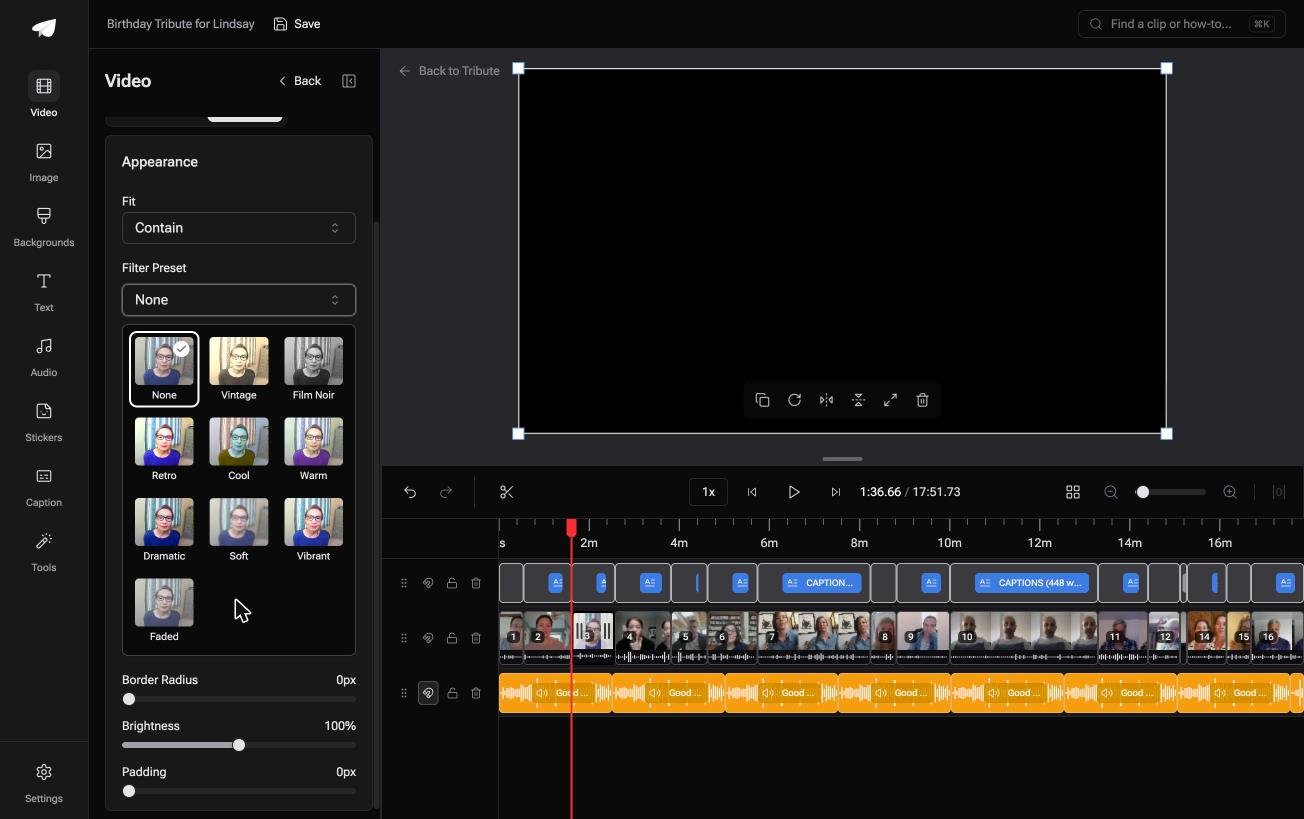
When this is the wrong answer: you shot the footage and the cuts are yours to design. Then Clipchamp or CapCut is the tool and the gallery is the point.
The editor is also not a Movie Maker replacement on its own: it lives inside a paid Tribute.
Frequently Asked Questions
How long should a Windows Movie Maker transition be?
Between 0.25 and 0.5 seconds for most cuts. Movie Maker allows up to 2 seconds, which is long enough to lose a word at the start of the incoming clip.
Can I apply one transition to every clip at once?
Yes. Select a transition, then click Apply to all beside the gallery. The result is uniform and monotonous, so it suits a photo sequence more than a set of talking clips.
Why is the Animations tab missing?
Nothing is selected on the storyboard, or a title row is selected instead of a clip. Click a video or photo thumbnail and the tab returns.
Can I still install Movie Maker in 2026?
Not from Microsoft. The suite was pulled from distribution after its January 2017 end of support, and Microsoft warns that sites handing out the installer are not giving you its software.
What are movie maker transitions called in Clipchamp?
Transitions, in their own toolbar tab. The difference is the mechanic: you drag the effect onto the join instead of selecting the clip that follows it.
Do transitions reduce video quality?
The blended frames are re-encoded, so a long crossfade on a low bitrate clip can look soft for a moment. Keeping the duration short keeps the softness short too.
👉 Put a new face on every cut instead of a wipe if the clips come from a dozen phones and none of them is yours, and the gallery never opens.
