
Windows Movie Maker Music Not Playing: The Causes, in Order
Windows Movie Maker music not playing comes down to three things: the track volume is at zero, the source file has moved, or the audio format is one Movie Maker cannot decode. Check them in that order and most projects come back.

Why is Windows Movie Maker music not playing in the preview?
Start with the volume that belongs to the track, not the one in the corner of Windows.
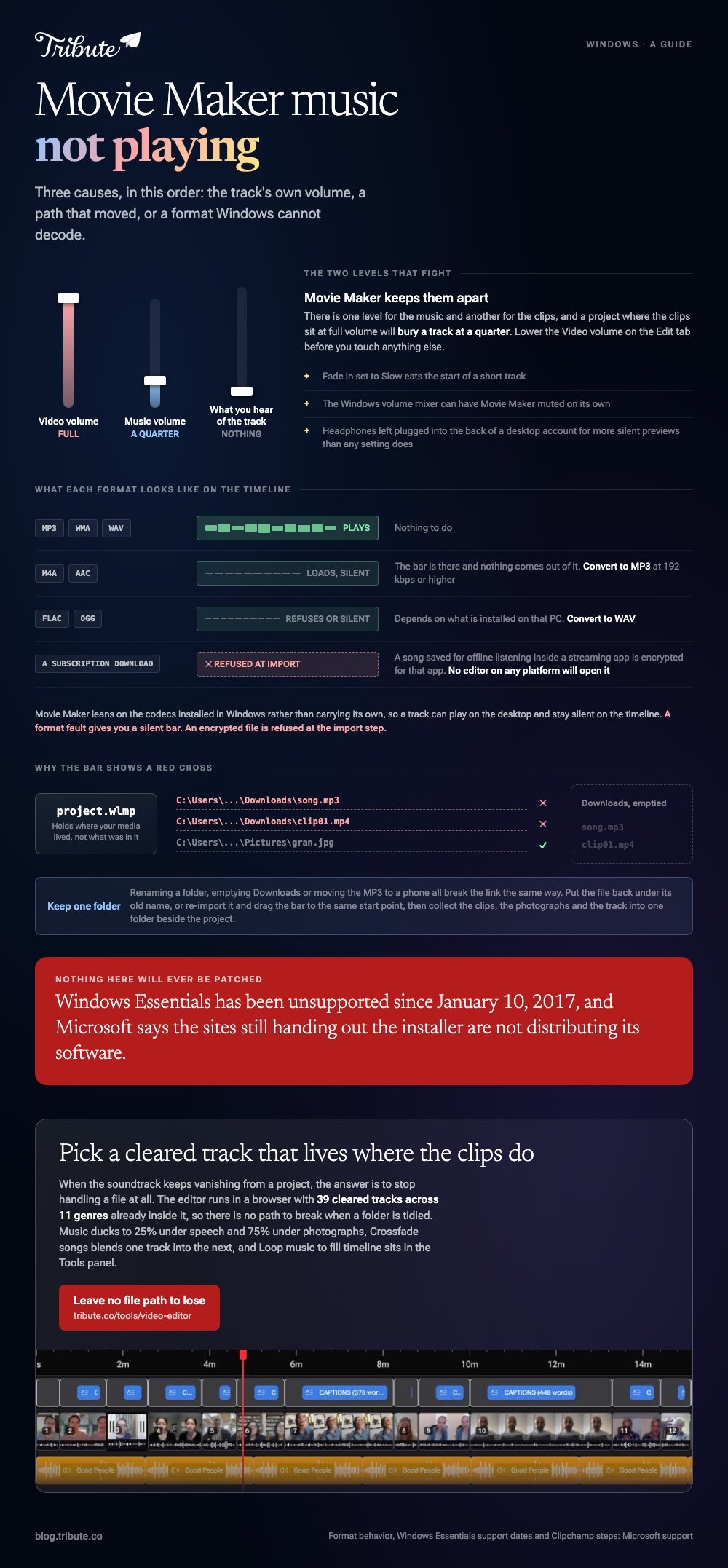
Movie Maker keeps a separate level for the music and for the clips, and a project where the clips are at full volume will bury a track sitting at a quarter.
- Click the music bar under the storyboard so it is selected.
- Open the Options tab that appears for music.
- Check Music volume is above zero, and that Fade in is not set to Slow on a short track.
- Open the Edit tab for a video clip and lower its Video volume so the track can be heard under it.
- Open the Windows volume mixer and confirm Movie Maker itself is not muted there.
Headphones left plugged into the back of a desktop account for more silent previews than any setting does. Microsoft's page on fixing sound problems in Windows covers the device side, including the audio troubleshooter and disabling audio enhancements.
Is Windows Movie Maker music not playing a format problem?
Often, and the symptom is specific: the bar appears on the timeline but nothing comes out of it.
Movie Maker leans on the codecs installed in Windows rather than carrying its own. A format Windows cannot decode gives you a silent green bar instead of an error.
| Audio format | What Movie Maker does | What to do |
|---|---|---|
| MP3, WMA, WAV | Plays | Nothing |
| M4A and AAC | Loads, often silent | Convert to MP3 |
| FLAC and OGG | Refuses or stays silent | Convert to WAV |
| A subscription download | Never plays | Use a track you own |
That last row catches people out. A song saved for offline listening inside a streaming app is encrypted for that app, and no editor on any platform will open it.
Unlike a format fault, which gives you a silent bar, an encrypted file is refused at the import step. The error is unhelpful and the cause is the license on the track.
Convert to MP3 at 192 kbps or higher and re-import. The windows movie maker music problem disappears with the format that caused it.
What if the music bar shows a red cross?
Then Movie Maker has the path and not the file.
A project file remembers where your media lived, not what was in it. Renaming the folder, emptying a downloads folder or moving the MP3 to a phone all break the link in the same way.
- Put the file back under its old name and reopen the project.
- Or re-import it and drag the new bar to the same start point.
- Then collect everything, clips, photos and the track, into one folder beside the project.
Compared with relinking a broken project twice, that one folder habit costs a minute. The same trap applies to video thumbnails, which is why a missing clip and a silent track often appear in the same session.
Joins misbehaving at the same moment point to the clip rather than the program: Movie Maker transitions covers that side.

Does the problem follow the project to another PC?
Yes, because a .wlmp project holds paths rather than media.
Copy the project file alone to a second machine and every clip and every track breaks at once. The fix is to copy the folder, not the file, and to open the project from inside it.
There is also a harder limit worth knowing about.
Microsoft's support page for Windows Essentials apps records that the suite has been unsupported since January 10, 2017 and is no longer offered for download. It warns that sites handing out the installer are not distributing Microsoft software.
Installed copies keep working. Nothing will be patched, so a codec fault that needs a program update has no route out.
What should you use instead of a slideshow movie maker with music?
Clipchamp, which Microsoft ships with Windows 11 and keeps updated.
Searches for a slideshow movie maker with music land on the same handful of apps, and the one already on the machine is the one with no download risk attached.
- Open Clipchamp and drop your clips or photos on the timeline.
- Open the Music library in the left sidebar, or import your own file.
- Drag the track onto the timeline under the pictures.
- Select the track, open the audio tab in the property panel, and set the volume.
- Open the fade tab and give it a second or two at each end.
Microsoft's guide to adding stock music lists all three ways to get a track onto the timeline, including the add button on the thumbnail.
The phrase people type, video editor & music movie maker, describes one job: pictures in a row with a track underneath. More routes to it in slideshow makers with music and photo video makers online.
What if the soundtrack were already under the voices?
Then there is no track to import, no path to break and no level to guess at.
The Tribute video editor is a browser-based group video editor: contributors record clips on their phones and Tribute assembles them on a timeline with the music balanced under the voices. It is ours, and it is the last thing on this page.
- 39 licensed tracks across 11 genres, cleared for use inside the editor
- Your own audio too: a YouTube link, or an MP3, WAV, M4A or FLAC upload
- 25% under video and 75% under photos by default, overridable on any single clip
- Crossfade songs, and a Loop music to fill timeline action in the Tools panel
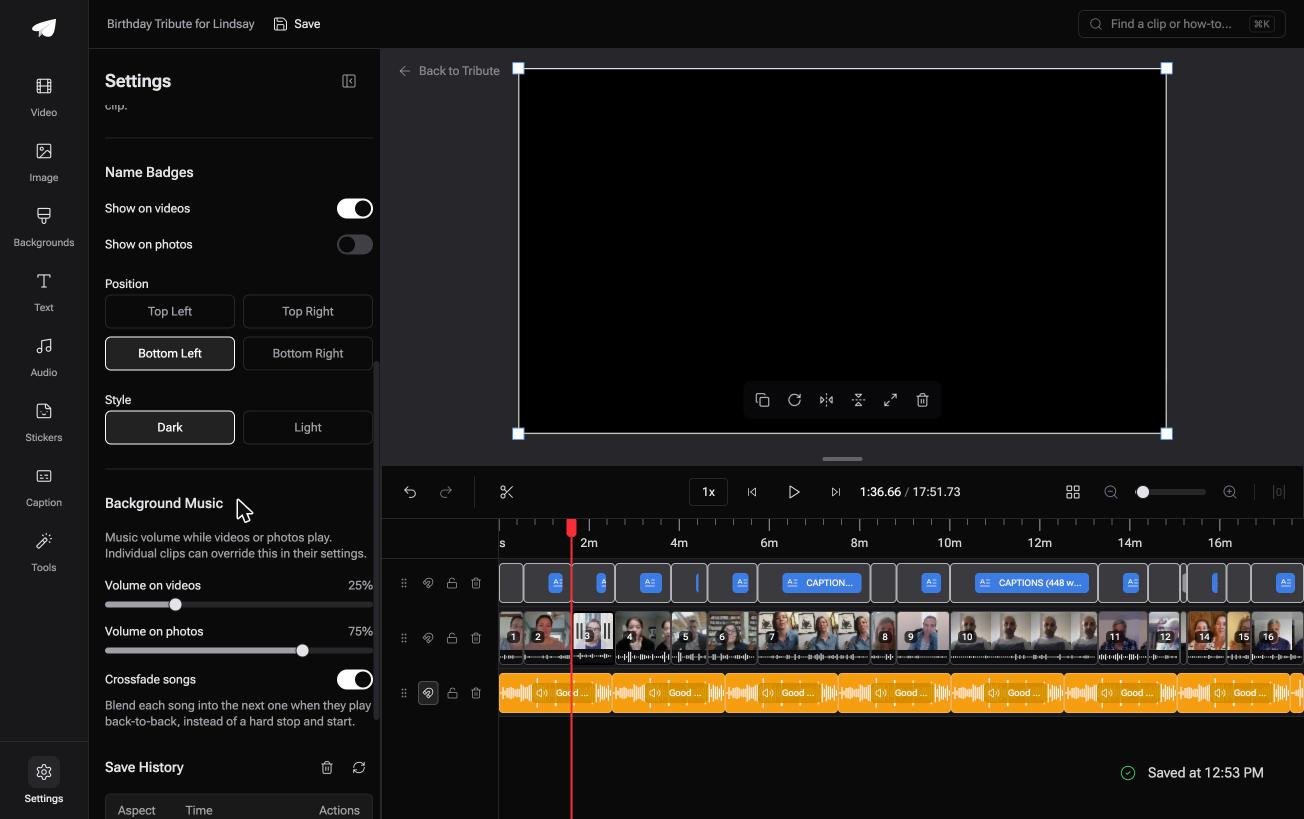
Best for: A photo and clip slideshow that needs a soundtrack without a download, a codec or a file path.
Why it works: The two levels that fight each other in Movie Maker are set apart here, one for speech and one for photos.
Is there a version of this where the audio cannot drop out?
Every fix above assumes you brought a track to a program that has to go and find it again.
Your file, your folder, your codec, your volume slider. Four places for the sound to vanish, and all four are yours to watch.
There is one case where none of them exist.
The case: the music was never a file you handled
You are in it when several people each record something for one person.
A grandmother turning eighty. A colleague leaving after fifteen years. A memorial where the people who should speak are in four time zones.
Nobody downloads a track. The editor runs in a browser and the music sits in it, so there is no path to break when a folder is tidied.

Why the silent timeline cannot happen
Because the track and the clips live in the same place.
Pick from 39 cleared tracks and the level under every speaking clip is already set at a quarter. Nothing is imported, nothing is relinked, and a codec you have never heard of is not involved.
That is how the Tribute video editor handles the soundtrack: not a better import dialog, but no import.
What you do not have to do
- No file path to keep. The track lives where the clips do, not on a disk.
- No conversion. Thirty-nine cleared tracks sit inside the editor already.
- No level setting. Music ducks to 25% while anyone is speaking.
- No edit. On a Concierge Tribute, Tribute's own editors build the video and send it back.

When this is the wrong answer: you have one MP3 on your disk and a Movie Maker project you want to finish. Then convert the track, relink it, and the checklist above is the whole job.
The editor is also not a Movie Maker replacement on its own: it lives inside a paid Tribute. For an edit that mixes clips and photographs, see the video montage maker guide.
Frequently Asked Questions
Why does my music play in Windows but not in Movie Maker?
Windows Media Player carries codecs that Movie Maker does not use the same way, so a track can play on the desktop and stay silent on the timeline. Converting to MP3 settles it.
What audio formats does Movie Maker accept?
MP3, WMA and WAV are reliable. M4A, AAC, FLAC and OGG load or fail according to what is installed on that PC.
Why is there sound in the preview but none in the saved video?
A music track that starts beyond the end of the last clip is trimmed out of the render. Drag it back inside the storyboard and save again.
Can I recover a project whose music file is gone?
Yes, if you still have the song. Re-import it, drag the bar to the original start point, then save the project into the same folder as the media.
Does movie maker music loop to fill a long slideshow?
Not on its own. Add the same track a second time and butt it against the first, or use an editor with a loop action built in.
Is a slideshow movie maker music download safe to install?
Treat any site offering the old installer as unknown software. Microsoft pulled the suite from distribution and says those sites are not giving you its product.
👉 Pick a cleared track that lives where the clips do if the soundtrack keeps vanishing from a project you did not build, and there is no file path left to lose.
