
Can an iPhone Join Videos Into One File?
Yes, but not in the Photos app. To make an iPhone join videos you need iMovie: tap Start New Project, tap Movie, select your clips, tap Create Movie, then export one file to the camera roll. CapCut is the alternative when captions matter.

Can the iPhone join videos without installing anything?
No, and this is where most people lose twenty minutes.
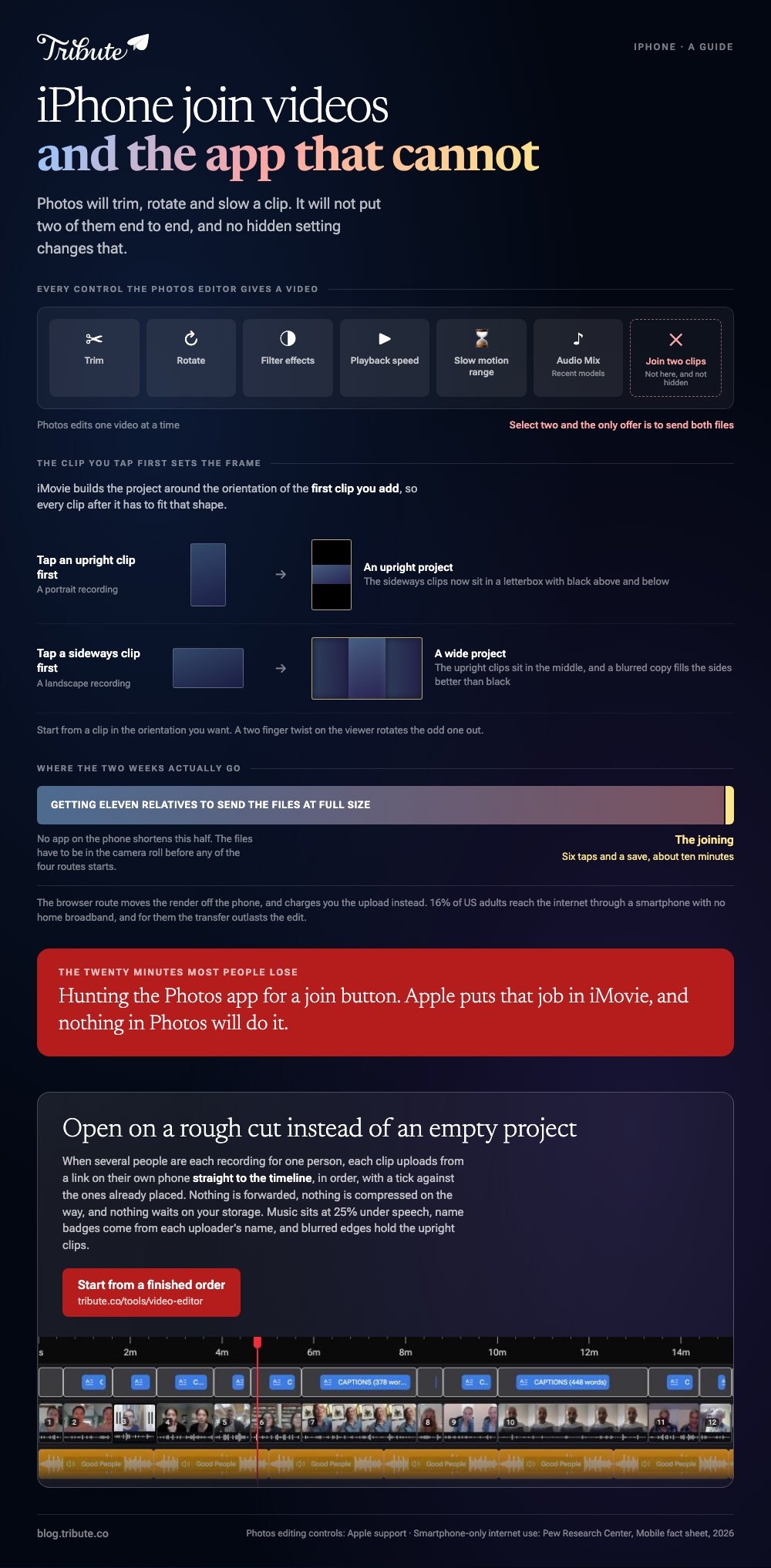
Apple's guide to editing videos on iPhone lists what Photos offers: trim, rotate, filter effects, playback speed, the slow motion range, and Audio Mix on recent models.
No control there joins two clips, and selecting two videos only offers to send both files.
Joining videos together on iPhone takes one more app, and Apple makes it. Here is how the four routes compare.
| Route | Account needed | Watermark | Best suited to |
|---|---|---|---|
| iMovie | No | None | Two to twenty of your own clips |
| CapCut | Yes | Read the export screen | Mismatched sound, captions |
| A browser tool | Varies | Read the export screen | A phone with no storage left |
| Photos | No | None | Nothing, it cannot join |
How do you join two videos on an iPhone in iMovie?
Six taps and a save, once the clips are in the camera roll.
- Open iMovie, tap Start New Project, then tap Movie.
- On the Moments screen, tap each clip you want. A blue checkmark marks your picks, and Media at the top switches to albums.
- Tap Create Movie. The clips land on a timeline in the order you tapped them.
- Drag a clip sideways to move it, or tap it and drag a yellow edge in to cut the silence at its head.
- Tap a clip, tap the Audio button in the inspector, and set the volume for that clip alone.
- Tap Done, tap Share, tap Share Video, choose a resolution, then Save Video.
Apple sets out the project steps in its iMovie for iPhone guide. Joining two videos on iPhone is the same sequence as joining twelve; only step four gets longer.
Best for: Clips you shot yourself, joined on the phone that shot them.
Why it works: Nothing uploads and nothing is rebuilt, so the output looks like the source and finishes in seconds.
When is CapCut the better way to join clips?
When the clips came from several phones rather than one.
CapCut writes captions from speech and gives you deeper audio control. A caption in iMovie is a title you type and time by hand, which is bearable for two clips and an evening for twelve.
- Tap New project and select every clip you want.
- Tap Add. The clips arrive on a timeline in selection order.
- Press and hold a clip, then drag it into a new position.
- Tap a clip, tap Volume, and set a level for that clip on its own.
- Tap Export at the top right, set resolution and frame rate, then save.
Unlike iMovie, CapCut asks for an account and puts a paid tier on the export screen. Read that screen before you render.
Best for: A dozen clips with mismatched sound, where captions would help.
Why it works: Per clip volume and spoken captions are the two controls a mixed set of recordings needs most.

Can you join videos on an iPhone in a browser?
Yes, and it is the route to take when there is no room left for another app.
Open a merging tool in Safari, choose the clips from the photo library, drag the thumbnails into order, then export and download the result back to the camera roll.
Rendering happens on a server, so an older iPhone finishes as fast as a new one.
The upload is what it costs you. A minute of 4K footage is a large file, and 16% of US adults reach the internet through a smartphone with no home broadband, per Pew Research Center.
For many of them the transfer outlasts the edit.
Best for: An iPhone with no storage left and a good connection.
Why it works: Nothing is installed, so the whole job happens in one Safari tab.
How do you make an iPhone join videos look like one video?
Three faults give away a join, and each takes under a minute.
Silence at the head of every clip. People press record, look at the lens, then begin. Drag the yellow edge in until the first word lands straight away.
Volume that jumps at the cut. A kitchen and a car are not the same room. Set a level per clip rather than one level for the whole video.
Upright clips in a wide frame. A portrait clip sits in the middle of a 16:9 frame with empty space either side, and a blurred copy of the clip fills that space better than black bars.
With 91% of US adults owning a smartphone, a family video is a video shot on three generations of camera, so expect the mismatch rather than hoping against it.
More on this in merging videos on an iPhone and combining videos on an iPhone.
What if the clips came from a dozen different people?
The Tribute video editor is a browser-based group video editor: contributors record clips on their phones and Tribute assembles them on a timeline with the music balanced under the voices.
It is ours, and it runs in a browser rather than on the phone.
- Clips arrive in order, with a tick against the ones already on the timeline
- Music at 25% under speech and 75% under photos, overridable per clip
- Name badges from an uploader name and relation, in any of four corners, dark or light
- Blurred edges behind upright footage, so a sideways clip and an upright one sit together
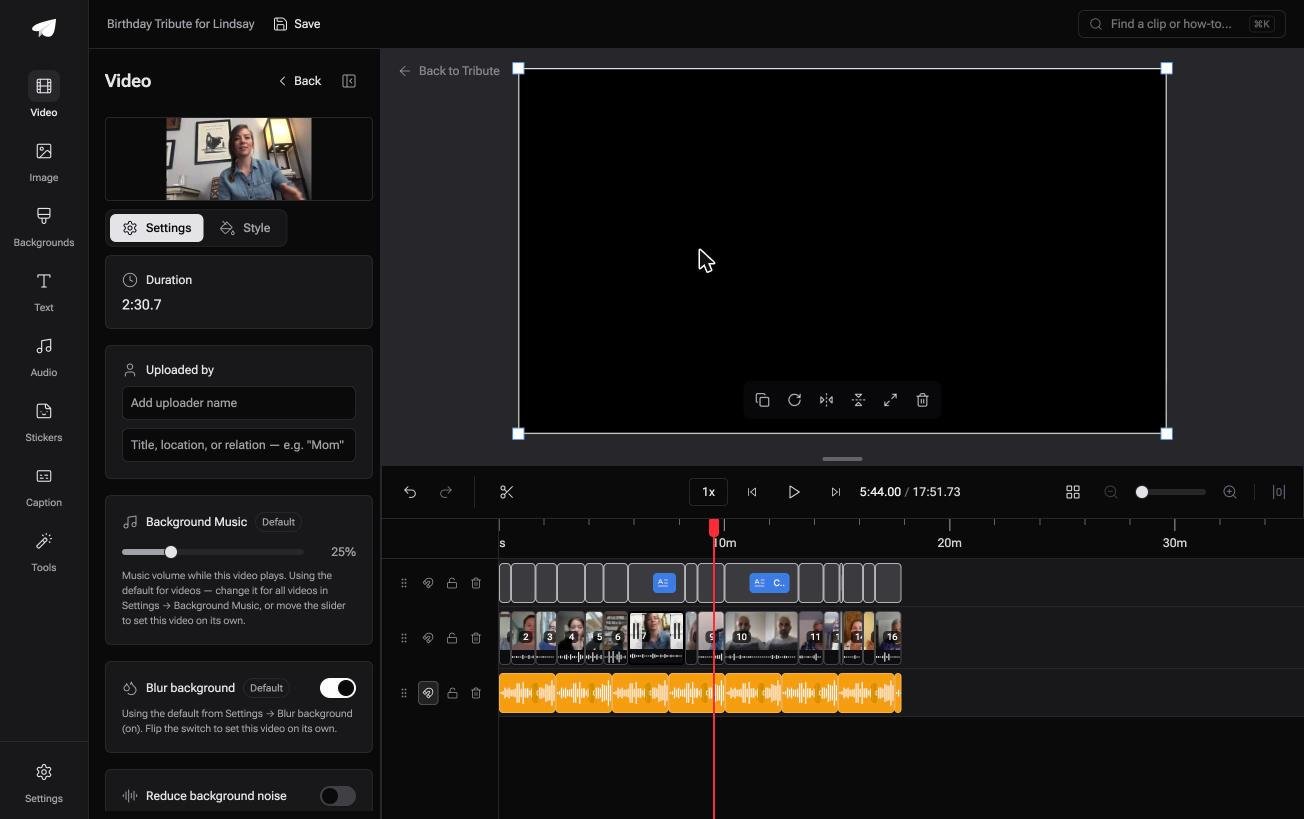
Best for: Clips that landed in your messages from eleven people, none of them shot on this iPhone.
Why it works: Compared to joining files on a phone screen, the collecting and the ordering are finished before you open anything.
Can you skip the joining on the iPhone altogether?
Only when the clips were never in your camera roll to begin with.
Every route above starts with files on the phone. Getting eleven relatives to send them at full size is the part no app on the device can shorten.
The case: one person, many recordings
You are in it when several people each record something for the same person.
A grandmother turning eighty. A teacher leaving after twenty years. Nobody is shooting a video: everyone is recording a message, and the assembling is yours.

Which means the search that brought you here, iPhone join videos, names the ten minute half of a two week job.
Why the camera roll stays empty
Each person records from a link on their own phone, so the clip goes to the timeline rather than into a text thread.
Nothing is forwarded, nothing is compressed on the way, and nothing waits on your storage. The Tribute video editor opens on a rough cut instead of an empty project.

What you do not have to do
- Not the chasing. Eleven relatives upload from a link, not into a text thread.
- Not the joining. Every clip is numbered and already in a running order.
- Not the captions. One switch writes them for the whole timeline.
- Not the edit. On a Concierge Tribute, Tribute's own editors finish it, and Eve, the AI assistant inside the editor, cuts a shorter version if it runs long.

When this is the wrong answer: the two clips are yours and already on the phone. Then iMovie finishes the job in a minute, and the Tribute editor is not a general joiner anyway, since it lives inside a paid Tribute.
Frequently Asked Questions
Why can the Photos app not join two clips?
Apple puts that job in iMovie. Photos edits one video at a time, so trimming, rotating and speed are all it offers, and no hidden setting changes that.
Is iMovie still a download at no cost?
Yes, from the App Store, and it ships on many iPhones already. It adds nothing to the picture on export, which is why it stays the default answer.
How many clips can iMovie handle on a phone?
A dozen is comfortable and twenty starts to drag, and the bottleneck is dragging clips into order on a hand sized screen. Past that, move to a laptop or to a tool that orders them for you.
Will joining clips lower the quality?
Not when the clips match in codec, resolution and frame rate, since iMovie copies the streams. Mismatched clips force a rebuild and the weakest file sets the ceiling.
Can I add music while joining?
Yes. Tap Add Media, tap Audio, then choose from Soundtracks or My Music. iMovie loops a soundtrack to fit the length of the video.
What if one clip is upside down?
The project frame follows the first clip you added, so start from one in the orientation you want. Rotating the odd clip with a two finger twist on the viewer fixes the rest.
How do I join clips from an iPhone and an Android phone?
Get both files onto one device at original size, then use the editor there. Our guide to joining multiple videos into one covers the cross platform version, and making a video montage covers what comes after.
👉 Skip the camera roll and start from a finished order if several people are recording for one person, and the joining is done before you look.
