
How to Join Multiple Videos Into One File Without Losing an Evening
Drop every clip on one timeline track in the order you want, trim the silence off each head, and export once. Clipchamp does it in a browser, iMovie on an iPhone or Mac, CapCut on Android. The hard part is never the joining.

How do you join multiple videos into one file?
Three steps, and only one of them is the merge.
- Get the files into one place. One folder, named so they sort into the order you want.
- Lay them on a single track. Side by side on the same row, not stacked, or the editor treats them as overlays.
- Export once, at the resolution of your best clip. Every extra export costs quality.
Tools built to join 2 videos fall over at twenty. The constraint stops being the merge and becomes the ordering, which is a filing problem wearing a video editing costume.
| Where you are | Use | Why |
|---|---|---|
| A laptop, nothing installed | Clipchamp | Runs in the browser, exports at 1080p |
| An iPhone or a Mac | iMovie | Already there, adds nothing to the picture |
| An Android phone | CapCut | Per clip volume and captions in one app |
| Twenty files from twenty people | Something that orders them | The merge was never the work |
Which tool should join multiple videos into one?
Clipchamp, in a browser or on Windows
Microsoft preinstalls it on Windows 11 and runs the same editor in Edge or Chrome.
- Open My media on the toolbar, click the import media button, and browse your device or OneDrive.
- Drag the clips onto the timeline, side by side on the same track so they play in order.
- Click a clip and drag its trimming handles. Hold shift or command to trim several at once.
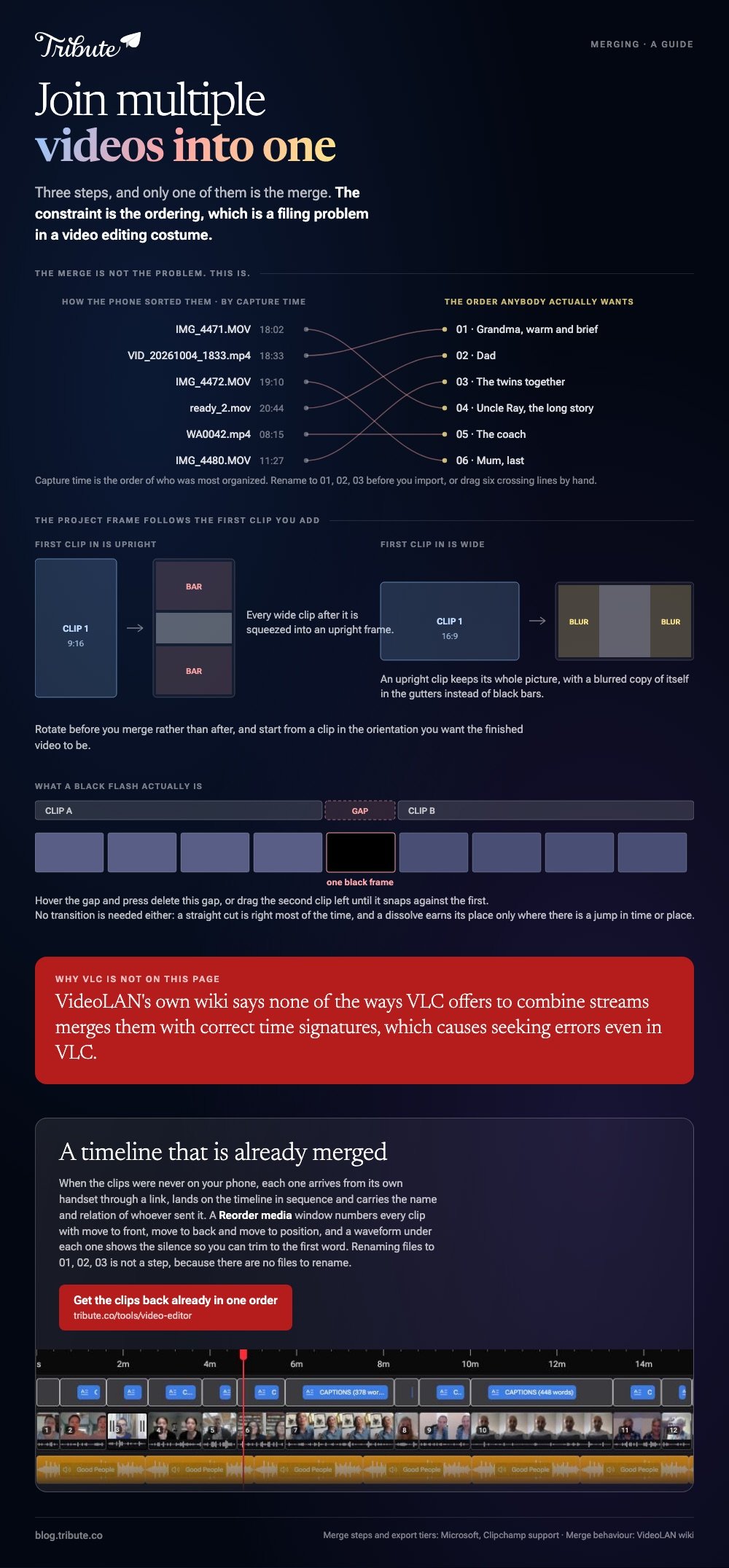
- Hover over any gap between clips and press the delete this gap button.
- Select Export, choose a quality such as 1080p, then Export again.
Those first four steps come from Microsoft's guide to combining videos in Clipchamp. A free plan on a personal account exports at 480p, 720p and 1080p with no watermark, and 4K needs a Microsoft 365 subscription or the Premium plan.
Best for: Ten or more files already on a laptop.
Why it works: A full-width timeline makes reordering a drag rather than a guess.
iMovie, on an iPhone or a Mac
Tap Start New Project, tap Movie, select the clips on the Moments screen, then tap Create Movie. The clips land in the order you tapped them.
Drag a clip sideways to move it, or tap it and pull a yellow edge in to cut the dead air at the start. To finish, tap Done, tap the Share button, tap Share Video, choose a resolution and tap Save Video.
Best for: Clips shot on the phone you are editing on.
Why it works: Nothing is uploaded, so a long set finishes at the speed of the device.

CapCut, on Android
Tap New project, select every clip, then tap Add. They arrive on the timeline in selection order.
Press and hold a clip to drag it somewhere else, tap a clip then Volume to set a level for that one alone, and tap Export at the top right.
Best for: Clips from several phones where the sound levels do not match.
Why it works: Per clip volume is the control a mixed set of recordings needs most.
Device walkthroughs live in joining videos on an iPhone and joining videos on Android.
Can VLC join MP4 files together?
Skip it, and the reason comes from VideoLAN rather than from us.
VLC plays almost anything, so it looks like the obvious way to join mp4 files on a desktop with nothing installed.
Its own wiki says none of the ways VLC offers to combine streams appears to merge them with correct time signatures, and that this causes seeking errors even when the result is replayed in VLC.
A video that will not scrub is a video nobody can check. Compared to a browser editor, VLC saves you an upload and hands back a file you cannot seek through, so use Clipchamp in the tab you already have open.
What breaks once there are more than ten clips?
Four things, and none of them is the merge.
- The order. Phone filenames sort by capture time, which is not the order anybody wants. Rename to 01, 02, 03 before you import.
- The heads. Every person presses record, looks at the lens, then begins. Twenty clips means twenty seconds of staring unless you trim each one.
- The levels. One clip came from a kitchen, the next from a car. Set volume per clip rather than once for the project.
- The shapes. Upright clips sit in the middle of a wide frame. A blurred copy of the clip in the gutters reads better than black bars.

Can you join MP4 files without re-encoding?
Only where the files already match.
When codec, resolution and frame rate line up, an editor can copy the streams end to end and the output looks like the source.
Mix a 4K 60fps clip with a 1080p 30fps one and the whole project is rebuilt, with the weakest file setting the ceiling.
Unlike a set shot on one camera, a family set is three generations of phone. Export at the highest resolution offered and watch the first and last clip before sending it anywhere.
Two clips rather than twenty? That case is covered in joining two videos together.
What if the clips came from a dozen different people?
The Tribute video editor is a browser-based group video editor: contributors record clips on their phones and Tribute assembles them on a timeline with the music balanced under the voices.
It is ours, and it is the last thing on this page.
- Clips arrive auto-assembled in order, with a tick against the ones already on the timeline
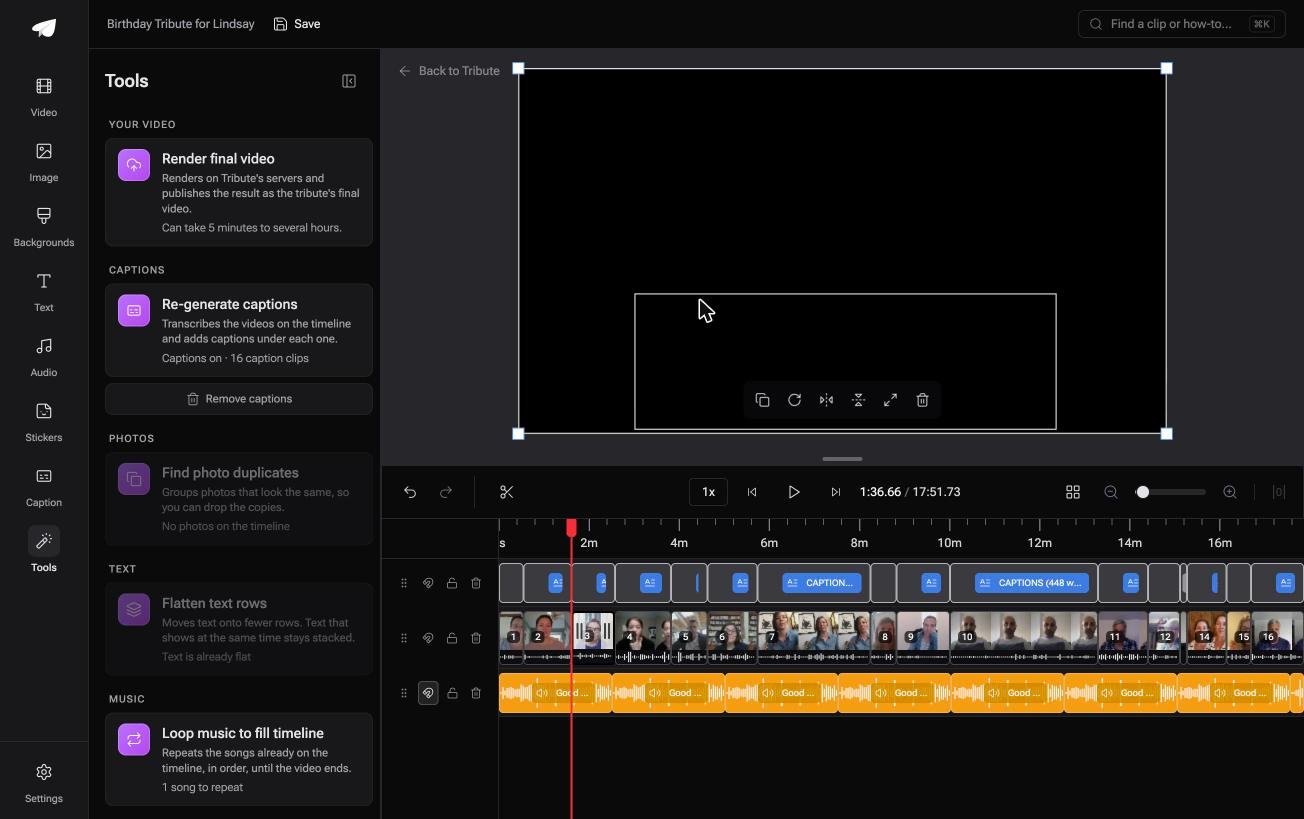
- A Reorder media window numbers every clip, with select all, move to front, move to back, move to position and bulk remove
- A waveform under every clip so you can see the silence and trim to the first word
- Blurred edges fill the frame behind upright phone footage, on by default
- Autosave and restorable version history, so a removed clip is recoverable rather than gone

Best for: Twenty files on a laptop, and twenty more still on other people's phones.
Why it works: The collecting and the ordering are finished before the editor opens, which is the part that takes two evenings.
Can the ordering be done before you open an editor?
Everything above treats the files as yours to find.
You chased them through text, email and a shared album, renamed them so they would sort, and discovered two were upside down. That is the real cost of a twenty-clip merge.
There is one case where none of it happens.
The case: several people each recorded for one person
You are in it when the clips were never on your phone.
Twenty cousins and a fiftieth wedding anniversary. A coach stepping down after nine seasons. A memorial where no two speakers live in the same state.
With 91% of US adults owning a smartphone, per the Pew Research Center mobile fact sheet, that is twenty cameras and twenty different settings before anybody presses record.
Nobody is merging anything yet. Everyone is recording a message, and your job is assembly, not collection.
Why the ordering problem never arises
The clips are already in order when the page loads.
Each one arrives from its own phone through a link, lands on the timeline in sequence, and carries the name and relation of whoever sent it. Renaming files to 01, 02, 03 is not a step, because there are no files to rename.
That is how the Tribute video editor handles it: not a faster merge, but a timeline that is already merged.

What you do not have to do
- No renaming. Nothing arrives as a file with a number on the end.
- No ordering. Clips land numbered and in sequence before you open anything.
- No joining pass. On a Concierge Tribute, Tribute's own editors cut it and send the video back.
- No export guesswork. The preview is frame-accurate to what comes back.
When this is the wrong answer: you shot all twenty clips yourself, or you want frame-level control. Then open Clipchamp. The editor is not a standalone merger, and it lives inside a paid Tribute.
The wider job is covered in making a video montage.
Frequently Asked Questions
How many clips can one project hold?
A dozen is comfortable on a phone and twenty starts to feel slow, because the bottleneck is dragging clips into order on a small screen. On a laptop the ceiling is storage rather than the editor.
Can I join multiple videos together online without an account?
Not in practice. Clipchamp, Canva and Clideo all ask for a sign-in before they will hand back the finished file, and the ones that do not tend to stamp the export.
Will joining videos reduce the quality?
Quality survives when the clips match in codec, resolution and frame rate, because the streams are copied rather than rebuilt. Mismatched clips force a re-encode and the weakest file sets the ceiling.
How do I join videos of different sizes?
Pick the frame you want first, then decide what happens to the clips that do not fit. Blurred fill behind an upright clip looks deliberate; black bars look like an accident.
Do I need a transition between every clip?
No. A straight cut is the right answer most of the time, and a dissolve is worth using only where there is a jump in time or place.
Why is there a black flash between two clips?
There is a gap on the timeline. Hover over it and delete the gap, or drag the second clip left until it snaps against the first.
Can I join clips that are sideways?
Yes, and rotate them before you merge rather than after. The project frame follows the first clip you add, so start from one in the orientation you want.
👉 Get the clips back already in one order if twenty of them are coming from twenty different people, and renaming files stops being your evening.
