
Android Join Videos: Two Clips, Two Minutes, and No Quality Loss
To join two videos on an Android phone, open Google Photos, tap Create, then Highlight video, and select both clips. Quality survives the join when the two clips match in resolution and frame rate, and drops when they do not.

Can Android join videos without an app?
Google Photos is already on the phone and will do it.
- Open Google Photos and tap Create at the bottom, then Highlight video.
- Tap Select content, choose the two clips, then tap Next.
- Touch and hold a clip to drag it into the right order.
- Tap Save.
Those steps come from Google's guide to making creations in Google Photos.
Know what you are getting. A highlight video arrives with a template, music and beat matching applied, so it is a produced edit rather than two clips butted together.
Best for: Two or three clips from the same afternoon that need to be one file tonight.
Why it works: No install, no account beyond the one on the phone, and it saves to the camera roll.
Which video joiner for Android is worth the install?
CapCut, when you want the clips and nothing added.
Tap New project, select both clips, then tap Add. They land in the order you tapped. Press and hold one to move it, tap a clip then Volume to set its level alone, and tap Export at the top right.
| What you want | Use | Watch for |
|---|---|---|
| Two clips, nothing added | CapCut | An account prompt on some features |
| Two clips with music over them | Google Photos | A template you did not ask for |
| Ten or more clips | A browser editor on a laptop | An upload for every file |
| Anything advertised as a joiner | Caution | A watermark on the export |
A video joiner Android users find at the top of the store listings is often a wrapper around the same encoder with a stamp on the output. Export something short and check the corners before you trust it with the real clips.

Can you join videos on Android without re-encoding?
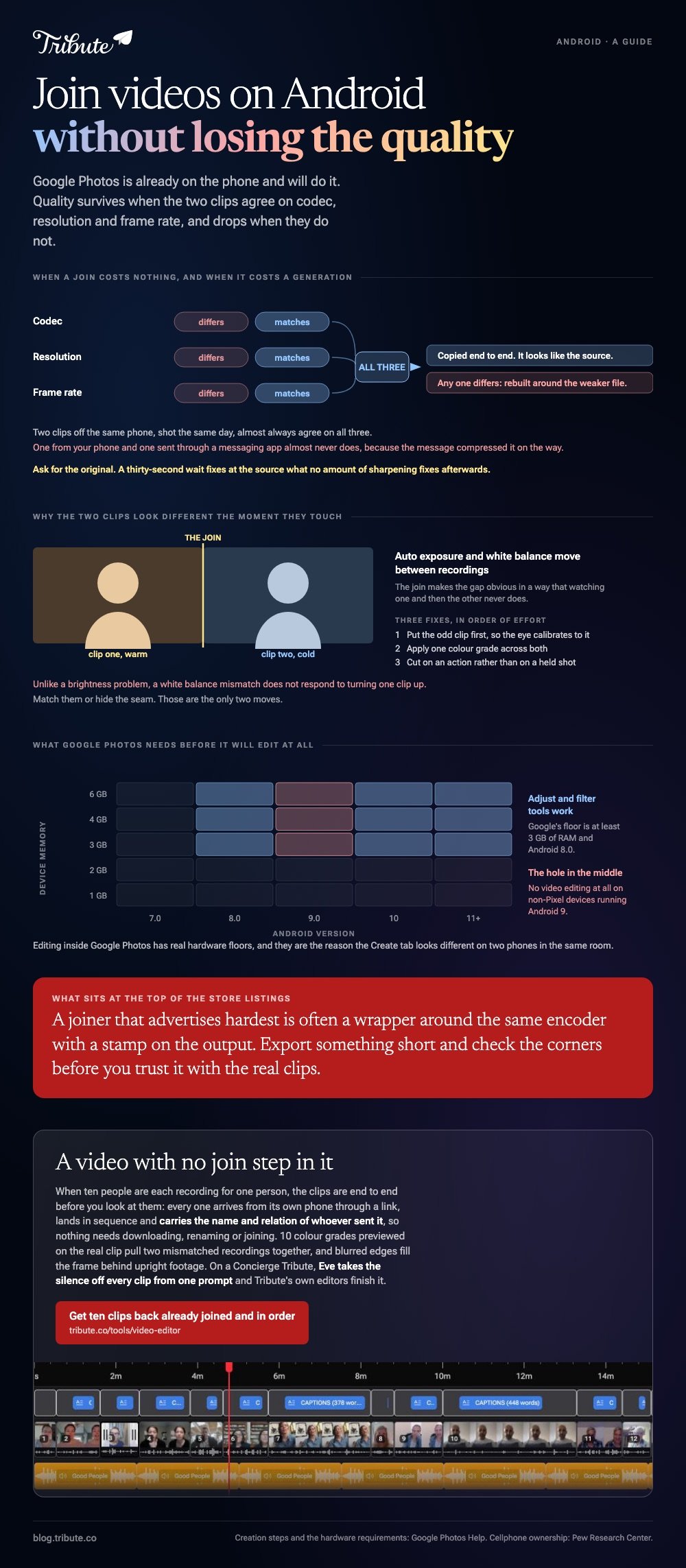
Only where the two clips already agree.
When codec, resolution and frame rate match, an editor can copy the streams end to end and the output looks like the source. Change any one of them and the whole thing is rebuilt around the weaker file.
Two clips off the same phone, shot the same day, almost always match. One from your phone and one sent through a messaging app almost never does, because the message compressed it on the way.
Ask for the original before you join. Compared to sharpening a compressed clip afterward, a thirty-second wait for the real file fixes it at the source.
What export settings should you use?
1080p, H.264, and export once.
- Resolution: match your best clip. Exporting above it invents pixels and costs file size.
- Frame rate: one rate for the whole video. Switching between clips is what causes drift.
- Format: H.264 MP4 opens everywhere. HEVC is smaller and fussier about where it plays.
- Passes: one. Every extra trip through an encoder costs a little more than the last.
Google publishes real hardware floors for editing inside Google Photos: at least 3GB of RAM and Android 8.0 for the adjust and filter tools, with no video editing at all on non-Pixel devices running Android 9.
The same job elsewhere is covered in joining videos on an iPhone and joining two videos together.
Why do the two clips look different after joining?
They were two different cameras, even when they were two different afternoons on the same phone.
Auto exposure and white balance move between recordings, so one clip reads warm and the next cold. The join makes the gap obvious in a way that watching one and then the other never does.
Three fixes, in order of effort: put the odd clip first so the eye calibrates to it, apply one color grade across both, or cut on an action rather than on a held shot.
Unlike a brightness problem, a white balance mismatch does not respond to turning one clip up. Match them or hide the seam.
What if the ten clips never reached your phone at all?
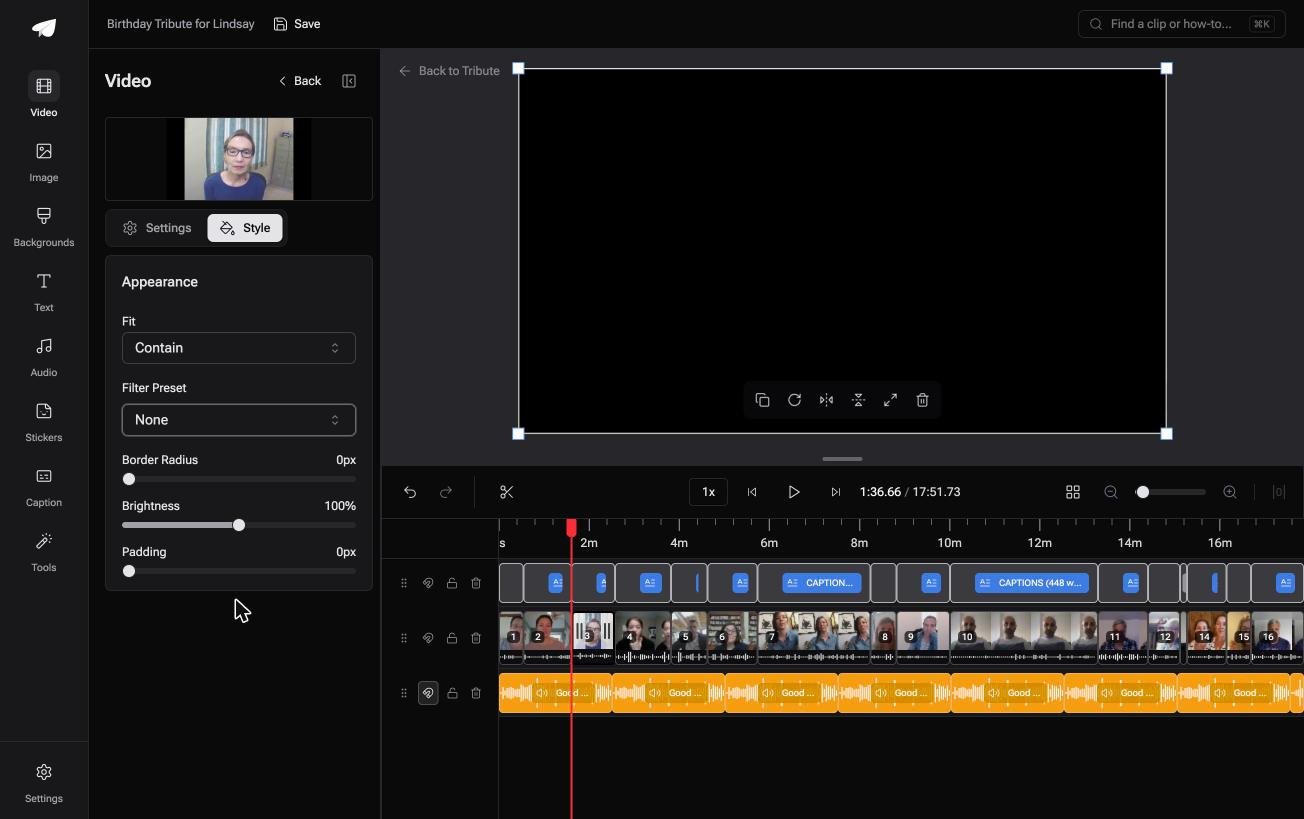
The Tribute video editor is a browser-based group video editor: contributors record clips on their phones and Tribute assembles them on a timeline with the music balanced under the voices.
It is ours, and it is the last thing on this page.
- Clips arrive auto-assembled in order, with a tick against the ones already on the timeline
- 10 color grades previewed on the real clip, so two mismatched recordings can be pulled together
- Blurred edges fill the frame behind upright phone footage, on by default
- Music ducks automatically to 25% under a voice and 75% under a photograph, overridable per clip
- A waveform under every clip, so the silence before the first word is visible rather than guessed at
Best for: Not two clips from one afternoon, but twenty from relatives who recorded at home.
Why it works: Ten phones means ten exposures and ten volumes, and both are adjustable one clip at a time.
What if joining them was never your job?
Two clips is a two-minute problem. Ten is a different one.
The joining stays trivial; the collecting does not. You ask ten people, six reply, two send links, one sends a photograph by mistake, and the last arrives after you exported.
There is a case where that whole stretch disappears.
The case: several people each recorded for one person
You are in it when the clips were never on your phone.
A grandmother turning eighty. A coach stepping down after twenty seasons. A memorial where the people who should speak are in four states.
Pew Research Center's mobile fact sheet puts cellphone ownership among US adults at 98%, so everyone you want in it already has the only equipment required.
Nobody is joining anything yet. Everyone is recording a message, and your job is assembly, not collection.
Why there is nothing left to join
The clips are end to end before you look at them.
Each arrives from its own phone through a link, lands on the timeline in sequence, and carries the name and relation of whoever sent it. No file reaches your storage, so nothing needs downloading, renaming or joining.
That is how the Tribute video editor handles it: not a better Android joiner, but a video with no join step in it.

What you do not have to do
- Not the chasing. One link goes out and each person records on their own phone.
- Not the joining. The clips sit end to end and numbered before you open them.
- Not the trims. On a Concierge Tribute, Eve, the AI assistant inside the editor, takes the silence off every clip from one prompt.
- Not the edit. Tribute's own editors finish it and send the video back.
Where it ends up
It can stay a link, or arrive as a video book: a hardcover case with a screen inside that plays when the cover opens.
When this is the wrong answer: you have two clips off your own phone. Then Google Photos takes two minutes and this page is finished with you. Tribute's editor is not a general joiner and it lives inside a paid Tribute.
Larger sets are covered in joining multiple videos into one and making a video montage.
Frequently Asked Questions
Does Android have a built-in way to join videos?
Google Photos builds one video from several clips, which is a join with a template over it. Samsung's gallery editor appends clips on some models, though the feature moves between software versions.
How do I join two videos on Android without a watermark?
Both Google Photos and CapCut export clean on the standard layouts. Anything that stamps the corner is holding the clean version behind a subscription.
Can I join videos of different lengths?
Yes. Length never matters to a join, while resolution and frame rate do, so check those two instead.
Why is my joined video out of sync?
The two clips were recorded at different frame rates and the editor switched between them. Export at one rate for the whole video and the drift goes away.
Can I join a video and a photograph?
Yes, and give the photograph about four seconds. Anything shorter reads as a flash, and anything longer stalls the video.
How long does joining take on a phone?
Under a minute for two short clips, several minutes for a long export at 1080p. Plug in before you start and leave the screen awake.
Does joining videos use mobile data?
Not on Google Photos or CapCut, because both work on the files already on the device. A browser editor uploads every clip, which is the one route where data matters.
👉 Get the clips back already joined, in order if ten people are each recording for one person, and the joining was never your part.
