
How to Join Two Videos Together
To join two videos together, place both clips end to end on one timeline, trim the silence off the front of the second, and export a single file. Use iMovie on an iPhone, CapCut on Android, Clipchamp on Windows, Clideo in a browser. Two clips takes about three minutes.

What does it take to join two videos?
Less than people expect. There is no skill in the join itself: you drop clip one, you drop clip two beside it, you export.
What separates a video that reads as deliberate from one that reads as two files glued together is the second you spend on the cut between them.
Two clips also means you can skip the tools built for twenty. A single purpose joiner finishes faster than a timeline editor when all you want to do is put two clips together and save the result.
Which tool should you use to join two videos together?
Pick by the device the clips are already on. Moving a file to a different machine costs more time than any of these tools take to run.
iMovie on an iPhone or Mac
- Open iMovie, tap Start New Project, then tap Movie.
- On the Moments screen, tap the first clip, then the second. A blue checkmark marks each.
- Tap Create Movie. Both clips arrive on a timeline in the order you tapped them.
- Tap the second clip and drag its yellow left edge in until the first word lands straight away.
- Tap Done, tap the Share button, then Share Video, and choose a resolution, then Save Video to put it in your photo library.
Apple sets out the project steps in its iMovie for iPhone guide. On a Mac the same app does it from the clip browser: select a clip, choose Edit > Add to Movie, and it lands at the end of the timeline.
Best for: Anyone on an iPhone, since the Photos app will trim a clip and will not join two.
Why it works: Two clips from one phone share a codec and a microphone, so the export copies rather than rebuilds.
CapCut on Android
- Tap New project and select both clips.
- Tap Add. They land on the timeline in selection order.
- Press and hold a clip to drag it to the other side if the order is wrong.
- Tap the small square where the two clips meet to add a transition, or leave it for a hard cut.
- Tap Export, set the resolution, then save.
Best for: Android, where the gallery editor changes with the handset and CapCut does not.
Why it works: The cut gets its own control, which is the only decision a two clip video has.

Clipchamp on Windows
- Click My media, then the import media button, and bring in both files.
- Drag them onto the timeline side by side on the same track.
- Drag the trimming handles on either clip to shorten it.
- Hover over the gap between them and press the delete gap button so they touch.
- Export from the top right at 1080p.
Best for: Windows 11, where Clipchamp is already installed.
Why it works: Gaps are the one thing that turns a join into a flash of black, and Clipchamp gives closing them a button.
Can VLC join two videos together?
Treat this one with care.
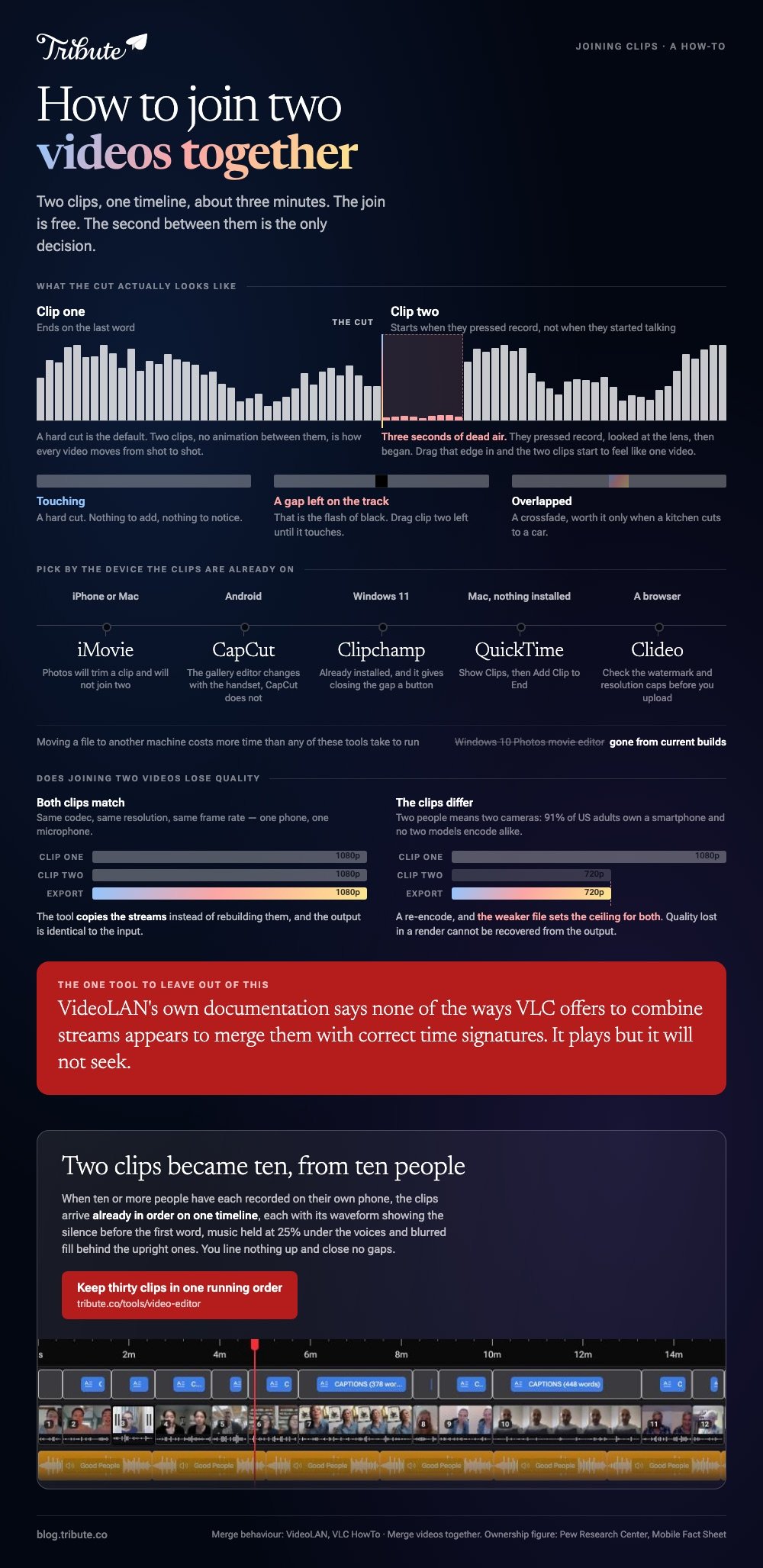
VLC has a convert feature that appends streams, and VideoLAN's own documentation is blunt about the result: its page on merging videos says none of the ways VLC offers to combine streams appears to merge them with correct time signatures, and that a tool other than VLC might work better.
In practice that shows up as a file that plays but will not seek, or a second clip with no sound.
On a Mac, QuickTime Player is the better no install option: open the first clip, choose View > Show Clips, then Edit > Add Clip to End, pick the second file, click Choose media, then Done.
On Windows, Clipchamp covers the same ground. Keep VLC for playing video, which is the job it is good at.
What should happen at the cut?
A hard cut is the right default. Two clips, no animation between them, is how every video and every news bulletin moves from shot to shot, and it never draws attention to itself.
Spend the minute on the three seconds before it instead. People press record, look at the lens, then begin, so the head of clip two is silence. Drag that edge in and the two clips start to feel like one video.
Our guide to trimming a video covers the waveform trick that finds the first word.
Match the volume as well. If clip one was recorded in a kitchen and clip two in a car, set a level on each clip rather than one level on the video, and listen to the join rather than the middles.

What if the two clips came from two different people?
Then you have the beginning of a different problem.
Two people become six once word gets around, the files arrive through three apps at three resolutions, and the question stops being how to join two videos together and starts being how to keep thirty in order.
The Tribute video editor
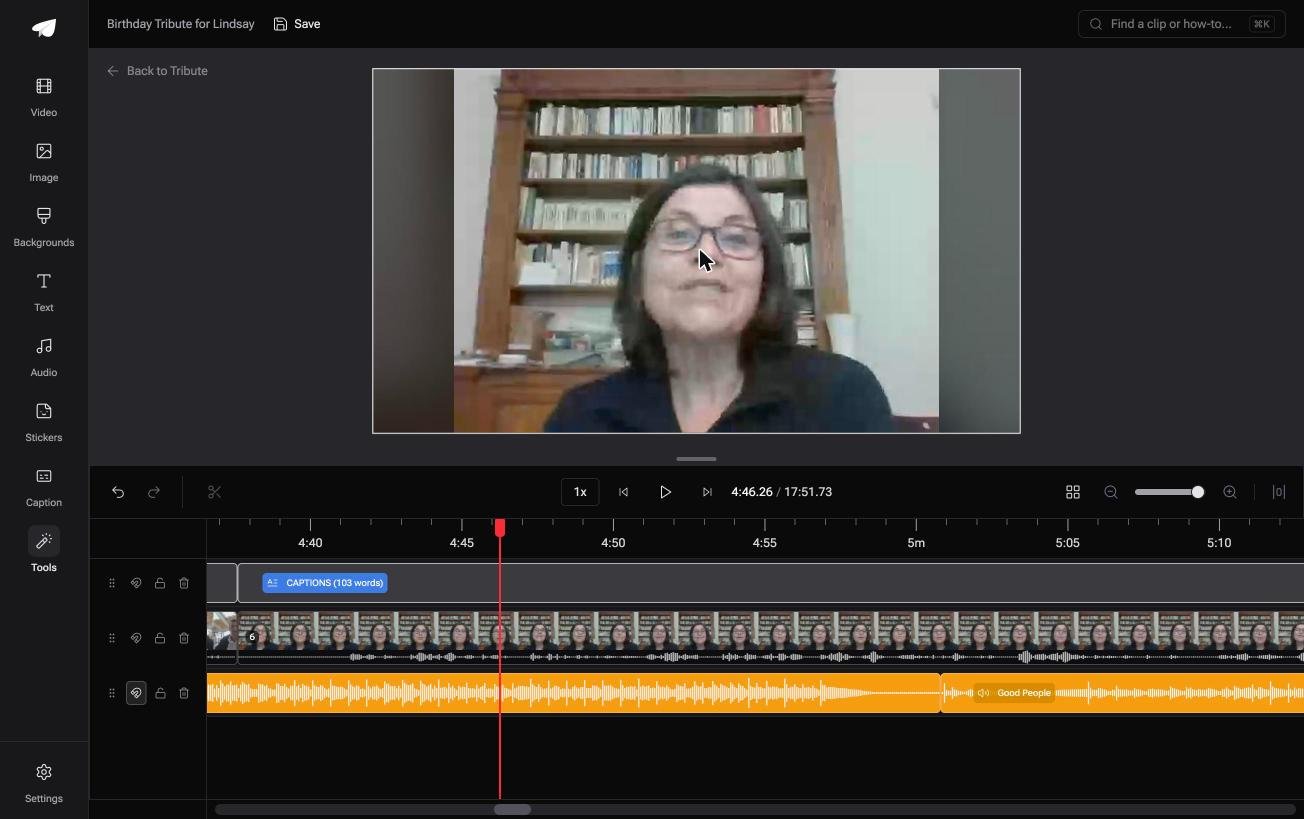
The Tribute video editor is a browser-based group video editor: contributors record clips on their phones and Tribute assembles them on a timeline with the music balanced under the voices.
Each clip carries a waveform so you can see the silence before the first word, and music sits at 25% under video so the speech stays in front.
It lives inside a paid Tribute rather than standing alone, and for two clips it is more machinery than you need.
Best for: Twenty clips rather than two, and nineteen of them still on their way to you.
Why it works: Unlike a folder of attachments, the collecting and the ordering happen before the editing starts.
More on that case: one video from thirty different phones, and the general version in putting videos together on a phone or computer.
Does joining two videos lose quality?
Only when the two clips differ. Matching codec, resolution and frame rate lets a tool copy the streams instead of rebuilding them, and the output is identical to the input. Mismatched clips force a re-encode, and the weaker file sets the ceiling for both.
Mismatch is common rather than rare.
With 91% of US adults owning a smartphone, per the Pew Research Center mobile fact sheet, two clips from two people are two different cameras, and 16% of adults own a phone with no home broadband, which decides whether a browser tool is even an option for them.
Compared to a photo, a video that lost quality in a render cannot be recovered from the output. Export at the highest setting offered, keep the originals, and watch the join before you send it anywhere.
For stills and clips mixed in one video, see making a slideshow, and for the full job, making a video montage.

Frequently Asked Questions
Can I join two videos together online?
Yes. Clideo and Adobe Express both take two files, let you drag them into order and hand back a download. Check the export screen for watermark and resolution caps before you upload rather than after.
How do I join two videos together on Android?
CapCut is the reliable answer, because the editor built into the gallery app differs between Samsung, Pixel and the rest. Tap New project, select both clips, tap Add, then Export.
How do I join two videos together on Windows 10?
Use Clipchamp in a browser, since the old Photos movie editor is gone from current Windows builds. Everything else on this page works the same way in Edge or Chrome.
Can I join two videos of different sizes?
Yes, and you choose what fills the space around the smaller one. An upright clip in a widescreen frame looks better with a blurred copy of itself behind it than with black bars on both sides.
Do I need a transition between the two clips?
No. A hard cut is the standard, and a crossfade is worth adding when the two clips were recorded in places so different that the jump is distracting.
Can I join a video and a photo?
Yes, in any timeline editor and in most browser joiners. The still gets a duration you set, so give it three to five seconds unless there is text on it to read.
Why is there a black flash between my clips?
There is a gap on the timeline. Drag the second clip left until it touches the first, or use the delete gap control if the editor has one.
👉 Keep them in one running order as more arrive if two clips turned into six once word got around, instead of joining a new pair each time.
