
How to Put Videos Together on a Phone or Computer
To put videos together, drag the clips end to end on one timeline, trim the silence off the front of each, and export a single file. Use iMovie on an iPhone, CapCut on Android, Clipchamp on Windows, QuickTime Player on a Mac. The job takes about five minutes.

What does putting videos together involve?
Three things, in this order. You get every file onto one device at its original size, you lay the clips on a timeline in a deliberate order, and you export once at the highest setting the tool offers.
Putting videos together is not the same as a collage, where two clips play at the same time in separate boxes, and not the same as cutting, where you remove a chunk from the middle. Tools call the same action join, merge, combine and stitch.
If the page you landed on uses a different verb, the buttons still do this.
How do you put two videos together on a phone?
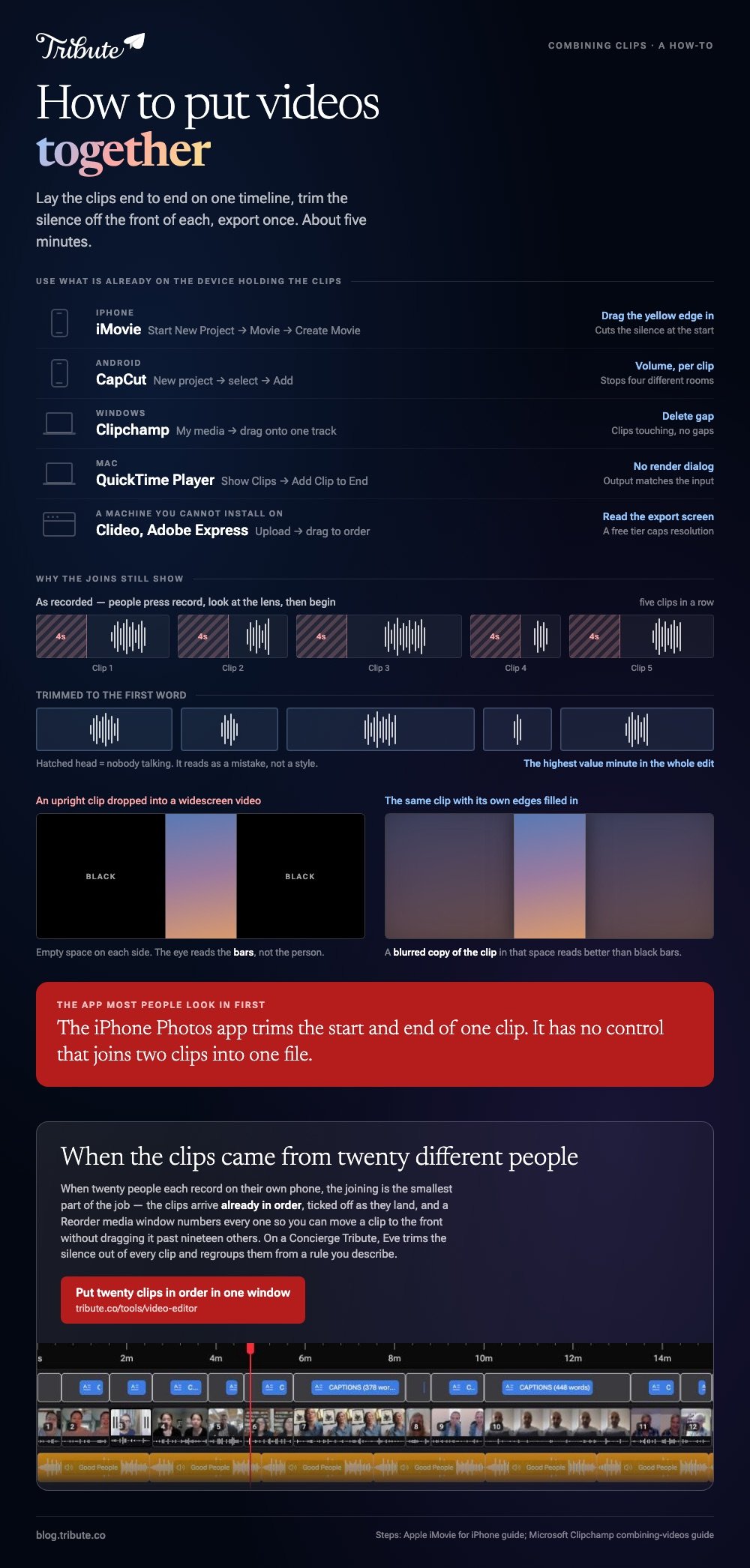
Both phone platforms have a free app that does it, and neither is the photo library. The iPhone Photos app trims the start and end of a single clip, and it has no control that joins two clips into one file.
iMovie on an iPhone
- Open iMovie, tap Start New Project, then tap Movie.
- On the Moments screen, tap each clip you want. A blue checkmark marks your picks.
- Tap Create Movie. The clips arrive on a timeline in the order you tapped them.
- Drag a clip sideways to move it, or tap it and drag a yellow edge in to cut the silence at the start.
- Tap Done, tap the Share button, then Share Video and choose a resolution, then Save Video to put it in your photo library.
Apple documents the project steps in its iMovie for iPhone guide. Tapping a clip opens an inspector, and the Audio button in it is where one clip gets its own volume level.
Best for: Two to ten clips already sitting in the iPhone camera roll.
Why it works: Nothing uploads, so a 4K clip joins at the speed of the phone rather than the speed of your connection.
CapCut on Android
- Tap New project and select every clip you want in the video.
- Tap Add. The clips land on a timeline in selection order.
- Press and hold a clip, then drag it to a new position.
- Tap a clip, tap Volume, and set a level for that clip on its own.
- Tap Export at the top right, set the resolution, then save.
Best for: Android phones, where the built in gallery editor changes with the handset.
Why it works: Per clip volume is the one control that stops a joined video sounding like four different rooms.

How do you put videos together on a computer?
A laptop gives you a wider timeline and more patience for long files. Two tools come with the operating system, so there is nothing to install on either side.
Clipchamp on Windows
- Click My media, then use the import button to bring in files from the PC or OneDrive.
- Drag the clips onto the timeline side by side on the same track so they play one after another.
- Click a clip and drag its trimming handles to shorten it.
- Hover over a gap between two clips and press the delete gap button to close it.
- Export from the top right and pick a resolution.
Microsoft sets the same sequence out in its guide to combining videos in Clipchamp.
Best for: Windows 11, where Clipchamp replaced the old Photos movie editor.
Why it works: One track, clips touching, no gaps is the whole recipe for a continuous video.
QuickTime Player on a Mac
- Open the first clip, then choose View > Show Clips.
- With nothing selected, choose Edit > Add Clip to End.
- Select the next file and click Choose media.
- Repeat, then drag the thumbnails in the clip bar to reorder them.
- Click Done and save.
Best for: A handful of clips from one camera, where you want no project file left behind.
Why it works: There is no render dialog, so the output matches the input and nothing gets downgraded by a wrong setting.
How do you put videos together online?
Browser tools upload your clips to a server, join them there, and hand back a download. Clideo asks you to choose your files, drag the thumbnails into order, pick an aspect ratio and export.
Adobe Express puts the same job under the Video tab as a quick action called Merge videos, where you add clips, drag to reorder, then download.
Both suit a machine you cannot install software on, and 16% of US adults have a smartphone but no home broadband, per Pew Research Center, so check your upload speed before you commit to this route.
Read the export screen first as well: a free tier often caps resolution or adds a watermark.
Best for: A Chromebook, a work laptop, or a shared family computer.
Why it works: The server does the rendering, so an old machine finishes as fast as a new one.

What if the clips came from twenty different people?
None of the tools above were built around that. Twenty people send twenty files through three different apps at twenty resolutions, and the joining is the smallest part of the job.
Collecting them at full quality and getting them into an order that makes sense is where the hours go.
The Tribute video editor
The Tribute video editor is a browser-based group video editor: contributors record clips on their phones and Tribute assembles them on a timeline with the music balanced under the voices.
The clips are in order before you open it, with a tick against the ones already placed, and a Reorder media window numbers every clip so you can move one to the front without dragging it past nineteen others.
Best for: Nineteen clips where the one that should open the video came in last.
Why it works: Unlike a folder of attachments, the collecting and the ordering happen before the editing starts.

That case gets its own guide: one video from thirty different phones. For the full job of turning a folder of clips into a finished video, start with making a video montage.
Why do the joins still show?
Four seconds of silence at the head of every clip is the giveaway. People press record, look at the lens, then begin, and five clips in a row of that reads as a mistake rather than a style.
Trimming to the first word is the highest value minute in the whole edit, and it counts double when you are joining two videos together and the cut is the one thing a viewer sees.
Mixed orientation is the other one. An upright phone clip dropped into a widescreen video sits in the middle with empty space on each side, and a blurred copy of the clip in that space reads better than black bars.
The same fix applies when you put a vertical phone video in a widescreen video.
Compared to those two fixes, everything else is decoration. Captions, music and titles improve a video that already flows, and none of them rescue one that stutters at every cut.

Frequently Asked Questions
What is the best app to put videos together?
The one already installed on the device holding the clips: iMovie on iPhone, CapCut on Android, Clipchamp on Windows, QuickTime Player on a Mac. Switch tools when you need captions or separate volume per clip, not before.
Can I put two videos together without downloading an app?
Yes, in a browser. Clideo and Adobe Express both join clips without an install, and both trade install time for upload time. A long 4K clip can take longer to send than the join takes to run.
How do I put videos together on an iPhone for free?
Use iMovie, a free app that ships on most iPhones. The Photos app will not join clips, which catches out most people who look there first. Android users get the same result from CapCut.
Does putting videos together lower the quality?
It can. Clips that match in codec, resolution and frame rate are copied rather than rebuilt, so quality holds. Mismatched clips force a re-encode, and the weakest file in the set decides how good the output looks.
How do I keep the clips in the right order?
Rename the files with a number in front before you import, because most tools sort by filename or by the order you tapped.
Then watch the whole thing once before export, since a misplaced clip is obvious in a playthrough and invisible in a thumbnail grid.
Can I add music while putting videos together?
Yes, and every tool here supports it. Set the music level well under the speech, or the voices disappear on a phone speaker. A video of stills works the same way, as our guide to making a slideshow explains.
What file should I export?
MP4 with H.264 video plays on every phone, TV and browser worth worrying about, and most tools default to it. Keep the original clips until you have watched the export from start to finish.
👉 Put the videos together in a list you can reorder in one window if the order keeps changing every time another clip arrives, or let Tribute's editors do it on a Concierge Tribute.
