
DaVinci Resolve Trim Video: Trim Modes, the Blade, and Ripple Edits
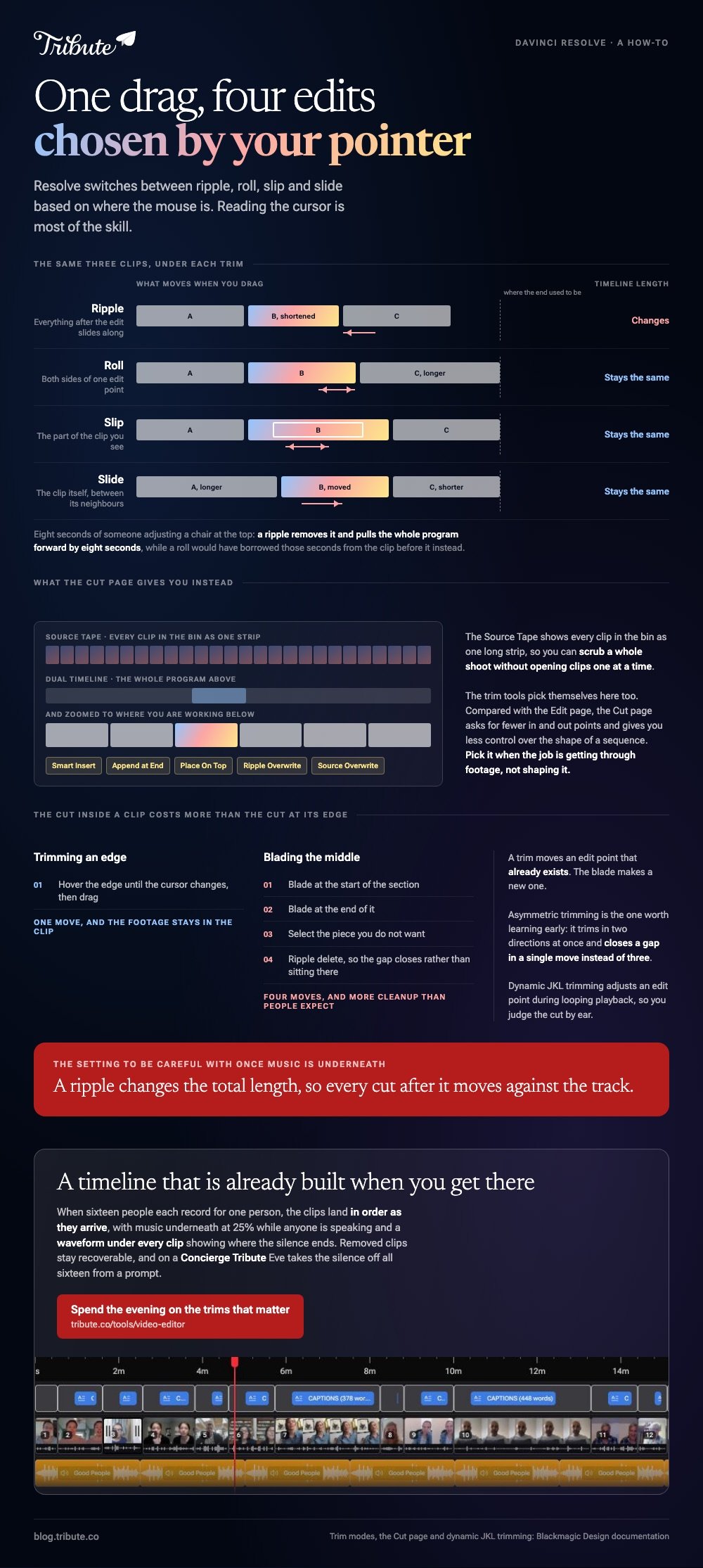
In DaVinci Resolve you trim by dragging the edge of a clip, and the tool you get depends on where the pointer sits. Resolve chooses between ripple, roll, slip and slide for you, which is why one drag can behave like four.

Which DaVinci Resolve trim video tool should you reach for?
The one Resolve has already chosen, in most cases.
Blackmagic describes a smart trim tool that switches between ripple, roll, slip and slide based on where the mouse pointer is. The cursor changes shape to tell you which one you are about to use.
Learning to read that cursor is most of the skill. Four edits share one drag, and they do very different things to the rest of the timeline.
| Trim | What moves | Timeline length |
|---|---|---|
| Ripple | Everything after the edit slides along | Changes |
| Roll | Both sides of one edit point | Stays the same |
| Slip | The part of the clip you see | Stays the same |
| Slide | The clip itself, between its neighbors | Stays the same |
How do you trim a clip on the Edit page?
Drag the edge, then check what happened to the clips after it.
Most trimming is this one motion. The blade is for the middle of a clip, and it leaves more cleanup behind than people expect.
- Put the playhead where the clip should start or end, so you have a reference line.
- Hover the edge of the clip until the cursor changes to a trim cursor.
- Drag inward to shorten, outward to restore footage the clip still holds.
- For a cut inside a clip, use the blade, then select the piece you do not want.
- Remove it with a ripple delete so the gap closes rather than sitting there.
- Play the edit back before you move on.
Resolve's Trim menu lists every mode with its shortcut beside it, which beats memorizing letters from a video. Blackmagic also offers dynamic JKL trimming, where you trim an edit point during looping playback and hear the result as you go.
Asymmetric trimming is the one worth knowing about early. It lets you trim in two directions at once, which closes a gap in a single move instead of three.

Does a DaVinci Resolve trim video edit leave a gap?
Only when the trim was not a ripple.
Dragging an edge in with a plain trim shortens the clip and leaves empty space where the picture used to be. A ripple trim pulls everything after it along, so the timeline closes itself.
Unlike a roll, a ripple changes the total length of your edit. That is the setting to be careful with once you have music underneath, because every cut after the ripple moves against the track.
Say your interview has eight seconds of someone adjusting a chair at the top. A ripple trim removes it and pulls the whole program forward by eight seconds. A roll would have borrowed those seconds from the clip before it instead.
What is different about trimming on the Cut page?
Less setup, and the trim tools pick themselves there too.
Blackmagic built the Cut page for turnaround rather than craft. Its Source Tape shows every clip in the bin as one long strip in the viewer, so you can scrub a whole shoot without opening clips one at a time.
- Dual timeline. The upper one shows the entire program, the lower one stays zoomed to where you are working.
- Smart edit tools. Smart Insert, Append at End, Place On Top, Ripple Overwrite and Source Overwrite, with an indicator showing where the edit will land.
- Trim tools. Roll, Trim, Slip, Slide and Duration, chosen by pointer position as on the Edit page.
Compared with the Edit page, the Cut page asks for fewer in and out points and gives you less control over the shape of a sequence. Pick it when the job is getting through footage, not shaping it.
More on the neighboring jobs in cropping in Resolve, adding text to a clip, trimming without a desktop editor, and building a montage once the cuts are in.
What if the clips were recorded by sixteen different people?
The Tribute video editor is a browser-based group video editor: contributors record clips on their phones and Tribute assembles them on a timeline with the music balanced under the voices.
It is ours, and it is the last thing on this page.
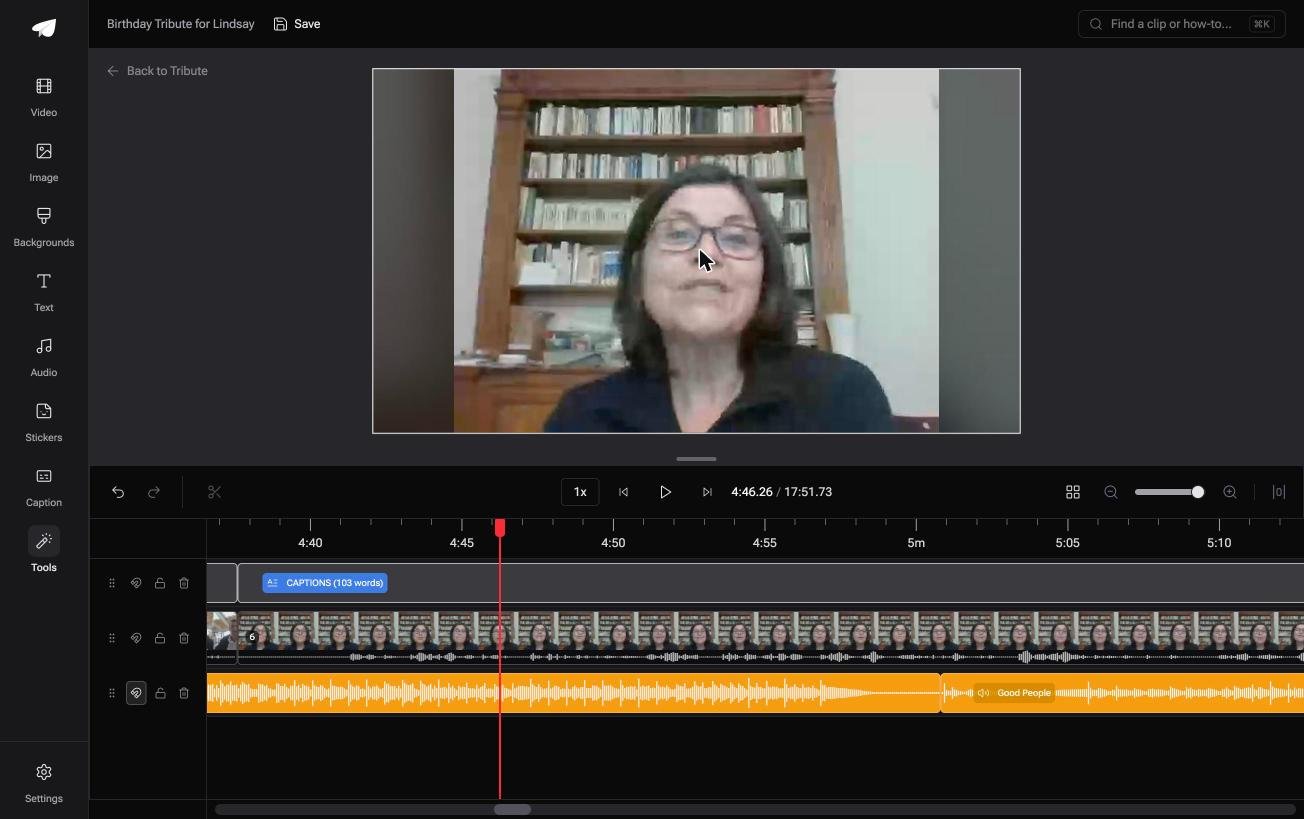
- A waveform under every clip, so you can see the silence before the first word and drag the edge to it
- Clips arrive in order, already on the timeline, with a tick against the ones placed
- A Reorder media window with every clip numbered, plus move to front, move to back and move to position
- Autosave and restorable version history, with removed clips recoverable rather than deleted
Best for: Someone with forty minutes of phone messages to cut down and no interest in learning a grading suite.
Why it works: Every clip needs the same trim, the dead air at the front, and the waveform shows you where it ends.
Who builds the timeline before you open it?
Trimming is the easy half. Ordering sixteen clips is the half that takes the evening.
Resolve assumes you arrive with footage you shot and a sequence in your head. Some videos arrive the other way around, as a pile of messages from people who are not in the room.
The case: the footage was sent, not shot
This is the case where several people each record something for one person.
A retirement after thirty years, with messages from two offices and a warehouse. A ninetieth birthday where the grandchildren record on the school run. Nobody framed anything, and every clip opens with four seconds of someone finding the record button.

Why the trimming stops being a project
Because the assembly happened before you sat down.
Clips land on the timeline in order as they arrive, with music underneath at 25% while anyone is speaking. What is left is one pass of the same small edit.
That is how the Tribute video editor handles it: not a lighter version of Resolve, but a timeline that is already built when you get there.
What you do not have to build
- Not the sequence. Sixteen clips land in order as they arrive, with music underneath at 25% while anyone speaks.
- Not the ordering evening. Clips are numbered, with move to front, move to back and move to position.
- Not a bin, a blade or a render queue. Tribute builds the video on its own servers.
- Not a minute of it on Concierge, where Tribute's editors cut the whole thing and send it back.
On a Concierge or Concierge Deluxe Tribute, Eve, the AI assistant inside the editor, trims to the first word for you and takes the silence off all sixteen clips from a prompt.

When this is the wrong answer: you are cutting your own footage and the trim is a judgment about rhythm. Resolve exists for that, and no amount of auto-assembly replaces it.
The editor has no blade, no ripple modes and no grading page, and it lives inside a paid Tribute rather than on its own.
Frequently Asked Questions
How do I trim a clip in DaVinci Resolve?
Hover the edge of the clip on the timeline until the cursor changes, then drag it in or out. The clip keeps the footage you trimmed away, so you can drag it back at any point.
What is the difference between trim and blade?
A trim moves an edit point that already exists. The blade makes a new one in the middle of a clip, which in most cases means two cuts and a delete where one trim would have done.
How do I close the gap after trimming?
Use a ripple trim, which pulls the following clips along as you drag. If the gap is already there, select it and ripple delete so the timeline closes.
What does slip do?
It changes which part of the clip you see without moving the clip or changing its length. Use it when the timing is right and the content inside the window is wrong.
Can I trim while the timeline is playing?
Yes. Blackmagic's dynamic JKL trimming lets you adjust an edit point during looping playback, so you judge the cut by ear rather than by eye.
Should I trim on the Cut page or the Edit page?
The Cut page for speed on a long pile of footage, the Edit page for anything where the shape of the sequence matters. Both use the same context-sensitive trim tools.
Is Resolve too much for a family video?
For one video of a party, yes. The install is large, the learning curve is real, and a browser trimmer will do that job in a few minutes.
👉 Spend the evening on the trims that matter if forty minutes of phone messages are waiting, and the assembly is done before you open it.
