
Fun Birthday Videos: How to Make One People Watch Twice
Fun birthday videos are short, specific and made of other people. Ten to fifteen clips, twenty seconds each, one story per person. The editing is the small part of this job. The asking is the real one.

What makes fun birthday videos fun?
Specific beats sentimental, every time.
"Happy birthday, hope you have a great year" is what people say when nobody told them what to say. The version that gets watched twice names a thing that happened: the camping trip, the parking ticket, the way she answers the phone.
Three choices separate a video people rewatch from one they sit through.
- One story per person. Not a summary of the friendship. One thing, start to finish.
- Twenty seconds. Long enough for a story, short enough that nobody rambles.
- A pattern. Everyone answers the same question, so the cuts land like a rhythm.
That last one is the trick most people miss. Fifteen separate greetings make a queue. Fifteen answers to "what is the worst advice Dad ever gave you" make a video.
What should you ask people to say?
Send a question, not an assignment.
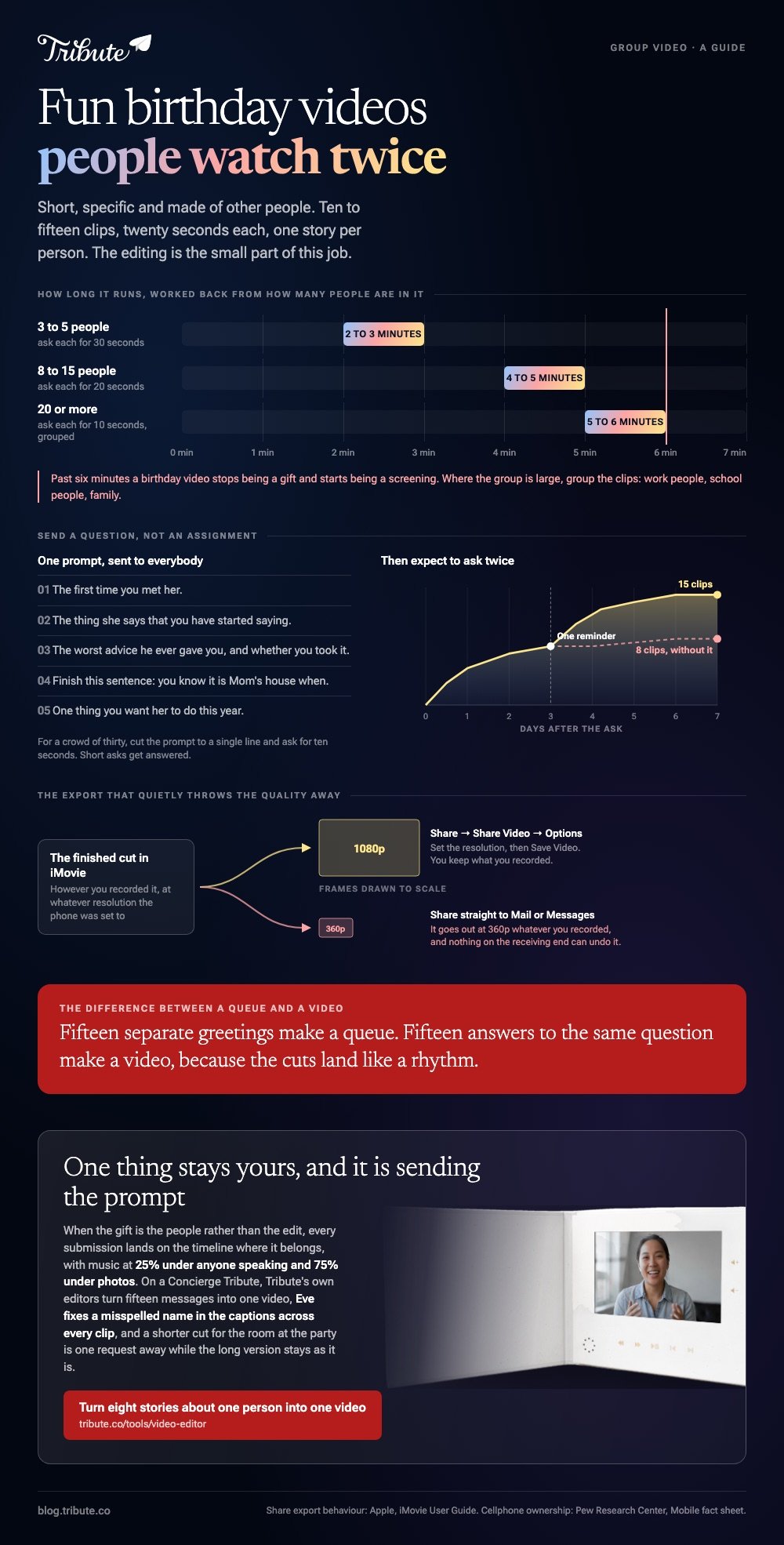
A blank "record a birthday video message" gets you fifteen people saying happy birthday into a kitchen cupboard. One prompt, sent to everyone, gets you fifteen answers that cut together.
- The first time you met her.
- The thing she says that you have started saying.
- The worst advice he ever gave you, and whether you took it.
- Finish this sentence: you know it is Mom's house when.
- One thing you want her to do this year.
For video birthday wishes from a crowd of thirty, cut the prompt to a single line and ask for ten seconds. Short asks get answered. Long ones sit in an inbox until the party.
Expect to ask twice. One message, then one reminder three days later, is the difference between eight clips and fifteen.
You are not asking much of the hardware. Pew Research Center's mobile fact sheet puts cellphone ownership at 98% of US adults, with 91% on a smartphone, so the camera is already in the room.

How do you turn the clips into a birthday video message?
Both phone platforms will build the first cut for you.
Apple puts this job in iMovie rather than Photos: the Photos app edits one clip at a time and will not join two together. Google Photos does it in a browser as well as in the app.
iMovie on iPhone
- Open iMovie, tap Start New Project, then tap Magic Movie.
- Open the album holding the clips and tap them in the order you want. The number in the corner of each one is its position.
- Tap Create Magic Movie. iMovie cuts it together with a soundtrack and titles.
- Fix what it guessed: trim the dead air at the head of each clip, retype the titles, change the song.
- Tap Share, then Share Video, then Options to set the resolution, then Save Video.
Apple's iMovie user guide flags one trap worth knowing: send the movie straight to Mail or Messages and it goes out at 360p, whatever you shot.
Google Photos in a browser
- Open photos.google.com, click Create, then Highlight video, then Create your own video.
- Click or select photos and pick the clips and pictures you want.
- Click Create at the top, then Save.
- To change the music, open the video, click Edit, click Music, choose a track and save.
Highlight videos replaced movies on the web, which is why older walkthroughs point at a button that is no longer there.
How long should the finished video run?
Under five minutes, and under three when the group is small.
| People sending clips | Ask each for | Finished length |
|---|---|---|
| 3 to 5 | 30 seconds | 2 to 3 minutes |
| 8 to 15 | 20 seconds | 4 to 5 minutes |
| 20 or more | 10 seconds | 5 to 6 minutes, grouped |
Past six minutes a birthday video stops being a gift and starts being a screening. Where the group is large, group the clips: work people, school people, family.
A video birthday card sits at the short end of the same craft: one or two people, ninety seconds, sent as a link instead of played in a room.
There is more on that in the video birthday card and in making one for free.
Which birthday video maker suits the job?
The one on the device holding the clips.
| Tool | Good at | The catch |
|---|---|---|
| iMovie | A first cut from phone clips | Apple devices only |
| Google Photos | Clips and photos already backed up | Light on manual control |
| Clipchamp | A browser timeline, 1080p export | Everything has to be uploaded |
| CapCut | Templates and captions | Template editing is narrow |
Compared with a template, a plain timeline takes longer and leaves the jokes where you put them. Templates cut on the beat and will cut a punchline in half to do it.
More on stitching the pieces together sits in the guide to making a video montage, and the photo-led version is in the photo birthday video maker.
What if the clips came from a dozen different people?
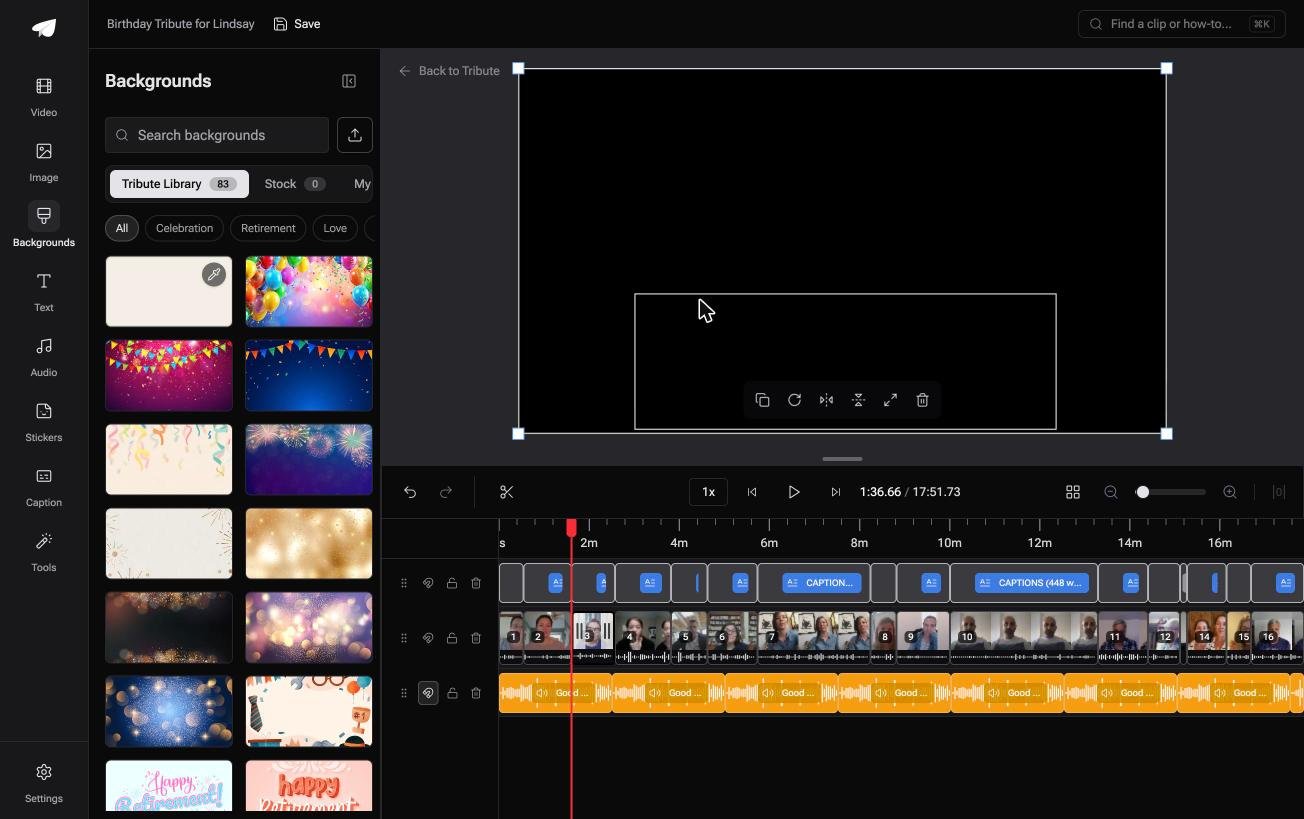
The Tribute video editor is a browser-based group video editor: contributors record clips on their phones and Tribute assembles them on a timeline with the music balanced under the voices.
It is ours, and it is the last thing on this page.
- Clips arrive in order, already on the timeline, with a tick against the ones that are placed
- 83 occasion backgrounds grouped by occasion, Celebration among them
- Captions in one switch, 10 styles, every line editable with its own timecode
- Name badges from an uploader name and relation, in any of four corners
Best for: A birthday video where eight or more people are each sending something.
Why it works: Unlike a timeline you fill by hand, the order is already there and the music is already sitting under the voices.
What if the best bits are the people, not the edit?
Nothing above makes a birthday video funny.
The prompts, the twenty second rule, the grouping: all of it is staging for the thing that carries the video, which is fifteen people being themselves. The editing only has to stay out of the way.
There is one case where it does that on its own.
The case: you are collecting, not making
You are in it when the gift is other people and your job is to gather them.
A fortieth with cousins in three states. A friend whose school group has not been in one room since 2009. Nobody is making a video. Everyone is answering a question, and you are the person holding the answers.
Which means the search that brought you here, fun birthday videos, is a question about collecting them.
Why the edit stops being the problem
Clips that arrive in order are a different job from clips that arrive in a group chat.
In the Tribute video editor each submission lands on the timeline where it belongs, with music at 25% under anyone speaking and 75% under photos. You change what you do not like rather than building from nothing.
What drops off your list
One thing is yours, and it is sending the prompt.
- Not the cutting. On a Concierge Tribute, Tribute's editors turn fifteen messages into one video.
- Not the names. Eve, the assistant on Concierge and Concierge + Video Book, fixes a misspelled name in the captions across every clip.
- Not a second version for the room at the party. Ask Eve for a shorter cut and the long one stays as it is.

When this is the wrong answer: you shot the whole thing yourself at the party, or you want a template with beat-matched cuts. Then iMovie or CapCut is the shorter road, and the table above is where to start.

Frequently Asked Questions
How long should each person's clip be?
Twenty seconds for a group of ten to fifteen, ten seconds for a bigger crowd. Tell people the number when you ask, because nobody edits their own clip down.
What is the easiest birthday video maker for someone who has never edited?
iMovie on an iPhone or Google Photos in a browser. Both build a first cut from the clips you choose, and both let you change the music afterward.
Can I collect clips from people who use Android and iPhone?
Yes, and the files will not match. Ask everyone to hold the phone the same way, either upright or sideways, and most of the mismatch disappears.
What should go first in the video?
The funniest clip, not the oldest friend. The opening thirty seconds decide whether the room watches or talks over it.
Is a video birthday card different from a birthday video?
Only in scale. A card is one or two people and under ninety seconds, sent as a link; a birthday video is the group version played in a room.
What music works for video birthday wishes?
Something instrumental under the talking, at about a quarter of full volume. Lyrics and speech fight each other, and the speech loses.
👉 Turn eight stories about the same person into one video if the gift is the people rather than the edit, and the clips arrive in order with the music already under them.
