
Birthday Card Video Free: Three Free Apps and the Steps
A birthday card video is a greeting of 30 to 90 seconds, sent as a link rather than handed over. The phone you own already makes one. The editing app matters less than the first sentence you say.

Where do you get a birthday card video free online?
From a free app you have already paid for, which is to say the camera.
| Tool | Good for | Cost |
|---|---|---|
| Phone camera | One person, one take | Nothing |
| CapCut | A template with captions | Free tier, paid Pro |
| Clipchamp | Joining two or three clips | Free plan up to 1080p |
| iMovie | Apple devices, no account | Nothing |
A group video message for a birthday costs nothing to make with a free online tool, so the budget question is settled before it starts. What people pay for instead is time.
Pew Research Center's mobile fact sheet puts cellphone ownership at 98% of US adults, with 91% on a smartphone. Everyone you would ask to appear in the card is holding the camera for it.
What should the card say?
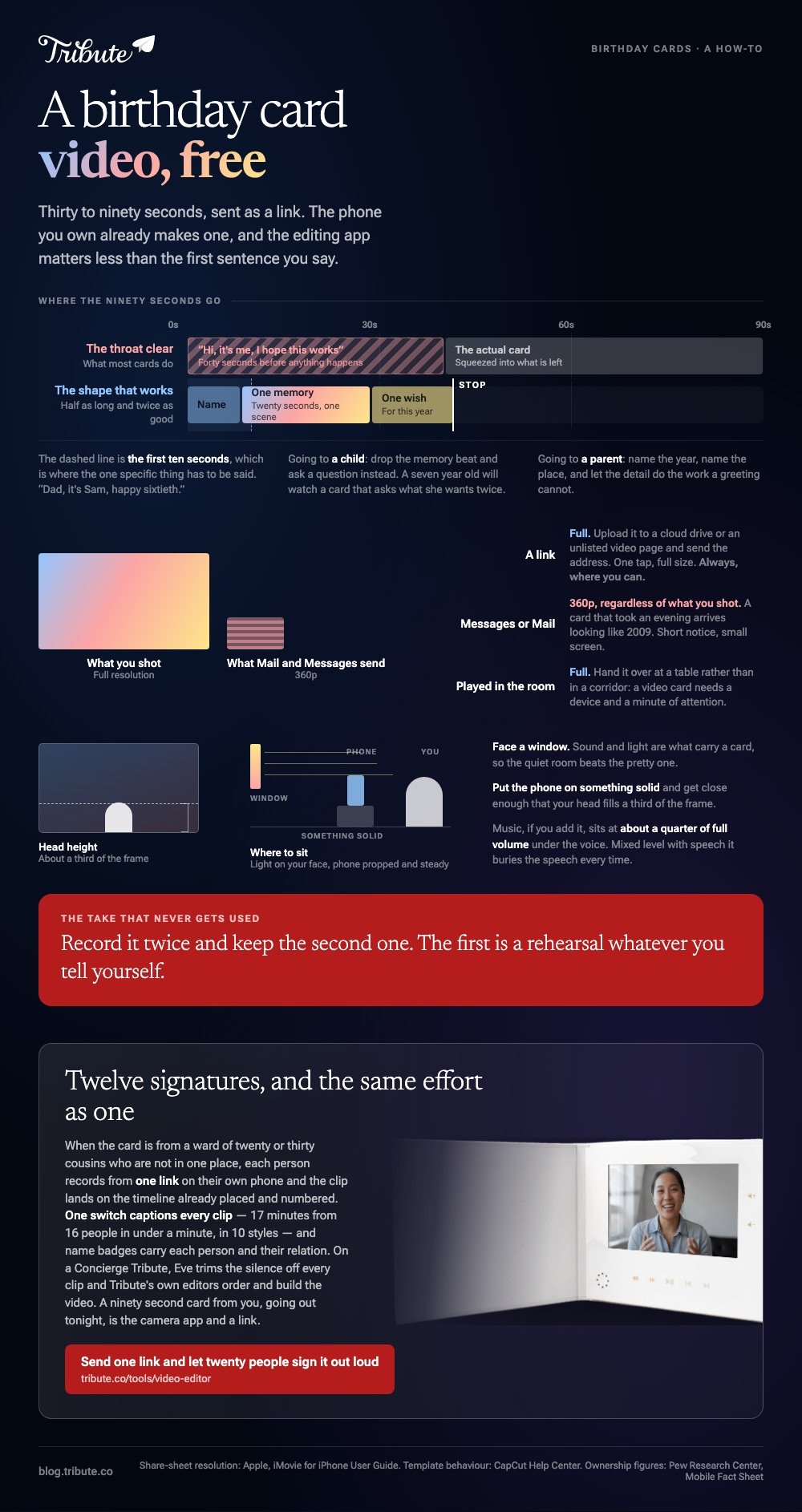
One specific thing, said in the first ten seconds.
The failure mode is the throat clear: forty seconds of "hi, it's me, I hope this works" before anything happens. Start at the story and the card is half as long and twice as good.
A shape that works for a single sender:
- Name and reason. "Dad, it's Sam, happy sixtieth."
- One memory. Twenty seconds, one scene, not a summary of the relationship.
- One wish. Something for this year, not for life.
- Stop. The hardest part. Put the phone down while you are ahead.
Record it twice and keep the second take. The first is a rehearsal whatever you tell yourself.
Where the card is going to a child, drop the memory beat and ask a question instead. A seven year old will watch a card that asks what she wants for her birthday twice; she will not watch a reminiscence once.
For a parent, the opposite holds. Name the year, name the place, and let the detail do the work that a greeting cannot.
Which free app makes the best birthday video maker?
The one with the template, if you want captions without typing them.
CapCut, for a template card
- Open CapCut, go to the Template section and pick one, then tap Use template.
- Choose Videos or Photos and select your material.
- Tap Preview, select a segment at the bottom, then tap Edit to swap or crop what is in it.
- Tap Export at the top right.
CapCut's own help page on using and exporting templates notes that templates are supported on mobile and web, while the desktop app carries official templates only.
Clipchamp, for two or three clips joined
- Upload the clips and drag them onto the timeline in the order you want.
- Trim the head off each one. Pull the left edge in to the first word.
- Add a title over the first second and a line of music underneath at a low level.
- Export at 1080p, which Microsoft lists on the free plan without a watermark.
iMovie, when it is all on an iPhone
- Tap Start New Project, then Magic Movie, then tap the clips in order.
- Tap Create Magic Movie, then retype the titles it guessed.
- Tap Share, then Share Video, then Save Video.
Unlike a template, a plain timeline leaves your pauses where you left them, which suits a card that is one person talking.

How do you send it so it plays?
As a link, not as a file.
Apple's iMovie user guide spells out the trap: share a movie straight into Mail or Messages and it goes at 360p regardless of what you shot. A card that took an evening arrives looking like 2009.
Upload it instead, to a cloud drive or an unlisted video page, and send the address. The recipient taps once and it plays at full size.
| Delivery | Quality | Best when |
|---|---|---|
| Link | Full | Always, where you can |
| Messages or Mail | 360p | Short notice, small screen |
| Played in the room | Full | You will be there anyway |
Compared with a printed card, a video card has one real weakness: it needs a device and a minute of attention. Hand it over at a table rather than in a corridor.
Longer group builds are covered in fun birthday videos, the photo-led version in a photo birthday video maker, the card format itself in the video birthday card, and the long form in making a video montage.
What if everyone wants to sign it?
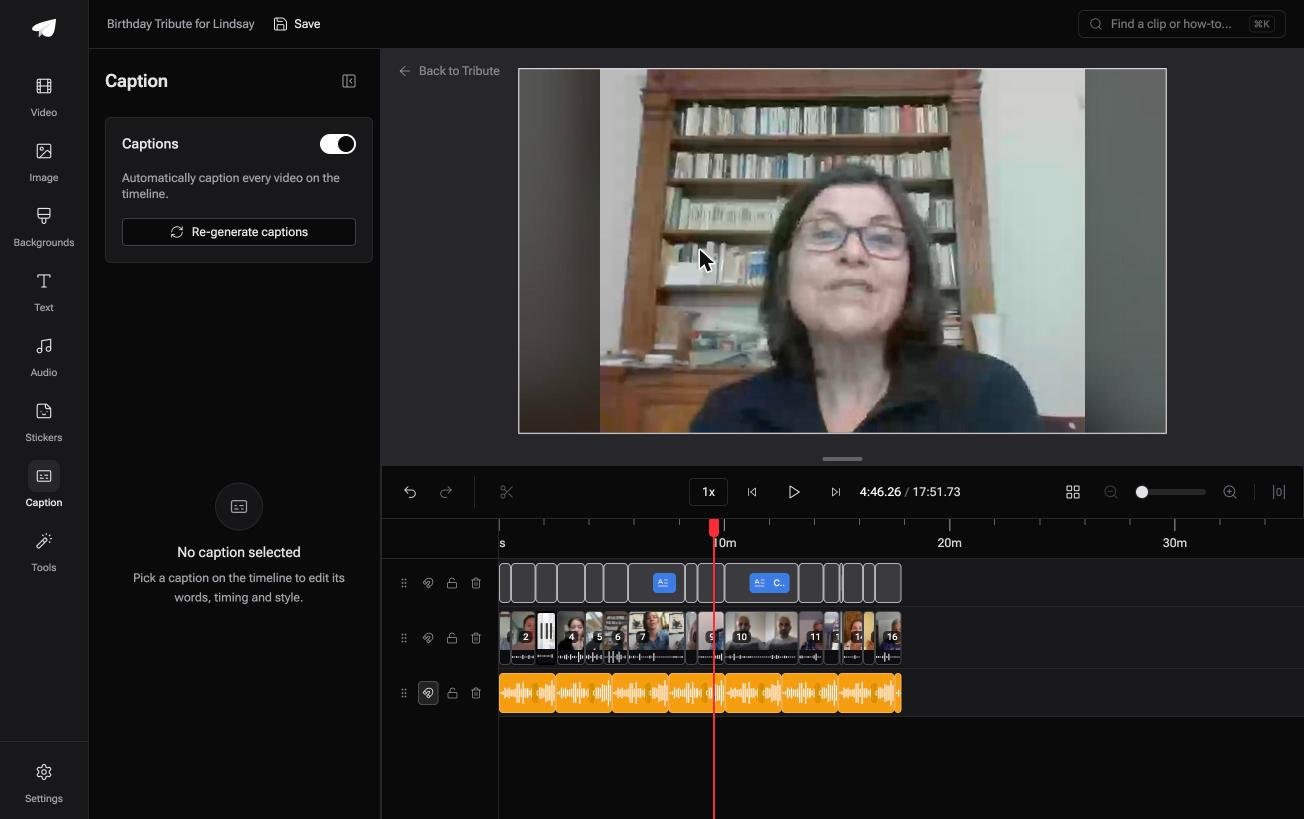
The Tribute video editor is a browser-based group video editor: contributors record clips on their phones and Tribute assembles them on a timeline with the music balanced under the voices.
It is ours, and it is the last thing on this page.
- One switch captions every clip, 17 minutes of video from 16 people in under a minute
- 10 caption styles with the spoken word highlighted, and every line editable with its own timecode
- Name badges from an uploader name and relation, in any of four corners, dark or light
- Blurred edges fill the frame behind upright phone footage, so nobody gets black bars
Best for: A card where the signatures are twelve short clips instead of twelve names in a book.
Why it works: Captions and names go on in one pass, so a card from a dozen people costs the same effort as a card from one.
Can one card hold twelve voices?
A card from one person is a short job.
Everything above assumes that: you record, you trim, you send. The moment the card is from a team, a class or a whole family, the work changes shape. It stops being editing and becomes chasing.
That version has a different answer.
The case: the signatures are people
You are in it when the card is the group, and the group is not in one place.
Picture a ward of twenty nurses signing off a colleague, or thirty cousins on a fiftieth. Each one owes ten seconds. None of them will install an app, and two of them will send a photo instead because that is what they had.
Which means the birthday card video free of an editing session is the one you are looking for, and the editor is not the obstacle. The collecting is.
Why the signing does itself
Each clip arrives placed, numbered and ready to caption.
In the Tribute video editor the submissions sit on the timeline in order before you open it, and the Reorder media window numbers every one so you can move a clip to the front or the back without dragging.
What nobody has to do
- No chasing. Twenty people each record from one link, on their own phone.
- No throat clears to hunt for on a Concierge Tribute: Eve, the assistant inside the editor, trims the silence off every clip.
- No caption pass. One switch subtitles all of them, in 10 styles.
- No arranging at all on Concierge, where Tribute's editors order the clips and build the video.

When this is the wrong answer: the card is from you, it is ninety seconds long, and it is going out tonight. Then the camera app and a link beat every tool on this page.
Frequently Asked Questions
How long should a video card be?
Thirty to ninety seconds from one person. Two to four minutes once a group is involved, and no longer, whoever is in it.
Do I need an app at all?
No. A single take from the camera app, uploaded and sent as a link, is a complete birthday card video.
What is the best free birthday video maker app for a phone?
CapCut for templates and captions, iMovie on an iPhone for a plain cut. Both export at full resolution without paying.
Can I add music to a card?
Yes, and keep it under the voice at about a quarter of full volume. Music mixed at an even level with speech will bury the speech every time.
How do I record a good clip in a bad room?
Face a window, put the phone on something solid, and get close enough that your head fills a third of the frame. Sound carries the card, so the quiet room beats the pretty one.
What if someone sends a photo instead of a clip?
Use it. Hold it on screen for four seconds with their name over it, and it reads as part of the card rather than a gap.
👉 Send one link and let twenty people sign it out loud if the card is from a whole team, and the signatures arrive as one video.
