
Online Birthday Video Maker With Photos: Free Options That Work
Google Photos, Clipchamp and Canva each turn a folder of photographs into a birthday video with no card and no download. All three export at 1080p. The differences are in what they hold back.

Is there an online birthday video maker with photos free to use?
Yes, and there are three worth the tab.
| Tool | Best at | Export | The catch |
|---|---|---|---|
| Google Photos | Photos already backed up | 1080p | Little control over timing |
| Clipchamp | A real timeline in a browser | 1080p, no watermark | Everything has to upload first |
| Canva | Titles and layouts | MP4 | Paid elements stamp a watermark |
Every free online video creator in that table builds one sequence from photos you give it, then lets you change the order and the timing. None of them will choose the forty pictures for you.
Which one you open depends on where the pictures already live. Uploading 300 photographs to a new site is the slowest part of this job, so start with the tool that already has them.
Pew Research Center's mobile fact sheet puts smartphone ownership at 91% of US adults, with 98% owning a cellphone of some kind, which is the reason the pictures are scattered across so many of them.
How do you make a video from photos online free?
In four steps, in a free online tool, with the order settled before you start.
Google Photos, in a browser
- Open photos.google.com, click Create, then Highlight video, then Create your own video.
- Click or select photos, then pick the photographs and clips you want.
- Click Create at the top, then Save.
- To change the soundtrack, open the video, click Edit, click Music, choose a track and save.
Google's help pages are plain about one thing that trips people up: on the web, highlight videos have replaced movies, so any guide pointing at a Movie button is out of date.
Clipchamp, when you want the timing
- Create a project and upload the photographs. Large batches go faster in groups of fifty.
- Drag them onto the timeline in order, then select all and set one duration. Four seconds reads as a pace, two reads as a flicker.
- Drop the music on the track underneath and pull it down under any clip where someone speaks.
- Add a name or a year as text over the first second of a section.
- Export at 1080p. Microsoft says the free plan covers watermark-free exports up to 1080p, with 4K behind a subscription.
Canva, when the titles matter
Canva's strength here is type: a birthday title that looks designed rather than typed.
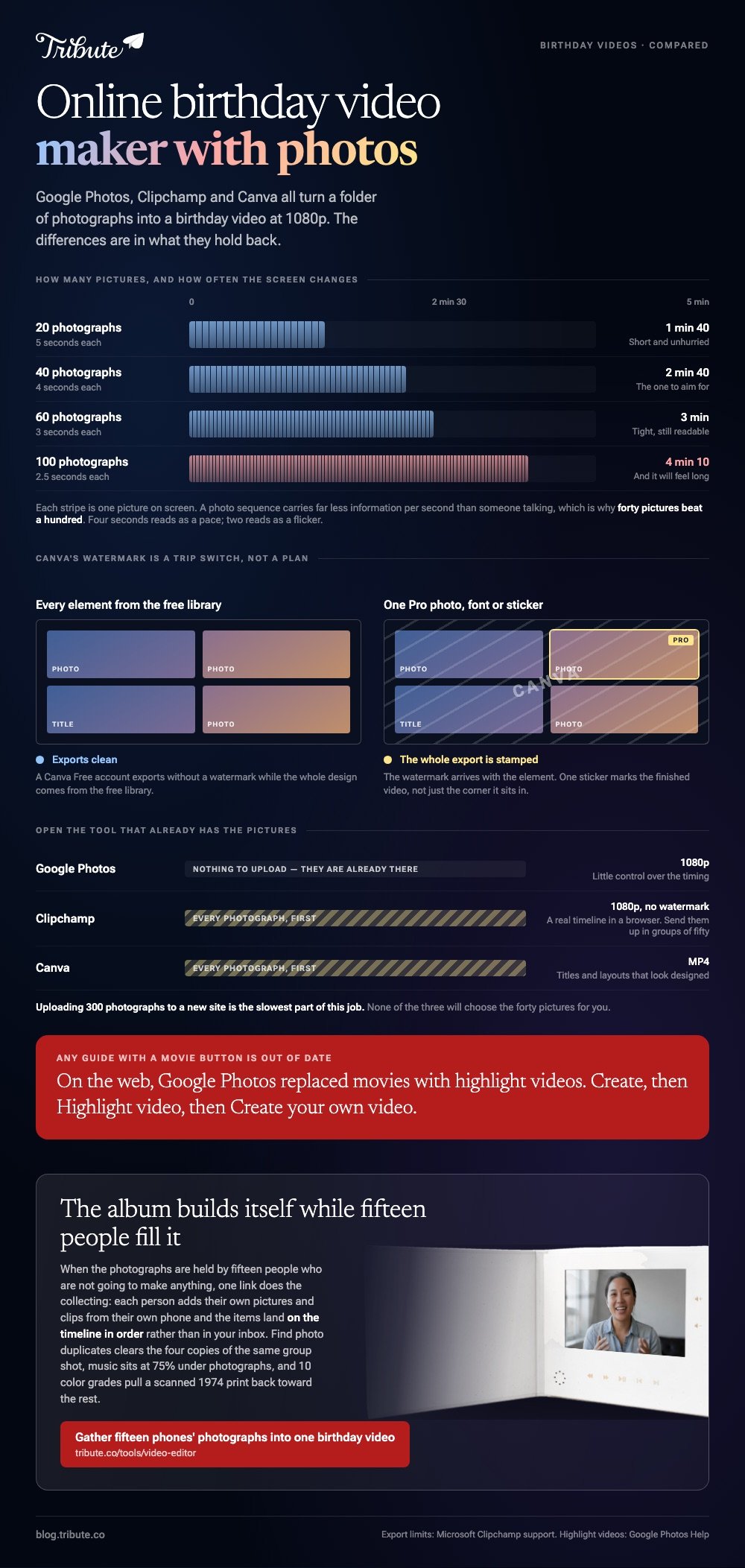
Its own pages say a Canva Free account exports without a watermark while every element in the design comes from the free library. Add one Pro photo, font or sticker and the watermark arrives with it.

What should you fix in the photos first?
Two things, and both take minutes.
Scans of old prints come in at odd sizes and will sit in a 16:9 frame with bars down the side. Crop them to the same shape before they reach the timeline and the whole video stops flickering between formats.
A free online photo background editor handles the other case: one guest, one cluttered kitchen, one photograph worth keeping anyway. You can edit a photo online for free, cut the background out and drop the face onto a plain panel.
To create a video from photos free online you need nothing beyond that. Crop, order, time, music.
How many photographs, and how long?
About forty, and about three minutes.
| Photographs | Seconds each | Finished length |
|---|---|---|
| 20 | 5 | 1 min 40 |
| 40 | 4 | 2 min 40 |
| 60 | 3 | 3 min |
| 100 | 2.5 | 4 min 10, and it will feel long |
Divide the song length by the number of pictures and you have your duration. Hold the last image while the music resolves rather than cutting to black on the final beat.
Compared with a video of people talking, a photo sequence carries far less information per second, which is why forty pictures beat a hundred. More on pacing sits in making a video montage and in the birthday video maker guide.
Mixed material ages better than stills alone. The ideas in fun birthday videos and the video birthday card cover the talking half.
What if the photographs are spread across a dozen phones?
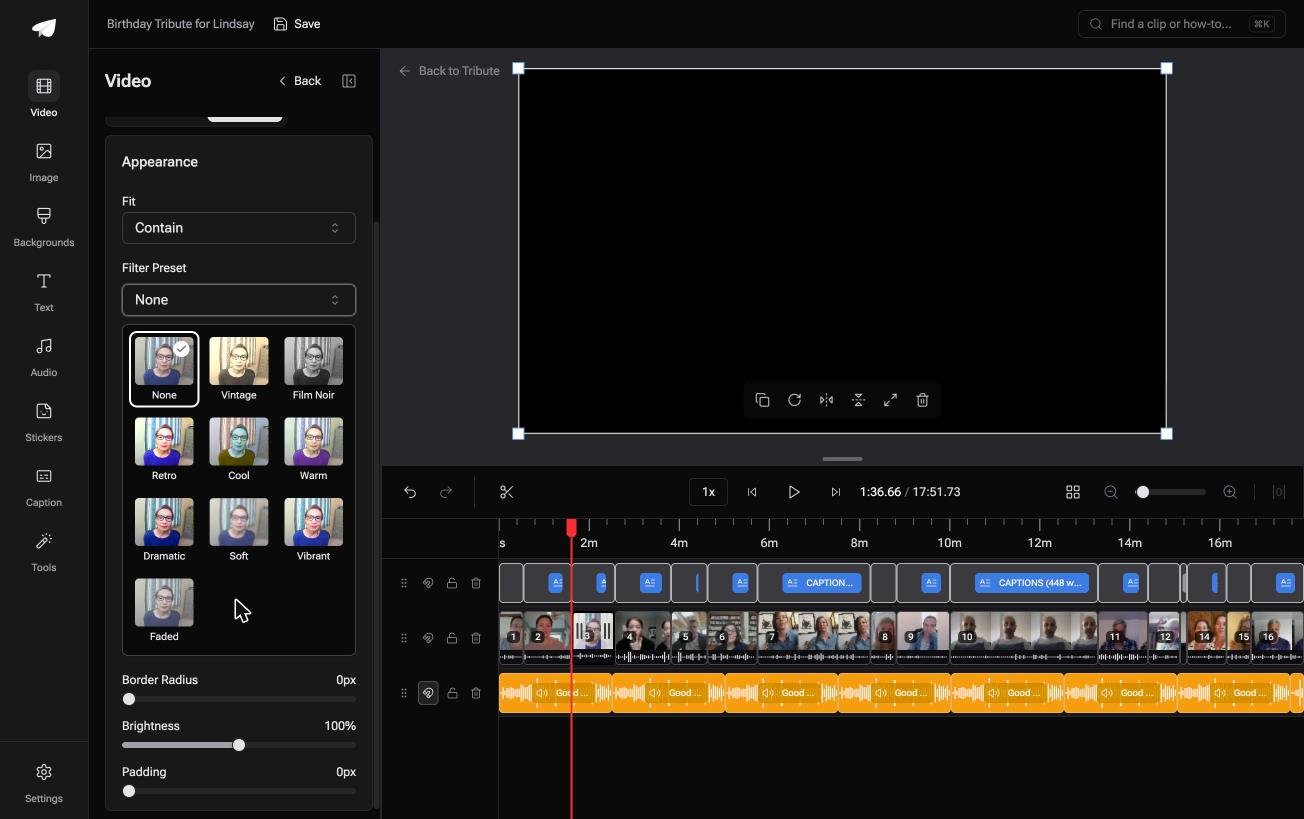
The Tribute video editor is a browser-based group video editor: contributors record clips on their phones and Tribute assembles them on a timeline with the music balanced under the voices.
It is ours, and it is the last thing on this page.
- Photos and clips arrive together, already in order, with a tick against what is placed
- Music at 75% under photographs and 25% under a voice, overridable per item
- 10 color grades previewed on the real picture, which pulls a scanned print back toward the others
- Find photo duplicates in the Tools panel, for the four people who sent the same group shot
Best for: A birthday where the photographs are in other people's camera rolls and nobody has a shared album.
Why it works: Compared with a folder you fill yourself, the material arrives sorted and the music level is already set for stills.
Where do the photos come from when everyone else has them?
Half the pictures you want are on somebody else's phone.
Every method above assumes the hard part is done: the photographs are in one place and the only question left is how to order them.
For a 60th or a surprise party that assumption is wrong. Chasing images in a group chat costs more evenings than the edit does.
There is a version of this where the chase is the product.
The case: the album does not exist yet
You are in it when the photographs and the clips are held by fifteen people who are not going to make anything.
Say your mother turns seventy in March. Her sister has the 1970s prints, your cousin has last summer, and three friends have a video each from a holiday you were not on. Nobody is editing. Everyone is contributing.
Which means the online birthday video maker with photos free of an upload queue is not the thing you are short of. The thing you are short of is the material.
Why the gathering stops being a chase
One link does the collecting, and the timeline fills itself.
In the Tribute video editor each person adds their own photographs and clips from their own phone, and the items land on the timeline in order rather than in your inbox. The duplicate finder clears the four copies of the same group shot.
What you do not have to do
- Not the chasing. Fifteen people add their own pictures and clips from one link.
- Not the duplicate hunt. The finder clears the four copies of the same group shot.
- Not the ordering. Items land on the timeline in sequence, not in your inbox.
- Not the edit. On a Concierge Tribute, Tribute's own editors grade the 1974 prints, set the music and finish it.

When this is the wrong answer: the photographs are already on your laptop in one folder and nobody else is sending anything. Then Clipchamp finishes this in an hour and costs nothing.

Frequently Asked Questions
Can I make a birthday video from photos without an account?
Google Photos and Canva both want a sign-in, and Clipchamp wants a Microsoft account. A few single-purpose sites skip the account and add a watermark instead, which is the trade.
What resolution should I export?
1080p. It plays on a television, attaches to a message, and is what the free tier of every tool above gives you.
How do I stop old scanned photographs looking wrong?
Crop them all to the same aspect before you start, then apply one color grade across the set. Mixed shapes and mixed white balance are what make a sequence look thrown together.
Can I add my own music?
Yes in all three, and check what happens if the video goes on YouTube. A commercial recording can draw a copyright claim, so cleared library music is the safer pick for anything public.
How long does a photo video take to make?
About an hour for forty pictures once you have them. Gathering the pictures is the part that takes a week.
Is a slideshow still worth making when half the family sends clips?
Mix them. Photographs between people talking give the video a rhythm, and they cover the gap when someone's clip is too dark to use.
👉 Gather fifteen phones' photographs into one birthday video if the pictures are on their camera rolls rather than yours, and everyone adds theirs to the same timeline.
