
Video Birthday Cards That Come From Everyone, Not One Person
A video birthday card is a short video sent in place of a paper card: a greeting on screen, one or more people talking to camera, and a link you send on the day. The ones people remember have several voices in them, the way a card signed by twelve people does.
One note before the options: we make the Tribute video editor, and it appears once, near the end, for the case where the card comes from a group. The rest of this uses tools we do not sell.

What is a video birthday card?
It is a video that does a card's job. A card says who remembered, what they think of you, and that they went to some trouble. Video does the first two better and the third one depends on what you build.
The format is loose. Thirty seconds of one person in a kitchen counts. So does a six minute video with titles, music and twenty contributors. What separates them is how many people are in it, not how polished it is.
What kinds of video birthday cards are there?
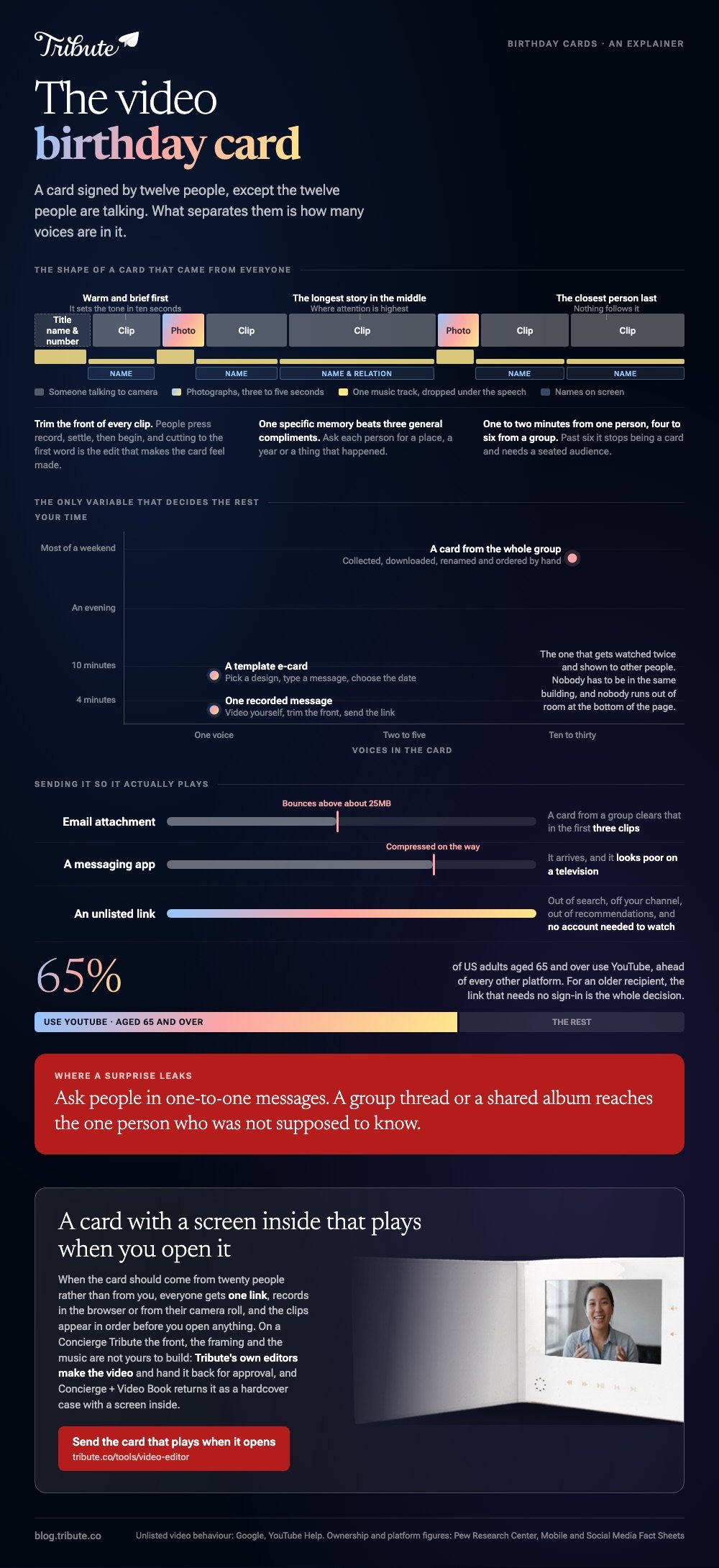
Three, and the amount of your time they cost is not close to equal. Pick by how many people you want in it, because that decides everything else.
A template card from an e-card site
You pick an animated design, type a message, and the site sends a link on the date you choose. Plenty of free apps and sites do this, and the paid tiers add music and longer videos.
Best for: A colleague or a distant relative when you want something warmer than a text and have ten minutes.
Why it works: It arrives on the right day without you remembering, which is the single thing paper cards keep failing at.
One recorded message
Video yourself saying the thing, trim the front, and send the file or a link. No template, no design, no account.
Best for: Someone close enough that a template would read as a shortcut.
Why it works: Your face and your voice carry more than any animation, and the whole job takes four minutes.
A card from the whole group
Ten to thirty people each record thirty seconds, and you join them into one video with a title at the front. This is the one that gets watched twice and shown to other people.
Best for: A milestone birthday, or anyone whose friends are scattered across time zones.
Why it works: Unlike a card passed around an office, nobody has to be in the same building, and nobody runs out of room at the bottom of the page.
How do you make a happy birthday video card?
The build is short once you know the shape. Treat it as four blocks rather than as an edit.
- Open with a title. Their name and the number, held for two or three seconds. It tells the viewer what they are watching before anyone speaks.
- Put the messages in a deliberate order. Someone warm and brief first, the longest story in the middle, the person closest to them last.
- Trim the front of every clip. People press record, settle, then begin. Cutting to the first word is the edit that makes the card feel made.
- Lay one music track underneath and drop its level under speech so the voices stay in front.
- Add names on screen if the recipient will not know half the faces, which is common past a dozen contributors.
- Export once, watch it once, then send the link.

Recording is no barrier to anyone on your list. The Pew Research Center mobile fact sheet puts smartphone ownership at 91% of US adults and cellphone ownership at 98%, so the constraint is knowing what to say, not owning a camera.
The assembly tools themselves are compared here: making a birthday video from everyone's clips.
What should go in a birthday video card?
One specific memory beats three general compliments. Ask each contributor for a place, a year or a thing that happened, and the card stops sounding like a round of best wishes.
Mix in photographs between the talking. Three to five seconds each is enough, and they give the viewer somewhere to rest between faces.
If you have more stills than footage, build it the other way around and drop the clips in: a slideshow built from photos and clips.
Keep the whole thing under six minutes if it will be opened on a phone in the middle of a birthday. Compared with a video shown to a seated room, a card competes with everything else happening that day.
For prompts to send out with the request, use the guide to collecting birthday video messages.
How do you send a video birthday card so it plays?
Send a link, not a file. Email attachments bounce above about 25MB and messaging apps compress video down to something that looks poor on a television.
YouTube set to unlisted is the safest default.
Google's video privacy help page states that an unlisted video stays out of search, off your channel and out of recommendations, and that the people you send the link to do not need a Google account to watch it.
For an older recipient that last detail is the one that matters: Pew's social media fact sheet puts YouTube use among US adults aged 65 and over at 65%, ahead of every other platform.
Two small touches help it land. Send the link in the morning rather than at midnight, and if you are also giving a physical gift, print the link as a QR code inside a paper card so the two arrive together.
When does a group video birthday card make sense?
When the list is long enough that collecting becomes the project. Twenty people sending clips across four apps, at four resolutions, two of them upside down, is a different job from making a card.
The Tribute video editor is a browser-based group video editor: contributors record clips on their phones and Tribute assembles them on a timeline with the music balanced under the voices.
Everyone gets one link, records in the browser or uploads from their camera roll, and the clips appear in order before you open the editor.
For a card, the front and the framing are the parts you would expect to build. On a Concierge Tribute you do not build them: Tribute's own editors make the video and hand it back for approval.
Concierge + Video Book sends it back as a hardcover case with a screen inside that plays when you open it, which is the thing a paper card is imitating.
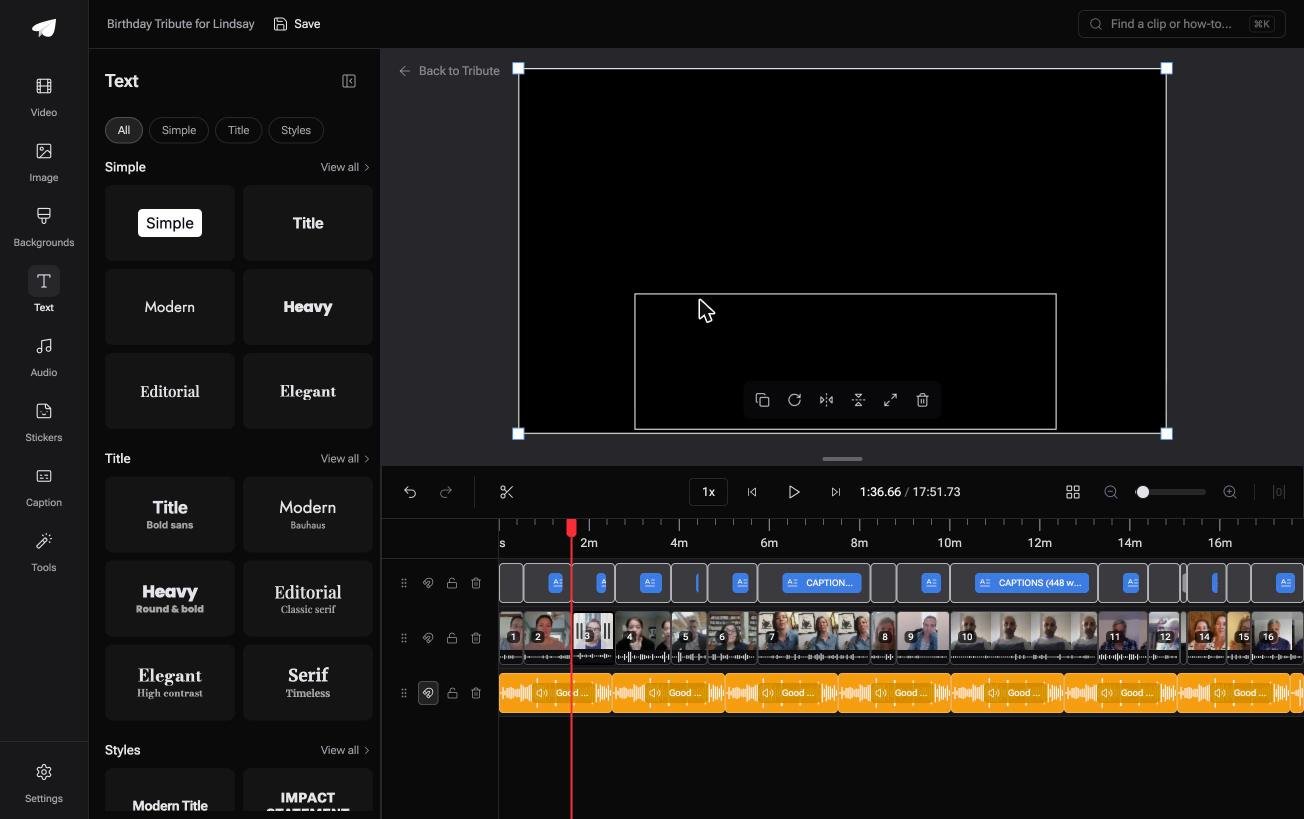
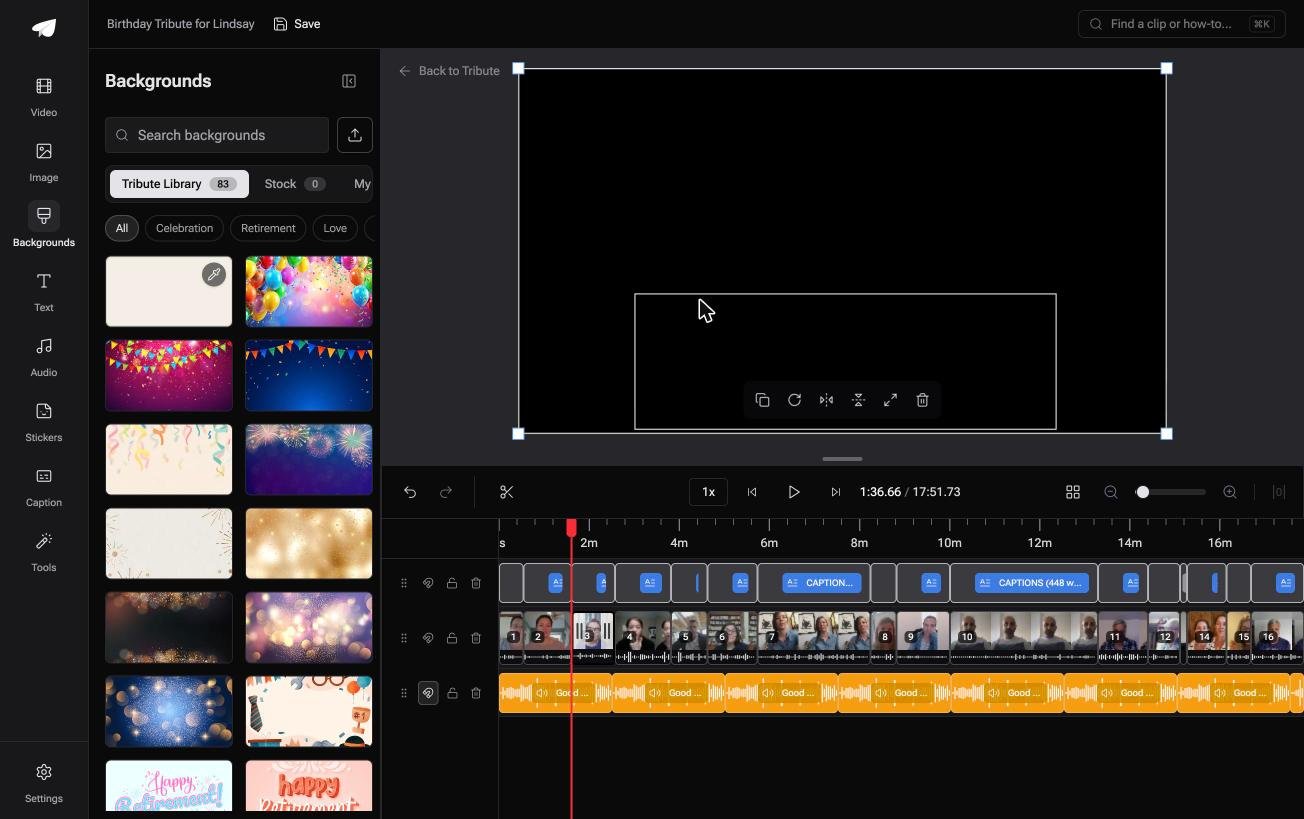
There are 83 occasion backgrounds grouped by occasion, including Celebration, and the text panel leads with ready-made title styles rather than a font list, so a title card takes a minute rather than an argument with a type menu.
It lives inside a paid Tribute rather than as a standalone editor. The wider format question, including memorials and retirements, is covered in what a video tribute is, and the full assembly job in our main montage guide.
What does a video birthday card cost?
Nothing if you video one message and send the link. E-card sites run on a subscription or a per-card charge, with the cheaper tiers capping video length and adding their own branding to the end.
Group video services charge a flat fee per video, which covers the collection links, the hosting and the render. Weigh that against the hours: twenty clips collected by hand, downloaded, renamed and ordered is most of a weekend.
Frequently Asked Questions
How long should a video birthday card be?
One to two minutes from a single person, four to six from a group. Past six minutes it stops being a card and becomes a video, which needs a sit-down audience rather than a phone on a kitchen counter.
Can I schedule it to arrive on the day?
E-card sites do this as standard. For a video you built yourself, upload it in advance and schedule the email or message instead, which gives you the same result with no new account.
What if the recipient is not good with technology?
Send a link that opens in a browser with no sign-in, and text it rather than emailing it. If you will be with them, download the file to your own phone first so it plays with no signal.
Do video birthday cards work for a surprise?
Yes, with one rule: ask people in one-to-one messages rather than a group thread that includes anyone who might mention it. Shared albums and group chats are where surprises leak.
Can I include people who will not video themselves?
Put their written line on screen over a photograph of them, or record their voice on a phone call and lay it under a still. Both read as part of the card rather than as a gap.
What music can I use?
A track from a licensed library, or the audio built into your editor. A commercial song may collect a copyright claim once the video is uploaded, which can block it in some countries.
Is a video card better than a paper one?
It is better at carrying voices and worse at sitting on a mantelpiece. Several people do both: a paper card with a QR code inside pointing at the video.
👉 Make the birthday card out of the people rather than the paper if it should come from everyone and not from you, and the front, the order and the music are settled before you open it.


